
WordCount 编码与测试
word count
github 项目地址:https://github.com/liuqiang666/wordCount
PSP表格
| PSP2.1 | PSP阶段 | 预估耗时(小时) | 实际耗时(小时) |
| Planning | 计划 | 0.5 | 0.5 |
| Estimate | 估计任务需要多少时间 | 0.5 | 0.5 |
| Development | 开发 | 2 | 2.5 |
| Analysis | 需求分析 | 0.5 | 0.5 |
| Design Spec | 生成设计文档 | 0.5 | 0 |
| Design Review | 设计复审 | 0.5 | 0 |
| Coding Standard | 代码规范 | 0.5 | 0 |
| Design | 具体设计 | 0.5 | 0.5 |
| Coding | 具体编码 | 3 | 3.5 |
| Code Review | 代码复审 | 0.5 | 0.5 |
| Test | 测试 | 2 | 2.5 |
| Reporting | 报告 | 0.5 | 0.5 |
| Test Report | 测试报告 | 1 | 0.5 |
| Size Measurement | 计算工作量 | 0.5 | 0.5 |
| Postmortem | 总结 | 0.5 | 0.5 |
| 合计 | 13.5 | 13 |
解题思路
- 首先考虑如何统计文件单词数,可以将一个非分隔符(如‘,’,‘ ’)作为一个新单词计数的开始,分隔符作为该单词的结束,行数的统计可以根据‘\n'的数量来统计。参考了博客【1】的部分思想。
- 考虑如何获取命令行的参数,百度了一下C++中main函数参数的获取,便大致知道main函数参数中的argc 代表参数数量,argv为参数的字符串数组。将argv数组中的参数逐个取出判别,便可获得命令行输入参数以及指定的输入文件名和指定的输出文件名。
- 考虑如何利用C++相关函数读取文件内容,以及如何写入文件内容。
程序设计实现
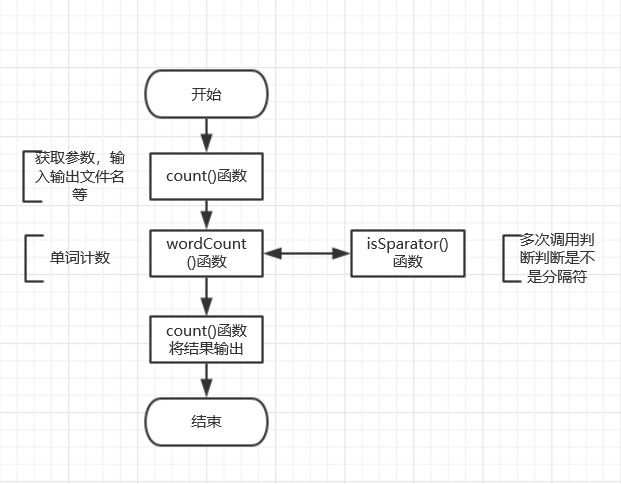
- wordCount函数:用于实现单词计数的核心功能
- count函数:负责读取分析命令行参数,以及获得输入文件名,读取输入文件,将统计结果写入结果文件。
- isSparator函数:判断字符是否是分隔符(如‘,’,‘ ’, '\n'等)。
- count函数为程序入口函数,调用wordCount函数进行单词计数。isSparator函数在单词计数判断过程中被调用。流程如下图:
代码说明
void wordCount()//单词统计函数

{

    chars = ;

    words = ;

    lines = ;

    while ((c = fgetc(file)) != EOF)

    {

        chars++;

        if (!isSeparator(c)) //若不是分隔符则是组成单词的一个字符

        {

            words++;

            while ((c = fgetc(file)) != EOF)//继续向后读

            {

                chars++;

                if (!isSeparator(c))//若不是分隔符则是组成单词的一个字符,

                {

                }

                else if (isNewline(c))//若是新行,行数+1

                {

                    lines++;

                    break;

                }

                else if (isSpace(c) || isComma(c) || isTab(c))//单词结束

                {

                    break;

                }

            }

        }

        else if (isNewline(c))

            lines++;

    }

    if (chars !=)//若该行为结束行,无换行符,行数也应+1

        lines++;

}
测试设计过程
- 如何测试设计用例
测试时应重点考虑边界值以及特殊情况,使测试用例最大程度覆盖代码。例如在本程序测试时,命令行输入参数时,应考虑输入文件未指定,·-o·参数独立出现,输入错误参数,输入参数重复等错误,应测试当输入文件为空文件或者全为分隔符的文件时统计结果是否正确等。
- 哪些地方会导致程序高风险
程序中的空指针,输入文件的内容为空或输入大文件内容等边界会导致程序高风险。
- 测试代码如何设计
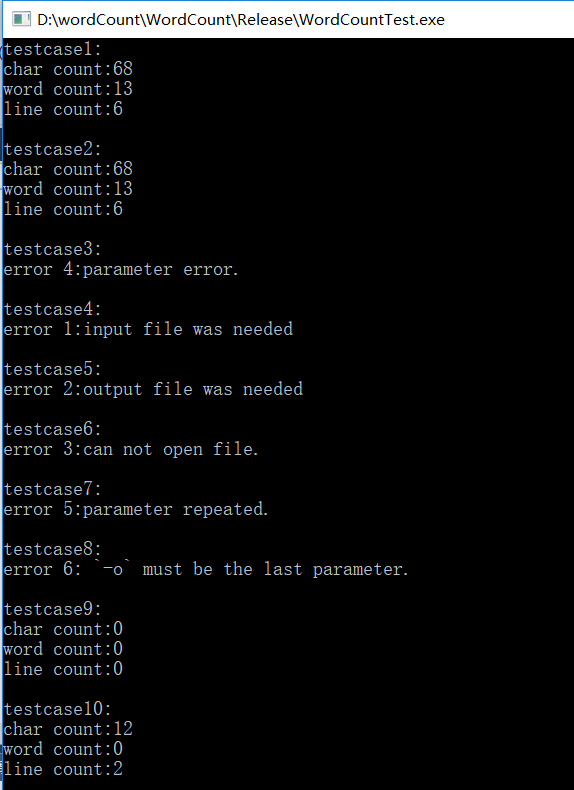
测试时应重点考虑边界值以及特殊情况并且使使测试用例最大程度覆盖代码,为此针对wordCount函数重点考虑边界值以及特殊情况和使用例最大程度覆盖代码产生test1, test9, test10共三个测试用例。同样地,针对Count函数产生test2, test3, test4,test5,test6,test7,test8共七个测试用例。测试代码如下:
void test1()//测试正确输入

{

    cout << "testcase1:" << endl;

    int argc = ;

    char *argv[] = { "WordCountTest.exe", "-c", "-w", "-l", "D:\\wordCount\\test.txt" };

    int result = count(argc, argv);

    assert(result == );

}

void test2()//测试指定输出文件

{

    cout << "testcase2:" << endl;

    int argc = ;

    char *argv[] = { "WordCountTest.exe", "-c", "-w", "-l", "D:\\wordCount\\test.txt" , "-o", "outfile.txt"};

    int result = count(argc, argv);

    assert(result == );

}

void test3()//测试错误参数

{

    cout << "testcase3:" << endl;

    int argc = ;

    char *argv[] = { "WordCountTest.exe", "-b", "-w", "-l", "D:\\wordCount\\test.txt" , "-o", "outfile.txt" };

    int result = count(argc, argv);

    assert(result == );

}

void test4()//测试不指定输入文件

{

    cout << "testcase4:" << endl;

    int argc = ;

    char *argv[] = { "WordCountTest.exe", "-c", "-w", "-l" , "-o", "outfile.txt" };

    int result = count(argc, argv);

    assert(result == );

}

void test5()//测试不指定输出文件,即'-o'单独出现

{

    cout << "testcase5:" << endl;

    int argc = ;

    char *argv[] = { "WordCountTest.exe", "-c", "-w", "-l" , "D:\\wordCount\\test.txt", "-o"};

    int result = count(argc, argv);

    assert(result == );

}

void test6()//测试输入文件指定错误,即指定为打不开的文件

{

    cout << "testcase6:" << endl;

    int argc = ;

    char *argv[] = { "WordCountTest.exe", "-c", "-w", "-l" , "D:\\wordCount\\tes.txt", "-o" , "outfile.txt" };

    int result = count(argc, argv);

    assert(result == );

}

void test7()//测试参数重复

{

    cout << "testcase7:" << endl;

    int argc = ;

    char *argv[] = { "WordCountTest.exe", "-c", "-c", "D:\\wordCount\\test.txt" };

    int result = count(argc, argv);

    assert(result == );

}

void test8()//'-o'参数出现在输入文件之前

{

    cout << "testcase8:" << endl;

    int argc = ;

    char *argv[] = { "WordCountTest.exe", "-c", "-o", "-l" , "D:\\wordCount\\test.txt" , "outfile.txt" };

    int result = count(argc, argv);

    assert(result == );

}

void test9()//测试空文件

{

    cout << "testcase9:" << endl;

    int argc = ;

    char *argv[] = { "WordCountTest.exe", "-c", "-w", "-l" , "D:\\wordCount\\test9.txt", "-o" , "outfile.txt" };

    int result = count(argc, argv);

    assert(result == );

}

void test10()//测试只含有',', ' ' 的文件

{

    cout << "testcase10:" << endl;

    int argc = ;

    char *argv[] = { "WordCountTest.exe", "-c", "-w", "-l" , "D:\\wordCount\\test10.txt", "-o" , "outfile.txt" };

    int result = count(argc, argv);

    assert(result == );

}
- 测试结果
用于测试的输入文件内容如下:
test.txt:
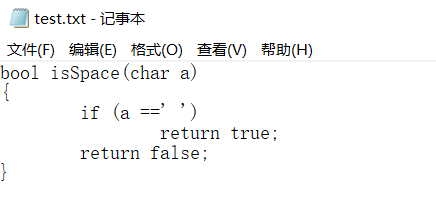
test9.txt 为空文件
test10.txt:
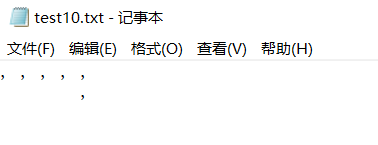
运行测试代码,测试全部通过,符合预期输出,结果如图:
参考文献链接:
博客【1】:http://blog.csdn.net/flyyyri/article/details/5084981
WordCount 编码与测试的更多相关文章
- WordCount编码和测试
WordCount编码和测试 项目地址:https://github.com/handsomesnail/WordCount PSP表格 PSP2.1 PSP阶段 预估耗时(分钟) 实际耗时(分钟) ...
- WordCount编码与测试
1. github项目地址:https://github.com/wwwwu/WordCount 2.PSP表格: PSP2.1 PSP阶段 预估耗时 (分钟) 实际耗时 (分钟) Planning ...
- 软件质量与测试——WordCount编码实现及测试
1.GitHub地址 https://github.com/noblegongzi/WordCount 2.PSP表格 PSP2.1 PSP 阶段 预估耗时 (分钟) 实际耗时 (分钟) ...
- WordCount编码测试
Github项目地址:https://github.com/LantyrLYL/WordCount PSP表格: PSP2.1 PSP阶段 预估耗时 (分钟) 实际耗时 (分钟) Planning 计 ...
- 软件测试第2周个人作业:WordCount编码测试
一.Github地址 https://github.com/zhouyubei/WordCount 二.PSP表格 PSP2.1 PSP阶段 预估耗时 (分钟) 实际耗时 (分钟) Planning ...
- WordCount程序与测试
Github地址: https://github.com/hcy6668/wordCount PSP表格: PSP PSP阶段 预估耗时(分钟) 实际耗时(分钟) Planning 计划 60 40 ...
- WordCountPro 编码与测试
WordCountPro github项目地址:https://github.com/handsomesnail/WordCountPro PSP表格 PSP2.1 PSP阶段 预估耗时(小时) ...
- WordCount程序及测试
Github地址:https://github.com/CG0317/WordCount PSP表: PSP2.1 PSP阶段 预估耗时 (分钟) 实际耗时 (分钟) Planning 计划 30 ...
- mysql字符集编码乱码测试如下
创建三个表tb_latin1,tb_utf8,tb_gbk,编码分别为latin1/utf8/gbk “你好a”字符串编码如下GBK : %C4%E3 %BA%C3 %61UTF-8 : %E4%BD ...
随机推荐
- 网页播放rtsp流媒体
解决方法: 1.搭建Red5流媒体服务器(其他还有CRTMPD.NGINX-RTMP.SRS) 2.FFmpeg(其他还有live555)实现监控摄像头的RTSP协议转RTMP协议直播 3.搭建WEB ...
- [基本操作] kd 树
概念就不说了吧,网上教程满天飞 学了半天才知道,kd 树实质上只干了两件事情: 1.快速定位一个点 / 矩形 2.有理有据地优化暴力 第一点大概是可以来做二维平面上给点/矩形打标记的问题 第二点大概是 ...
- rabbitmq的vhost与用户管理
当我们在创建用户时,会指定用户能访问一个虚拟机,并且该用户只能访问该虚拟机下的队列和交换机,如果没有指定,默认的是”/”;一个rabbitmq服务器上可以运行多个vhost,以便于适用不同的业务需要, ...
- npm install -d
nodejs Error: Cannot find module 'xxx'错误 解决方案: 确定package.json里有添加相应的依赖配置 使用npm install -d 可以自动配置pack ...
- 玩转C链表
链表是C语言编程中常用的数据结构,比如我们要建一个整数链表,一般可能这么定义: 1 2 3 4 struct int_node { int val; struct in ...
- ps命令,性能监控,grep命令
Linux中的ps命令是Process Status的缩写.ps命令用来列出系统中当前运行的那些进程.ps命令列出的是当前那些进程的快照,就是执行ps命令的那个时刻的那些进程,如果想要动态的显示进程信 ...
- VC用Beep整几首歌听听~~~
//生日快乐歌 #include "stdafx.h"#include <windows.h>void main(void) { unsigned FR ...
- JVM中存储类信息的三个表格
摘自:<Java Performance>第三章 Internal Class Loading Data The HotSpot VM maintains three hash table ...
- dtgrid 手动条件删除表格中的某一行
dtgrid 手动条件删除表格中的某一行 var grid = $.fn.DtGrid.init(dtGridOption); $(function () { grid.load(); }); fun ...
- ansible for devops读书笔记第一章
yum -y install ansible ansible --version mkdir /etc/ansible touch /etc/ansible/hosts [example] www ...