
关于在SSM框架下使用PageHelper
首先,如果各位在这块配置和代码有什么问题欢迎说出来,我也会尽自己最大的能力帮大家解答
这些代码我都是写在一个小项目里的,项目的github地址为:https://github.com/Albert-Best-Dong/parking,还希望哪个大佬给我这个小课题指点指点
jdk1.8,spring 4.3.18,mybatis 3.4.6,其实直接直接看pom文件就好了。
很长一段时间里,我学习编程很少总结代码。后来代码总结也只是写在一个电脑里的文件夹,觉得与互联网脱轨了,哈哈哈,所以现在也准备写一写博客,记录自己,提高水平。
这是我的第一篇,也是关于SSM框架下使用PageHelper。
这里不具体写我做的项目课题的全部内容,主要专注于PageHelper部分
工程结构如下图:
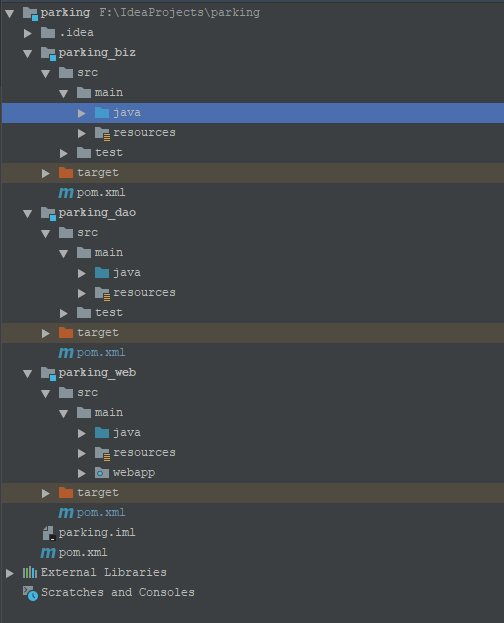
首先在pom.xml(parking_dao模块下)引入PageHelper依赖
 <?xml version="1.0" encoding="UTF-8"?>

 <project xmlns="http://maven.apache.org/POM/4.0.0"

          xmlns:xsi="http://www.w3.org/2001/XMLSchema-instance"

          xsi:schemaLocation="http://maven.apache.org/POM/4.0.0 http://maven.apache.org/xsd/maven-4.0.0.xsd">

     <parent>

         <artifactId>parking</artifactId>

         <groupId>com.dong</groupId>

         <version>1.0-SNAPSHOT</version>

     </parent>

     <modelVersion>4.0.0</modelVersion>

     <artifactId>parking_dao</artifactId>

     <dependencies>

         <dependency>

             <groupId>mysql</groupId>

             <artifactId>mysql-connector-java</artifactId>

             <version>5.1.47</version>

         </dependency>

         <dependency>

             <groupId>org.mybatis</groupId>

             <artifactId>mybatis</artifactId>

             <version>3.4.6</version>

         </dependency>

         <dependency>

             <groupId>org.springframework</groupId>

             <artifactId>spring-core</artifactId>

             <version>${spring.version}</version>

         </dependency>

         <dependency>

             <groupId>org.springframework</groupId>

             <artifactId>spring-context</artifactId>

             <version>${spring.version}</version>

         </dependency>

         <dependency>

             <groupId>org.springframework</groupId>

             <artifactId>spring-beans</artifactId>

             <version>${spring.version}</version>

         </dependency>

         <dependency>

             <groupId>org.mybatis</groupId>

             <artifactId>mybatis-spring</artifactId>

             <version>1.3.1</version>

         </dependency>

         <dependency>

             <groupId>org.springframework</groupId>

             <artifactId>spring-jdbc</artifactId>

             <version>${spring.version}</version>

         </dependency>

         <dependency>

             <groupId>com.github.pagehelper</groupId>

             <artifactId>pagehelper</artifactId>

             <version>5.1.2</version>

         </dependency>

     </dependencies>

 </project>
最主要的是:
<dependency>
    <groupId>com.github.pagehelper</groupId>
    <artifactId>pagehelper</artifactId>
    <version>5.1.2</version>
</dependency>
随后需要在spring配置(spring-dao)文件里配置PageHelper
<beans xmlns="http://www.springframework.org/schema/beans"
xmlns:xsi="http://www.w3.org/2001/XMLSchema-instance"
xmlns:context="http://www.springframework.org/schema/context"
xsi:schemaLocation="http://www.springframework.org/schema/beans
http://www.springframework.org/schema/beans/spring-beans.xsd
http://www.springframework.org/schema/context
http://www.springframework.org/schema/context/spring-context.xsd"> <context:component-scan base-package="com.dong.parking.dao"/> <bean id="dataSource" class="org.springframework.jdbc.datasource.DriverManagerDataSource">
<property name="driverClassName" value="com.mysql.jdbc.Driver"/>
<property name="url"
value="jdbc:mysql://localhost:3306/car_park?useUnicode=true&characterEncoding=utf-8&useSSL=false"/>
<property name="username" value="root"/>
<property name="password" value="root"/>
</bean> <bean id="sessionFactory" class="org.mybatis.spring.SqlSessionFactoryBean">
<property name="typeAliasesPackage" value="com.dong.parking.entity"/>
<property name="dataSource" ref="dataSource"/>
<!--配置PageHelper-->
<property name="plugins">
<array>
<bean class="com.github.pagehelper.PageInterceptor">
<property name="properties">
<value>
offsetAsPageNum=true
rowBoundsWithCount=true
pageSizeZero=true
reasonable=true
</value>
</property>
</bean>
</array>
</property>
</bean>
<bean class="org.mybatis.spring.mapper.MapperScannerConfigurer">
<property name="sqlSessionFactoryBeanName" value="sessionFactory"/>
<property name="basePackage" value="com.dong.parking.dao"/>
</bean>
</beans>
最主要的为:
 <bean id="sessionFactory" class="org.mybatis.spring.SqlSessionFactoryBean">

         <property name="typeAliasesPackage" value="com.dong.parking.entity"/>

         <property name="dataSource" ref="dataSource"/>

         <!--配置PageHelper-->

         <property name="plugins">

             <array>

                 <bean class="com.github.pagehelper.PageInterceptor">

                     <property name="properties">

                         <value>

                             offsetAsPageNum=true

                             rowBoundsWithCount=true

                             pageSizeZero=true

                             reasonable=true

                         </value>

                     </property>

                 </bean>

             </array>

         </property>

     </bean>
Ok,关于配置已经好了,现在进入parking,结构如下,以红框标识的为例
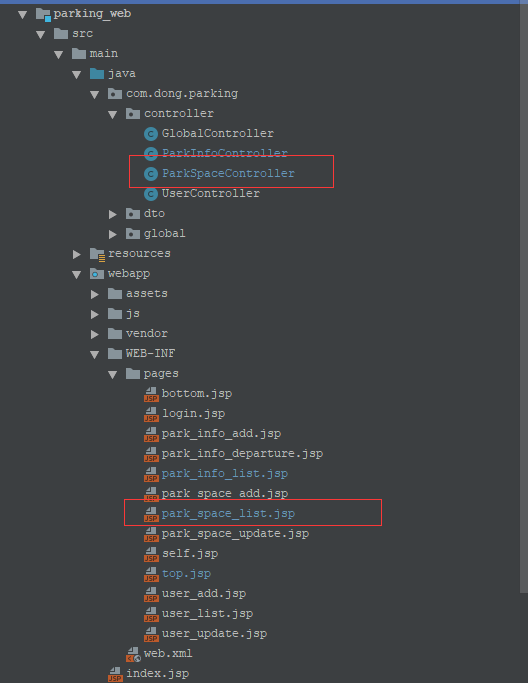
ParkSpaceController代码如下
 package com.dong.parking.controller;

 import com.dong.parking.biz.ParkSpaceBiz;

 import com.dong.parking.entity.ParkSpace;

 import com.dong.parking.entity.User;

 import com.dong.parking.global.Constant;

 import com.github.pagehelper.Page;

 import com.github.pagehelper.PageHelper;

 import com.github.pagehelper.PageInfo;

 import org.springframework.beans.factory.annotation.Autowired;

 import org.springframework.stereotype.Controller;

 import org.springframework.web.bind.annotation.RequestMapping;

 import org.springframework.web.bind.annotation.RequestParam;

 import javax.servlet.http.HttpSession;

 import java.util.List;

 import java.util.Map;

 @Controller("parkSpaceController")

 @RequestMapping("/parkSpace")

 public class ParkSpaceController {

     @Autowired

     private ParkSpaceBiz parkSpaceBiz;

     @RequestMapping(value = "/list")

     public String list(Map<String, Object> map, @RequestParam(value = "status", required = false) Integer status,

                        @RequestParam(defaultValue = "1", required = true, value = "pageNo") Integer pageNo) {

         List<ParkSpace> list = null;

         Integer pageSize = 2;

         PageHelper.startPage(pageNo, pageSize);

         if (status == null)

             list = parkSpaceBiz.findAll();

         else

             list = parkSpaceBiz.findByStatus(status);

         PageInfo<ParkSpace> pageInfo = new PageInfo<ParkSpace>(list);

         map.put("pageInfo", pageInfo);

         return "park_space_list";

     }

     @RequestMapping("/to_update")

     public String toUpdate(Map<String, Object> map, @RequestParam int id) {

         map.put("floor", Constant.getFloor());

         map.put("area", Constant.getArea());

         map.put("parkSpace", parkSpaceBiz.findById(id));

         return "park_space_update";

     }

     @RequestMapping("/update")

     public String update(ParkSpace parkSpace, HttpSession session) {

         User user = (User) session.getAttribute("user");

         parkSpace.setUpdateBy(user.getSn());

         parkSpaceBiz.edit(parkSpace);

         return "redirect:list";

     }

     @RequestMapping("/to_add")

     public String toAdd(Map<String, Object> map) {

         map.put("floor", Constant.getFloor());

         map.put("area", Constant.getArea());

         map.put("parkSpace", new ParkSpace());

         return "park_space_add";

     }

     @RequestMapping("/add")

     public String add(ParkSpace parkSpace, HttpSession session) {

         User user = (User) session.getAttribute("user");

         parkSpace.setCreateBy(user.getSn());

         parkSpace.setUpdateBy(user.getSn());

         parkSpaceBiz.add(parkSpace);

         return "redirect:list";

     }

     @RequestMapping(value = "/remove", params = "id")

     public String remove(int id) {

         parkSpaceBiz.remove(id);

         return "redirect:list";

     }

 }
我们关注一下list方法
    @RequestMapping(value = "/list")

     public String list(Map<String, Object> map, @RequestParam(value = "status", required = false) Integer status,

                        @RequestParam(defaultValue = "1", required = true, value = "pageNo") Integer pageNo) {

         List<ParkSpace> list = null;

         Integer pageSize = 2;

         PageHelper.startPage(pageNo, pageSize);

         if (status == null)

             list = parkSpaceBiz.findAll();

         else

             list = parkSpaceBiz.findByStatus(status);

         PageInfo<ParkSpace> pageInfo = new PageInfo<ParkSpace>(list);

         map.put("pageInfo", pageInfo);

         return "park_space_list";

     }
这里的形参pageNo为前台传来的值。这里的步骤可归结如下
步骤1:PageHelper.startPage(pageNo,pageSize),设置每页显示的个数和页数
步骤2:List<Bean> list = beanService.find(),获得bean的结合(这里以Bean代表一般的实体类)
步骤3:PageInfo<Bean> pageInfo = new PageInfo<Bean>(list); 将list集合封装到pageInfo对象。
步骤4:map.put("pageInfo",pageInfo);将pageInfo对象回给前台
好了,现在咱们来到前台页面,park_space_list.jsp代码如下
 <%@ taglib prefix="c" uri="http://java.sun.com/jsp/jstl/core" %>

 <%@ page contentType="text/html;charset=UTF-8" language="java" %>

 <jsp:include page="top.jsp"/>

 <section id="content" class="table-layout animated fadeIn">

     <div class="tray tray-center">

         <div class="content-header">

             <h2> 员工列表 </h2>

             <p class="lead"></p>

         </div>

         <div class="admin-form theme-primary mw1000 center-block" style="padding-bottom: 175px;">

             <div class="panel  heading-border">

                 <div class="panel-menu">

                     <div class="row">

                         <div class="hidden-xs hidden-sm col-md-3">

                             <div class="btn-group">

                                 <button type="button" class="btn btn-default light">

                                     <i class="fa fa-refresh"></i>

                                 </button>

                                 <button type="button" class="btn btn-default light">

                                     <i class="fa fa-trash"></i>

                                 </button>

                                 <button type="button" class="btn btn-default light">

                                     <i class="fa fa-plus"

                                        onclick="javascript:window.location.href='/parkSpace/to_add';"></i>

                                 </button>

                             </div>

                         </div>

                         <div class="col-xs-12 col-md-9 text-right">

                             <div class="btn-group">

                                 <button type="button" class="btn btn-default light">

                                     <i class="fa fa-chevron-left"></i>

                                 </button>

                                 <button type="button" class="btn btn-default light">

                                     <i class="fa fa-chevron-right"></i>

                                 </button>

                             </div>

                         </div>

                     </div>

                 </div>

                 <div class="panel-body pn">

                     <table id="message-table" class="table admin-form theme-warning tc-checkbox-1">

                         <thead>

                         <tr class="">

                             <th class="text-center hidden-xs">Select</th>

                             <th class="hidden-xs">楼层</th>

                             <th class="hidden-xs">区域</th>

                             <th class="hidden-xs">车位号</th>

                             <th class="hidden-xs">状态</th>

                             <th>操作</th>

                         </tr>

                         </thead>

                         <tbody>

                         <c:forEach items="${pageInfo.list}" var="space">

                             <tr class="message-unread">

                                 <td class="hidden-xs">

                                     <label class="option block mn">

                                         <input type="checkbox" name="mobileos" value="FR">

                                         <span class="checkbox mn"></span>

                                     </label>

                                 </td>

                                 <td>${space.floor}</td>

                                 <td>${space.area}</td>

                                 <td>${space.spaceId}</td>

                                 <td>

                                     <c:if test="${space.status == 0}">空闲</c:if>

                                     <c:if test="${space.status == 1}">占用</c:if>

                                     <c:if test="${space.status == 2}">预定</c:if>

                                 </td>

                                 <td>

                                     <a href="/parkSpace/to_update?id=${space.id}">编辑</a>

                                     <a href="/parkSpace/remove?id=${space.id}">删除</a>

                                 </td>

                             </tr>

                         </c:forEach>

                         </tbody>

                     </table>

                     <p>当前 ${pageInfo.pageNum }页,总${pageInfo.pages }

                         页,总 ${pageInfo.total } 条记录

                     </p>

                     <a href="list?pageNo=${pageInfo.getFirstPage()}">首页</a>

                     <c:if test="${pageInfo.hasPreviousPage }">

                         <a href="list?pageNo=${pageInfo.pageNum-1}">上一页</a>

                     </c:if>

                     <c:if test="${pageInfo.hasNextPage }">

                         <a href="list?pageNo=${pageInfo.pageNum+1}">下一页</a>

                     </c:if>

                     <a href="list?pageNo=${pageInfo.getLastPage()}">末页</a>

                 </div>

             </div>

         </div>

     </div>

 </section>

 <jsp:include page="bottom.jsp"/>
我们关注于
       <div class="panel-body pn">

                     <table id="message-table" class="table admin-form theme-warning tc-checkbox-1">

                         <thead>

                         <tr class="">

                             <th class="text-center hidden-xs">Select</th>

                             <th class="hidden-xs">楼层</th>

                             <th class="hidden-xs">区域</th>

                             <th class="hidden-xs">车位号</th>

                             <th class="hidden-xs">状态</th>

                             <th>操作</th>

                         </tr>

                         </thead>

                         <tbody>

                         <c:forEach items="${pageInfo.list}" var="space">

                             <tr class="message-unread">

                                 <td class="hidden-xs">

                                     <label class="option block mn">

                                         <input type="checkbox" name="mobileos" value="FR">

                                         <span class="checkbox mn"></span>

                                     </label>

                                 </td>

                                 <td>${space.floor}</td>

                                 <td>${space.area}</td>

                                 <td>${space.spaceId}</td>

                                 <td>

                                     <c:if test="${space.status == 0}">空闲</c:if>

                                     <c:if test="${space.status == 1}">占用</c:if>

                                     <c:if test="${space.status == 2}">预定</c:if>

                                 </td>

                                 <td>

                                     <a href="/parkSpace/to_update?id=${space.id}">编辑</a>

                                     <a href="/parkSpace/remove?id=${space.id}">删除</a>

                                 </td>

                             </tr>

                         </c:forEach>

                         </tbody>

                     </table>

                     <p>当前 ${pageInfo.pageNum }页,总${pageInfo.pages }

                         页,总 ${pageInfo.total } 条记录

                     </p>

                     <a href="list?pageNo=${pageInfo.getFirstPage()}">首页</a>

                     <c:if test="${pageInfo.hasPreviousPage }">

                         <a href="list?pageNo=${pageInfo.pageNum-1}">上一页</a>

                     </c:if>

                     <c:if test="${pageInfo.hasNextPage }">

                         <a href="list?pageNo=${pageInfo.pageNum+1}">下一页</a>

                     </c:if>

                     <a href="list?pageNo=${pageInfo.getLastPage()}">末页</a>

                 </div>
最终的效果如图所示:
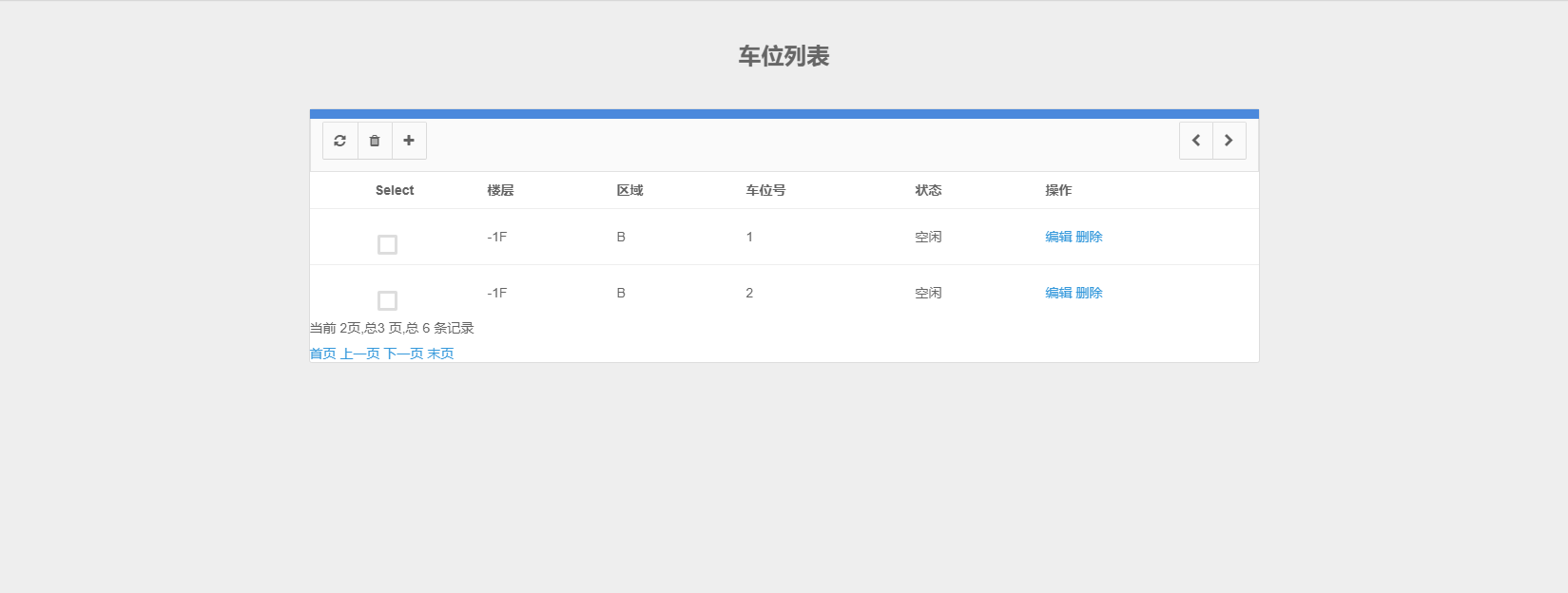
水平有限,表述还是很不好
关于在SSM框架下使用PageHelper的更多相关文章
- ssm框架下怎么批量删除数据?
ssm框架下批量删除怎么删除? 1.单击删除按钮选中选项后,跳转到js函数,由函数处理 2. 主要就是前端的操作 js 操作(如何全选?如何把选中的数据传到Controller中) 3.fun()函数 ...
- Jquery DataTable AJAX跨域请求的解决方法及SSM框架下服务器端返回JSON格式数据的解决方法
如题,用HBuilder开发APP,涉及到用AJAX跨域请求后台数据,刚接触,费了不少时间.幸得高手指点,得以解决. APP需要用TABLE来显示数据,因此采用了JQ 的DataTable. 在实现 ...
- SSM框架下分页的实现(封装page.java和List<?>)
之前写过一篇博客 java分页的实现(后台工具类和前台jsp页面),介绍了分页的原理. 今天整合了Spring和SpringMVC和MyBatis,做了增删改查和分页,之前的逻辑都写在了Servle ...
- ssm框架下实现文件上传
1.由于ssm框架是使用Maven进行管理的,文件上传所需要的jar包利用pom.xml进行添加,如下所示: <properties> <commons-fileupload.v ...
- SSM框架下 Failed to load resource: the server responded with a status of 404 (Not Found)错误
这个错误提示的是js的引用路径有错: 1.检查应用路径是否正确(我的问题是路径是正确的但是去到页面就会提示404错误) 引用路径,最好都使用绝对路径 <script type="tex ...
- SSM框架下的redis缓存
基本SSM框架搭建:http://www.cnblogs.com/fuchuanzhipan1209/p/6274358.html 配置文件部分: 第一步:加入jar包 pom.xml <!-- ...
- SSM框架下结合 log4j、slf4j打印日志
首先加入log4j和slf4j的jar包 <!-- 日志处理 <!-- slf4j日志包--> <dependency> <groupId>org.slf4j ...
- ssm框架下的文件上传和文件下载
最近在做一个ssm的项目,遇到了添加附件和下载的功能,在网上查了很多资料,发现很多都不好用,经过摸索,发现了一套简便的方法,和大家分享一下. 1.在自己已经构建好的maven web项目中 pom. ...
- PageHelper--Mybatis分页插件(ssm框架下的使用)
1.导入PageHelper依赖 <!-- MyBatis 分页插件 --> <dependency> <groupId>com.github.pagehelper ...
随机推荐
- PHP 使用header函数设置HTTP头的示例解析 表头
PHP 使用header函数设置HTTP头的示例解析 表头 //定义编码 header( 'Content-Type:text/html;charset=utf-8 '); //Atom header ...
- 谈MicroMessageTest的开始创建
一开始,创建一个可以看到的jsp前端页面. 只不过不是用纯jsp页面访问,而是用Servlet doGet跳转至jsp页面,req.getRequestDispatcher(jsp页面的全称 还是全地 ...
- vc中播放mp3文件的方法小结
一般播放MP3常见的有两种方法,一种是自己解码,另外一种用系统的库,比如MCI,当然如果可以用控件直接用个控件会更方便. 1. 使用mci #include <windows.h> ...
- luogu1776宝物筛选
多重背包问题 一开始我们的转移方程是 ;i<=n;i++) for(int j=m;j>=w[i];j--) ;k<=c[i];k++) )dp[j]=max(dp[j],dp[j- ...
- Anthem.NET的 "Bad Response" 问题,及脚本调试技巧小结
今天解决了一位朋友使用 Anthem.NET 遇到的问题.他的代码在 Windows XP 的开发机器上反应正常,而部署到 2003 Server 的服务器上就提示 "BADRESPONSE ...
- S3C2410中文芯片手册-11.串口
目录 11 UART Overview Featrues UART Operation Data Transmission Data Reception Auto Flow Control(AFC) ...
- 构建嵌入式小型Linux系统
构建嵌入式小型Linux系统 摘要:用buildroot构建x86的交叉编译工具链:裁减linux内核,尽可能做到最小:手工构建根文件系统:安装qemu虚拟机,仿真新配置的Linux系统:为新配置的L ...
- TFS自定义开发中的反射应用
最近CM(Configuration Management) 的同事在自定义开发TFS的过程中遇到一个问题. 领导要求快速开发一个工具, 可以自动连接TFS,然后自动Check out一些word文件 ...
- IAR常用快捷键及技巧
1.复制和粘贴几行的部分代码 需求:有时候我们需要复制几行代码的后半部分,不需要复制前半部分.方法:按住Alt键,再用鼠标拖动就可以复制和粘贴后半部分 [END/2015-09-23] 2.复制一行 ...
- Python:struct模块的pack、unpack
mport struct pack.unpack.pack_into.unpack_from 1 # ref: http://blog.csdn<a href="http://lib. ...