
java错误:The superclass "javax.servlet.http.HttpServlet" was not found on the Java Bu
我们在用Eclipse进行Java web开发时,可能会出现这样的错误:The superclass javax.servlet.http.HttpServlet was not found on the Java Build Path。我们该怎么解决这个问题呢?
我们遇到的错误显示如下:
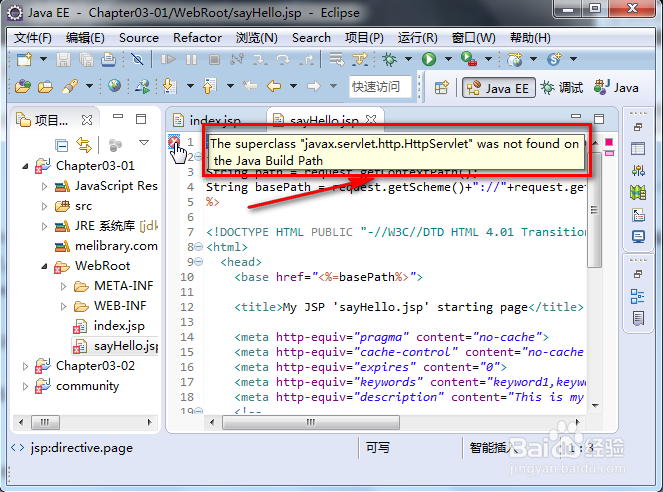
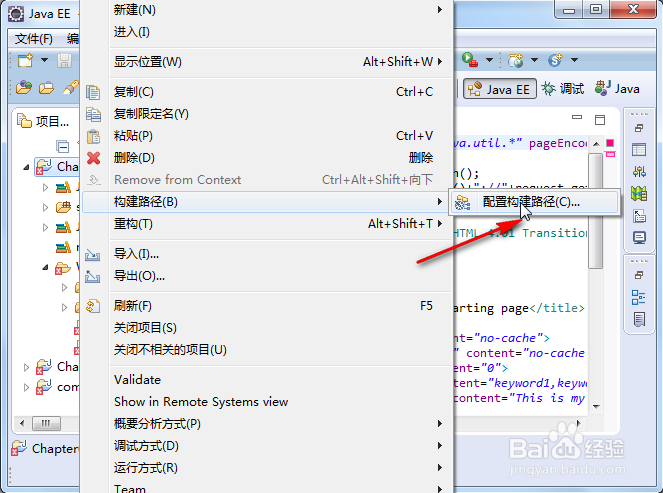
我们右击有错误提示的文件夹,如下:
我们点击”配置构建路径“,如下:
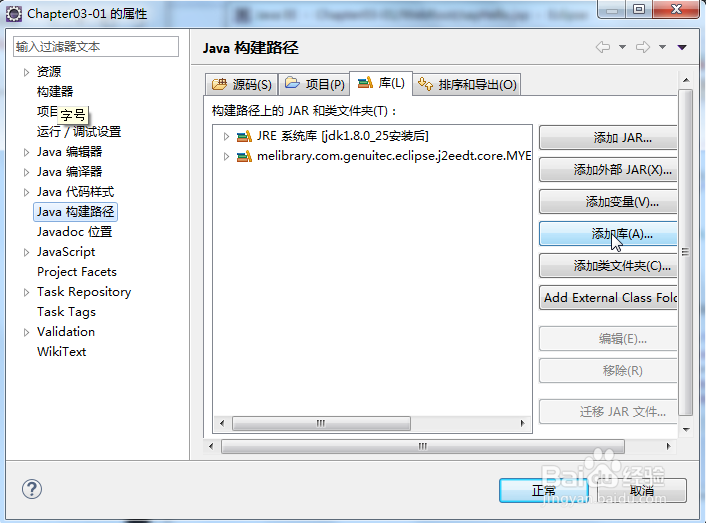
我们再点击”添加库“,如下:
我们选中上图中标出的选项,再点击下一步,如下:
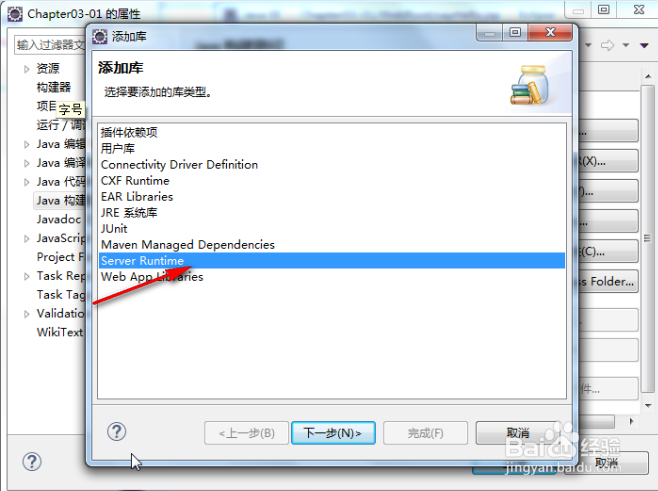
我们再点击”完成“,如下:
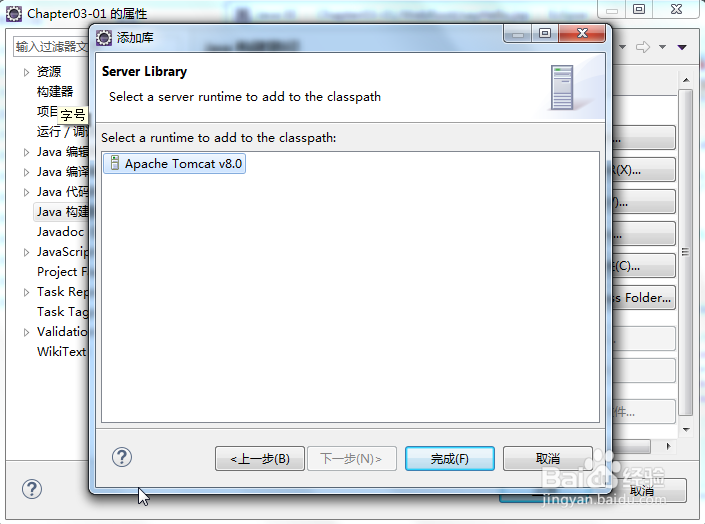
我们再点击”正常“,即可完成设置。这样我的错误就会消失了,
java错误:The superclass "javax.servlet.http.HttpServlet" was not found on the Java Bu的更多相关文章
- tomcat错误The superclass "javax.servlet.http.HttpServlet" was not found on the Java Build Path
在更换tomcat版本后,原来的项目文件中jsp会出现错误The superclass "javax.servlet.http.HttpServlet" was not found ...
- 2018.10.10 Java的The superclass "javax.servlet.http.HttpServlet" was not found on the Java Build Path 错误
我们在用Eclipse进行Java web开发时,可能会出现这样的错误:The superclass javax.servlet.http.HttpServlet was not found on t ...
- The superclass "javax.servlet.http.HttpServlet" was not found on the Java Build Path(Myeclipse添加Server Library)
网上找练习的项目导入到myeclipse项目发现每个JSP 出现错误The superclass "javax.servlet.http.HttpServlet" was not ...
- maven项目The superclass "javax.servlet.http.HttpServlet" was not found on the Java Build Path
用Eclipse创建了一个maven web程序,使用tomcat8.5作为服务器,可以正常启动,但是却报如下错误 The superclass "javax.servlet.http.Ht ...
- 错误:The superclass "javax.servlet.http.HttpServlet" was not found on the Java Build Path
我们在利用Eclipse进行Java web开发时,可能会出现这样的错误:The superclass javax.servlet.http.HttpServlet was not found on ...
- The superclass “javax.servlet.http.HttpServlet" was not found on the Java Build Path错误
1.异常信息 创建maven web项目时,出现 The superclass "javax.servlet.http.HttpServlet" was not found on ...
- 新建jsp文件,The superclass "javax.servlet.http.HttpServlet" was not found on the Java Build Path错误解决方法
新建一个jsp文件后,有一个错误,The superclass "javax.servlet.http.HttpServlet" was not found on the Java ...
- The superclass "javax.servlet.http.HttpServlet" was not found on the Java Build Path解决方案
0.环境: win7系统,Tomcat9配置无误. 1.错误: 项目中某一.jps页面忽然出现错误,鼠标点上去为:The superclass "javax.servlet.http.Htt ...
- 项目忽然出现 The superclass "javax.servlet.http.HttpServlet" was not found on the Java Build Path 解决方法
0.环境: 新装win8.1系统,Tomcat配置无误. 1.错误: 项目中某一.jps页面忽然出现错误,鼠标点上去为:The superclass "javax.servlet.http. ...
随机推荐
- centos关机与重启命令详解
Linux centos关机与重启命令详解与实战 Linux centos重启命令: 1.reboot 普通重启 2.shutdown -r now 立刻重启(root用户使用) 3.shutdo ...
- ActiveMQ与xml rpc
最近项目在做平台间的消息传递,也让我对平台间消息的传递进行了深一步的探讨.先叙述一下概况 公司上一个版本用的是winform做的监控软件,主要做设备的通信和控制,基本的连接如下
- hasOwnProperty()与in操作符的区别
hasOwnProperty() 判断属性是否是实例化(不包括原型)的属性, 存在会返回true; 否则, 返回false in 无论属性是存在实例本身中, 还是原型对象中, 存在会返回true; ...
- 【Atheros】Ath9k速率调整算法源码走读
上一篇文章介绍了驱动中minstrel_ht速率调整算法,atheros中提供了可选的的两种速率调整算法,分别是ath9k和minstrel,这两个算法分别位于: drivers\net\wirele ...
- ElasticSearch(二十四)基于scoll技术滚动搜索大量数据
1.为什么要使用scroll? 如果一次性要查出来比如10万条数据,那么性能会很差,此时一般会采取用scoll滚动查询,一批一批的查,直到所有数据都查询完处理完 2.原理 使用scoll滚动搜索,可以 ...
- Struts2之ModelDriven的使用
http://www.cnblogs.com/luoyanli/archive/2012/11/20/2778361.html 我们可以根据Action属性的不同将它分为两类:Field-Driven ...
- js hoisting
1.变量提升 var x = 2; function test(){ console.log(x) var x = 1; } ==>运行程序报错,在test()函数中,x被提升到了顶部声明,相当 ...
- 关于js sort排序方法
sort() 方法用于对数组的元素进行排序. 语法:arrayObject.sort(sortby):参数sortby可选.规定排序顺序.必须是函数. 当方法不带参数的时候,将按照字符编码顺序进行排序 ...
- MSSQL触发器
1.触发器语法 CREATE TRIGGER<trigger name> ON [<模式名>.]<表名或视图名> [WITH ENCRYPTION] {{{FOR| ...
- ICCV 2015 B-CNN细粒度分类
哈哈,好久没写博客了....最近懒癌发作~~主要是因为心情不太好啊,做什么事情都不太顺心,不过已经过去啦.最近一直忙着公司的项目,想用这个网络,就给大家带来了的这篇文章.可能比较老,来自ICCV 20 ...