
Android课程---关于Service的学习(后台运行)
MainActivity.java
package com.hanqi.test2;

import android.content.ComponentName;

import android.content.Context;

import android.content.Intent;

import android.content.ServiceConnection;

import android.os.IBinder;

import android.support.v7.app.AppCompatActivity;

import android.os.Bundle;

import android.util.Log;

import android.view.View;

import android.widget.Toast;

public class MainActivity extends AppCompatActivity {

    protected void onCreate(Bundle savedInstanceState)

     {

        super.onCreate(savedInstanceState);

        setContentView(R.layout.activity_main);

    }

    //一般方式启动Service

    //参考Activity 的启动方式

    public void bt1_onclick(View v)

    {

        //通过意图Intent

        //显式意图

        Intent intent = new Intent(this,TestService1.class);

        startService(intent);

        Toast.makeText(MainActivity.this, "启动Service", Toast.LENGTH_SHORT).show();

    }

    public void bt2_onclick(View v)

    {

        //通过意图Intent

        //显式意图

        Intent intent = new Intent(this,TestService1.class);

        stopService(intent);

        Toast.makeText(MainActivity.this, "停止Service", Toast.LENGTH_SHORT).show();

    }

    ServiceConnection sc;

    public void bt3_onclick(View v)

    {

        //通过意图Intent

        //显式意图

        Intent intent = new Intent(this,TestService1.class);

        if (sc == null) {

            sc = new ServiceConnection() {

                @Override

                public void onServiceConnected(ComponentName name, IBinder service) {

                    Log.e("TAG", "连接服务");

                }

                @Override

                public void onServiceDisconnected(ComponentName name) {

                    Log.e("TAG", "断开连接服务");

                }

            };

        }

        //参数:意图,连接,绑定方式 BIND_AUTO_CREATE:自动创建

        bindService(intent,sc, Context.BIND_AUTO_CREATE);

        Toast.makeText(MainActivity.this, "绑定服务成功", Toast.LENGTH_SHORT).show();

    }

    public void bt4_onclick(View v)

    {

        //判断是否已经绑定,连接是否为空

        if (sc != null)

        {

            //解除绑定

            unbindService(sc);

            sc = null;

            Toast.makeText(MainActivity.this, "解除绑定", Toast.LENGTH_SHORT).show();

        }

        else

        {

            Toast.makeText(MainActivity.this, "尚未绑定", Toast.LENGTH_SHORT).show();

        }

    }

    @Override

    protected void onDestroy() {

        if (sc != null) {

            //解除绑定

            unbindService(sc);

            sc = null;

        }

        super.onDestroy();

    }

}
TestService1.java
package com.hanqi.test2;

import android.app.Service;

import android.content.Intent;

import android.os.Binder;

import android.os.IBinder;

import android.util.Log;

public class TestService1 extends Service {

    public TestService1() {

        Log.e("TAG","构造Service");

    }

    //绑定的回调方法

    //必须要重写

    @Override

    public IBinder onBind(Intent intent) {

        // TODO: Return the communication channel to the service.

        //throw new UnsupportedOperationException("Not yet implemented");

        Log.e("TAG","绑定被调用");

        return new Binder();

    }

    @Override

    public void onCreate() {

        Log.e("TAG","创建Service");

        super.onCreate();

    }

    @Override

    public void onDestroy() {

        Log.e("TAG","销毁Service");

        super.onDestroy();

    }

    @Override

    public int onStartCommand(Intent intent, int flags, int startId) {

        Log.e("TAG","启动命令");

        return super.onStartCommand(intent, flags, startId);

    }

    @Override

    public boolean onUnbind(Intent intent) {

        Log.e("TAG","解除绑定");

        return super.onUnbind(intent);

    }

}
activity_main.xml
<?xml version="1.0" encoding="utf-8"?>

<LinearLayout xmlns:android="http://schemas.android.com/apk/res/android"

    xmlns:tools="http://schemas.android.com/tools"

    android:layout_width="match_parent"

    android:layout_height="match_parent"

    android:paddingBottom="@dimen/activity_vertical_margin"

    android:paddingLeft="@dimen/activity_horizontal_margin"

    android:paddingRight="@dimen/activity_horizontal_margin"

    android:paddingTop="@dimen/activity_vertical_margin"

    tools:context="com.hanqi.test2.MainActivity"

    android:orientation="vertical">

    <LinearLayout

        android:layout_width="match_parent"

        android:layout_height="wrap_content">

        <Button

            android:layout_width="0dp"

            android:layout_height="wrap_content"

            android:layout_weight="1"

            android:text="一般启动服务"

            android:onClick="bt1_onclick"/>

        <Button

            android:layout_width="0dp"

            android:layout_height="wrap_content"

            android:layout_weight="1"

            android:text="一般停止服务"

            android:onClick="bt2_onclick"/>

    </LinearLayout>

    <LinearLayout

        android:layout_width="match_parent"

        android:layout_height="wrap_content">

        <Button

            android:layout_width="0dp"

            android:layout_height="wrap_content"

            android:layout_weight="1"

            android:text="绑定启动服务"

            android:onClick="bt3_onclick"/>

        <Button

            android:layout_width="0dp"

            android:layout_height="wrap_content"

            android:layout_weight="1"

            android:text="解绑停止服务"

            android:onClick="bt4_onclick"/>

    </LinearLayout>

</LinearLayout>
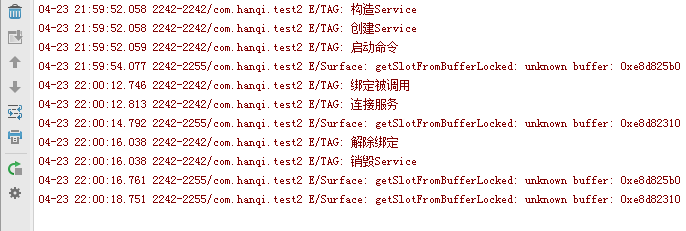
效果图:

Android课程---关于Service的学习(后台运行)的更多相关文章
- Android课程---关于对话框的学习
<?xml version="1.0" encoding="utf-8"?> <LinearLayout xmlns:android=&quo ...
- Android开发按返回键应用后台运行
@Override public boolean onKeyDown(int keyCode, KeyEvent event) { if (keyCode == KeyEvent.KEYCODE ...
- Android 中的 Service 全面总结
1.Service的种类 按运行地点分类: 类别 区别 优点 缺点 应用 本地服务(Local) 该服务依附在主进程上, 服务依附在主进程上而不是独立的进程,这样在一定程度上节约了资源,另 ...
- Android 中的 Service 全面总结(转载)
转载地址:http://www.cnblogs.com/newcj/archive/2011/05/30/2061370.html 感谢作者 Android 中的 Service 全面总结 1.Ser ...
- Android 中的 Service 全面总结 (转)
原文地址:http://www.cnblogs.com/newcj/archive/2011/05/30/2061370.html 1.Service的种类 按运行地点分类: 类别 区别 优点 ...
- Android开发之Service的写法以及与Activity的通信
Service的总结: 1.按运行地点分类: 类别 区别 优点 缺点 应用 本地服务(Local) 该服务依附在主进程上, 服务依附在主进程上而不是独立的进程,这样在一定程度上节约了资源,另外 ...
- Android四大组件——Service
Service相关链接 Service初涉 Service进阶 Service精通 Service是Android系统中的一种组件,它跟Activity的级别差不多,但是它不能自己运行,只能后台运行, ...
- Android中的Service 与 Thread 的区别[转]
很多时候,你可能会问,为什么要用 Service,而不用 Thread 呢,因为用 Thread 是很方便的,比起 Service 也方便多了,下面我详细的来解释一下. 1). Thread:Thre ...
- 关于android编程中service和activity的区别
一. 绝大部分情况下,Service的作用是用来“执行”后台的.耗时的.重要的任务,三者缺一不可,而最重要的原因是第三点:要执行重要的任务. 因为当一个进程启动了Service后,进程的优先级变高了, ...
随机推荐
- dubbo配置
Dubbo是Alibaba开源的分布式服务框架,它最大的特点是按照分层的方式来架构,使用这种方式可以使各个层之间解耦合(或者最大限度地松耦合).从服务模型的角度来看,Dubbo采用的是一种非常简单的模 ...
- Fight my work!
来这个公司第一天工作, 上来就是装ubantu系统,对于玩linux玩的不熟的我.还是相当吃力的, 反正有问题尝试着自己解决,不会就问, 压力还是很大了. 学了一下企业的历史,理念等相关信息,也没重点 ...
- 图文相关性 flickr数据实验结论_1
初始化的选取很重要,random_uniform的效果远远好于random_normal, 是否有bias对效果影响很小 红色是random_uniform初始化,对比random_normal初始化 ...
- 让IIS支持bootstrap 增加svg和woff格式文件的支持
增加以下两种文件类型即可: .woff application/x-woff.svg image/svg+xml
- C#区分多态和重载-delphi也类似
Delphi也是基于继承和接口的多态性.
- [软件推荐、资料分享]MATLAB
MATLAB是美国MathWorks公司出品的商业数学软件,用于算法开发.数据可视化.数据分析以及数值计算的高级技术计算语言和交互式环境,主要包括MATLAB和Simulink两大部分. Matlab ...
- SpringMvc的xml配置与annotation配置的例子的区别
1.导入jar包时,要在xml配置基础上加 spring-aop-4.2.2.RELEASE.jar (注解的时候需要) 2.编写controller的时候要annotation需要做相关配置即红色部 ...
- Python for Infomatics 第14章 数据库和SQL应用三(译)
14.5 SQL 总结 到目前为止,我们在Python示例程序中使用了SQL,并且涉及了许多SQL基础.在这一小节中,我们特别审视SQL语言,并对其语法进行回顾. 虽然有很多不同的数据库供应商,但因S ...
- 【AspNet Core】Nuget代理网站
因为访问Nuget太慢,在Dotnet Core RC2发布前,我就基于Asp.Net做了一个Nuget代理网站 这是网站地址:http://nuget.lzzy.net/ Nuget源:http:/ ...
- Win 通过修改注册表把CapsLock映射为Rshift
成品: REGEDIT4 [HKEY_LOCAL_MACHINE\SYSTEM\CurrentControlSet\Control\Keyboard Layout] "Scancod ...