
利用jsplumb和碰撞检测自动生成流程图
使用jsplumb构建流程图模型时,有一个需求要求,选项可以从选项表中拖拽到指定容器,并且两个选项要接触到的时候才能连接起来,不接触不能连接。效果图如下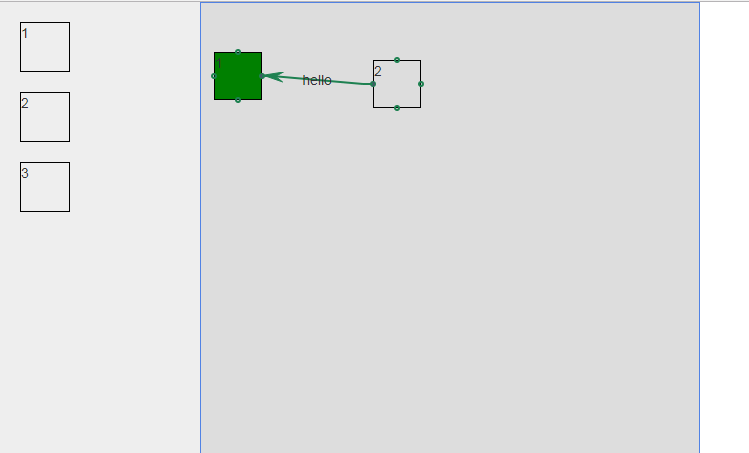
略丑~
因为这里用到了拖拽,拖放功能,所以用到的有jquery,jquery-ui,jsplumb,考虑到兼容ie8,用到的是jsplumb-1.7.10版本。
首先简单的布局
<style>

html,body {

    height:100%;

    padding:0;

    margin:0;

}

    #container{

        width:200px;

        height:500px;

        background:#eee;

        float:left;

    }

    #container .node {

        width:50px;

        height:50px;

        border:1px solid #000;

        margin-top:20px;

        margin-left:20px;

        z-index:999;

    }

    #wrapper {

        width:500px;

        height:500px;

        margin-left:200px;

        border:1px solid #5182E4;

        background:#ddd;

        position:relative;

    }

</style>

<div id="container">

        <div class="node" id="Node1">1</div>

        <div class="node" id="Node2">2</div>

        <div class="node" id="Node3">3</div>

</div>

<div id="wrapper">

</div>
接下来就是功能实现,第一步拖拽
 $('#container .node').draggable({

          helper:'clone',

          revert: 'invalid',//放置不到位自动恢复原位

          stop:function(event,ui){

            //准备碰撞检测所需要的条件

              var r1 = ui.offset.left+ui.helper.context.offsetWidth;

              var l1 = ui.offset.left;

              var b1 = ui.offset.top+ui.helper.context.offsetHeight;

              var t1 = ui.offset.top;

              var L = $('#wrapper')[0].offsetLeft;

              var T = $('#wrapper')[0].offsetTop;

              var id= ui.helper.context.id;

              var len = $('#wrapper').children('.node').length;

             var uid = 'dragNode'+len;

              var arr=[];

              $('#wrapper').children('.node').each(function(){

                  var json={};

                  json.id = $(this).context.id;

                  json.left = $(this).context.offsetLeft+L;

                  json.right = $(this).context.offsetLeft+L+$(this)[0].offsetWidth;

                  json.top = $(this).context.offsetTop+T;

                  json.bottom = $(this).context.offsetTop+T+$(this)[0].offsetHeight;

                  arr.push(json);

              });

            //jsplumb 设置样式

              var common = {

                          anchors:['Left','Right'],

                          endpoint:['Dot',{radius:2}],

                          paintStyle:{

                            strokeStyle:'#1e8151',

                            fillStyle:'transparent',

                            radius:2,

                            lineWidth:2,

                        }

                      };

              for(var i=0;i<arr.length;i++){

                  if(arr[i].id!=uid){

                      var id3= arr[i].id;

                    //碰撞检测

                      if(r1<arr[i].left||b1<arr[i].top||l1>arr[i].right||t1>arr[i].bottom){

                          $('#'+id3).css('background','red')

                          console.log(2);

                      }else {

                          $('#'+id3).css('background','green');

                      //碰撞后,连接到一起

                        jsPlumb.connect({

                            source:uid,

                            target:arr[i].id,

                            scope:'',

                            connector:[

                                'Straight',

                                {

                                    stub:[10,10],

                                    gap:0

                                }

                            ],

                            overlays:[

                                ['Arrow',{width:10,height:10,location:0.9}],

                                ['Label',{label:'hello',location:0.5}]

                            ]

                        },common);

                        var lef = ui.offset.left+50;

                        //jsPlumb 动画,选项连接后自动分离开一段距离

                        jsPlumb.animate(uid,{left:lef},{duration:350,easing:'easeOutBack'});

                      }

                  }

              }

          }

        });
选项可以拖拽后,还要有放置的地儿,当然draggable里也可以,这里使用droppable;
$('#wrapper').droppable({

            drop:function(event,ui){

                var leng = $('#wrapper').children('.node').length+1;

                 var arr=[];

                var id = "dragNode"+leng;

                var id2 = ui.draggable[0].id;

                var left = parseInt(ui.offset.left-$(this).offset().left);

                var top = parseInt(ui.offset.top-$(this).offset().top);

                var width = ui.draggable[0].clientWidth;

                var height = ui.draggable[0].clientHeight;

                var len = $(this).children('.node').length;

            //判断容器内拖拽的是否重复

                if(!len){

                    $(this).append($('<div style="position:absolute;" class="node" id="'+id+'">'+$(ui.helper).html()+'</div>'));

                    $('#'+id).css('left',left).css('top',top);

                    $('#'+id).css('width',width).css('height',height);

                    $('#'+id).css('border','1px solid #000');

                }else {

                        $(this).children('.node').each(function(){

                             // console.log($(this).html());

                             arr.push($(this).html());

                        });

                        if(arr.indexOf($(ui.helper).html())>-1){

                            alert('已存在!');

                            return;

                        }else {

                            $(this).append($('<div style="position:absolute;" class="node" id="'+id+'">'+$(ui.helper).html()+'</div>'));

                            $('#'+id).css('left',left).css('top',top);

                            $('#'+id).css('width',width).css('height',height);

                            $('#'+id).css('border','1px solid #000');

                        }

                }

                arr.push(id2);

            //限制容器内选项的拖拽范围

                jsPlumb.draggable(id,{

                    containment:'parent'

                });

            //

                var connectorPaintStyle={

                    lineWidth:4,

                    strokeStyle:'#61B7CF',

                    joinstyle:'round',

                };

                var connectorHoverStyle = {

                    lineWidth:4,

                    strokeStyle:'#216477',

                };

                var defaults = {

                    endpoint:['Dot',{radius:2}],

                    connectorStyle:connectorPaintStyle,

                    connectorHoverStyle:connectorHoverStyle,

                    paintStyle:{

                        strokeStyle:'#1e8151',

                        fillStyle:'transparent',

                        radius:2,

                        lineWidth:2,

                    },

                    isSource:true,

                    connector:['Flowchart',{stub:[40,60],gap:5,cornerRadius:5,alwaysRespectStubs:true}],

                    isTarget:true,

                    maxConnections:-1,

                    connectorOverlays:[

                        ['Arrow',{width:10,length:10,location:1}],

                        ['Label',{label:'yes',width:10,height:10}]

                        ]

                };

                //在添加连接点

                jsPlumb.addEndpoint(id,{anchors:'TopCenter'},defaults);

                jsPlumb.addEndpoint(id,{anchors:'BottomCenter'},defaults);

                jsPlumb.addEndpoint(id,{anchors:'RightMiddle'},defaults);

                jsPlumb.addEndpoint(id,{anchors:'LeftMiddle'},defaults);

            }

        });
利用jsplumb与碰撞检测,自动生成流程图的过程基本就这样了。
利用jsplumb和碰撞检测自动生成流程图的更多相关文章
- 利用MyEclipse连接数据库并自动生成基于注解或者XML的实体类
一.利用MyEclipse连接数据库 1. 打开MyEclipse的数据库连接视图 然后在Other中找到"MyEclipse Database"中的DB Browser 2. 在 ...
- 利用Eclipse的JPA自动生成注解实体
新公司用的SSH(springmvc)框架,看代码的时候,发现没有hbm.xml文件,全部使用的注解形式.在一次闲聊的时候问同事,这么多entity 写起来不麻烦么.同事说根据数据库自动生成的.于是 ...
- c# 利用t4模板,自动生成Model类
我们在用ORM(比如dapper)的时候,很多时候都需要自己写Model层(当然也有很多orm框架自带了这种功能,比如ef),特别是表里字段比较多的时候,一个Model要写半天,而且Model如果用于 ...
- ASP.NET MVC5利用EF,反向自动生成数据库
1.在Model类里面,写好相应的属性. using System; using System.Collections.Generic; using System.Linq; using System ...
- 利用动软代码生成器 自动生成LINQ需要用的数据实体类 (转)
首先先建立一个模板 名称随意 我起的“生成数据实体.cmt” 代码如下: <#@ template language="c#" HostSpecific="True ...
- 利用Tkinter做的自动生成JSONSchema的小工具
前面讲到可以使用JSONSchema做json数据校验, 但是每个接口数据都手动写jsonschema太痛苦了, 就写了个小脚本,可以直接复制接口文档的mock数据然后生成一个简单的jsonschem ...
- MyBatis代码自动生成(利用eclipse插件)
上一篇文章已经介绍了利用命令的方式自动生成mybatis代码,但是每次都去运行cmd命令感觉还是有点麻烦,所以找了些资料发现eclipse里面也可以安装插件自动生成代码,下面简单介绍一下,也是给自己以 ...
- [goa]golang微服务框架学习(二)-- 代码自动生成
之前用过go语言的反射来做一些代码生成,参考这篇. 但是这种方式,入侵太强,需要执行对应的申明调用, 所以对GOA框架的自动生成非常感兴趣,于是仔细研究了一下,发现用的比较巧妙, 这里先卖个关子,先看 ...
- php中soap的使用实例以及生成WSDL文件,提供自动生成WSDL文件的类库——SoapDiscovery.class.php类
1. web service普及: Webservice soap wsdl区别之个人见解 Web Service实现业务诉求: Web Service是真正“办事”的那个,提供一种办事接口的统称. ...
随机推荐
- 使用VS Code配合Remote Development插件连接远程服务器(Mac/Linux+Windows) | Using VS Code with Remote Development Connect to Remote Server (Mac/Linux+Windows)
最新版VS Code(2019年6月)出了一系列新的插件,包括Remote Development,Remote SSH等,使得用户可以使用VS Code远程连接服务器写代码,方便了协同工作.具体配置 ...
- D. Beautiful Array
题目:http://codeforces.com/contest/1155/problem/D 给你n,x,一个n个数的序列,你可以选择一段区间,区间的数都乘以x,然后求出最大字段和 竟然是很简单的d ...
- 2018CCPC网络赛A(优先队列,思维)
#include<bits/stdc++.h>using namespace std;priority_queue<pair<int,int>>q;int main ...
- cf834D(dp+线段树区间最值,区间更新)
题目链接: http://codeforces.com/contest/834/problem/D 题意: 每个数字代表一种颜色, 一个区间的美丽度为其中颜色的种数, 给出一个有 n 个元素的数组, ...
- [Xcode 实际操作]三、视图控制器-(8)在Storyboard中设置初始化视图控制器
目录:[Swift]Xcode实际操作 本文将演示如何设置故事板的初始视图控制器. 打开自动生成的默认故事板[Main.storyboard] 在打开的故事板中,系统已经生成了一个空白的视图控制器. ...
- 最大加权矩形 压缩+前缀和+dp
题目描述 为了更好的备战NOIP2013,电脑组的几个女孩子LYQ,ZSC,ZHQ认为,我们不光需要机房,我们还需要运动,于是就决定找校长申请一块电脑组的课余运动场地,听说她们都是电脑组的高手,校长没 ...
- java 正则简单使用
查找是否包含字串 查询是否包含 #{name} 片段 这里有包含所以返回true String context = "select * from t_user where (name = # ...
- sourcetree基本使用
非常有用的使用sourcetree开发的步骤文档 https://www.cnblogs.com/fps2tao/p/7825742.html 1) master,最终发布版本,整个项目中有且只有一个 ...
- 项目 07 Model与数据优化
项目班 07 Model与数据优化 html默认可以用直接用的方法和变量 {{ static_url(p.image_url) }} #static_url表示直接获取静态文件url {{ handl ...
- Eclipse(2019-03版本)汉化
1.Eclipse IDE 版本 eclipse-jee-2019-03-R-win32-x86_64.zip 2.Eclipse 汉化包下载 babel-R0.16.0-photon.zip 3.解 ...