
第二篇——Struts2的Action搜索顺序
Struts2的Action的搜索顺序:
地址:http://localhost:8080/path1/path2/student.action
1、判断package是否存在,例如:/path1/path2;
2、若存在,判断action是否存在,没有则报错;
3、不存在,检查上一级路径的package是否存在(知道默认的namespace),重复第一步,没有则报错。
项目实例:
1、项目结构
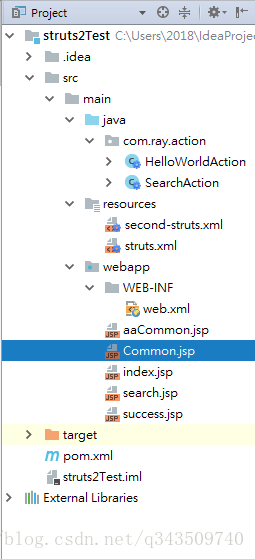
2、pom.xml
<project xmlns="http://maven.apache.org/POM/4.0.0" xmlns:xsi="http://www.w3.org/2001/XMLSchema-instance"
  xsi:schemaLocation="http://maven.apache.org/POM/4.0.0 http://maven.apache.org/maven-v4_0_0.xsd">
  <modelVersion>4.0.0</modelVersion>
  <groupId>com.ray</groupId>
  <artifactId>struts2Test</artifactId>
  <packaging>war</packaging>
  <version>1.0-SNAPSHOT</version>
  <name>struts2Test Maven Webapp</name>
  <url>http://maven.apache.org</url>

  <dependencies>

    <dependency>
      <groupId>junit</groupId>
      <artifactId>junit</artifactId>
      <version>3.8.1</version>
      <scope>test</scope>
    </dependency>

    <!-- https://mvnrepository.com/artifact/org.apache.struts/struts2-core -->
    <dependency>
      <groupId>org.apache.struts</groupId>
      <artifactId>struts2-core</artifactId>
      <version>2.5.16</version>
    </dependency>

  </dependencies>

  <build>
    <finalName>struts2Test</finalName>
  </build>

</project>
3、web.xml
<web-app xmlns="http://java.sun.com/xml/ns/javaee"
         xmlns:xsi="http://www.w3.org/2001/XMLSchema-instance"
         xsi:schemaLocation="http://java.sun.com/xml/ns/javaee
                      http://java.sun.com/xml/ns/javaee/web-app_3_0.xsd"
         version="3.0" metadata-complete="true">
  <display-name>Archetype Created Web Application</display-name>

  <!-- 过滤所有请求交给Struts2处理 -->
  <filter>
    <filter-name>struts2</filter-name>
    <filter-class>
      org.apache.struts2.dispatcher.filter.StrutsPrepareAndExecuteFilter
    </filter-class>
  </filter>

  <filter-mapping>
    <filter-name>struts2</filter-name>
    <url-pattern>/*</url-pattern>
  </filter-mapping>

</web-app>
4、SearchAction.java
package com.ray.action;

import com.opensymphony.xwork2.ActionSupport;

/**
 * Created by Ray on 2018/3/26 0026.
 * 第二篇实例
 **/
public class SearchAction extends ActionSupport{

    public String search(){
        return SUCCESS;
    }
}
5、second-struts.xml
<?xml version="1.0" encoding="UTF-8"?>

<!DOCTYPE struts PUBLIC
        "-//Apache Software Foundation//DTD Struts Configuration 2.5//EN"
        "http://struts.apache.org/dtds/struts-2.5.dtd">

<struts>

    <package name="search1" extends="struts-default" namespace="/">

        <action name="search" class="com.ray.action.SearchAction" method="search">
            <result>/search.jsp</result>
        </action>

        <action name="CommonSearch" class="com.ray.action.SearchAction" method="search">
            <result>/Common.jsp</result>
        </action>

    </package>

    <package name="search2" extends="struts-default" namespace="/aa">

        <action name="CommonSearch" class="com.ray.action.SearchAction" method="search">
            <result>/aaCommon.jsp</result>
        </action>

    </package>
</struts>
6、struts.xml
include引入 > 后面会讲解
<?xml version="1.0" encoding="UTF-8"?>

<!DOCTYPE struts PUBLIC
        "-//Apache Software Foundation//DTD Struts Configuration 2.5//EN"
        "http://struts.apache.org/dtds/struts-2.5.dtd">

<struts>

    <package name="default" namespace="/" extends="struts-default">

        <action name="helloWorld" class="com.ray.action.HelloWorldAction">
            <result name="success">/success.jsp</result>
        </action>
    </package>

    <include file="second-struts.xml"/>
</struts>
7、aaCommon.jsp
<%@ page language="java" import="java.util.*" pageEncoding="UTF-8" %>
<%
    String path = request.getContextPath();
    String basePath = request.getScheme() + "://" + request.getServerName() + ":" + request.getServerPort() + path + "/";
%>

<!DOCTYPE HTML PUBLIC "-//W3C//DTD HTML 4.01 Transitional//EN">
<html>
<head>
    <base href="<%=basePath%>">

    <title>This is aaCommon.jsp</title>

    <meta http-equiv="pragma" content="no-cache">
    <meta http-equiv="cache-control" content="no-cache">
    <meta http-equiv="expires" content="0">
    <meta http-equiv="keywords" content="keyword1,keyword2,keyword3">
    <meta http-equiv="description" content="This is my page">
    <!--
	<link rel="stylesheet" type="text/css" href="styles.css">
	-->

</head>

<body>
    This is aaCommon.jsp
</body>
</html>
8、search.jsp
<%@ page language="java" import="java.util.*" pageEncoding="UTF-8" %>
<%
    String path = request.getContextPath();
    String basePath = request.getScheme() + "://" + request.getServerName() + ":" + request.getServerPort() + path + "/";
%>

<!DOCTYPE HTML PUBLIC "-//W3C//DTD HTML 4.01 Transitional//EN">
<html>
<head>
    <base href="<%=basePath%>">

    <title>This is search.jsp</title>

    <meta http-equiv="pragma" content="no-cache">
    <meta http-equiv="cache-control" content="no-cache">
    <meta http-equiv="expires" content="0">
    <meta http-equiv="keywords" content="keyword1,keyword2,keyword3">
    <meta http-equiv="description" content="This is my page">
    <!--
	<link rel="stylesheet" type="text/css" href="styles.css">
	-->

</head>

<body>
    This is search.jsp
</body>
</html>
9、Common.jsp
<%@ page language="java" import="java.util.*" pageEncoding="UTF-8" %>
<%
    String path = request.getContextPath();
    String basePath = request.getScheme() + "://" + request.getServerName() + ":" + request.getServerPort() + path + "/";
%>

<!DOCTYPE HTML PUBLIC "-//W3C//DTD HTML 4.01 Transitional//EN">
<html>
<head>
    <base href="<%=basePath%>">

    <title>This is Common.jsp</title>

    <meta http-equiv="pragma" content="no-cache">
    <meta http-equiv="cache-control" content="no-cache">
    <meta http-equiv="expires" content="0">
    <meta http-equiv="keywords" content="keyword1,keyword2,keyword3">
    <meta http-equiv="description" content="This is my page">
    <!--
	<link rel="stylesheet" type="text/css" href="styles.css">
	-->

</head>

<body>
    This is Common.jsp
</body>
</html>
10、页面效果
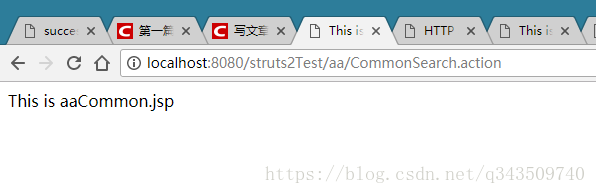
访问一:http://localhost:8080/struts2Test/aa/CommonSearch.action
此时存在namespace="/aa"的package,搜索action,存在
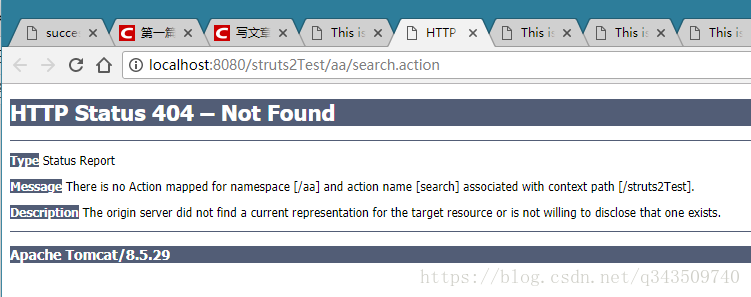
访问二:http://localhost:8080/struts2Test/aa/search.action
此时存在namespace="/aa"的package,搜索action,不存在,报错
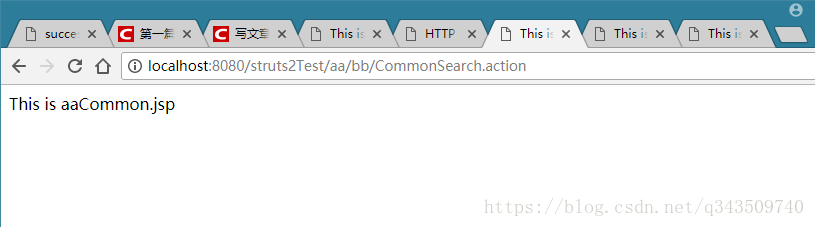
访问三:http://localhost:8080/struts2Test/aa/bb/CommonSearch.action
此时不存在namespace="/aa/bb"的package,搜索上一级路径的package,此时存在namespace="/aa"的package,搜索action,存在
访问四:http://localhost:8080/struts2Test/CommonSearch.action
存在namespace="/"的package,搜索action,存在
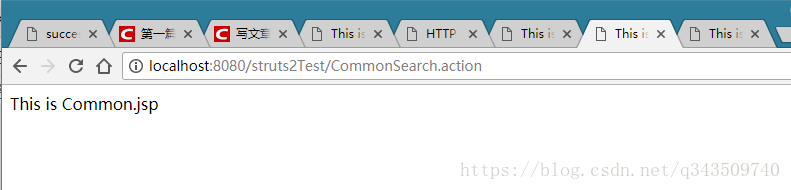
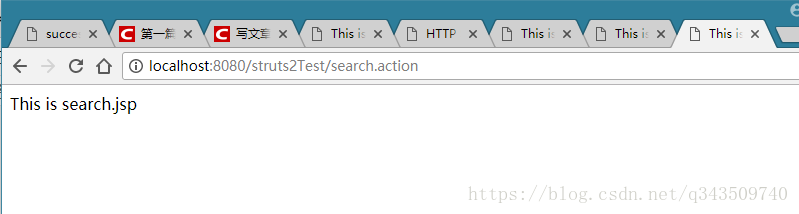
访问五:http://localhost:8080/struts2Test/search.action
存在namespace="/"的package,搜索action,存在
ok!
第二篇——Struts2的Action搜索顺序的更多相关文章
- Struts2学习三----------Action搜索顺序
© 版权声明:本文为博主原创文章,转载请注明出处 Struts2的Action的搜索顺序 http://localhost:8080/path1/path2/student.action 1)判断pa ...
- 【Struts2学习笔记(1)】Struts2中Action名称的搜索顺序和多个Action共享一个视图--全局result配置
一.Action名称的搜索顺序 1.获得请求路径的URI,比如url是:http://server/struts2/path1/path2/path3/test.action 2.首先寻找namesp ...
- 02. struts2中Action名称的搜索顺序
搜索顺序 获得请求路径的URI,例如URL为:http://localhost:8080/struts2/path1/path2/path3/student.action 首先寻找namespace为 ...
- Struts2配置拦截器,struts2加载常量时的搜索顺序
1:struts2加载常量时的搜索顺序 1.Struts-default.xml 2.Struts-plugin.xml 3.Struts.xml 4.Struts-properties(自己创建的) ...
- SSH框架之Struts2第二篇
1.2 知识点 1.2.1 Struts2的Servlet的API的访问 1.2.1.1 方式一 : 通过ActionContext实现 页面: <h1>Servlet的API的访问方式一 ...
- SSH框架-Struts2基础-Action
Struts2的目录结构: 解压apps目录下的struts2-blank.war: 仿照这个最基本的项目,拷贝相关文件: 1.拷贝apps/struts2-blank/WEB-INF/classes ...
- WEBUS2.0 In Action - 搜索操作指南 - (1)
上一篇:WEBUS2.0 In Action - 索引操作指南(2) | 下一篇:WEBUS2.0 In Action - 搜索操作指南(2) 1. IQueriable中内置的搜索功能 在Webus ...
- WEBUS2.0 In Action - 搜索操作指南 - (3)
上一篇:WEBUS2.0 In Action - 搜索操作指南(2) | 下一篇:WEBUS2.0 In Action - 搜索操作指南(4) 3. 评分机制 (Webus.Search.IHitSc ...
- WEBUS2.0 In Action - 搜索操作指南 - (4)
上一篇:WEBUS2.0 In Action - 搜索操作指南(3) 6. 搜索多个索引 为了提升性能, 我们可以从多个索引同时进行搜索, Webus.Search.MultiSearcher提供了相 ...
随机推荐
- 框架源码系列十:Spring AOP(AOP的核心概念回顾、Spring中AOP的用法、Spring AOP 源码学习)
一.AOP的核心概念回顾 https://docs.spring.io/spring/docs/5.1.3.RELEASE/spring-framework-reference/core.html#a ...
- 24小时学通Linux内核之调度和内核同步
心情大好,昨晚我们实验室老大和我们聊了好久,作为已经在实验室待了快两年的大三工科男来说,老师让我们不要成为那种技术狗,代码工,说多了都是泪啊,,不过我们的激情依旧不变,老师帮我们组好了队伍,着手参加明 ...
- Linux环境设置IP及关闭防火墙
确认当前网络配置: [root@localhost ~]# nmcli -p dev ===================== Status of devices ================= ...
- vscode c++ 编译生成后,调试时无法命中断点
//test.cpp #include <stdio.h> ; void print_line(char *str) { if (str != NULL) printf("%s\ ...
- asp.net mvc 路由检测工具
初学mvc,路由搞不清楚,可以通过一款插件 查看匹配的路由. 工具名<RouteDebugger> 可以在nuget中查询RouteDebugger后,安装.或者在控制台进行安装: pm& ...
- laravel5.4+vue+element简单搭建(gulp+laravel Elixir)(转)
如今laravel来到5.4版本,更方便引入vue了,具体步骤如下: 下图为我动到的文件 1.下载laravel5.4 2.命令行(laravel5.4目录下):composer install 3. ...
- TS的一些小东西
首先介绍下泛型的三种方法,函数声明,函数表达式,箭头函数 function Interview2<T>(name:T):T{ return name } let mn=function&l ...
- 文本编辑器vim和gedit
vim和gedit都是文本编辑器 vim用法: vim 文件名 #打开文件 输入 i,进入文本编辑模式,编辑完再按ESC,退出编辑模式,再输:wq,保存退出:如果输:q!则是不保存退出,很简单.. 如 ...
- Oracle课程档案。第十一天
读一致性:oracle通过多版本与闪回机制保证读一致性.保证从某个时间点开始查询是一致的.在Oracle中主要通过SCN版本号来控制系统修改的版本,典型的例子是我们可以通过在同一个查询中得到同一个对象 ...
- 数组copy
数组copy(推荐用法) System.arraycopy的用法 int[] src = {1,3,5,7,9,11,13,15,17}; int[] dest = {2,4,6,8,10,12,14 ...