
unity仿微信飞机大战项目
开发路线:

	1,游戏背景(连续播放)

	2,添加主角

	3,设置游戏主角的动画

	4,添加两种子弹并设置子弹的运动

	5,添加三种子弹

		设置子弹的自动生成和运动

	6,添加两种奖励物品

		设置奖励物品的自动生成和运动

	7,设置主角的控制

		7.1检测手指触摸

		7.2问题:防止主角飞出屏幕

	8,设置Tag

		添加子弹和敌人的碰撞

	9,设计敌人 0 1 2 震动动画和爆炸效果

	10,添加脚本GameManager做游戏的控制

	11,统计分数
1,新建项目,导入资源,平台匹配;
2,背景循环(一般是2/3个背景精灵切换);
A. 精灵Sprite :Pixels Per Unit 是精灵的尺寸在unity之后的换算问题
栗子:图片高度为852像素,导入后显示的为8个单位

B. 建立一个空节点做父节点,在每个背景上添加脚本,BackgroundScroll
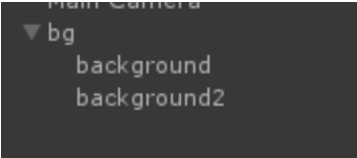
C.脚本; BackgroundScroll.cs
private static float moveSpeed = 3.0f;
void Start () {
}
void Update () {
//move down
this.transform.Translate(Vector3.down * moveSpeed * Time.deltaTime);
//limit
Vector3 pos = transform.position;
if(pos.y <= -8.52f)
{
this.transform.position = new Vector3(pos.x, pos.y + 8.52f * 2, pos.z);
}
}
3.制作主角动画:(序列帧实现动画)
A.拖拽第一张精灵图片,层次:渲染的顺序
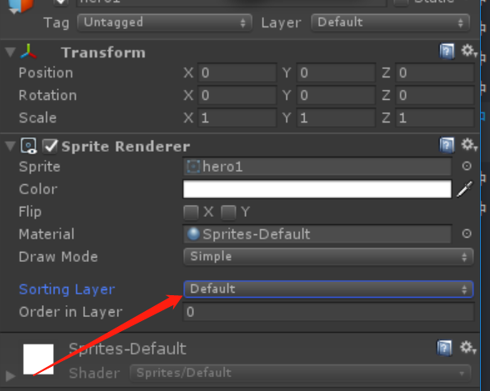
B.一般2D游戏设置:
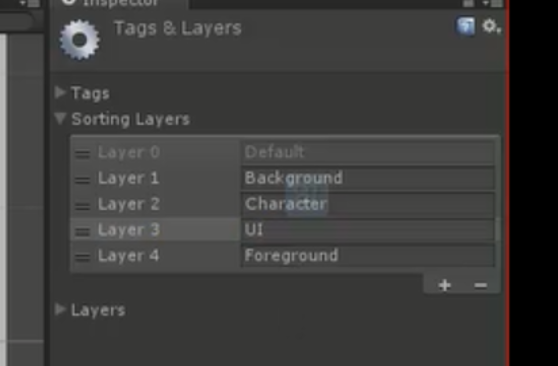
C. 分别设置不同的层级:一般0-;数字越小先渲染,然后会被后渲染的遮挡住;
D. 设置主角为character,后添加脚本 Hero;
脚本:using System.Collections;
using System.Collections.Generic;
using UnityEngine;
public class Hero : MonoBehaviour {
//标志位,控制动画播放
public bool animation = true;
//每秒播放帧数 五遍动画 一个动画播放2帧
public int frameCountPerseconds = 10;
//计时器
public float timer = 0;
//sprites
public Sprite[] sprites;
//2
private SpriteRenderer spriteRenderer;
void Start () {
spriteRenderer = this.GetComponent<SpriteRenderer>();
}
void Update () {
if (animation)
{
timer += Time.deltaTime;
//每帧所用事件 1f/frameCountPerseconds
int frameIndex = (int)(timer / (1f / frameCountPerseconds));
int frame = frameIndex % 2;//取值0,1
//this.GetComponent<SpriteRenderer>().sprite = sprites[frame];//消耗性能
spriteRenderer.sprite = sprites[frame];
}
}
}
E.子弹;character层;添加脚本Bullet:
using System.Collections;
using System.Collections.Generic;
using UnityEngine;
public class Bullet : MonoBehaviour {
public float moveSpeed = 2;
void Start () { }
void Update () {
transform.Translate(Vector3.up * Time.deltaTime * moveSpeed);
//limit
if(transform.position.y >=4.3f)
{
Destroy(this.gameObject);
}
}
}
F.在Hero对象下添加对应位置的空节点放置
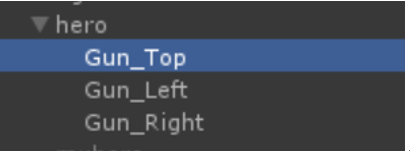
脚本Gun: 放置不同的子弹预制
using System.Collections;
using System.Collections.Generic;
using UnityEngine;
public class Gun : MonoBehaviour {
public float rate = 0.2f;
public GameObject bullet;
public void Fire()
{
GameObject.Instantiate(bullet, transform.position, Quaternion.identity);//第三个参数:旋转角度,四元素的一个(无旋转的)静态变量
}
public void OpenFire()
{
InvokeRepeating("Fire", 1, rate);
}
void Start () {
OpenFire();
}
}
G.敌人,三种类型添加脚本Enemy,之后挂载 修改对应的hp和move_speed
using System.Collections; using System.Collections.Generic; using UnityEngine;
public class Enemy : MonoBehaviour {
public int hp = 1;
public float speed = 2;
public int score = 100;
void Update () {
this.transform.Translate(Vector3.down * speed * Time.deltaTime);
if(this.transform.position.y <= -5.6f)
{
Destroy(this.gameObject);
}
}
}
H.奖励:两种 脚本Award:
using System.Collections; using System.Collections.Generic; using UnityEngine;
public class Award : MonoBehaviour {
public int type = 0;//0 gun 1 explose
public float speed = 1.5f;
void Update () {
this.transform.Translate(Vector3.down * speed * Time.deltaTime);
if(this.transform.position.y <= -4.5f)
{
Destroy(this.gameObject);
}
}
}
- 上述诸多对象做成预制,添加空节点,命名Spawn(用于生成对象)
using System.Collections;
using System.Collections.Generic;
using UnityEngine;
public class Spawn : MonoBehaviour {
public GameObject enemy0Prefab;
public float enemy0Rate = 0.5f;
void Start () {
InvokeRepeating("createEnemy0", 1, enemy0Rate);
}
public void createEnemy0()
{
//随机pos.x
float pos_x = Random.Range(-2.15f, 2.15f);
GameObject.Instantiate(enemy0Prefab,new Vector3(pos_x,transform.position.y,transform.position.z),Quaternion.identity);
}
}
unity仿微信飞机大战项目的更多相关文章
- 【一】仿微信飞机大战cocos2d-x3.0rc1
參考 [偶尔e网事] 的 [cocos2d-x入门实战]微信飞机大战 cocos2dx 2.0版本号,偶尔e网事他写的很具体,面面俱到,大家很有必要看下.能够通过以下链接跳转: cocos2d-x入 ...
- Cocos2d-x 3.0final 终结者系列教程16-《微信飞机大战》实现
看到cocos2d-x推出了3.1版本号,真是每月一次新版本号,速度. 另一个好消息就是http://cn.cocos2d-x.org/上线了,祝贺!啥时候把我的视频和教程放上去呢?!! . 视频下载 ...
- 用DIV+Css+Jquery 实现的旧版微信飞机大战。
用jquery 实现的旧版微信飞机大战. 以前一直都是做后台和业务逻辑,前端很少去做, 现在个小游戏. 方向键控制方向,Ctrl 键 放炸弹(当然你的有炸弹,哈哈)! 主要都是用div+Css实现的, ...
- 用Javascript模拟微信飞机大战游戏
最近微信的飞机大战非常流行,下载量非常高. 利用JS进行模拟制作了一个简单的飞机大战[此源码有很多地方可以进行重构和优化] [此游戏中没有使用HTML5 任何浏览器都可以运行]. 效果图: 原理:利用 ...
- [Unity3D]Unity3D游戏开发之飞机大战项目解说
大家好,我是秦元培,欢迎大家继续关注我的博客,我的博客地址是blog.csdn.net/qinyuanpei. 首先感谢大家对我博客的关注,今天我想和大家分享的是一个飞机大战的项目.这是一个比較综合的 ...
- 500行代码,教你用python写个微信飞机大战
这几天在重温微信小游戏的飞机大战,玩着玩着就在思考人生了,这飞机大战怎么就可以做的那么好,操作简单,简单上手. 帮助蹲厕族.YP族.饭圈女孩在无聊之余可以有一样东西让他们振作起来!让他们的左手 / 右 ...
- [置顶] 【cocos2d-x入门实战】微信飞机大战之四:飞机登场咯
转载请表明地址:http://blog.csdn.net/jackystudio/article/details/11757175 昨天收到了电子工业出版社寄过来的<cocos2d-x游戏开发之 ...
- 【开源】SpringBoot&Netty实现仿微信网页版项目更新
阅读本文约“2.3分钟” 项目更新啦!V1.3.0 还记得那个聊天室的小项目吗? SpringBoot 加 Netty 实现聊天室 没错,这次已经完整进行了版本的替换,酥酥聊天室! 基于原项目的改动, ...
- 用Swift语言和Sprite Kit复制微信飞机大战游戏
先上GitHub链接: https://github.com/songrotek/PlaneWar.git 接下来略微解说一下! 这个程序还有点Bug,见谅! 1 说明 游戏採用了Sprite kit ...
随机推荐
- 009-Python-面向对象
1.面向对象: 1.1什么是类? 类:把一类事物的相同的特征和动作整合到一起就是类,类是一个抽象的概念: 1.2什么是对象? 对象:就是基于类而创建的一个具体事物(具体存在的)也是特征和动作整合到一起 ...
- SQL Server常见的操作符
常见的操作符:Sort.Hash Match(聚合).Filter.Compute Scalar等 一:Sort select Shelf from Production.ProductInvento ...
- VS2015 将*.xaml.cs文件包裹在*.xaml文件下
原文:https://stackoverflow.com/questions/13387527/add-existing-xaml-files-to-visual-studio-2012 Right- ...
- RxJava2.0相关教程
这可能是最好的RxJava 2.x 教程(完结版) https://www.jianshu.com/p/0cd258eecf60 RxJava2.0——从放弃到入门 https://www.jians ...
- Oracle Client(客户端) 安装与配置
因为工作需要,需要通过本地oracle客户端将数据导入到远程服务器上的oracle数据库中.从csdn下了很多oracle客户端,都是属于精简版,缺少imp.exe文件,造成无法导入数据.所以最终从o ...
- Maya闪退
电脑上装的Maya2015突然就打不开了,窗口闪一下就关闭,也没有任何提示. 将15卸载装了Maya2016还是一样. 再彻底卸载16,装了15,还不行... 将系统环境变量中PYTHONHOME和P ...
- nginx做负载均衡 tomcat获得客户端真实ip
因项目需要做tomcat2台机器的负载均衡,配置好负载环境后,发现tomcat的日志一律是我前置nginx代理服务器的ip 通过百度教材发现需要修改nginx的配置文件,修改代理头信息,传递给后方,后 ...
- Could not locate executable null\bin\winutils.exe in the Hadoop binaries解决方式 spark运行wordcoult
虽然可以正常运行,但是会出异常,现给出解决方法. 1.问题: 2. 问题解决: 仔细查看报错是缺少winutils.exe程序. Hadoop都是运行在Linux系统下的,在windows下ec ...
- day7 [id],[is],编码
老师的笔记: 字典:dic = {'name':'alex'} 1,增 dic['k'] = 'v' 有键值对,则覆盖 setdefault 有键值对,不添加 dic.setdefault('k1', ...
- Codeforces 854C Planning 【贪心】
<题目链接> 题目大意: 表示有n架飞机本需要在[1,n]时间内起飞,一分钟只能飞一架.但是现在[1,k]时间内并不能起飞,只能在[k+1,k+n]内起飞.ci序号为i的飞机起飞延误一分钟 ...