
【译】Building ArduPilot on Windows with waf and Bash
原文链接:http://ardupilot.org/dev/docs/building-ardupilot-onwindows10.html
翻译水平有限,如有错误请指出!
在Windows上使用waf和Bash编译ArduPilot
警告:
这个编译方法仅适用于Windows10 X64并且没有描述编译不推荐的给予Arduino的飞行控制器(APM1.x,2.x)。支持大多数使用者,但是你可能需要或者更喜欢备用的windows编译过程:http://ardupilot.org/dev/docs/building-px4-with-make.html
微软有介绍WSL-the Windows Subsytem for Linux(Linux的Windows子系统)-对Win10.这个教程描写“在Windows上的Ubuntu的Bash”,因为他是目前唯一由WSL支持的发行版本。其他Linux版本比如Fedora,可能在未来可以使用然而将稍微需要不同的设置去编译ArduPilot。
警告:
这个教程预期作为一个“复制粘贴”引导,只要按照这个步骤一步步来就好。
小窍门:
网上有很多安装Linux的Windows子系统。这是一个例子:https://www.howtogeek.com/249966/how-to-install-and-use-the-linux-bash-shell-on-windows-10/
小窍门:
随着Windows10更新的“秋季推送”从WSL到Windows的文件夹访问被破坏。貌似如果你把Ardupilot的源代码放到一个windows驱动下从WSL经过/mnt/<drive>文件夹编译,最终会有随机的包含(include)错误。为了成功编译源代码,你必须把源码放到一个本地的WSL文件系统下或者放到Windows下面共享它,并通过drvfs驱动程序挂载,如:
mount -t drvfs '\\127.0.0.1\ardupilot' /devel/ardupilot
通过Windows10上的Ubuntu bash安装Ardupilot开发环境
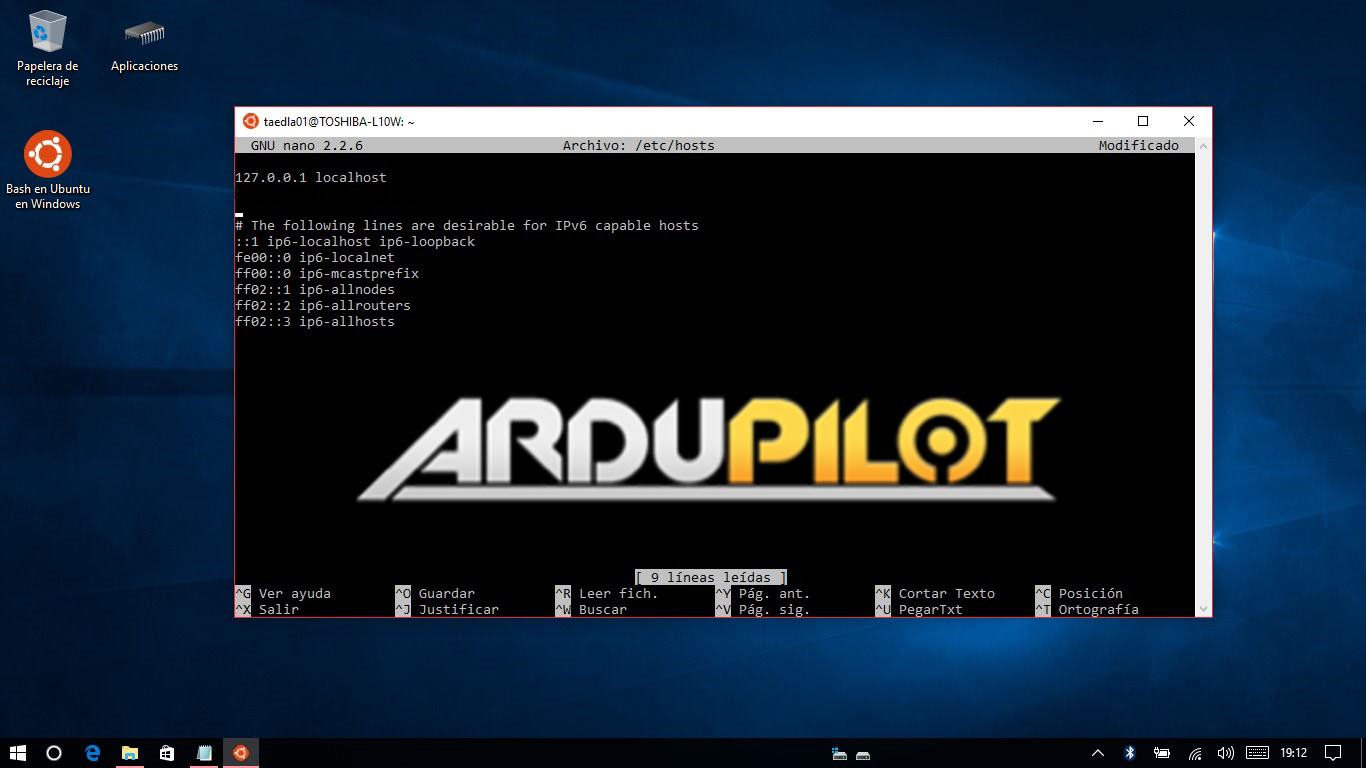
1.第一步,你必须将你的本地主机写入到/etc/hosts文件:
sudo nano /etc/hosts
2.插入到第一行的下面:
127.0.0.1 "hostname"
(“hostname”是指PC名称)
3.然后使用root账户操作终端:
sudo passwd root

su root
4.返回主目录
cd
5.安装git:
sudo apt-get install git
6.为将来的参考做一个新文件夹(可选):
mkdir GitHub

cd GitHub
7.Clone ardupilot git
git clone https://github.com/ArduPilot/ardupilot.git
8.当WSL的root路径下没有“opt”文件夹的时候创建一个新的文件夹:
sudo mkdir /opt
9.运行 install-prereqs-ubuntu.sh 脚本:
./ardupilot/Tools/scripts/install-prereqs-ubuntu.sh

10.我们同时需要安装一些外部工具,以便我们能够编译各种各样的Ardupilot目标:
cd

sudo add-apt-repository ppa:george-edison55/cmake-.x -y

sudo apt-get update

sudo apt-get install cmake

sudo add-apt-repository ppa:ubuntu-toolchain-r/test

sudo apt-get update

sudo apt-get install g++-4.9

sudo add-apt-repository ppa:terry.guo/gcc-arm-embedded

sudo apt-get update

sudo apt-get install gcc-arm-none-eabi=4.9..2015q3-1trusty1

sudo apt-get update

sudo apt-get upgrade
编译ArduPilot源码
1.“waf”是首选的Ardupilot编译工具,他在windows和Ubuntu Bash下性能优异。首先gitArdupilot软件:
cd

cd GitHub/ardupilot/
2.使用下面的命令能够获得ArduPilot的支持板卡列表:
./waf list_boards
3.设置你的板卡
./waf configure --board target
(“target”可以是px4-v2,navio,pxf...从上述提到的支持板卡中选择)

4.编译你的目标:
./waf vehicle
(“vehicle”能够是 copter,plane,rover...)

5.当你到了这里,你已经编译成功了!
笔记:
已发布的WSL无法访问USB串行外设,因此waf中的上传选项无法通过USB工作。编译生成的二进制文件必须通过其他工具上传到你的飞控,比如使用MissionPlanner作为一个“自制固件”。如果你想要通过waf上传,在写USB串行访问时,只能在Windows子系统Linux版(WSL)的Windows内部版本中使用,这需要你加入Windows内部人员程序。https://insider.windows.com/GettingStarted 对于有网络连接的飞行器管理者,Linu targets,上传的功能描述如下:https://github.com/ArduPilot/ardupilot/blob/master/BUILD.md
小窍门:
如果你想取消隐藏Windows系统上的Ubuntu系统文件夹,以管理员身份打开命令提示符,导航到Ubuntu系统路径(C:\Users\username\AppData\Local)并更改文件夹属性。所以(“username”是你的用户名):
cd C:\Users\username\AppData\Local

attrib -s -h lxss
你可以建立一个快捷方式在你的桌面方便快捷导航到“lxss”。
如果事情没有按照计划进行,你可能需要一些东西
sudo apt-get install python

git submodule update --recursive --init modules/uavcan

pip install future

pip install lxml

sudo apt-get install genromfs

sudo apt-get install unzip

sudo apt-get install zip

apt-get install python-empy
【译】Building ArduPilot on Windows with waf and Bash的更多相关文章
- Building OpenCascade on Windows with Visual Studio
Building OpenCascade on Windows with Visual Studio eryar@163.com 摘要Abstract:详细说明OpenCascade的编译配置过程,希 ...
- 在Windows中运行Linux bash命令的几种方法
如果你正在课程中正在学习 shell 脚本,那么需要使用 Linux 命令来练习命令和脚本. 你的学校实验室可能安装了 Linux,但是你自己没有安装了 Linux 的笔记本电脑,而是像其他人一样的 ...
- 译:重置/还原Windows IIs设置为默认设置
译文出处:http://www.codeproject.com/Tips/870858/Reset-Restore-IIS-Settings-to-its-Default-in-Windo 简介: I ...
- Building Apps for Windows 10 on LattePanda–Jump Start
1.引言 目前来看,LattePanda应该是最小的运行Full Windows 10系统的开发板了(注意,不是Windows 10 for Mobile,也不是Windows 10 IoT系列,而是 ...
- 在windows上编译chrome浏览器Building Chromium for Windows
web端用webRTC实现的一对一视频,互动直播和会议.https://github.com/starrtc/android-demo Chromium requires Visual Studio ...
- Building Apps for Windows Phone 8.1教程下载地址整理
官方教程地址http://channel9.msdn.com/Series/Building-Apps-for-Windows-Phone-8-1http://media.ch9.ms/ch9/8db ...
- Tips on Building WebRTC on Windows
Problem: Git ask me to input git user and password Solution: Set environment variable SET DEPOT_TOOL ...
- Windows 10 运行原生Bash【Ubuntu】
当前widnows用户的 AppData\Local\lxss 目录下安装了ubuntu,其中rootfs是和ubuntu安装的目录一致 bash进入的就是LINUX的SHELL,因此其二进制格式是E ...
- Windows下修改Git bash的HOME路径
Windows中使用http://git-scm.com/安装Git bash工具,默认的HOME和~路径一般都是C:\Users\用户名,每次得用命令切换到常用的Repository下,此操作重复而 ...
随机推荐
- Django框架(七)
15 Django组件-中间件 中间件 中间件的概念 中间件顾名思义,是介于request与response处理之间的一道处理过程,相对比较轻量级,并且在全局上改变django的输入与输出.因为改变的 ...
- vs 设置自动缩进tab转换成空格
工具 选项 文本编辑器 如下图 选中插入空格 使用技巧: 按Ctrl+K+F组合键,可以自动进行代码对齐.
- Vue(六) 表单与 v-model
学习使用 v-model 指令完成表单数据双向绑定 基本用法 表单控件在实际业务较为常见,比如单选,多选.下拉选择.输入框等,用他们可以完成数据的录入.校验.提交等.Vue.js 提供了 v-mode ...
- day11_python_1124
01 昨日内容回顾 函数名的运用: 1,特殊的变量. 2,函数名可以当做变量赋值. 3,函数名可以当做容器类类型的元素. 4,函数名可以当做函数的参数. 5,函数名可以当做函数的返回值. 闭包: 1, ...
- 版本控制git第一篇
一.git的下载与安装 参考:https://blog.51cto.com/wangfeng7399/2352524 Git 是一个开源的分布式版本控制软件,用以有效.高速的处理从很小到非常大的项目版 ...
- Mac book Pro BootCamp驱动下载地址
https://www.drvsky.com/sort/908_1.htm 可以通过说明中的支持的独立显卡列表:,找到适合自己的版本
- radhat 添加用户,组,shell,附加组,家目录
linux下强制踢掉登陆用户 查看机器中登陆的用户 [root@sunsyk ~]# w 16:29:02 up 2 days, 2:35, 5 users, load average: 0.03, ...
- activity select problem(greedy algorithms)
many activities will use the same place, every activity ai has its' start time si and finish time f ...
- python day20面向对象-属性,类方法,静态方法
一.属性的初识 # class Person: # # def __init__(self,name,hight,weight): # self.name = name # self.__hight ...
- 双跑道------js分机号
博客园 首页 新随笔 联系 管理 订阅 随笔- 310 文章- 0 评论- 134 [tomcat]启动报错:Failed to initialize end point associated ...