
【译】Building ArduPilot on Windows with waf and Bash
原文链接:http://ardupilot.org/dev/docs/building-ardupilot-onwindows10.html
翻译水平有限,如有错误请指出!
在Windows上使用waf和Bash编译ArduPilot
警告:
这个编译方法仅适用于Windows10 X64并且没有描述编译不推荐的给予Arduino的飞行控制器(APM1.x,2.x)。支持大多数使用者,但是你可能需要或者更喜欢备用的windows编译过程:http://ardupilot.org/dev/docs/building-px4-with-make.html
微软有介绍WSL-the Windows Subsytem for Linux(Linux的Windows子系统)-对Win10.这个教程描写“在Windows上的Ubuntu的Bash”,因为他是目前唯一由WSL支持的发行版本。其他Linux版本比如Fedora,可能在未来可以使用然而将稍微需要不同的设置去编译ArduPilot。
警告:
这个教程预期作为一个“复制粘贴”引导,只要按照这个步骤一步步来就好。
小窍门:
网上有很多安装Linux的Windows子系统。这是一个例子:https://www.howtogeek.com/249966/how-to-install-and-use-the-linux-bash-shell-on-windows-10/
小窍门:
随着Windows10更新的“秋季推送”从WSL到Windows的文件夹访问被破坏。貌似如果你把Ardupilot的源代码放到一个windows驱动下从WSL经过/mnt/<drive>文件夹编译,最终会有随机的包含(include)错误。为了成功编译源代码,你必须把源码放到一个本地的WSL文件系统下或者放到Windows下面共享它,并通过drvfs驱动程序挂载,如:
mount -t drvfs '\\127.0.0.1\ardupilot' /devel/ardupilot
通过Windows10上的Ubuntu bash安装Ardupilot开发环境
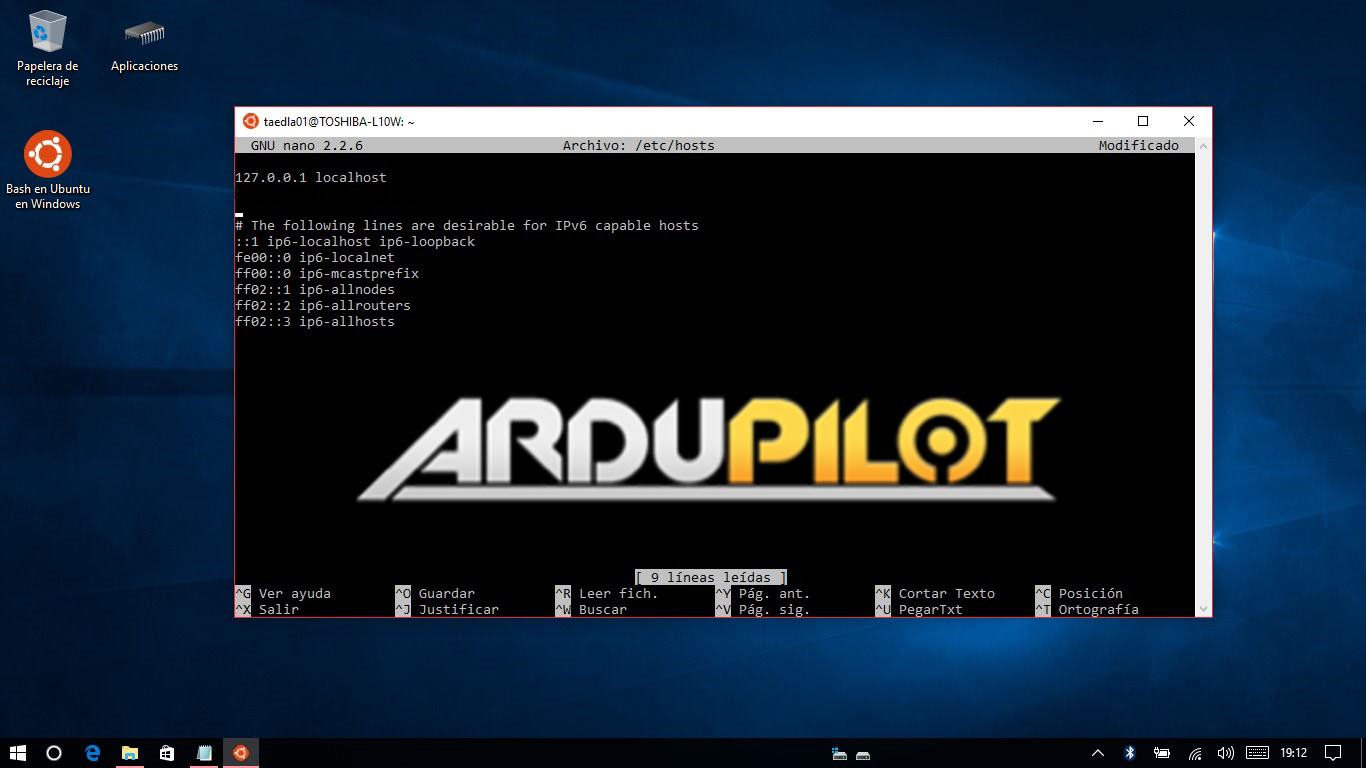
1.第一步,你必须将你的本地主机写入到/etc/hosts文件:
sudo nano /etc/hosts
2.插入到第一行的下面:
127.0.0.1 "hostname"
(“hostname”是指PC名称)
3.然后使用root账户操作终端:
sudo passwd root

su root
4.返回主目录
cd
5.安装git:
sudo apt-get install git
6.为将来的参考做一个新文件夹(可选):
mkdir GitHub

cd GitHub
7.Clone ardupilot git
git clone https://github.com/ArduPilot/ardupilot.git
8.当WSL的root路径下没有“opt”文件夹的时候创建一个新的文件夹:
sudo mkdir /opt
9.运行 install-prereqs-ubuntu.sh 脚本:
./ardupilot/Tools/scripts/install-prereqs-ubuntu.sh

10.我们同时需要安装一些外部工具,以便我们能够编译各种各样的Ardupilot目标:
cd

sudo add-apt-repository ppa:george-edison55/cmake-.x -y

sudo apt-get update

sudo apt-get install cmake

sudo add-apt-repository ppa:ubuntu-toolchain-r/test

sudo apt-get update

sudo apt-get install g++-4.9

sudo add-apt-repository ppa:terry.guo/gcc-arm-embedded

sudo apt-get update

sudo apt-get install gcc-arm-none-eabi=4.9..2015q3-1trusty1

sudo apt-get update

sudo apt-get upgrade
编译ArduPilot源码
1.“waf”是首选的Ardupilot编译工具,他在windows和Ubuntu Bash下性能优异。首先gitArdupilot软件:
cd

cd GitHub/ardupilot/
2.使用下面的命令能够获得ArduPilot的支持板卡列表:
./waf list_boards
3.设置你的板卡
./waf configure --board target
(“target”可以是px4-v2,navio,pxf...从上述提到的支持板卡中选择)

4.编译你的目标:
./waf vehicle
(“vehicle”能够是 copter,plane,rover...)

5.当你到了这里,你已经编译成功了!
笔记:
已发布的WSL无法访问USB串行外设,因此waf中的上传选项无法通过USB工作。编译生成的二进制文件必须通过其他工具上传到你的飞控,比如使用MissionPlanner作为一个“自制固件”。如果你想要通过waf上传,在写USB串行访问时,只能在Windows子系统Linux版(WSL)的Windows内部版本中使用,这需要你加入Windows内部人员程序。https://insider.windows.com/GettingStarted 对于有网络连接的飞行器管理者,Linu targets,上传的功能描述如下:https://github.com/ArduPilot/ardupilot/blob/master/BUILD.md
小窍门:
如果你想取消隐藏Windows系统上的Ubuntu系统文件夹,以管理员身份打开命令提示符,导航到Ubuntu系统路径(C:\Users\username\AppData\Local)并更改文件夹属性。所以(“username”是你的用户名):
cd C:\Users\username\AppData\Local

attrib -s -h lxss
你可以建立一个快捷方式在你的桌面方便快捷导航到“lxss”。
如果事情没有按照计划进行,你可能需要一些东西
sudo apt-get install python

git submodule update --recursive --init modules/uavcan

pip install future

pip install lxml

sudo apt-get install genromfs

sudo apt-get install unzip

sudo apt-get install zip

apt-get install python-empy
【译】Building ArduPilot on Windows with waf and Bash的更多相关文章
- Building OpenCascade on Windows with Visual Studio
Building OpenCascade on Windows with Visual Studio eryar@163.com 摘要Abstract:详细说明OpenCascade的编译配置过程,希 ...
- 在Windows中运行Linux bash命令的几种方法
如果你正在课程中正在学习 shell 脚本,那么需要使用 Linux 命令来练习命令和脚本. 你的学校实验室可能安装了 Linux,但是你自己没有安装了 Linux 的笔记本电脑,而是像其他人一样的 ...
- 译:重置/还原Windows IIs设置为默认设置
译文出处:http://www.codeproject.com/Tips/870858/Reset-Restore-IIS-Settings-to-its-Default-in-Windo 简介: I ...
- Building Apps for Windows 10 on LattePanda–Jump Start
1.引言 目前来看,LattePanda应该是最小的运行Full Windows 10系统的开发板了(注意,不是Windows 10 for Mobile,也不是Windows 10 IoT系列,而是 ...
- 在windows上编译chrome浏览器Building Chromium for Windows
web端用webRTC实现的一对一视频,互动直播和会议.https://github.com/starrtc/android-demo Chromium requires Visual Studio ...
- Building Apps for Windows Phone 8.1教程下载地址整理
官方教程地址http://channel9.msdn.com/Series/Building-Apps-for-Windows-Phone-8-1http://media.ch9.ms/ch9/8db ...
- Tips on Building WebRTC on Windows
Problem: Git ask me to input git user and password Solution: Set environment variable SET DEPOT_TOOL ...
- Windows 10 运行原生Bash【Ubuntu】
当前widnows用户的 AppData\Local\lxss 目录下安装了ubuntu,其中rootfs是和ubuntu安装的目录一致 bash进入的就是LINUX的SHELL,因此其二进制格式是E ...
- Windows下修改Git bash的HOME路径
Windows中使用http://git-scm.com/安装Git bash工具,默认的HOME和~路径一般都是C:\Users\用户名,每次得用命令切换到常用的Repository下,此操作重复而 ...
随机推荐
- yii框架通过http协议获取地址栏中的内容
//创建一个控制器 <?php namespace frontend\controllers; use frontend\models\Zhuce; use Yii; use yii\web\C ...
- Dedecms V5.7 关于session
在dedecmsv5.7里面使用session的话要注意开启方式!和PHP源码里的使用方式不一样!!! 开启session,前面必须要@ @session_start(); 启动session,前面必 ...
- CSS清除浮动的方法及优缺点
浮动是CSS布局里面用的比较多的属性.浮动的框向左或向右移动,直到它的外边缘碰到包含框或另一个浮动框的边框为止. 因为浮动会使当前元素产生向上浮的效果,所以浮动的元素会脱离正常的文档流,它包围的内容在 ...
- kali-rolling安装使用sonarqube教程(docker方式)
一.说明 最近要找一款代码审计工具,Fortify SCA太贵,VisualCodeGrepper不太好用.在freebuf上看到可用sonarqube来建代码自动化扫描系统所以也来试一试. 直接安装 ...
- 学习笔记-AngularJs(九)
到目前为止,我们所做的学习案例都是没有加任何动画效果的,对于以往来说,我们经常会去使用一些动画插件或是css框架(如:animate.css)来点缀我们的网页,这样显得生动,高大上,那么接下来我们可以 ...
- mysql安装和初次密码修改
下载 第一步:打开网址,https://www.mysql.com,点击downloads之后跳转到https://www.mysql.com/downloads 第二步 :跳转至网址https:// ...
- 聊一聊啥都不会的我自学Linux系统的历程
Linux大家都不陌生,我是在大三的时候开始接触Linux,上课的时候一位给我们上课的老师闲聊的时候说,你们计算机专业的学生要好好去学Linux,对于你们以后发展或者是就业都很有帮助. 开始的时候是一 ...
- PHP有关守护进程,以及流程控制和信号处理函数
守护进程(Daemon)是运行在后台的一种特殊进程.它独立于控制终端并且周期性地执行某种任务或等待处理某些发生的事件.守护进程是一种很有用的进程.PHP也可以实现守护进程的功能. 1.基本概念 进程 ...
- Mac配置系统环境变量
最近在配置flutter的环境变量,使用: export PATH=$PATH:`pwd`/flutter/bin 然后一段时间之后发现环境变量莫名其妙的就消失了,这里有一个大坑! !!!!Mac 系 ...
- OpenStack之Neutron分配VIP提供给两台虚拟机做高可用
一. 简单介绍 在openstack私有云平台的应用场景中,涉及多台虚拟机实例进行高可用的绑定,这里我们需要在云平台中提供一个IP给高可用场景切换,这里介绍keepalived + allow_add ...