
windows下eclipse实现操作虚拟机ubantu中的hdfs hbase
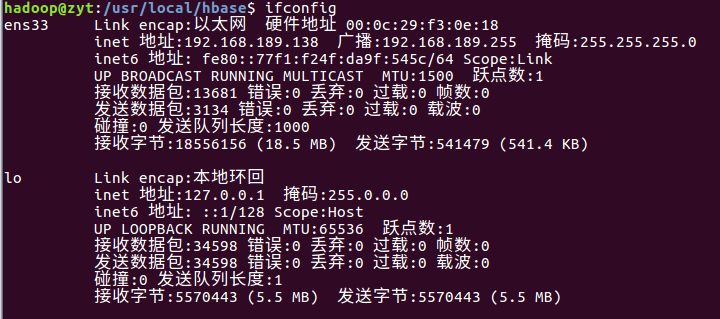
1.首先打开虚拟机,查看虚拟机的ip地址
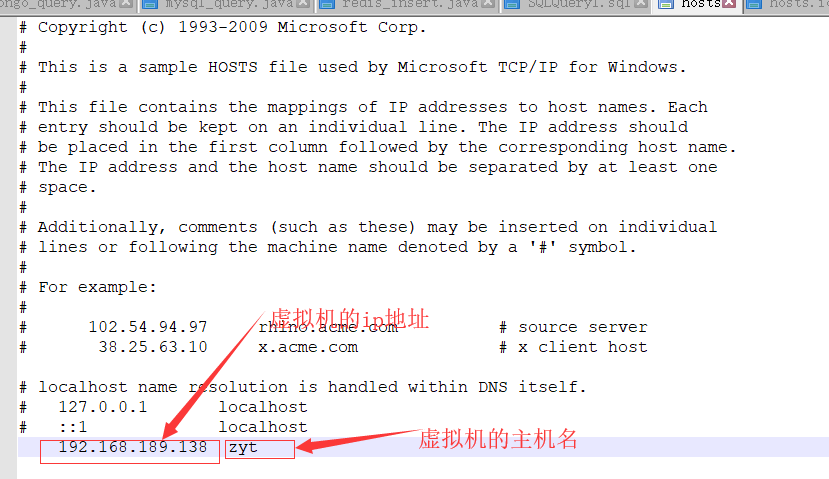
2.修改C:\Windows\System32\drivers\etc下的主机名与ip的映射文件

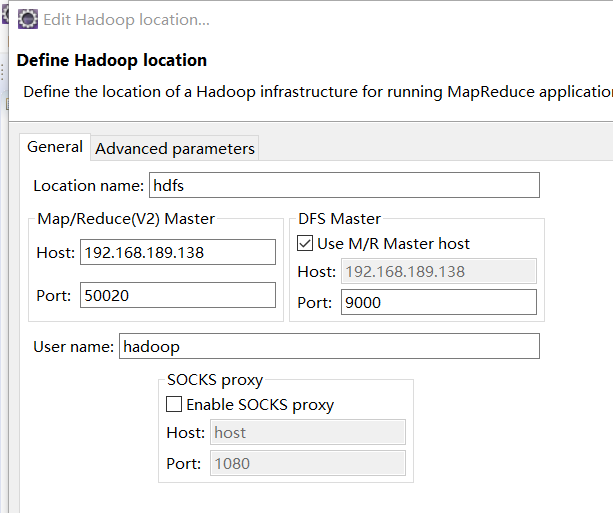
3.配置Map/reduce
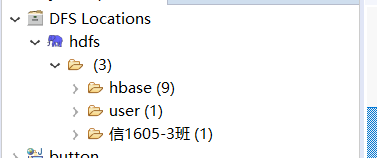
配置成功后可以查看hdfs文件目录
4.修改、虚拟机的ip与主机名的映射文件
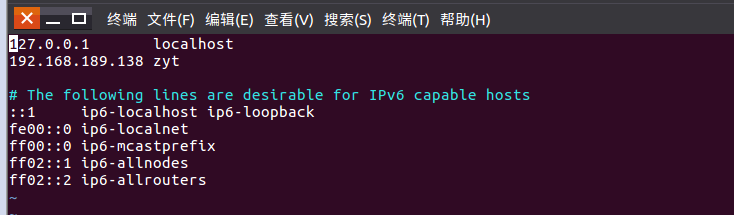
5启动hdfs,hbase服务

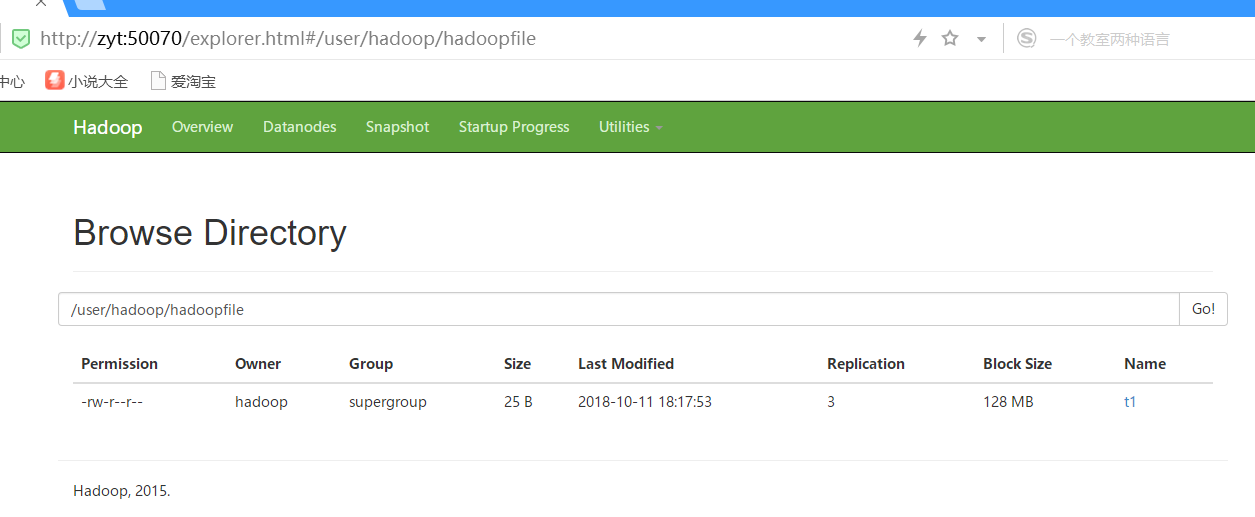
6.通过代码测试

 package dao;

 import org.apache.hadoop.conf.Configuration;

 import org.apache.hadoop.fs.FileSystem;

 import org.apache.hadoop.fs.Path;

 public class exit {

     public static void main(String[] args){

         try{

             String fileName = "/user/hadoop/hadoopfile";

             Configuration  configuration = new Configuration();

            // conf.set("fs.defaultFS", "hdfs://192.168.189.137:9000");

             configuration.set("hbase.zookeeper.quorum", "zyt");

             configuration.set("hbase.zookeeper.property.clientPort", "2181");

             configuration.set("hbase.rootdir", "hdfs://zyt:9000/hbase");

             //设置响应时间

             configuration.set("hbase.client.pause", "50");

             configuration.set("hbase.rpc.timeout", "2000");

             configuration.set("hbase.client.operation.timeout", "3000");

             configuration.set("hbase.client.scanner.timeout.period", "10000");

             configuration.set("fs.hdfs.impl", "org.apache.hadoop.hdfs.DistributedFileSystem");

             FileSystem fs = FileSystem.get( configuration);

             if(fs.exists(new Path(fileName))){

                 System.out.println("文件存在");

             }else{

                 System.out.println("文件不存在");

             }

         }catch (Exception e){

             e.printStackTrace();

         }

     }

 }
core-site.xml
 <?xml version="1.0" encoding="UTF-8"?>

 <?xml-stylesheet type="text/xsl" href="configuration.xsl"?>

 <!--

   Licensed under the Apache License, Version 2.0 (the "License");

   you may not use this file except in compliance with the License.

   You may obtain a copy of the License at

     http://www.apache.org/licenses/LICENSE-2.0

   Unless required by applicable law or agreed to in writing, software

   distributed under the License is distributed on an "AS IS" BASIS,

   WITHOUT WARRANTIES OR CONDITIONS OF ANY KIND, either express or implied.

   See the License for the specific language governing permissions and

   limitations under the License. See accompanying LICENSE file.

 -->

 <!-- Put site-specific property overrides in this file. -->

 <configuration>

  <property>

         <name>hadoop.tmp.dir</name>

         <value>file:/usr/local/hadoop/tmp</value>

         <description>Abase for other temporary directories.</description>

     </property>

     <property>

         <name>fs.defaultFS</name>

         <value>hdfs://zyt:9000</value>

     </property>

 </configuration>
hdfs-site.xml
 <?xml version="1.0" encoding="UTF-8"?>

 <?xml-stylesheet type="text/xsl" href="configuration.xsl"?>

 <!--

   Licensed under the Apache License, Version 2.0 (the "License");

   you may not use this file except in compliance with the License.

   You may obtain a copy of the License at

     http://www.apache.org/licenses/LICENSE-2.0

   Unless required by applicable law or agreed to in writing, software

   distributed under the License is distributed on an "AS IS" BASIS,

   WITHOUT WARRANTIES OR CONDITIONS OF ANY KIND, either express or implied.

   See the License for the specific language governing permissions and

   limitations under the License. See accompanying LICENSE file.

 -->

 <!-- Put site-specific property overrides in this file. -->

 <configuration>

 <property>

         <name>dfs.replication</name>

         <value>2</value>

     </property>

     <property>

         <name>dfs.namenode.name.dir</name>

         <value>file:/usr/local/hadoop/tmp/dfs/name</value>

     </property>

     <property>

         <name>dfs.datanode.data.dir</name>

         <value>file:/usr/local/hadoop/tmp/dfs/data</value>

     </property>

     <property>

         <name>dfs.permissions</name>

         <value>false</value>

     </property>

 </configuration>
 <?xml version="1.0" encoding="UTF-8"?>

 <?xml-stylesheet type="text/xsl" href="configuration.xsl"?>

 <!--

   Licensed under the Apache License, Version 2.0 (the "License");

   you may not use this file except in compliance with the License.

   You may obtain a copy of the License at

     http://www.apache.org/licenses/LICENSE-2.0

   Unless required by applicable law or agreed to in writing, software

   distributed under the License is distributed on an "AS IS" BASIS,

   WITHOUT WARRANTIES OR CONDITIONS OF ANY KIND, either express or implied.

   See the License for the specific language governing permissions and

   limitations under the License. See accompanying LICENSE file.

 -->

 <!-- Put site-specific property overrides in this file. -->

 <configuration>

  <property>

         <name>hadoop.tmp.dir</name>

         <value>file:/usr/local/hadoop/tmp</value>

         <description>Abase for other temporary directories.</description>

     </property>

     <property>

         <name>fs.defaultFS</name>

         <value>hdfs://zyt:9000</value>

     </property>

 </configuration>

windows下eclipse实现操作虚拟机ubantu中的hdfs hbase的更多相关文章
- windows下Eclipse操作MapReduce例子报错:Failed to set permissions of path: \tmp\hadoop-Jerome\mapred\staging\
windows下Eclipse操作MapReduce例子报错: 14/05/18 22:05:29 WARN util.NativeCodeLoader: Unable to load native- ...
- windows下eclipse+hadoop2
windows下eclipse+hadoop2.4开发手册 1.解压下载的hadoop2.4,到任意盘符,例如D:\hadoop-2.4.0. 2.设置环境变量 ①新建系统变量,如下所示. ②将新建的 ...
- windows下Eclipse安装Perl插件教程
windows下Eclipse安装Perl插件教程 想用eclipse编写perl.网上看了很多资料.但EPIC插件的下载连接都失效了.无奈,只好自己动手写个教程记录一下. 准备工作: 安装好Ecli ...
- windows下eclipse远程连接hadoop集群开发mapreduce
转载请注明出处,谢谢 2017-10-22 17:14:09 之前都是用python开发maprduce程序的,今天试了在windows下通过eclipse java开发,在开发前先搭建开发环境.在 ...
- [b0007] windows 下 eclipse 开发 hdfs程序样例
目的: 学习使用hdfs 的java命令操作 相关: 进化: [b0010] windows 下 eclipse 开发 hdfs程序样例 (二) [b0011] windows 下 eclipse 开 ...
- [b0011] windows 下 eclipse 开发 hdfs程序样例 (三)
目的: 学习windows 开发hadoop程序的配置. [b0007] windows 下 eclipse 开发 hdfs程序样例 太麻烦 [b0010] windows 下 eclipse 开发 ...
- [b0010] windows 下 eclipse 开发 hdfs程序样例 (二)
目的: 学习windows 开发hadoop程序的配置 相关: [b0007] windows 下 eclipse 开发 hdfs程序样例 环境: 基于以下环境配置好后. [b0008] Window ...
- Windows下Eclipse提交MR程序到HadoopCluster
作者:Syn良子 出处:http://www.cnblogs.com/cssdongl 欢迎转载,转载请注明出处. 以前Eclipse上写好的MapReduce项目经常是打好包上传到Hadoop测试集 ...
- Windows下Eclipse连接hadoop
2015-3-27 参考: http://www.cnblogs.com/baixl/p/4154429.html http://blog.csdn.net/u010911997/article/de ...
随机推荐
- Apache shiro如何实现一个账户同一时刻只有一个人登录
继承AuthorizingRealm类,重写方法doGetAuthenticationInfo /** * 认证(登录时调用) */ @Override protected Authenticatio ...
- ASM ClassReader failed to parse class file解决方法
1. 环境信息: Spring 3.2.2, JDK 1.8, Hibernate 3.5.5 2. 运行简单的程序,出现以下错误信息: [2018-05-25 02:36:58,671] Ar ...
- Netty实战 - 1. 基本概念
1. Netty简介 Netty是由JBOSS提供的一个java开源框架.它提供异步的.事件驱动的网络应用程序框架和工具,用以快速开发高性能.高可靠性的网络服务器和客户端程序.Netty是一个基于NI ...
- 查看SQL Server的版本及License
select @@VERSION Microsoft SQL Server 2008 R2 (SP2) - 10.50.4000.0 (X64) Jun 28 2012 08:36:30 Copyri ...
- Windows下python3生成UTF8的CSV文件和sha256sum踩坑记录
CSV的坑 在Ubuntu下是简单的写入完事 import csv ... with open(filename, 'w') as output: f = csv.writer(output) f.w ...
- 解决Visual Studio调试突然变慢卡死的问题
最开始摸不到头脑,之前还能好好调试的啊.后来在VS的调试菜单的符号选项里面发现了系统环境变量_NT_SYMBOL_PATH 的值为:srv*c:\symbols*http://msdl.microso ...
- 关于web项目创建后WEB-INF下面没有出现web.xml的解决方法
提供两种解决方案: 第一种:创建完项目后,需要手动创建出web.xml 第一步:选取创建的项目名称右击 第二步:eclipse的同学找到 java EE Tools 中的 下图画圈部分. MyEcl ...
- 训练的时候 nvidia:自动刷新
间隔一秒自动刷新: watch -n 1 -d nvidia-smi
- (6) MySQL慢查询日志的使用
一. 设置方法 使用慢查询日志里捕获 启用之前需要先进行一些设置 方法一:全局变量设置 设置慢查询日志的日志文件位置 set global slow_query_log_file = "D: ...
- 常用MQ及其原理
mq为了解决什么问题?1.异步通信 有些业务不想也不需要立即处理消息.消息队列提供了异步处理机制,允许用户把一个消息放入队列,但并不立即处理它.想向队列中放入多少消息就放多少,然后在需要的时候再去 ...