
用自己的机器人和ubuntu PC实现通信和控制--26
原创博客:转载请表明出处:http://www.cnblogs.com/zxouxuewei/
前提: 1.拥有一台能够采用手动或者自动移动的机器人移动平台。
2.在电机端需要安装高分辨率的霍尔编码器。
3.在终端控制板上有基本的电机PWM控制,PID电机补偿调速。编码器输入捕获,串口数据收发的驱动。
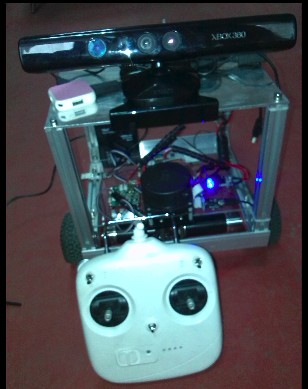
以下是我的机器人:
控制思路如下:
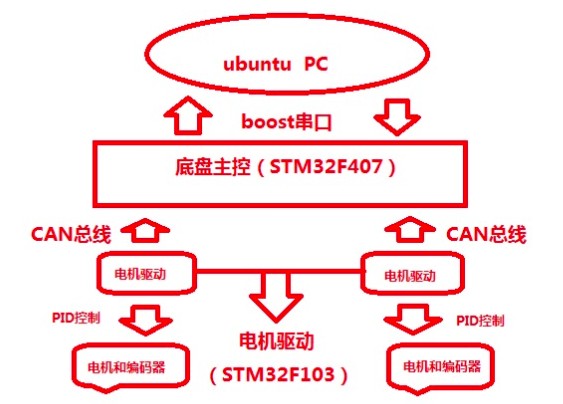
1.电机驱动板获取编码器的数据通过CAN总线透传给地盘主控。地盘主控解析编码器的数据计算出X方向上的线速度和Z轴上的角速度,通过串口上传到ubuntuPC机上。源码如下:(采用定时器方式计算速度)
struct Encoder_{

    float d_left;

    float d_right;int enc_left;        //wheel encoder readings

    int enc_right;

    int left;          // actual values coming back from robot

    int right;

}self;

float d,th;

#define ticks_meter 123077.0   //每米编码器的值   linear = 2.6

#define base_width 0.31f;      //轴距  angule = 0.316
#define robot_timer 0.53f      //周期

union Max_Value

{

    unsigned char buf[12];

    struct _Float_{
       float hander;

            float _float_vx;

            float _float_vth;

    }Float_RAM;

}Send_Data;

extern int encoder_0;
extern int encoder_1;

void Updata_velocities_Data()

{
   u8 i=0;

    self.right = encoder_0;//编码器的累计量

    self.left  = encoder_1;

    if(self.enc_left == 0)

    {

        self.d_left  = 0;

        self.d_right = 0;

    }

    else

    {

        self.d_left = (self.left - self.enc_left) / ticks_meter;

        self.d_right = (self.right - self.enc_right) / ticks_meter;

    }

    self.enc_left = self.left;

    self.enc_right = self.right;

    d  = ( self.d_left + self.d_right ) / 2;    //distance traveled is the average of the two wheels

    th = ( self.d_right - self.d_left ) / base_width;  //this approximation works (in radians) for small angles

    self.dx = d / robot_timer;   //calculate velocities

    self.dr = th / robot_timer;


   Send_Data.Float_RAM.hander = 15.5;

    Send_Data.Float_RAM._float_vx = self.dx;

    Send_Data.Float_RAM._float_vth = self.dr;

    for(i=0;i<12;i++)
    sendchar_usart1(Send_Data.buf[i]);

}
2.在ubuntu PC端通过boost串口接收数据时。对串口进行读取 即可。在此节点中我们需要发布从下位机获取的速度信息,还要监听/cmd_vel话题下的移动数据,发送到下位机。代码如下:
#include <ros/ros.h>
#include <sensor_msgs/JointState.h>
#include <tf/transform_broadcaster.h>
#include <nav_msgs/Odometry.h>
#include <iostream>
#include <iomanip>
#include <boost/asio.hpp>
#include <boost/bind.hpp>
#include <math.h>

using namespace std;
using namespace boost::asio;

ros::Time current_time, last_time;
double x = 0.0;
double y = 0.0;
double th = 0.0;
double vx = 0.0;
double vy = 0.0;
double vth = 0.0;

union _SPEED_
{
    unsigned char speed_buf[16];
    struct _speed_value_
    {
        float flag;
        float left_vel;
        float yspeed_vel;
        float right_vel;
    }Struct_Speed;
}Union_Speed;

geometry_msgs::Quaternion odom_quat;

void cmd_velCallback(const geometry_msgs::Twist &twist_aux)
{
    geometry_msgs::Twist twist = twist_aux;

    Union_Speed.Struct_Speed.flag = 15.5;
    Union_Speed.Struct_Speed.left_vel = twist_aux.linear.x;
    Union_Speed.Struct_Speed.yspeed_vel = 0.0;
    Union_Speed.Struct_Speed.right_vel = twist_aux.angular.z;
}

double dt = 0.0;

union _Data_
{
    unsigned char buf_rev[12];
    struct _value_encoder_
    {
        float Flag_Float;
        float VX_speed;
        float VZ_speed;
    }Struct_Encoder;
}Union_Data;

int main(int argc, char** argv)
{
    unsigned char check_buf[1];
    unsigned char i;
    io_service iosev;
    serial_port sp(iosev, "/dev/ttyUSB0");
    sp.set_option(serial_port::baud_rate(115200));
    sp.set_option(serial_port::flow_control(serial_port::flow_control::none));
    sp.set_option(serial_port::parity(serial_port::parity::none));
    sp.set_option(serial_port::stop_bits(serial_port::stop_bits::one));
    sp.set_option(serial_port::character_size(8));

    ros::init(argc, argv, "base_controller");
    ros::NodeHandle n;
    ros::Subscriber cmd_vel_sub = n.subscribe("cmd_vel", 50, cmd_velCallback);
    ros::Publisher odom_pub = n.advertise<nav_msgs::Odometry>("odom", 50);
    tf::TransformBroadcaster odom_broadcaster;

    while(ros::ok())
    {
        current_time = ros::Time::now();

        ros::spinOnce();
        dt = (current_time - last_time).toSec();
        last_time = ros::Time::now();

        current_time = ros::Time::now();
        read(sp, buffer(Union_Data.buf_rev));

        if(Union_Data.Struct_Encoder.Flag_Float == 15.5)
        {
                vx = Union_Data.Struct_Encoder.VX_speed;
                vth = Union_Data.Struct_Encoder.VZ_speed;
          ROS_INFO("msg_encoder.angular_z is %f",vth);
          ROS_INFO("msg_encoder.linear.x  is %f",vx);
        }
        else
        {
            ROS_INFO("Fucking communication fails,The fuck can i hurry up to restart!");
            read(sp, buffer(check_buf));
        }
        write(sp, buffer(Union_Speed.speed_buf,16));

        double delta_x = (vx * cos(th) - vy * sin(th)) * dt;
        double delta_y = (vx * sin(th) + vy * cos(th)) * dt;
        double delta_th = vth * dt;
        x += delta_x;
        y += delta_y;
        th += delta_th;

        geometry_msgs::Quaternion odom_quat = tf::createQuaternionMsgFromYaw(th);

        geometry_msgs::TransformStamped odom_trans;
        odom_trans.header.stamp = current_time;
        odom_trans.header.frame_id = "odom";
        odom_trans.child_frame_id = "base_link";

        odom_trans.transform.translation.x = x;
        odom_trans.transform.translation.y = y;
        odom_trans.transform.translation.z = 0.0;
        odom_trans.transform.rotation = odom_quat;

        odom_broadcaster.sendTransform(odom_trans);

        nav_msgs::Odometry odom;
        odom.header.stamp = current_time;
        odom.header.frame_id = "odom";

        odom.pose.pose.position.x = x;
        odom.pose.pose.position.y = y;
        odom.pose.pose.position.z = 0.0;
        odom.pose.pose.orientation = odom_quat;


        odom.child_frame_id = "base_link";
        odom.twist.twist.linear.x = vx;
        odom.twist.twist.linear.y = vy;
        odom.twist.twist.angular.z = vth;

        odom_pub.publish(odom);
        last_time = current_time;
    }
    iosev.run();
}
然后测试如下:打开你的机器人,和ubuntu PC 确保串口线链接。然后运行所需的节点:
roscore &
rosrun odom_tf_package tf_broadcaster_node
rviz
rosrun rbx1_nav timed_out_and_back.py  //此节点为turtlebot的damo
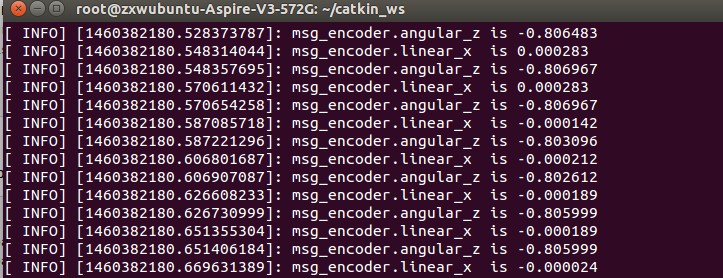
在tf_broadcaster_node节点下的调试输出如下:
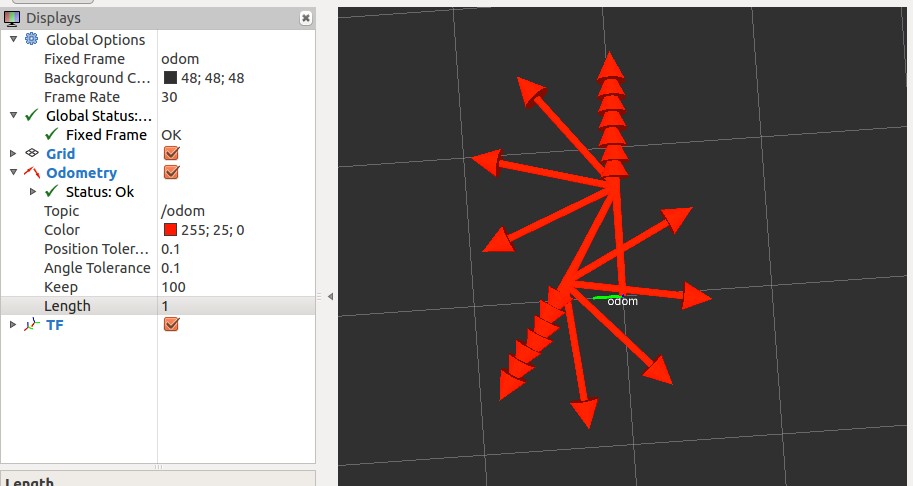
rviz视图中查看机器人入下:
用自己的机器人和ubuntu PC实现通信和控制--26的更多相关文章
- 基于FPGA的红外遥控解码与PC串口通信
基于FPGA的红外遥控解码与PC串口通信 zouxy09@qq.com http://blog.csdn.net/zouxy09 这是我的<电子设计EDA>的课程设计作业(呵呵,这个月都拿 ...
- PC蓝牙通信C#代码实现
PC蓝牙通信C#代码实现 这篇文章主要为大家详细介绍了PC蓝牙通信C#代码实现,具有一定的参考价值,感兴趣的小伙伴们可以参考一下 本文实例为大家分享了C#实现PC蓝牙通信代码,供大家参考,具体内容如下 ...
- 小黄鸡机器人和小I机器人的调用
<?php //---------------------------------聊天小机器人类---------------------------------------------- ...
- 18-09-13 机器人和服务器之间的ip配置和脚本的重启
问题9 服务器安装完毕后 怎么配置机器人客户端的配置ip
- ROS----TUT-RIM协作机器人和Actin-ROS接口
TUT-RIM: Collaborative Intelligent Heavy Machinery and Robotics http://www.ros.org/news/2017/02/tutr ...
- 30行python让图灵机器人和茉莉机器人无止尽的瞎扯蛋
首先注册申请图灵机器人的API: http://www.tuling123.com/ 查看一下API的格式,很简单: { "key": "APIKEY", &q ...
- 公司内网机器vm ubuntu proxy 设置
解决浏览器上网问题: System Setting -> Network -> Network Proxy设置公司的代理 解决apt联网问题: 在/etc/apt/apt.conf文件里加 ...
- Ubuntu 12 安装 MySQL 5.6.26 及 问题汇总
参考先前的文章:Ubuntu 14 编译安装 PHP 5.4.45 + Nginx 1.4.7 + MySQL 5.6.26 笔记 安装过程: #安装依赖库 sudo apt-get install ...
- 八、mini2440裸机程序之UART(2)UART0与PC串口通信【转】
转自:http://blog.csdn.net/shengnan_wu/article/details/8309417 版权声明:本文为博主原创文章,未经博主允许不得转载. 1.相关原理图 2.相关寄 ...
随机推荐
- 3.5缺少动态连接库.so--cannot open shared object file: No such file or directory
总结下来主要有3种方法:1. 用ln将需要的so文件链接到/usr/lib或者/lib这两个默认的目录下边 ln -s /where/you/install/lib/*.so /usr/lib sud ...
- svm特征
svm特征格式:<label><index1>:<value1><index1>:<value1>.... 其中<label> ...
- 神奇的NOIP模拟赛 T3 LGTB 玩THD
LGTB 玩THD LGTB 最近在玩一个类似DOTA 的游戏名叫THD有一天他在守一座塔,对面的N 个小兵排成一列从近到远站在塔前面每个小兵有一定的血量hi,杀死后有一定的金钱gi每一秒,他都可以攻 ...
- TrueType, OpenType, PCL和PostScript字体版本nterleaved 2 of 5 Barcode Font Advantage Package
Interleaved 2 of 5 Barcode Font Advantage Package包含了TrueType, OpenType, PCL和PostScript字体版本. 提供了超过30个 ...
- linux exec用法总结
Linux中exec的用法总结 先总结一个表: exec命令 作用 exec ls 在shell中执行ls,ls结果显示结束后不返回原来的的目录中,而是/(根目录) exec <file 将fi ...
- 系统的 host文件的作用
有些用户可能已经注意到,我们在上网时除了可使用常规的 http://www.xxx.com或http://www.xxx.com.cn等形式的网站域名之外,还可以使用类似于“202.106.184.2 ...
- 收藏的博客--PHP
32位Win7下安装与配置PHP环境(一至三) http://blog.csdn.net/yousuosi/article/details/9448903
- (转)Eclipse “cannot be resolved to a type” error
原:http://www.cnblogs.com/xuxm2007/archive/2011/10/20/2219104.html Eclipse “cannot be resolved to a t ...
- C/C++ memmove 和 memcpy
这两个函数用于拷贝字符串或者一段连续的内存,函数原型: void * memcpy ( void * destination, const void * source, size_t num ); v ...
- BZOJ 3163 Eden的新背包问题
分治背包+单调队列优化. 但是为什么maxn要1w多?...不怎么懂. #include<iostream> #include<cstdio> #include<cstr ...