
Struts Hello World Example
In this tutorial we show you how to develop a hello world web application using classic Struts 1.3 framework.
Tools and technologies used :
- Struts 1.3.10
- Maven 2.x
- Eclipse 3.6
Final project structure
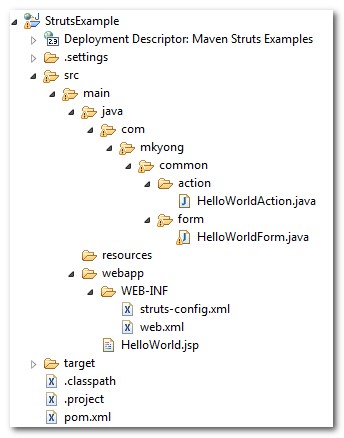
Let’s see the final folder structure first.
1. Maven Template
Generate a quick start Java project structure with Maven command “mvn archetype:generate“, select template 18 for a simple Java web project template.
Define value for groupId: : com.mkyong.common

Define value for artifactId: : StrutsExample

Define value for version:  1.0-SNAPSHOT: :

Define value for package:  com.mkyong.common: : com.mkyong.common

...

[INFO] ------------------------------------------------------------------------

[INFO] BUILD SUCCESSFUL

[INFO] ------------------------------------------------------------------------

[INFO] Total time: 1 minute 5 seconds

[INFO] Finished at: Thu Apr 08 11:29:30 SGT 2010

[INFO] Final Memory: 8M/14M

[INFO] ------------------------------------------------------------------------
2. pom.xml file configuration
Add the Struts dependencies in pom.xml. In Struts 1.x, you need the struts-core.jar for core module and struts-taglib.jar for tag library.
<project xmlns="http://maven.apache.org/POM/4.0.0"

  xmlns:xsi="http://www.w3.org/2001/XMLSchema-instance"

  xsi:schemaLocation="http://maven.apache.org/POM/4.0.0

  http://maven.apache.org/maven-v4_0_0.xsd">

  <modelVersion>4.0.0</modelVersion>

  <groupId>com.mkyong.common</groupId>

  <artifactId>StrutsExample</artifactId>

  <packaging>war</packaging>

  <version>1.0-SNAPSHOT</version>

  <name>StrutsExample Maven Webapp</name>

  <url>http://maven.apache.org</url>

  <dependencies>

    <dependency>

      <groupId>junit</groupId>

      <artifactId>junit</artifactId>

      <version>3.8.1</version>

      <scope>test</scope>

    </dependency>

    <dependency>

      <groupId>org.apache.struts</groupId>

	  <artifactId>struts-core</artifactId>

      <version>1.3.10</version>

    </dependency>

    <dependency>

      <groupId>org.apache.struts</groupId>

	  <artifactId>struts-taglib</artifactId>

      <version>1.3.10</version>

    </dependency>

  </dependencies>

  <build>

    <finalName>StrutsExample</finalName>

  </build>

</project>
3. Eclipse IDE
Convert this project to Eclipse web project with Maven command “mvn eclipse:eclipse -Dwtpversion=1.5“. All the Struts dependent libraries will automatically download into your Maven local repository, link it in your project classpath, and convert it to Eclipse’s web project style.
E:\workspace\struts\StrutsExample>mvn eclipse:eclipse -Dwtpversion=1.5

[INFO] Scanning for projects...

[INFO] Searching repository for plugin with prefix: 'eclipse'.

[INFO] ------------------------------------------------------------------------

[INFO] Building StrutsExample Maven Webapp
Just import it into Eclipse IDE.
4. Action Form
Create a Struts Action Form to hold the “hello world” data later.
package com.mkyong.common.form;

import org.apache.struts.action.ActionForm;

public class HelloWorldForm extends ActionForm{

	String message;

	public String getMessage() {

		return message;

	}

	public void setMessage(String message) {

		this.message = message;

	}

}
5. Action (Controller)
Create a Struts Action (Action Controller) file to control how Struts will forward the request, just override the execute() method with your own logic here.
package com.mkyong.common.action;

import javax.servlet.http.HttpServletRequest;

import javax.servlet.http.HttpServletResponse;

import org.apache.struts.action.Action;

import org.apache.struts.action.ActionForm;

import org.apache.struts.action.ActionForward;

import org.apache.struts.action.ActionMapping;

import com.mkyong.common.form.HelloWorldForm;

public class HelloWorldAction extends Action{

	public ActionForward execute(ActionMapping mapping,ActionForm form,

		HttpServletRequest request,HttpServletResponse response)

        throws Exception {

		HelloWorldForm helloWorldForm = (HelloWorldForm) form;

		helloWorldForm.setMessage("Hello World! Struts");

		return mapping.findForward("success");

	}

}
6. JSP view page
Create a JSP page and access the Action Form object via Struts tag library and print it’s message property.
<%@taglib uri="http://struts.apache.org/tags-bean" prefix="bean"%>
7. struts-config.xml
Create a struts-config.xml file for the Struts configuration details, and put it into the WEB-INF folder.
<?xml version="1.0" encoding="UTF-8"?>

<!DOCTYPE struts-config PUBLIC

"-//Apache Software Foundation//DTD Struts Configuration 1.3//EN"

"http://jakarta.apache.org/struts/dtds/struts-config_1_3.dtd">

<struts-config>

	<form-beans>

	   <form-bean name="helloWorldForm"

		type="com.mkyong.common.form.HelloWorldForm"/>

	</form-beans>

	<action-mappings>

	   <action path="/helloWorld"

		type="com.mkyong.common.action.HelloWorldAction"

		name="helloWorldForm">

		<forward name="success" path="/HelloWorld.jsp"/>

	   </action>

	</action-mappings>

</struts-config>
Define a form bean named “helloWorldForm” and action controller mapping “HelloWorldAction“, match the /helloWorld web path to HelloWorldAction. It’s means all the request from /helloWorldweb path will redirect toHelloWorldAction. The “name” attribute is use to define which action form will pass to this HelloWorldAction`.
8. The Web Application Deployment Descriptor
In web.xml file, configure the Struts ActionServlet instance and map it with url-pattern “*.do”, so that the container is aware of all the “*.do” pattern will redirect to Struts ActionServlet.
<!DOCTYPE web-app PUBLIC

 "-//Sun Microsystems, Inc.//DTD Web Application 2.3//EN"

 "http://java.sun.com/dtd/web-app_2_3.dtd" >

<web-app>

  <display-name>Maven Struts Examples</display-name>

  <servlet>

    <servlet-name>action</servlet-name>

    <servlet-class>

        org.apache.struts.action.ActionServlet

    </servlet-class>

    <init-param>

        <param-name>config</param-name>

        <param-value>

         /WEB-INF/struts-config.xml

        </param-value>

    </init-param>

    <load-on-startup>1</load-on-startup>

  </servlet>

  <servlet-mapping>

       <servlet-name>action</servlet-name>

       <url-pattern>*.do</url-pattern>

  </servlet-mapping>

</web-app>
9. Java EE Module dependency (Optional)
If you want to do the debugging work in Eclipse IDE, you have to make sure the Java EE module dependencies is checked so that the Eclipse will deploy all the dependencies into correct folder. See details here.
10. Run it
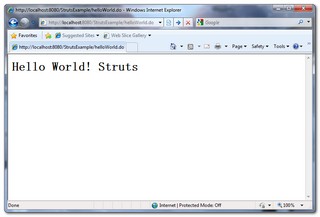
In Eclipse IDE, create a new server plugin and start it. You can access this example in the following URL.
http://localhost:8080/StrutsExample/helloWorld.do
HttpServletRequest class not found?
If you hit above error, make sure you include the javaee.jar (exists in your JDK/lib folder). Due to license issue, this javaee.jar is not able to use Maven to download it, you have to include it manually.
Struts Hello World Example的更多相关文章
- 菜鸟学Struts2——Struts工作原理
在完成Struts2的HelloWorld后,对Struts2的工作原理进行学习.Struts2框架可以按照模块来划分为Servlet Filters,Struts核心模块,拦截器和用户实现部分,其中 ...
- Struts的拦截器
Struts的拦截器 1.什么是拦截器 Struts的拦截器和Servlet过滤器类似,在执行Action的execute方法之前,Struts会首先执行Struts.xml中引用的拦截器,在执行完所 ...
- Struts框架的核心业务
Struts的核心业务 Struts核心业务有很多,这里主要介绍了比较简单一些的: 请求数据的处理,和数据自动封装,类型自动转换 1.Struts中数据处理 1.1.方式1:直接过去servletap ...
- Struts的文件上传下载
Struts的文件上传下载 1.文件上传 Struts2的文件上传也是使用fileUpload的组件,这个组默认是集合在框架里面的.且是使用拦截器:<interceptor name=" ...
- 配置hibernate,Struts。文件
hibernate文件配置 <?xml version="1.0" encoding="UTF-8"?> <!DOCTYPE hibernat ...
- hibernate与Struts框架结合编写简单针对修改练习
失败页面fail.jsp <%@ page language="java" contentType="text/html; charset=UTF-8" ...
- 3. 解析 struts.xml 文件
1. struts.xml 文件基本配置: 主要放在资源路径下,配置 sturts2相关的 Action , 拦截器等配置 <struts> <!-- 设置常量 --> < ...
- Struts+Spring+Hibernate项目的启动线程
在Java Web项目中,经常要在项目开始运行时启动一个线程,每隔一定的时间就运行一定的代码,比如扫描数据库的变化等等.要实现这个功能,可以现在web.xml文件中定义一个Listener,然后在这个 ...
- Struts 原理
今天开始接触公司的框架,叫YNA,三个字母应该是雅马哈的缩写,这个框架听公司前辈说功能很强大,但实际上我看不懂.哈哈...... 其中整合了SSH框架,接下来我说下Struts的一些原理 其实这张图就 ...
- axis2+struts拦截地址冲突问题
axis2和struts在整合过程中,struts会把axis的地址也拦截了,默认当成一个action处理, 会因为找不到action而报错: <!-- struts配置 --> < ...
随机推荐
- laravel下的团队开发
当你的团队在开发一个大型应用时,该应用的不同部分可能以不同的速度前进.比如,设想下面的场景:一个开发热源被分配 数据层 的backend工作,而另外一个开发人员做front-end和web/contr ...
- Balsamiq Mockups简单介绍(UI草图绘制工具)
什么是Balsamiq Mockups Balsamiq Mockups出自加利福尼亚州的Balsamiq工作室,创始人Peldi在2008年6月推出了这款手绘风格的产品原型设计工具,并广受好评.2年 ...
- (转)IOS UITableView学习
转自:http://www.cnblogs.com/smileEvday/archive/2012/06/28/tableView.html 作者:一片枫叶 看TableView的资 ...
- HDU 5264 pog loves szh I (字符串,水)
题意:设有两个串A和B,现将B反转,再用插入的形式合成一个串.如:A:abc B:efg:反转B先,变gfe:作插入,agbfce.现在给出一个串,要求还原出A和B. 思路:扫一遍O(n),串A在 ...
- 07day2
居然是动规专场.这样不好吧? 采药 [问题描述] 辰辰是个天资聪颖的孩子,他的梦想是成为世界上最伟大的医师.为此,他想拜附近最有威望的医师为师.医师为了判断他的资质,给他出了一个难题.医师把他带到 ...
- LA 3882 And Then There Was One
解题思路:分析要好久,懒得分析了,贴了某大牛的的分析,代码就是我自己写的. N个数排成一圈,第一次删除m,以后每k个数删除一次,求最后一被删除的数. 如果这题用链表或者数组模拟整个过程的话,时间复杂度 ...
- trunc的使用
1.日期比较时精确到日,可以使用 TRUNC(sysdate,'dd')函数.函数支持格式有:yyyy MM dd hh Mi可以用 select TRUNC(sysdate,'yyyy') fr ...
- Android下监听Home键
网上看到demo,亲测了以下机器和设备,均测试通过: 测试通过的手机: 1.华为荣耀3(Android 4.2.2) 2.小米2s(Android 4.1.1) 3.联想的手机 (Android2.3 ...
- 【转】Github轻松上手4-常用的git命令
转自:http://blog.sina.com.cn/s/blog_4b55f6860100zzih.html 附上一些git的常见命令: • git remote add origin git ...
- MongoDB的启动
在桌面或者其它地方建立mongodb.bat 批处理文件 在里面写入如下内容 mongod --dbpath D:\java_tools\MongoDB\MongoDBDATA 保存-然后打开该文件 ...