
Xcode6中segue取消原push与modal(deprecated)
xcode6 之后push 和modal 就被废弃了。只能用于ios8之前。在拖线的时候我们就可以看见。
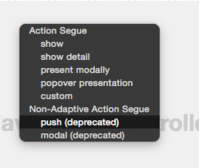
下面我列出以下官方是怎么解释的。
官方文档 位置 https://developer.apple.com/library/ios/recipes/xcode_help-IB_storyboard/chapters/StoryboardSegue.html
Show
根据当前屏幕中的内容,在master area或者detail area中展示内容。
例如:如果app当前同时显示master和detail视图,内容将会压入detail区域。
如果app当前仅显示master或者detail视图,内容则压入当前视图控制器堆栈中的顶层视图。
Show Detail
在detail area中展现内容。
例如:即使app同时显示master和detail视图,那么内容将被压入detail区域
如果app当前仅显示Master或者detail视图,那么内容将替换当前视图控制器堆栈中的顶层视图。
Present Modally
使用模态展示内容。属性面板中提供presentation style (UIModalPresentationStyle)与 transition style (UIModalTransitionStyle)两种选项
Present as Popover
在某个现有视图中的锚点处使用弹出框展示内容。这个选项可指定显示在弹出框视图一边上的箭头可用方向,同时也是指定锚点视图的一个选项。
《以下是官网推荐》
Adding a Segue Between Scenes in a Storyboard
Specify a transition from one scene to another by Control-dragging between them.
Open a storyboard in the interface builder.
Control-drag from an object (such as a button, a table view cell, or a tab view item) in one scene to another scene.

Interface Builder highlights a valid destination in blue.
In the menu that appears, choose the style for the segue.
Select the segue on the Interface Builder canvas or in its outline view. A selected segue will be shown in blue.

Open the utility area for the workspace window by clicking
 in the workspace selector in the toolbar.
Click the Attributes button
 to open the Attributes inspector.
Type an identifying string in the segue Identifier field.

Use an identifier that you can verify at runtime in the
prepareForSegue:sender:method of the source view controller. You can also use the identifier to trigger a segue programmatically with theperformSegueWithIdentifier:sender:method.To choose from several types of transitions for a popover segue, make choices from the pop-up menus in the Attributes inspector.
For a custom segue, fill in the name of your custom segue class in the Attributes inspector. (See Creating Custom Segues for more information.)
Segue Types
There are several types of constraints, some of which are unique to either OS X or iOS. On iOS, the segues are further divided into segues that adapt to size classes and the older, and now deprecated types. You should avoid using the deprecated segues on iOS. The only possible reason to use them is supporting iOS versions less than iOS 8.
The following two tables list the types of segue for each platform including the name, interface builder symbol, and a brief description.
|
Name |
Interface Builder Symbol |
Description |
|---|---|---|
|
Show |
|
Present the content in the detail or master area depending on the content of the screen. If the app is displaying a master and detail view, the content is pushed onto the detail area. If the app is only displaying the master or the detail, the content is pushed on top of the current view controller stack. |
|
Show Detail |
|
Present the content in the detail area. If the app is displaying a master and detail view, the new content replaces the current detail. If the app is only displaying the master or the detail, the content replaces the top of the current view controller stack. |
|
Present Modally |
|
Present the content modally. There are options to choose a presentation style ( |
|
Present as Popover |
|
Present the content as a popover anchored to an existing view. There is an option to specify the possible directions of the arrow shown on one edge of the popover view ( |
|
Custom |
|
A custom segue enabling you to write your own behaviors. |
|
Push (Deprecated) |
|
Present the content by pushing it onto the current stack of view controllers. |
|
Modal (Deprecated) |
|
Present the content modally on top of the existing screen. The options are the same as Present Modally. |
|
Popover (Deprecated) |
|
Present the content as a popover. The options are the same as Present as Popover. |
|
Replace (Deprecated) |
|
Replace the top view controller on the screen with the new content. |


|
Name |
Interface Builder Symbol |
Description |
|---|---|---|
|
Show |
|
Present the content in a new window. |
|
Modal |
|
Present the content as a modal dialog. |
|
Popover |
|
Present the content as a popover anchored to an existing view. There are options to specify the behavior ( |
|
Sheet |
|
Present the content as a sheet attached to the originating window. |
|
Custom |
|
A custom segue enabling you to write your own behaviors. |


Xcode6中segue取消原push与modal(deprecated)的更多相关文章
- Storyboard里面的几种Segue区别及视图的切换:push,modal,popover,replace和custom
一.视图切换类型介绍 在storyboard中,segue有几种不同的类型,在iphone和ipad的开发中,segue的类型是不同的. 在iphone中,segue有:push,modal,和cus ...
- iOS开发中视图相关的小笔记:push、modal、popover、replace、custom
在storyboard中,segue有几种不同的类型,在iphone和ipad的开发中,segue的类型是不同的. 在iphone中,segue有:push,modal,和custom三种不同的类型, ...
- Storyboard中segue(转场)使用
源引:http://www.2cto.com/kf/201210/161737.html 一.视图切换类型介绍在storyboard中,segue有几种不同的类型,在iphone和ipad的开发中,s ...
- 苹果在Xcode6中弃用segue的push和model
苹果在Xcode6中弃用了segue的push和model.被show和present取代. 下面是新版本中每种类型的使用总结和例子.建议自己使用前先在测试项目中自己试一试 Show 根据当前屏幕中的 ...
- Xcode6中如何使用自定义的类模板
说到IOS类的模板,有些人感觉很陌生,但是只要有开发过IOS程序的人,其实都用过类的模板,只不过是用的系统自带的类的模板. 例如创建一个ClassTemplateVC继承于UIViewControll ...
- Xcode6中autolayout和sizeclass的使用
一.关于自动布局(Autolayout) 在Xcode中,自动布局看似是一个很复杂的系统,在真正使用它之前,我也是这么认为的,不过事实并非如此. 我们知道,一款iOS应用,其主要UI组件是由一个个相对 ...
- Xcode6中自动布局autolayout和sizeclass的使用
Xcode6中自动布局autolayout和sizeclass的使用 一.关于自动布局(Autolayout) 在Xcode中,自动布局看似是一个很复杂的系统,在真正使用它之前,我也是这么认为的, ...
- 在xcode6中使用矢量图(iPhone6置配UI)
转载出处:http://blog.xoneday.com ios应用程序是一个图像主导的产品.在开发一个应用程序时,你需要各种尺寸的图标,你需要为每个图像文件制作一个@1x尺寸和一个@2x尺寸.这样你 ...
- (转)Xcode6中自动布局autolayout和sizeclass的使用
Xcode6中自动布局autolayout和sizeclass的使用 一.关于自动布局(Autolayout) 在Xcode中,自动布局看似是一个很复杂的系统,在真正使用它之前,我也是这么认为的, ...
随机推荐
- OpenGL的glTranslatef平移变换函数详解
OpenGL的glTranslatef平移变换函数详解 glTranslated()和glTranslatef()这两个函数是定义一个平移矩阵,该矩阵与当前矩阵相乘,使后续的图形进行平移变换. 我们先 ...
- rsync同步完整配置
一.需求: 1.对于分公司访问一些服务器(如工程图纸服务器),如果通过Internet上的VPN访问总是觉得速度慢,毕竟带宽有限,为了解决此问题,可以两地建立同步镜像服务器,分公司可以访问本地的镜像服 ...
- Oracle在Linux下使用异步IO(aio)配置
1.首先用root用户安装以下必要的rpm包 # rpm -Uvh libaio-0.3.106-3.2.x86_64.rpm# rpm -Uvh libaio-devel-0.3.106-3.2.x ...
- Kafka 消息存储及检索(作者:杜亦舒)
Kafka 消息存储及检索 原创 2016-02-29 杜亦舒 性能与架构 Kafka是一个分布式的消息队列系统,消息存储在集群服务器的硬盘Kafka中可以创建多个消息队列,称为topic,消息的生产 ...
- 基于 php-redis 的redis操作
基于 php-redis 的redis操作 林涛 发表于:2016-5-13 12:12 分类:PHP 标签:php,php-redis,redis 203次 redis的操作很多的,下面的例子都是基 ...
- Apache Commons fileUpload实现文件上传之一
需要两个jar包: commons-fileupload.jar Commons IO的jar包(本文使用commons-io-2.4.jar) 利用Servlet来实现文件上传. package ...
- [redis] Redis 配置文件置参数详解
################################ 基础配置 ################################# #daemonize no 默认情况下, redis 不 ...
- poj----(1470)Closest Common Ancestors(LCA)
Closest Common Ancestors Time Limit: 2000MS Memory Limit: 10000K Total Submissions: 15446 Accept ...
- 初学java之常用组件
import javax.swing.*; import java.awt.*; class Win extends JFrame { JTextField mytext; // 设置一个文本区 JB ...
- jquery ajax请求方式与提示用户正在处理请稍等,等待数据返回时loading的显示
1.jquery ajax请求方式与提示用户正在处理请稍等 为了提高用户体验度,我们通常会给出 “正在处理,请稍等!”诸如此类的提示.我们可通过设置$.ajax()下的参数beforeSend()来实 ...