
easyui 入门
http://www.cnblogs.com/tangge/p/3214496.html
1.页面引用.
jquery,easyui,主题easyui.css,图标ico.css,语言zh_CN.js
<script src="Scripts/jquery-easyui-1.3.2/jquery-1.8.0.min.js"></script> <script src="Scripts/jquery-easyui-1.3.2/jquery.easyui.min.js"></script> <link href="Scripts/jquery-easyui-1.3.2/themes/default/easyui.css" rel="stylesheet" /> <link href="Scripts/jquery-easyui-1.3.2/themes/icon.css" rel="stylesheet" /> <script src="Scripts/jquery-easyui-1.3.2/locale/easyui-lang-zh_CN.js"></script> |
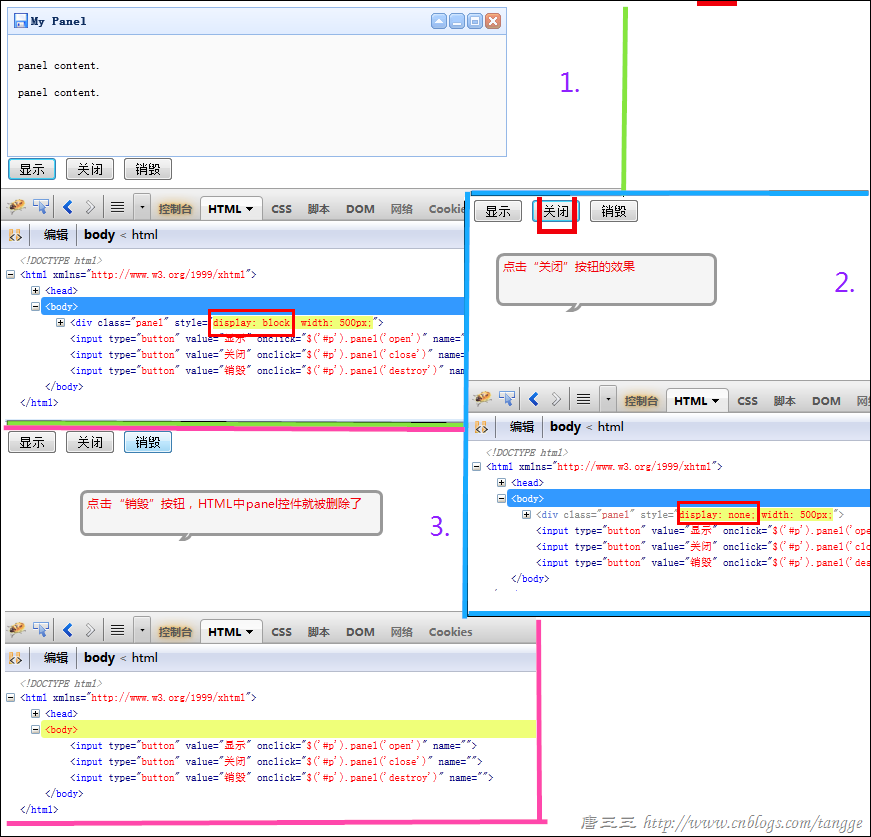
2.parser组件panel组件
<body>
<div id="p" class="easyui-panel" title="My Panel"
style="width: 500px; height: 150px; padding: 10px; background: #fafafa;"
data-options="iconCls:'icon-save',closable:true,
collapsible:true,minimizable:true,maximizable:true">
<p>panel content.</p>
<p>panel content.</p>
</div>
<input type="button" name="" onclick="$('#p').panel('open')" value="显示" />
<input type="button" name="" onclick="$('#p').panel('close')" value="关闭" />
<input type="button" name="" onclick="$('#p').panel('destroy')" value="销毁" />
</body>
3.Form表单的验证(validate)提交
<!DOCTYPE html>
<html xmlns="http://www.w3.org/1999/xhtml">
<head>
<meta http-equiv="Content-Type" content="text/html; charset=utf-8" />
<title></title>
<script src="Scripts/jquery-easyui-1.3.2/jquery-1.8.0.min.js"></script>
<script src="Scripts/jquery-easyui-1.3.2/jquery.easyui.min.js"></script>
<link href="Scripts/jquery-easyui-1.3.2/themes/default/easyui.css" rel="stylesheet" />
<link href="Scripts/jquery-easyui-1.3.2/themes/icon.css" rel="stylesheet" />
<script src="Scripts/jquery-easyui-1.3.2/locale/easyui-lang-zh_CN.js"></script>
<script type="text/javascript">
var LoginAndRegDialog;
var LoginInputForm;
$(function () {//对话框dialog
LoginAndRegDialog = $("#LoginAndRegDialog").dialog({closable: false,
modal: true,
buttons: [{text: '登录',
iconCls: 'icon-ok',
handler: function () {//***先验证(根据自己的需求)
if (LoginInputForm.form('validate')) {//表单form提交
LoginInputForm.submit();
}
}
}, {text: '取消',
handler: function () {$('#LoginInputForm').form('clear');}
}]
});
//表单的提交要求
LoginInputForm = $('#LoginInputForm').form({url: '/Login.ashx',
onSubmit: function () {// do some check
// return false to prevent submit;
},
success: function (data) {//alert(data);
console.info(data);
$.messager.show({title: '提示',
msg: data
})
},
});
})
</script>
</head>
<body>
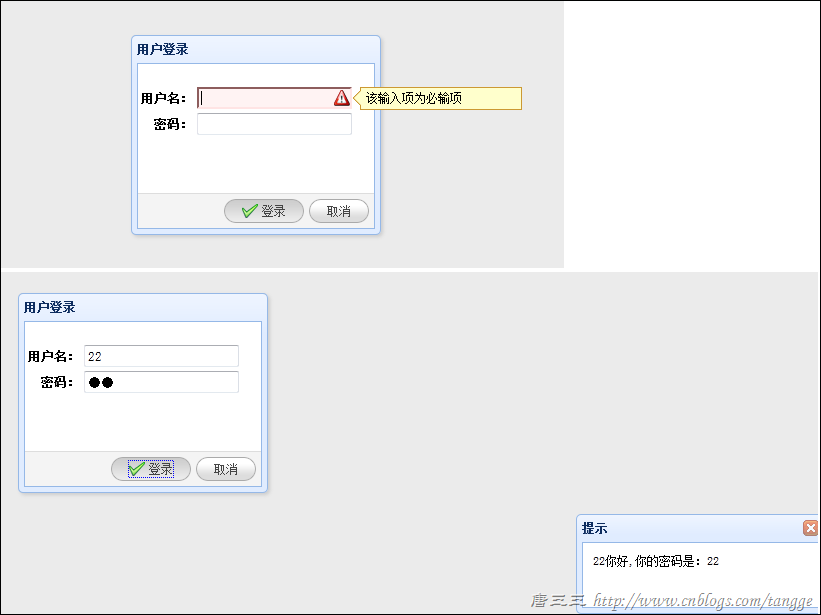
<div id="LoginAndRegDialog" title="用户登录" style="width: 250px; height: 200px;">
<form id="LoginInputForm" method="post">
<table style="margin-top: 20px">
<tr>
<th>用户名:</th>
<td>
<!--直接使用验证规则class="easyui-validatebox"-->
<input name="name" class="easyui-validatebox" data-options="required:true" />
</td>
</tr>
<tr>
<th align="right">密码:</th>
<td>
<input name="password" type="password" />
</td>
</tr>
</table>
</form>
</div>
</body>
</html>
public void ProcessRequest(HttpContext context)
{context.Response.ContentType = "text/html";
string username = context.Request["name"];
string password = context.Request["password"];
context.Response.Write(username + "你好,你的密码是:" + password);
}
jQuery EasyUI 1.3 中文帮助手册
easyui 入门的更多相关文章
- EasyUI学习(一)——EasyUI入门
EasyUI学习总结(一)——EasyUI入门 一.EasyUI下载 EasyUI官方下载地址:http://www.jeasyui.com/download/index.php,目前最新的版本是:j ...
- EasyUI学习总结(一)——EasyUI入门
一.EasyUI下载 EasyUI官方下载地址:http://www.jeasyui.com/download/index.php,目前最新的版本是:jQuery EasyUI 1.4.1
- Easyui入门视频教程 第11集---Window的使用
目录 Easyui入门视频教程 第11集---Window的使用 Easyui入门视频教程 第10集---Messager的使用 Easyui入门视频教程 第09集---登录完善 图标自定义 ...
- Easyui入门视频教程 第10集---Messager的使用
Easyui入门视频教程 第10集---Messager的使用 <script type="text/javascript"> function show(){ $.m ...
- Easyui入门视频教程 第09集---登录完善 图标自定义
目录 ----------------------- Easyui入门视频教程 第09集---登录完善 图标自定义 Easyui入门视频教程 第08集---登录实现 ajax button的使用 ...
- Easyui入门视频教程 第08集---登录实现 ajax button的使用
目录 ----------------------- Easyui入门视频教程 第09集---登录完善 图标自定义 Easyui入门视频教程 第08集---登录实现 ajax button的使用 ...
- Easyui入门视频教程 第06集---Layout初始化和属性方法使用
目录 ----------------------- Easyui入门视频教程 第09集---登录完善 图标自定义 Easyui入门视频教程 第08集---登录实现 ajax button的使用 ...
- Easyui入门视频教程 第05集---Easyui复杂布局
目录 ----------------------- Easyui入门视频教程 第09集---登录完善 图标自定义 Easyui入门视频教程 第08集---登录实现 ajax button的使用 ...
- Easyui入门视频教程 第04集---Easyui布局
目录 目录 ----------------------- Easyui入门视频教程 第09集---登录完善 图标自定义 Easyui入门视频教程 第08集---登录实现 ajax button的 ...
- Easyui入门视频教程 第03集---Easyui布局
Easyui入门视频教程 第03集---Easyui布局 目录 ----------------------- Easyui入门视频教程 第09集---登录完善 图标自定义 Easyui入门视频教 ...
随机推荐
- 使用MediaRecorder录制音频
手机一般都提供了麦克风硬件,而Android系统就可以利用该硬件来录制音频了. 为了在Android应用中录制音频,Android提供了MediaRecorder类,使用MediaRecorder录制 ...
- PowerMock使用遇到的问题——1
遇到问题:再用PowerMock Mock构造方法时,所有语句都可以通过执行,但当最后执行verify语句时却总是出现如下错误: java.lang.AssertionError: ...
- CSS name
页头:header 如:#header{属性:属性值;}或.header{属性:属性值;},也许你需要了解class与id区别及用法登录条:loginBar 标志:logo 侧栏:sideBar广告: ...
- NOIP 2013提高组day 1 T 1转圈游戏 快速幂
描述 n 个小伙伴(编号从 0 到 n-1)围坐一圈玩游戏.按照顺时针方向给 n 个位置编号,从0 到 n-1.最初,第 0 号小伙伴在第 0 号位置,第 1 号小伙伴在第 1 号位置,……,依此类推 ...
- [vijos P1034] 家族
寒假给自己定的第一个目标就是把并查集,Tarjan之类搞会.翻了翻笔记,发现并查集是2012年的6月30日学的…早就忘光了…今天敲题目的时候也吃了不少的亏呢… 家族这一题就是并查集的标准题,第一次提交 ...
- 父元素与子元素之间的margin-top问题(css hack)(转载)
情况: 父元素的盒子包含一个子元素盒子,给子元素盒子一个垂直外边距margin-top,父元素盒子也会往下走margin-top的值,而子元素和父元素的边距则没有发生变化. 解决方法: 1.修改父元素 ...
- idea修改jsp后不会自动编译和替换(转)
使用IntelliJ IDEA开发JavaWeb项目时,修改了JSP后刷新浏览器无法及时显示修改后的页面? 解决办法:tomcat配置中,On frame deactivation属性选择Update ...
- Python Web 应用:WSGI基础
在Django,Flask,Bottle和其他一切Python web 框架底层的是Web Server Gateway Interface,简称WSGI.WSGI对Python来说就像 Servle ...
- SharePoint表单和工作流 - Nintex篇(七)
博客地址 http://blog.csdn.net/foxdave 接上篇点击打开链接 在工作流设计面板点击Close返回到列表页面,切换到List标签,选择"Nintex Forms&qu ...
- 立体透视 perspective transform-style 倾斜旋转
1.perspective 是设置镜头距离,距离越远视图越小,视图越近,视图越大.就像相机焦距一样.其只对子元素产生效果. 2.transform-style: preserve-3d 设置3d效果, ...