
Qt 解析命令行参数
#include <QGuiApplication>

#include <QQmlApplicationEngine>

#include <QQuickView>

#include <QCommandLineParser>

int main(int argc, char *argv[])

{

    QGuiApplication app(argc, argv);

    QGuiApplication::setApplicationName("Qt");  // 应用名称

    QGuiApplication::setApplicationVersion("0.1");  // 应用版本号

    QCommandLineParser parser;

    parser.setApplicationDescription(QGuiApplication::translate("main", "Qt"));  // 设置应用程序描述信息

    parser.addHelpOption();  // 添加帮助选项 ("-h" 或 "--help")

    parser.addVersionOption();  // 添加版本选项 ("-v" 或 "--version")

    parser.setSingleDashWordOptionMode(QCommandLineParser::ParseAsLongOptions);  // 举例说明:将 "-adb" 当成一个选项来看,而不是看成 "-a -b -c"

//    parser.addPositionalArgument("xxx", QGuiApplication::translate("main", "?????? undefined"));

    QCommandLineOption widthOption(QStringList() << "wid" << "width",

                                   QGuiApplication::translate("main", "Width of the covered area (default is 800)."),

                                   QGuiApplication::translate("main", "width"), "");

    parser.addOption(widthOption);

    QCommandLineOption heightOption(QStringList() << "hei" << "height",

                                    QGuiApplication::translate("main", "Height of the covered area (default is 480)."),

                                    QGuiApplication::translate("main", "height"), "");

    parser.addOption(heightOption);

    QCommandLineOption xOption(QStringList() << "x",

                               QGuiApplication::translate("main", "The x coordinate of the covered area (default is 0)."),

                               QGuiApplication::translate("main", "x"), "");

    parser.addOption(xOption);

    QCommandLineOption yOption(QStringList() << "y",

                               QGuiApplication::translate("main", "The y coordinate of the covered area (default is 0)."),

                               QGuiApplication::translate("main", "y"), "");

    parser.addOption(yOption);

    QCommandLineOption colorOption(QStringList() << "c" << "color",

                               QGuiApplication::translate("main", "The color of the covered area (default is black)."),

                               QGuiApplication::translate("main", "color"), "black");

    parser.addOption(colorOption);

    parser.process(app);

//    const QStringList args = parser.positionalArguments();

    int width = parser.value(widthOption).toInt();

    int height = parser.value(heightOption).toInt();

    if ( > width ||  > height) {

        fprintf(stderr, "%s\n", qPrintable(QGuiApplication::translate("main", "Error: Invalid format argument. "

                                                                              "Width and height must be greater than 0.")));

        parser.showHelp();

    }

    int x = parser.value(xOption).toInt();

    int y = parser.value(yOption).toInt();

    QString color = parser.value(colorOption);

    QQuickView view;

    view.setGeometry(x, y, width, height);

    view.setColor(QColor(color));

    view.setFlags(Qt::FramelessWindowHint);

//    view.setSource(QUrl("qrc:/main.qml"));

    view.show();

    return app.exec();

}
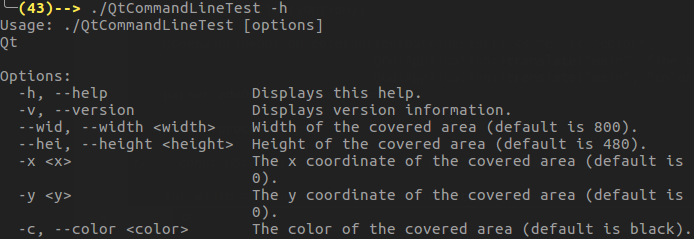
效果:
Qt 解析命令行参数的更多相关文章
- Qt之命令行参数
简述 在Qt之进程间通信(QProcess)一节,我们讲解了如何通过QProcess来进行进程间的通信.主要通过启动外部程序,然后通过命令行的方式传递参数. 这里,我们可以通过Qt Creator来设 ...
- boost之program_options库,解析命令行参数、读取配置文件
一.命令行解析 tprogram_options解析命令行参数示例代码: #include <iostream> using namespace std; #include <boo ...
- optparse模块解析命令行参数的说明及优化
一.关于解析命令行参数的方法 关于“解析命令行参数”的方法我们一般都会用到sys.argv跟optparse模块.关于sys.argv,网上有一篇非常优秀的博客已经介绍的很详细了,大家可以去这里参考: ...
- python解析命令行参数
常常需要解析命令行参数,经常忘记,好烦,总结下来吧. 1.Python 中也可以所用 sys 的 sys.argv 来获取命令行参数: sys.argv 是命令行参数列表 参数个数:len(sys.a ...
- linux 中解析命令行参数(getopt_long用法)
linux 中解析命令行参数(getopt_long用法) http://www.educity.cn/linux/518242.html 详细解析命令行的getopt_long()函数 http:/ ...
- C语言中使用库函数解析命令行参数
在编写需要命令行参数的C程序的时候,往往我们需要先解析命令行参数,然后根据这些参数来启动我们的程序. C的库函数中提供了两个函数可以用来帮助我们解析命令行参数:getopt.getopt_long. ...
- Windows下解析命令行参数
linux通常使用GNU C提供的函数getopt.getopt_long.getopt_long_only函数来解析命令行参数. 移植到Windows下 getopt.h #ifndef _GETO ...
- 3.QT中QCommandLineParser和QCommandLineOption解析命令行参数
1 新建项目 main.cpp #include <QCoreApplication> #include <QCommandLineParser> #include & ...
- QT解析命令行(QCommandLineOption和QCommandLineParser类)
Qt从5.2版开始提供了两个类QCommandLineOption和QCommandLineParser来解析应用的命令行参数. 一.命令行写法命令行:"-abc" 在QComma ...
随机推荐
- 小程序图片上传,长按删除,weui
<view class="weui-cells"> <view class="weui-cell"> <view class=&q ...
- Microsoft Visual Studio 显示行号
工具下面有一个选项
- CSS常用小技巧
1.隐藏overflow滚动条 ::-webkit-scrollbar { display:none } 2.单行文字两端对齐(例:输入框前的label) // 若考虑兼容,文字间要有空格 { tex ...
- [AtCoder Code Festival 2017 QualB C/At3574] 3 Steps - 二分图染色,结论
给你一个n个点m条边的无向图,进行以下操作 如果存在两个点u和v,使得从u走三步能恰好到达v,那么在u和v之间连接一条边 重复这个操作直到不能再连接新的边,问最后有多少条边? n, m <= 1 ...
- HDU1241 Oil Deposits(dfs+连通块问题)
背景描述 ztw同志负责探测地下石油储藏.ztw现在在一块矩形区域探测石油.他通过专业设备,来分析每个小块中是否蕴藏石油.如果这些蕴藏石油的小方格相邻(横向相邻,纵向相邻,还有对角相邻),那么它们被认 ...
- Jmeter录制https协议不能跳转成功(证书导入)
原文: http://www.cnblogs.com/Lam7/p/7154120.html 录制脚本的时候,比如录制https协议的百度网站 https://www.baidu.com ,所有录制 ...
- 注册登录于一体的 用户登录注册界面(php)
<!DOCTYPE HTML><html> <head> <script type="text/javascript" src=" ...
- python面试的100题(4)
4.打乱一个排好序的list对象alist? import random alist = [1,2,3,4,5] random.shuffle(alist) print(alist) 结果为:[2, ...
- OpenCV图像载入、显示和输出到文件以及滑块的使用
图像载入 imread()函数 Mat imread(const string& filename, int flags = 1); 第一个参数为文件名 第二个参数为载入标识 flags &g ...
- Solr与JDK对应版本关系,Tomcat与JDK版本对应关系
最新在部署solrCloud集群,由于自己机器上用的JDK都是JDK1.7的,然后我就从网上下载了最新下载了最先的solr6.6.0和最新的Tomcat9.0,部署了一下,开始报错,提示solr和JD ...