
Use on Git
Preface
The document is about to introduce some specialties on PLM development and maintenance activities, we weren’t going to state everything about Git Usage. All content of the document written here describe only most helpful commands and steps.
Before you begin…
Before you begin reading, you should have already known some information about PLM, if you are unfamiliar with PLM absolutely, please refer to PLM Guide Document firstly.
Project Directories
Description: when you login Git server at the first time, you can view the directorys below.

At first, you need to know what projects must be downloaded for normal work. “appl-v6r2016x” and “tools”, the two one must be downloaded. Other projects are useful for improvement on PLM after you become an expert on PLM.
appl-v6r2016x:
it is project source code which could be modified through legal processes, containing all business source code and configuration property files customized for Luxottica PLM. All developers will modify the project if necessary.
interface:
PLM system will interact with SAP system, although, as a PLM professionals, SAP functionalities is not belonging to the domain of acknowledge for our work, but ,we have to know these interactive approaches between PLM and SAP system. So this project is related to this sake.
Tools:
Tools targets to help developers to revise some source code and make their modified code work normally in environment. Of course, developers could make their modification of source code work via uploading or deploying file to real environment manually. But it will be inefficient when they schedule to resolve many issues in parallel.
matrixone:
matrixone project almost contains all framework code. The source code of the project is good tutorial for senior programmer for researching internal technical information and learning more knowledge on software designed thought. I recommend you to learn the internal implementation if you feel bored and not exhausted after completion of tasks.
Establishment of Local Repository
Git Installation
Description: you can only install Git Client on your windows.
Most of staffs in Luxottica can’t download executable file from internet. Even they are able to obtain the installable package from elsewhere, installing any executable file requires administrative authentication before entering guidance program of software. Therefore, please contact Tristar IT support operation team that is in charge of all issues and jobs on software and hardware.
Clone Remote Repository
Description: after Git Installation completed, developers can download source code from remote repository.
- To attain the duplication of repository URL for cloning.

2. To locate a personalized directory that hold local source code repository, then get started of Git bash prompt in the directory.
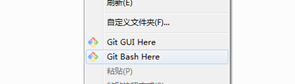
3. Here is ‘clone’ command introduced to download resource code from remote Git repository.

Note:Git bash will prompt you to confirm the authenticity of host “lwplmgitp01(ip address)”, because your PC never connect to the Git server before, so you PC didn’t save public key of Git server. The prompt likely is :

Additionally, you must notice the message infos“Permission denied(publickey)”, it means you didn’t generate your PC’s publickey to Git server, Git server also need to verify client’s information with your PC’s public key.
Now, if you execute ‘clone’ command again, then the prompt will probably tell you:

if you don’t understand what I said above, please refer to SSH key document and set up SSH key firstly in order to be convenient later. After completion of SSH key, return here to continue to clone resource code.

4. After cloning process finished, go into the project directory downloaded just now.
Use “git branch” or ‘git branch -l’ to see local branch of the project.

5. As you can see from last step, perhaps there is only one branch mapped to remote Git repository. But if developers desire to track more branches in the local context. What commands could help them for the intention?
‘Git branch -r’ git command only help coders for listing all remote branches of the project, as you can see from the following result. There is pointer(origin/HEAD) representing to one of remote branches. (HEAD is a vital term across Git Usage, meaningful for you if you can understand, I described the concepts and what it was applied on daily works, click here for reference if you are interested)

6. So, there are alternatives you can download into local directory for more work.
Run the following command:
git checkout ‘branch_name’
here, for example :”git checkout v6r2016r”

Then, run command “git branch -l” to check if you have already downloaded successfully from remote server.

Editing
Checkout Repository
Description: for sure that you have already cloned resource code from remote server through the previous steps. I think you have already comprehended a little about ‘checkout’ command. Briefly, ‘checkout’ is a little dangerous command easily causing some unexpected loss of work effort if you don’t understand the usage of it. On advisory tips, I recommend you to study further about the command and firstly to set up a comprehensive understanding of the command before you get started in real work.
Assume that readers know how to download code from Git remote server, the following part is introduced to demonstrate several commands on ‘appl-v6r2016x’ project.

The above snapshot presents different local branches of ‘appl-v6r2016x’ project, but to be incredible, how do different branches exist in only a directory ’ D:\workspace\appl-v6r2016x’?
Please note all subdirectories of the directory, ‘.git’ is a special directory supposed to be used to support Git system. All necessary information is included to ‘.git’ directory. Differences from different branches are stored into the directory in a git-style format which Git easily handle. In order to get an absolute restoration of a branch, .git directory has to record changed information or logs before developer exchange branch from this branch to another one.
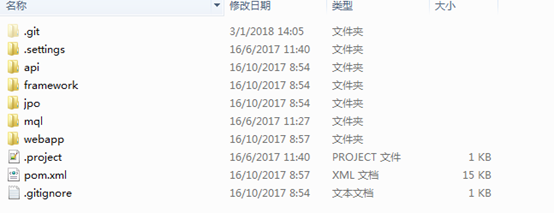
‘dev’ branch is the best branch you should choose firstly to add some new code for development task. After test is done successfully in dev branch, you should do the same modification in ‘cert’ and ‘prod’ branch as dev branch simultaneously.
the following pic shows the entire mechanic working in ‘.git’ directory.
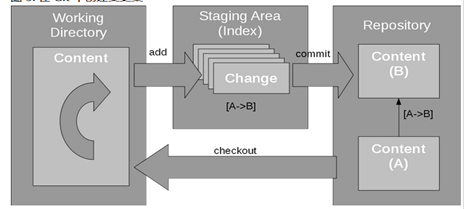
The most surprising thing is that the entire cycle is unrelated to Git remote repository. The total cycle only runs beneath ‘.git’ directory. Execute command “git status”, check if you modified some codes, of course, if you don’t have any revision on resource code, ignoring it.
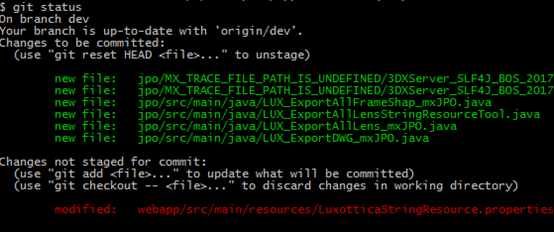
If Git shell bash prompt tell you did something unsaved (the red part clearly display the unsaved file).
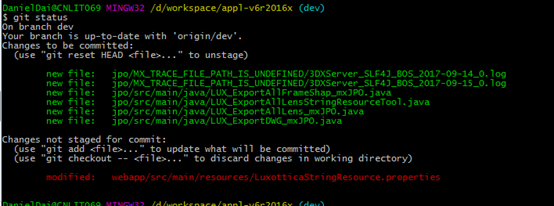
What does that ‘Changes not staged for commit’ means? Let me explain more subsequently.
As you can see from the below structure of local Git system, you changed a file named “LuxotticaStringResource.properties” within the scope of Working Directory, before you can commit your change to Repository(local), the transmit place is staging area. You can execute command ‘git add ’ to move your changed resources files to staging area.
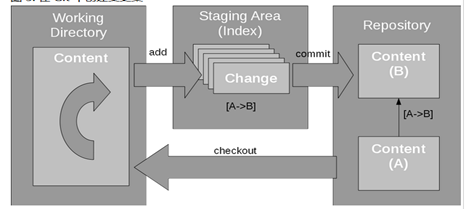
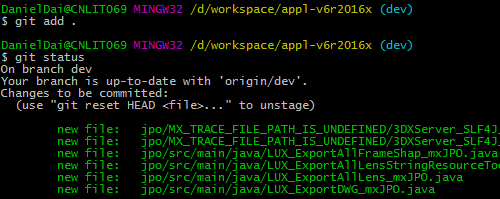
So the green part shows all files which I add them to staging area before.
Now, if I execute ‘git commit’ for committing my changed resource code, the green parts will be saved into repository (local), the red part will not be saved into Repository (local).
Why does the Git management need the area? One of reasons is that we can commit our changing resource file multiple times for different tickets respectively, perhaps you can know all reasons after you get understanding of Git comprehensively.
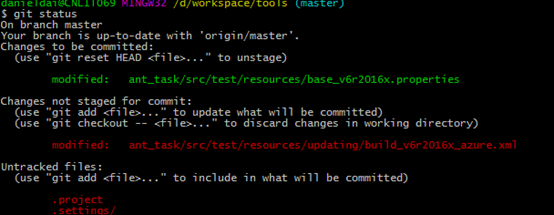
There are two other confusing log information, one shows the ‘git reset HEAD’ command, one shows the ‘git checkout ’ command.
As you can see from the below snapshot, ‘git checkout’ command can discard changes in working area, as I said before, the checkout command is a little dangerous, it can remove that you changed but not move to staging area.
For more information about reset command, please refer to Git official documentation.
Here I only explain the key wordHEAD,
Try to execute command ‘git checkout prod’
Configuring your personalized Git settings
Description: make sure you have installed Git Client in your computer. Now you should configure personalized Git Settings
SSH Key:
Before access to GitLab, you need to generate SSH key. SSH protocol provides security and allows you to authenticate to GitLab remote server without supplying your username and password each time. Please click here to see what SSH key is and how you configure SSH key.
Config file:



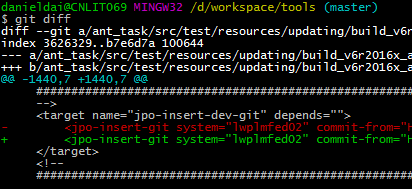
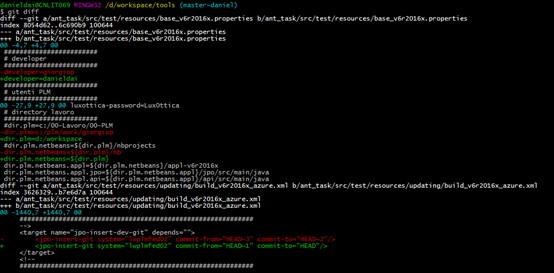
Check differences between two commits.
About HEAD
HEAD is important key work representing a key concept that Git users mention and use frequently. it is intrinsically a pointer which point to a commit (or you can understand it as revision) of a branch, usually the current commit of the current branch on which you are working.




Revision of remote GitLab Server
Description: Due to some reasons, PLM development team have to revise Gitlab Server address, moving all source codes and historical commits to other valid server. So developers should know how to adapt the activity. The following stages are going to tell you the details via an example.
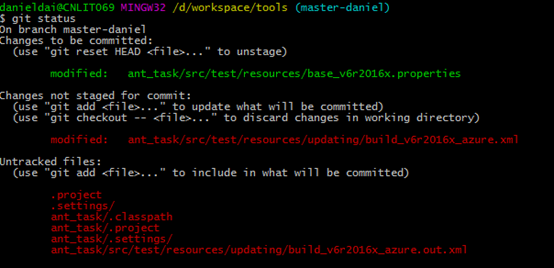
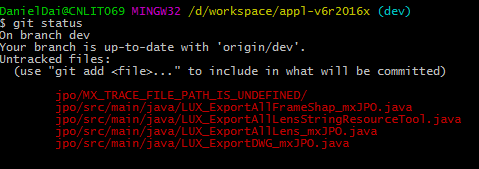
- Immediately saving your important changes and local output (such as, customized files, source code files), git command: git status can help you for location of your needs.
2. Git command : git add . help you make your changes staged(if you don’t know what staged state is, you should refer to Git official site for it).
Git Stash
But before change from a branch to another branch, probably you didn’t save all modification you have done in this branch, so
‘git status’ command help you for details that you have done in the branch.


Use on Git的更多相关文章
- Git 子模块 - submodule
有种情况我们经常会遇到:某个工作中的项目需要包含并使用另一个项目. 也许是第三方库,或者你 独立开发的,用于多个父项目的库. 现在问题来了:你想要把它们当做两个独立的项目,同时又想在 一个项目中使用另 ...
- Git 在团队中的最佳实践--如何正确使用Git Flow
我们已经从SVN 切换到Git很多年了,现在几乎所有的项目都在使用Github管理, 本篇文章讲一下为什么使用Git, 以及如何在团队中正确使用. Git的优点 Git的优点很多,但是这里只列出我认为 ...
- Git与Repo入门
版本控制 版本控制是什么已不用在说了,就是记录我们对文件.目录或工程等的修改历史,方便查看更改历史,备份以便恢复以前的版本,多人协作... 一.原始版本控制 最原始的版本控制是纯手工的版本控制:修改文 ...
- Git Bash的一些命令和配置
查看git版本号: git --version 如果是第一次使用Git,你需要设置署名和邮箱: $ git config --global user.name "用户名" $ gi ...
- 在Ubuntu 16.10 安装 git 并上传代码至 git.oschina.net
1. 注册一个账号和创建项目 先在git.oschina.net上注册一个账号和新建一个project ,如project name 是"myTest". 2.安装git sudo ...
- 史上最详细git教程
题外话 虽然这个标题很惊悚,不过还是把你骗进来了,哈哈-各位看官不要着急,耐心往下看 Git是什么 Git是目前世界上最先进的分布式版本控制系统. SVN与Git的最主要的区别 SVN是集中式版本控制 ...
- [版本控制之道] Git 常用的命令总结(欢迎收藏备用)
坚持每天学习,坚持每天复习,技术永远学不完,自己永远要前进 总结日常开发生产中常用的Git版本控制命令 ------------------------------main-------------- ...
- 【解决方案】Myeclipse 10 安装 GIT 插件 集成 步骤 图解
工程开发中,往往要使用到集成GIT ,那么下面说说插件安装步骤 PS:以Myeclipse 10 为例,讲解集成安装步骤. ----------------------main------------ ...
- git 命令
切换仓库地址: git remote set-url origin xxx.git切换分支:git checkout name撤销修改:git checkout -- file删除文件:git rm ...
- git亲测命令
一.Git新建本地分支与远程分支关联问题 git checkout -b branch_name origin/branch_name 或者 git branch --set-upstream bra ...
随机推荐
- 把多个JavaScript函数绑定到onload事件处理函数上的技巧
一,onload事件发生条件 用户进入页面且页面所有元素都加载完毕.如果在页面的初始位置添加一个JavaScript函数,由于文档没有加载完毕,DOM不完整,可能导致函数执行错误或者达不到我们想要的效 ...
- shell编程:有类型的变量
1.通过 declare 和 typeset 命令 declare 和 typeset 两者等价 declare 和 typeset 都是用来定义变量类型的 下面以 declare 进行总结 2.de ...
- The Accomodation of Students HDU - 2444 二分图判定 + 二分图最大匹配 即二分图-安排房间
/*655.二分图-安排房间 (10分)C时间限制:3000 毫秒 | C内存限制:3000 Kb题目内容: 有一群学生,他们之间有的认识有的不认识.现在要求把学生分成2组,其中同一个组的人相互不认 ...
- OOP三大特性及几大设计原则
封装: 1.隐藏实现细节:2.恰当地公开接口:3.将接口和实现分开,增强可维护性:(实现细节改变时,使用该类的客户端程序不需要改变) 继承: 1.描述联结类的层次模型;2.通过抽象,表达共性,实现类的 ...
- 解决.Net MVC 中出现 非介入式客户端验证规则中的验证类型名称必须唯一。下列验证类型出现重复: required 的bug
最近在开动科技创新作品的开发,出现了一个让人很烦恼的错误,每次从浏览页跳转到编辑页时就会出现一下错误 非介入式客户端验证规则中的验证类型名称必须唯一.下列验证类型出现重复: required 上一下出 ...
- activiti网关
activiti中有两种网关:并行网关,排他网关. 排他网关用于任务选择等情况,流程图如下 bpnm代码如下 <?xml version="1.0" encoding=&qu ...
- Java 简单链表实现
1.初衷 最近在看Java基础,有一章节涉及到链表,便记之所学所得. 2.链表的定义 链表是存储地址不连续的线性存储结构 3.链表的基本结构 一个节点包含当前节点,与下个节点的引用 4.简单链表的实现 ...
- 使mysql数据库支持简体中文
永久支持简体中文[root@localhost ~]# vim /etc/my.cnf添加如下四行:[client]default-character-set=utf8 [mysql]default- ...
- Gym 101981K bfs
思路:暴力让所有的骆驼和第一只骆驼合并,比如现在是第k只骆驼和第一只合并,广搜找出第k只骆驼如果想和第一只骆驼合并需要走哪一步,然后走一步,并更新所有骆驼的位置. 代码: #include <b ...
- git 分支相关操作
git status 查看当前工作区 会显示分支 如下 D:\工程\vue_study\testplat_vue>git statusOn branch masternothing to co ...