
sqlldr details
https://www.csee.umbc.edu/portal/help/oracle8/server.815/a67792/ch05.htm
Loading into Empty and Non-Empty Tables
You can specify one of the following methods for loading tables:
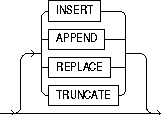
Loading into Empty Tables
If the tables you are loading into are empty, use the INSERT option.
Loading into Non-Empty Tables
If the tables you are loading into already contain data, you have three options:
- APPEND
- REPLACE
- TRUNCATE
Warning: When the REPLACE or TRUNCATE keyword is specified, the entire table is replaced, not just individual rows. After the rows are successfully deleted, a commit is issued. You cannot recover the data that was in the table before the load, unless it was saved with Export or a comparable utility.
Note: This section corresponds to the DB2 keyword RESUME; users of DB2 should also refer to the description of RESUME in Appendix B, "DB2/DXT User Notes".
APPEND
If data already exists in the table, SQL*Loader appends the new rows to it. If data doesn't already exist, the new rows are simply loaded. You must have SELECT privilege to use the APPEND option. Case 3: Loading a Delimited, Free-Format File provides an example.
REPLACE
All rows in the table are deleted and the new data is loaded. The table must be in your schema, or you must have DELETE privilege on the table. Case 4: Loading Combined Physical Recordsprovides an example.
The row deletes cause any delete triggers defined on the table to fire. If DELETE CASCADE has been specified for the table, then the cascaded deletes are carried out, as well. For more information on cascaded deletes, see the "Data Integrity" chapter of Oracle8i Concepts.
Updating Existing Rows
The REPLACE method is a table replacement, not a replacement of individual rows. SQL*Loader does not update existing records, even if they have null columns. To update existing rows, use the following procedure:
- Load your data into a work table.
- Use the SQL language UPDATE statement with correlated subqueries.
- Drop the work table.
For more information, see the "UPDATE" statement in Oracle8i SQL Reference.
TRUNCATE
Using this method, SQL*Loader uses the SQL TRUNCATE command to achieve the best possible performance. For the TRUNCATE command to operate, the table's referential integrity constraints must first be disabled. If they have not been disabled, SQL*Loader returns an error.
Once the integrity constraints have been disabled, DELETE CASCADE is no longer defined for the table. If the DELETE CASCADE functionality is needed, then the contents of the table must be manually deleted before the load begins.
The table must be in your schema, or you must have the DELETE ANY TABLE privilege.
Notes:
Unlike the SQL TRUNCATE option, this method re-uses a table's extents.
INSERT is SQL*Loader's default method. It requires the table to be empty before loading. SQL*Loader terminates with an error if the table contains rows. Case 1: Loading Variable-Length Dataprovides an example.
Continuing an Interrupted Load
If SQL*Loader runs out of space for data rows or index entries, the load is discontinued. (For example, the table might reach its maximum number of extents.) Discontinued loads can be continued after more space is made available.
State of Tables and Indexes
When a load is discontinued, any data already loaded remains in the tables, and the tables are left in a valid state. If the conventional path is used, all indexes are left in a valid state.
If the direct path load method is used, any indexes that run out of space are left in direct load state. They must be dropped before the load can continue. Other indexes are valid provided no other errors occurred. (See Indexes Left in Index Unusable State for other reasons why an index might be left in direct load state.)
Using the Log File
SQL*Loader's log file tells you the state of the tables and indexes and the number of logical records already read from the input datafile. Use this information to resume the load where it left off.
Dropping Indexes
Before continuing a direct path load, inspect the SQL*Loader log file to make sure that no indexes are in direct load state. Any indexes that are left in direct load state must be dropped before continuing the load. The indexes can then be re-created either before continuing or after the load completes.
Continuing Single Table Loads
To continue a discontinued direct or conventional path load involving only one table, specify the number of logical records to skip with the command-line parameter SKIP. If the SQL*Loader log file says that 345 records were previously read, then the command to continue would look like this:
SQLLDR USERID=scott/tiger CONTROL=FAST1.CTL DIRECT=TRUE SKIP=345
Continuing Multiple Table Conventional Loads
It is not possible for multiple tables in a conventional path load to become unsynchronized. So a multiple table conventional path load can also be continued with the command-line parameter SKIP. Use the same procedure that you would use for single-table loads, as described in the preceding paragraph.
Continuing Multiple Table Direct Loads
If SQL*Loader cannot finish a multiple-table direct path load, the number of logical records processed could be different for each table. If so, the tables are not synchronized and continuing the load is slightly more complex.
To continue a discontinued direct path load involving multiple tables, inspect the SQL*Loader log file to find out how many records were loaded into each table. If the numbers are the same, you can use the previously described simple continuation.
CONTINUE_LOAD
If the numbers are different, use the CONTINUE_LOAD keyword and specify SKIP at the table level, instead of at the load level. These statements exist to handle unsynchronized interrupted loads.
Instead of specifying:
LOAD DATA...
at the start of the control file, specify:

SKIP
Then, for each INTO TABLE clause, specify the number of logical records to skip for that table using the SKIP keyword:
...

INTO TABLE emp

SKIP 2345

...

INTO TABLE dept

SKIP 514

...
Combining SKIP and CONTINUE_LOAD
The CONTINUE_LOAD keyword is only needed after a direct load failure because multiple table loads cannot become unsynchronized when using the conventional path.
If you specify CONTINUE_LOAD, you cannot use the command-line parameter SKIP. You must use the table-level SKIP clause. If you specify LOAD, you can optionally use the command-line parameter SKIP, but you cannot use the table-level SKIP clause.
sqlldr details的更多相关文章
- oracle_hc.sql
select event,count(1) from gv$session group by event order by 2;exec dbms_workload_repository.create ...
- 批量生成sqlldr文件,高速卸载数据
SQL*Loader 是用于将外部数据进行批量高速加载的数据库的最高效工具,可用于将多种平面格式文件加载到Oracle数据库.SQL*Loader支持传统路径模式以及直接路径这两种加载模式.关于SQL ...
- sqlldr的使用
1,在公司进行预处理的时候,发现文件不能入库,而公司前辈使用的是sqlldr的技术将解析后的文件入库,前辈在测试的时候使用的是本机上的数据库(见图一),没有使用完整的远程连接oracle的正确方式,所 ...
- oracle的sqlldr常见问题
http://www.orafaq.com/wiki/SQL*Loader_FAQ#Can_one_skip_certain_columns_while_loading_data.3F What is ...
- HTML5 标签 details 展开 搜索
details有一个新增加的子标签--summary,当鼠标点击summary标签中的内容文字时,details标签中的其他所有元素将会展开或收缩. 默认状态为 收缩状态 设置为展开状态为 <d ...
- HTML5 <details> 标签
HTML5 中新增的<details>标签允许用户创建一个可展开折叠的元件,让一段文字或标题包含一些隐藏的信息. 用法 一般情况下,details用来对显示在页面的内容做进一步骤解释.其展 ...
- 三个不常用的HTML元素:<details>、<summary>、<dialog>
前面的话 HTML5不仅新增了语义型区块级元素及表单类元素,也新增了一些其他的功能性元素,这些元素由于浏览器支持等各种原因,并没有被广泛使用 文档描述 <details>主要用于描述文档或 ...
- Oracle数据加载之sqlldr工具的介绍
环境: 服务端:RHEL6.4 + Oracle 11.2.0.4 客户端:WIN10 + Oracle 11.2.0.1 client 目录: sqlldr语法 sqlldr实验准备 sqlldr常 ...
- 解决MyEclipe出现An error has occurred,See error log for more details的错误
今晚在卸载MyEclipse时出现An error has occurred,See error log for more details的错误,打开相应路径下的文件查看得如下: !SESSION 2 ...
随机推荐
- TreeMap源码解析笔记
常见的数据结构有数组.链表,还有一种结构也很常见,那就是树.前面介绍的集合类有基于数组的ArrayList,有基于链表的LinkedList,还有链表和数组结合的HashMap,今天介绍基于树的Tre ...
- Begin at this time
学习了一段时间的Python,今天终于下定决心建立博客来记录自己的机器学习之路了.希望这是一个好的开始,希望自己永远不放弃,坚持努力下去.
- MySQL关闭查询缓存(QC)的两种方法
MySQL Query Cache 会缓存select 查询,安装时默认是开启的,但是如果对表进行INSERT, UPDATE, DELETE, TRUNCATE, ALTER TABLE, DROP ...
- kubernetes报错
错误信息:执行yaml文件后,服务在运行,但是提示命令找不到 原因:没有环境,相当于只有一个快捷方式 环境目录为/usr/local/bin 解决办法:将/etc/ansible/bin下的文件都拷贝 ...
- ES模块的基本用法常见使用问题
本文作者:高峰,360奇舞团前端工程师,W3C WoT工作组成员. ES6中引入了模块(Modules)的概念,相信大家都已经挺熟悉的了,在日常的工作中应该也都有使用. 本文会简单介绍一下ES模块的优 ...
- js关闭当前窗口的几种方法
第一种:不带任何提示关闭窗口的js代码 <a href="javascript:window.opener=null;window.open('','_self');window.cl ...
- Dataphin支持哪些数据源
业务数据存储是业务系统最基本的构成,构建数据中台,就是要将这些数据集中起来放到一个有更强算力的地方集中处理,所以对于数据集成的能力是构建数据中台最基本要求: 从存储的发展历程来看,由于不同的业务场景需 ...
- [NOIP模拟23]题解
中间鸽了好几篇啊QAQ……有时间再补吧…… A.mine sbdp,考场上写的巨麻烦不过还是能A的(虽然MLE了……每一维都少开1就A掉了555).设$dp[i][j][k]$为枚举到第i位,第i位是 ...
- [CQOI2011]放棋子 题解(dp+组合数学)
Description Input 输入第一行为两个整数n, m, c,即行数.列数和棋子的颜色数. 第二行包含c个正整数,即每个颜色的棋子数. 所有颜色的棋子总数保证不超过nm. N,M<=3 ...
- js中的函数声明和函数表达式的区别
目录 一.声明与表达式的格式 1.1 声明式的格式: 1.2 表达式的格式: 二.区别 2.1 函数表达式可以直接在后面加括号执行,而函数声明不可以. 2.2 函数表达式可以被提前解析出来 2.3 命 ...