
4_3.springboot2.x之默认访问首页和国际化
1、默认访问首页
1.引入thymeleaf和引入bootstrap
<!--引入thymeleaf-->

        <dependency>

            <groupId>org.springframework.boot</groupId>

            <artifactId>spring-boot-starter-thymeleaf</artifactId>

        </dependency>

        <!--引入bootstrap-->

        <dependency>

            <groupId>org.webjars</groupId>

            <artifactId>bootstrap</artifactId>

            <version>4.1.0</version>

        </dependency>
2.新建mvc配置类
//@EnableWebMvc

@Configuration//扩展springmvc功能

public class MyMvcConfig implements WebMvcConfigurer {

      //用来做视图映射 浏览器发送 /和/index.htm 请求来到 login页面(由thymeleaf提供)

    @Override

    public void addViewControllers(ViewControllerRegistry registry) {

        registry.addViewController("/").setViewName("login");

        registry.addViewController("/index.html").setViewName("login");

        registry.addViewController("/main.html").setViewName("dashboard");

    }

}
application.properties
server.servlet.context-path=/crud
配置web应用的请求路径
2、国际化
springmvc国际化的配置:
1)、编写国际化配置文件;
2)、使用ResourceBundleMessageSource管理国际化资源文件
3)、在页面使用fmt:message取出国际化内容
springboot自动化的配置:
步骤:
1)、编写国际化配置文件,抽取页面需要显示的国际化消息
login.properties
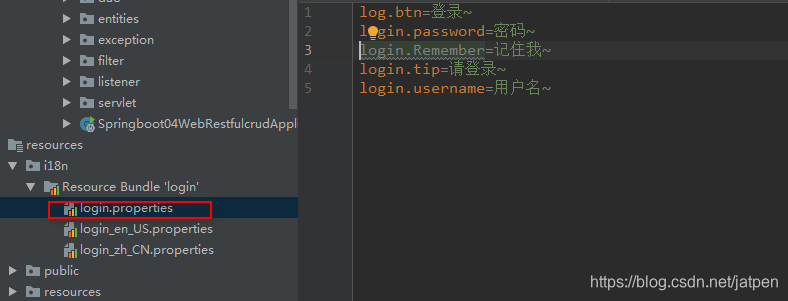
login_en_US.properties
log.btn=Sign In

login.password=Password

login.Remember=Remember me

login.tip=Please sign in

login.username=Username
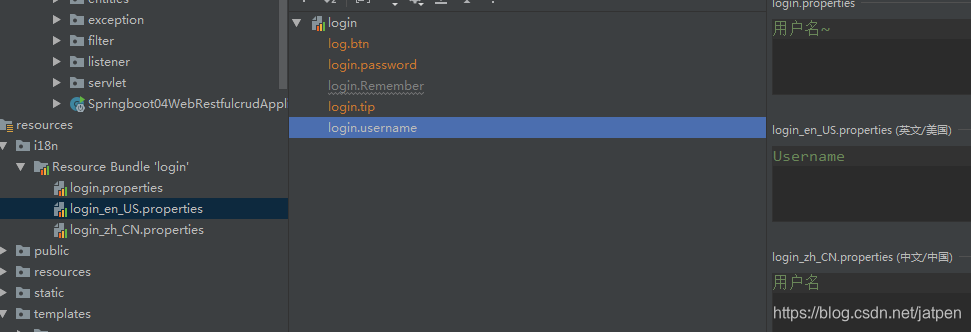
中文环境类似
2)、SpringBoot自动配置好了管理国际化资源文件的组件;
@Configuration

@ConditionalOnMissingBean(value = MessageSource.class, search = SearchStrategy.CURRENT)

@AutoConfigureOrder(Ordered.HIGHEST_PRECEDENCE)

@Conditional(ResourceBundleCondition.class)

@EnableConfigurationProperties

public class MessageSourceAutoConfiguration {

    //添加基础名配置类,配置文件可以直接放在类路径下叫messages.properties;

    @Bean

	@ConfigurationProperties(prefix = "spring.messages")

	public MessageSourceProperties messageSourceProperties() {

		return new MessageSourceProperties();

	}

    @Bean

	public MessageSource messageSource(MessageSourceProperties properties) {

		ResourceBundleMessageSource messageSource = new ResourceBundleMessageSource();

		if (StringUtils.hasText(properties.getBasename())) {

            //设置国际化资源文件的基础名(去掉语言国家代码的)

			messageSource.setBasenames(StringUtils

					.commaDelimitedListToStringArray(StringUtils.trimAllWhitespace(properties.getBasename())));

		}

		if (properties.getEncoding() != null) {

			messageSource.setDefaultEncoding(properties.getEncoding().name());

		}

		messageSource.setFallbackToSystemLocale(properties.isFallbackToSystemLocale());

		Duration cacheDuration = properties.getCacheDuration();

		if (cacheDuration != null) {

			messageSource.setCacheMillis(cacheDuration.toMillis());

		}

		messageSource.setAlwaysUseMessageFormat(properties.isAlwaysUseMessageFormat());

		messageSource.setUseCodeAsDefaultMessage(properties.isUseCodeAsDefaultMessage());

		return messageSource;

	}

}
application.properties
spring.messages.basename=i18n.login, i18n.language
3)、去页面获取国际化的值
由于使用thymeleaf,用#{}取国际化信息
<input type="text" name="username" class="form-control" placeholder="Username" th:placeholder="#{login.username}" required="" autofocus="">
若这里有中文乱码,请参考idea中properties中文乱码怎么解决。
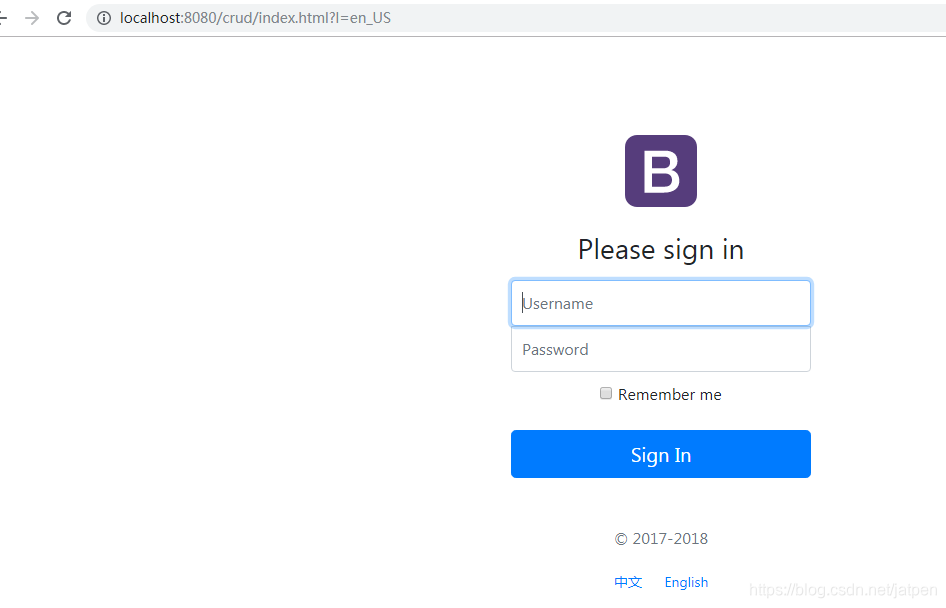
效果:根据浏览器语言设置的信息切换了国际化;
4)、点击链接切换国际化
原理解析:
springmvc中:国际化Locale(区域信息对象);LocaleResolver(获取区域信息对象);
WebMvcAutoConfiguration
@Bean

		@ConditionalOnMissingBean

		@ConditionalOnProperty(prefix = "spring.mvc", name = "locale")

		public LocaleResolver localeResolver() {

			if (this.mvcProperties.getLocaleResolver() == WebMvcProperties.LocaleResolver.FIXED) {

				return new FixedLocaleResolver(this.mvcProperties.getLocale());

			}

            //根据请求头request中获取区域信息,

			AcceptHeaderLocaleResolver localeResolver = new AcceptHeaderLocaleResolver();

			localeResolver.setDefaultLocale(this.mvcProperties.getLocale());

			return localeResolver;

		}
自定义区域信息解析器:
html页面:

<a class="btn btn-sm" th:href="@{/index.html(l='zh_CN')}">中文</a>

<a class="btn btn-sm" th:href="@{/index.html(l='en_US')}">English</a>
区域信息解析器:
package com.spboot.springboot04.component;

import org.springframework.util.StringUtils;

import org.springframework.web.servlet.LocaleResolver;

import javax.servlet.http.HttpServletRequest;

import javax.servlet.http.HttpServletResponse;

import java.util.Locale;

/*

* 链接上携带区域信息

* */

public class MyLocaleResolver implements LocaleResolver {

    @Override

    public Locale resolveLocale(HttpServletRequest request) {

        String l = request.getParameter("l");

        Locale locale = Locale.getDefault();//根据浏览器默认

        if(!StringUtils.isEmpty(l)){

            String[] s = l.split("_");

            locale = new Locale(s[0],s[1]);

        }

        return locale;

    }

    @Override

    public void setLocale(HttpServletRequest request, HttpServletResponse response, Locale locale) {

    }

}
将自己添加的区域信息解析器添加到springmvc配置类中,从而添加到容器中:
@Configuration//扩展springmvc功能

public class MyMvcConfig implements WebMvcConfigurer {

   	   .

       .

       .

       .

     @Bean

    public LocaleResolver localeResolver(){

        return new MyLocaleResolver();

    }

}
测试:
4_3.springboot2.x之默认访问首页和国际化的更多相关文章
- 怎么修改tomcat默认访问首页
一般情况下安装好tomcat之后我们的默认访问首页是index了,但我们如果要修改或增加一个默认首页,我们可参考下面办法来解决. 通过 ip:port 访问到的是 tomcat 的管理页面,其他常规部 ...
- 设置java web工程中默认访问首页的几种方式
1.demo中最常见的方式是在工程下的web.xml中设置(有时候根据业务可能需要设置action,在action中处理逻辑加载跳转什么的,比较少): <welcome-file-list> ...
- tomcat修改默认访问首页
找到conf下server.xml文件修改如下位置内容 <Host name="localhost" appBase="webapps" unpackWA ...
- SpringBoot:扩展SpringMVC、定制首页、国际化
目录 扩展使用SpringMVC 如何扩展SpringMVC 为何这么做会生效(原理) 全面接管SpringMVC 首页实现 页面国际化 SpringBoot扩展使用SpringMVC.使用模板引擎定 ...
- 8、SpringBoot-CRUD默认访问的首页以及thyleaf的静态文件引入/WebMvcConfigurer / WebMvcConfigurationSupport
1.导入资源 2.默认的访问首页 (1).将代码写在controller中 @RequestMapping({"/","index.html"}) public ...
- 更改CI框架默认访问路径及去掉index.php
下面是去掉index.php的操作 PHP CodeIgniter(CI)去掉 index.php - Langjun - 博客园 设置访问的默认路径是在
- Phpcms安装前后域名默认访问路径
一.安装前 phpcms下载后index.html文件内容如下图,在本地服务器配置项目虚拟域名后,访问域名后直接跳到:域名/install/install.php,然后出现安装界面. 二.安装之后 提 ...
- 0012SpringBoot访问首页
有三种方式可以实现访问首页: 第一种: 定义一个Controller,定义请求方法和返回内容,方法内容如下: @RequestMapping({"/","/index&q ...
- Apache 创建虚拟主机目录和设置默认访问页面
虚拟主机 (Virtual Host) 是在同一台机器搭建属于不同域名或者基于不同 IP 的多个网站服务的技术. 可以为运行在同一物理机器上的各个网站指配不同的 IP 和端口, 也可让多个网站拥有不同 ...
随机推荐
- 泛型(Generic)接口
泛型接口例子:一个学生有一个独一无二的ID,但是每个学生的姓名不一定是唯一的. class Program { static void Main(string[] args) { Student< ...
- Delphi 取整函数round、trunc、ceil和floor
Delphi 取整函数round.trunc.ceil和floor 1.Round(四舍六入五留双)功能说明:对一个实数进行四舍五入.(按照银行家算法)例:var i, j: Integer;begi ...
- checkbox与文字对齐
checkbox和后面的文字如果不加样式,会导致checkbox和文字对齐,解决办法是对checkbox和文字同时添加如下样式: vertical-align:middle;
- NX二次开发-算法篇-冒泡排序(例子:遍历所有点并排序)
NX9+VS2012 #include <uf.h> #include <uf_ui.h> #include <uf_curve.h> #include <u ...
- json-lib 的maven dependency 一直找不到jar 包
项目中要用到json-lib,mvnrepository.com查找它的dependency时结果如下: xml 代码 <dependency> <groupId>net.sf ...
- Spring源码分析(一):从哪里开始看spring源码(系列文章基于Spring5.0)
概述 对于大多数第一次看spring源码的人来说,都会感觉不知从哪开始看起,因为spring项目源码由多个子项目组成,如spring-beans,spring-context,spring-core, ...
- USACO 2004 Open The Cow Lineup /// oj25965
题目大意: 输入n k,n头牛 k个品种 接下来n行描述每头牛的品种 输出无法找出的最短子序列的长度 Sample Input 14 515325134425123 Sample Output 3 H ...
- identityserver4 对接钉钉
参考了https://www.cnblogs.com/sheldon-lou/p/10643267.html
- 将sparkStreaming结果保存到Redshift数据库
1.保存到redshift数据库的代码 package test05 import org.apache.log4j.{Level, Logger}import org.apache.spark.rd ...
- MAP(Mean Average Precision)平均精度均值
wrong 0 2 right 1 / 2 3 right 2 / 3 4 wrong 0 5 right 3 / 5 6 wrong 0 7 wrong 0 8 wrong 0 9 right 4 ...