
【水滴石穿】React-Redux-Demo
这个项目没有使用什么组件,可以理解就是个redux项目
项目地址为:https://github.com/HuPingKang/React-Redux-Demo
先看效果图
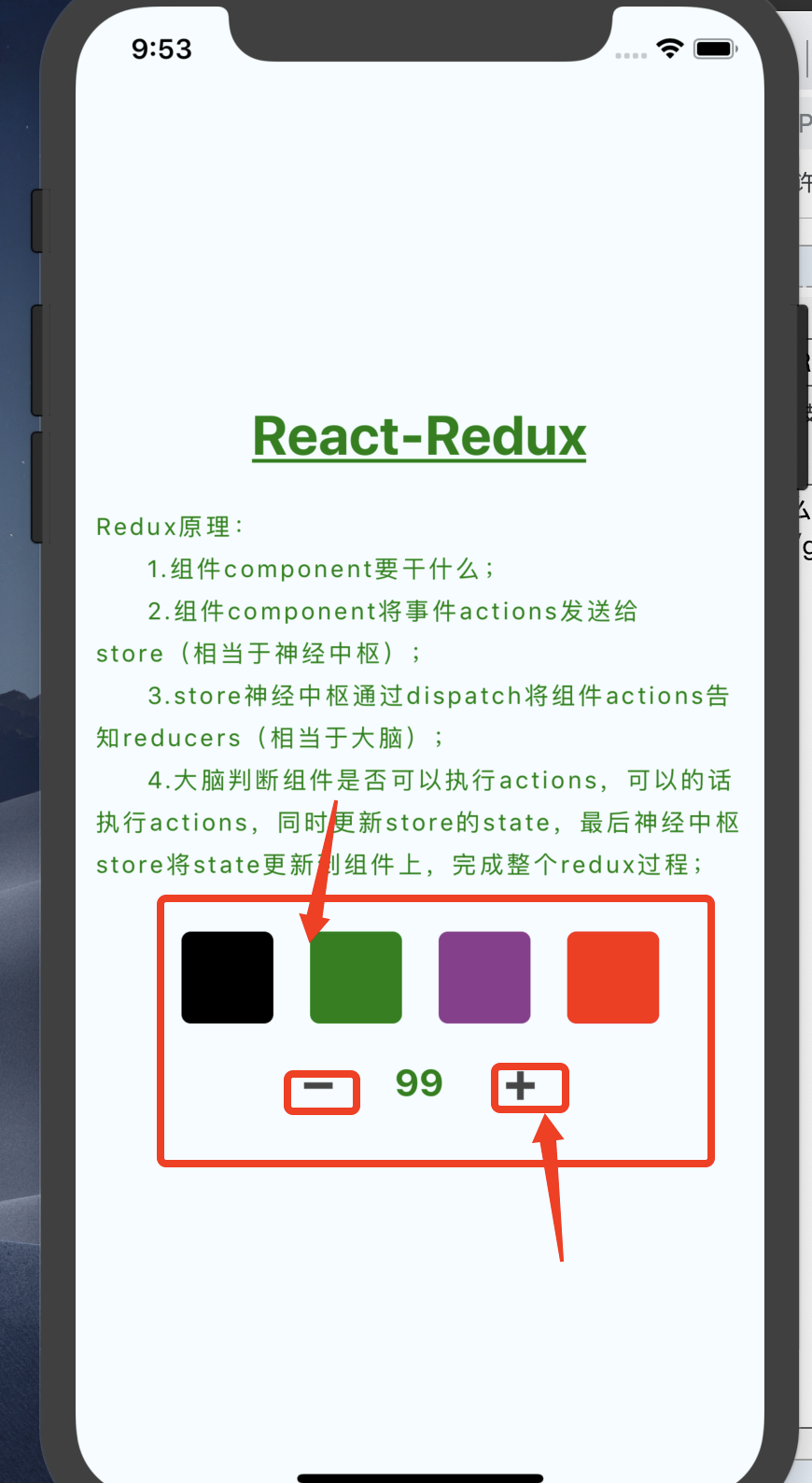
点击颜色字体颜色改变,以及可以进行加减法运算
代码如下
//index.js

/**

 * @format

 * @lint-ignore-every XPLATJSCOPYRIGHT1

 */

import {AppRegistry} from 'react-native';

import App from './App';

import {name as appName} from './app.json';

AppRegistry.registerComponent(appName, () => App);
//React-Redux-Demo/App.js

import { Provider } from 'react-redux';

import React, {Component} from 'react';

import {StyleSheet, Text, View,Button,TouchableWithoutFeedback} from 'react-native';

import configureStore from './redux/store';

const store = configureStore();

/**

 * Redux原理:

 *    1.组件component要干什么;

 *    2.组件component将事件actions发送给store(相当于神经中枢);

 *    3.store神经中枢通过dispatch讲组件actions告知reducers(相当于大脑);

 *    4.大脑判断组件是否可以执行actions,可以的话执行actions,同时更新store的

 *      state,最后神经中枢store将state更新到组件上,完成整个redux过程;

 *

 *    ex:耳朵想听歌,耳朵通过神经中枢将想听歌这件事告知大脑皮层,大脑发送指令开始拿起耳机播放音乐;

 *

 *    综上:完成一个Redux流程需要三个角色(组件component、神经中枢store、大脑reducer);

 *      component___actions___>store___dispatch___>reducer___state___>store___state;

 *

 */

 var number = 100;

export default class App extends Component{

  constructor(props){

      super(props);

      //生命周期函数中,从store中获得state作为当前的state;

      this.state = store.getState();

      //当前界面绑定store更新事件;

      store.subscribe(()=>this._storeChanged());

      this._selectColorIndex = this._selectColorIndex.bind(this._selectColorIndex);

  }

  //监听store是否更新了;

  _storeChanged(){

    //store更新后 重新获取store的state作为当前的state;当前界面上的组件就会被刷新;

    this.setState(store.getState());

  }

  //组件发送事件给store;

  _clickAdd(){

    number = number+1;

    const action = {

      //每个action绑定一个type;

          type:'change_number_add',

          //需要更新store中的相关数据;

          value:number

    };

    //store将事件派发给reducer;

    store.dispatch(action);

  }

  _clickPlus(){

    number = number-1;

    const action = {

          type:'change_number_plus',

          value:number

    };

    store.dispatch(action);

  }

  _selectColorIndex(index){

    const colors = ['black','green','#8E388E','red'];

    const action={

        type:'change_theme_color',

        value:colors[index],

    };

    store.dispatch(action);

  }

   _colorViews(){

    var colorViews = [];

    var styleYS = [styles.blackContainer,styles.greenContainer,styles.purpureContainer,styles.redContainer];

    styleYS.map((item)=>{

      colorViews.push(

        <TouchableWithoutFeedback key={styleYS.indexOf(item)} onPress={()=>this._selectColorIndex(styleYS.indexOf(item))}>

          <View style={item}></View>

        </TouchableWithoutFeedback>

      );

    });

    return colorViews;

  }

  render() {

    const desString = 'Redux原理:\n\t1.组件component要干什么;\n\t2.组件component将事件actions发送给store(相当于神经中枢);\n\t3.store神经中枢通过dispatch将组件actions告知reducers(相当于大脑);\n\t4.大脑判断组件是否可以执行actions,可以的话执行actions,同时更新store的state,最后神经中枢store将state更新到组件上,完成整个redux过程;';

    return (

      <Provider store={store}>

        <View style={styles.container}>

          <Text style={{

            fontSize: 30,textAlign: 'center',margin: 10,color:this.state.theme.themeColor,fontWeight:"bold",textDecorationLine:'underline'

          }}>React-Redux</Text>

          <Text style={{

            fontSize: 13,textAlign: 'left',margin: 10,color:this.state.theme.themeColor,lineHeight:23,letterSpacing:1.5

          }}>{desString}</Text>

          <View style={{justifyContent:"center",flexDirection:'row',marginTop:5}}>

            {this._colorViews()}

          </View>

          <View style={{justifyContent:"center",flexDirection:'row',marginTop:5}}>

              <Button onPress={()=>this._clickPlus()} title='➖'></Button>

              {/* 读取当前state的number值 */}

              <Text style={{

                fontSize: 20,textAlign: 'center',margin: 5,color:this.state.theme.themeColor,fontWeight:"bold",width:60

              }}>{this.state.number.number}</Text>

              <Button onPress={()=>this._clickAdd()} title="➕"></Button>

          </View>

        </View>

      </Provider>

    );

  }

}

const styles = StyleSheet.create({

  container: {

    flex: 1,

    justifyContent: 'center',

    alignItems: 'center',

    backgroundColor: '#F5FCFF',

  },

  blackContainer: {

    width:50,

    height:50,

    borderRadius:5,

    backgroundColor:'black',

    margin:10,

  },

  greenContainer: {

    width:50,

    height:50,

    borderRadius:5,

    backgroundColor:'green',

    margin:10,

  },

  purpureContainer: {

    width:50,

    height:50,

    borderRadius:5,

    backgroundColor:'#8E388E',

    margin:10,

  },

  redContainer: {

    width:50,

    height:50,

    borderRadius:5,

    backgroundColor:'red',

    margin:10,

  }

});
redux里面的东西比较有意思

//React-Redux-Demo/redux/CounterReducer.js

const defaluteState = {

    number:100,

}

//redux接受store.dispatch事件;state为store中保存的所有state;

export default function numbers(state=defaluteState,actions){

    //reducer判断事件类型;

    if(actions.type==='change_number_plus' || actions.type==='change_number_add'){

        //深拷贝store的state;

        const newState = JSON.parse(JSON.stringify(state));

        //设置新的state的属性值;

        newState.number = actions.value;

        //将新的state作为返回值,返回给store,作为store的新的state,完成store的更新;

        return newState;

    }

    //返回store默认的state;

    return state;

}
//React-Redux-Demo/redux/IndexReducer.js

import { combineReducers } from 'redux'

import numbers from './CounterReducer'

import themeColor from './ThemeReducer'

export default combineReducers({

    number:numbers, //store.getState().number.number

    theme:themeColor //store.getState().theme.themeColor

})
//React-Redux-Demo/redux/store.js

'use strict';

import { createStore, applyMiddleware } from 'redux';

import thunkMiddleware from 'redux-thunk';

import reducer from './IndexReducer';

const createStoreWithMiddleware = applyMiddleware(thunkMiddleware)(createStore);

export default function configureStore(initialState) {

  const store = createStoreWithMiddleware(reducer, initialState)

  return store;

}
//这个有意思

//React-Redux-Demo/redux/ThemeReducer.js

const defaluteState = {

    themeColor:'black',

}

//redux接受store.dispatch事件;state为store中保存的所有state;

export default function themeColor(state=defaluteState,actions){

    if(actions.type==='change_theme_color'){

        //深拷贝store的state;

        const newState = JSON.parse(JSON.stringify(state));

        //设置新的state的属性值;

        newState.themeColor = actions.value;

        return newState;

    }

    //返回store默认的state;

    return state;

}
//app.js里面对颜色还是做了限制的

_selectColorIndex(index){

    const colors = ['black','green','#8E388E','red'];

    const action={

        type:'change_theme_color',

        value:colors[index],

    };

    store.dispatch(action);

  }

   _colorViews(){

    var colorViews = [];

    var styleYS = [styles.blackContainer,styles.greenContainer,styles.purpureContainer,styles.redContainer];

    styleYS.map((item)=>{

      colorViews.push(

        <TouchableWithoutFeedback key={styleYS.indexOf(item)} onPress={()=>this._selectColorIndex(styleYS.indexOf(item))}>

          <View style={item}></View>

        </TouchableWithoutFeedback>

      );

    });

    return colorViews;

  }
项目还不是很精通的读懂啊~~~
【水滴石穿】React-Redux-Demo的更多相关文章
- 我的第一个 react redux demo
最近学习react redux,先前看过了几本书和一些博客之类的,感觉还不错,比如<深入浅出react和redux>,<React全栈++Redux+Flux+webpack+Bab ...
- angular开发者吐槽react+redux的复杂:“一个demo证明你的开发效率低下”
曾经看到一篇文章,写的是jquery开发者吐槽angular的复杂.作为一个angular开发者,我来吐槽一下react+redux的复杂. 例子 为了让大家看得舒服,我用最简单的一个demo来展示r ...
- webpack+react+redux+es6开发模式
一.预备知识 node, npm, react, redux, es6, webpack 二.学习资源 ECMAScript 6入门 React和Redux的连接react-redux Redux 入 ...
- webpack+react+redux+es6
一.预备知识 node, npm, react, redux, es6, webpack 二.学习资源 ECMAScript 6入门 React和Redux的连接react-redux Redux 入 ...
- webpack+react+redux+es6开发模式---续
一.前言 之前介绍了webpack+react+redux+es6开发模式 ,这个项目对于一个独立的功能节点来说是没有问题的.假如伴随着源源不断的需求,前段项目会涌现出更多的功能节点,需要独立部署运行 ...
- react+redux构建淘票票首页
react+redux构建淘票票首页 描述 在之前的项目中都是单纯的用react,并没有结合redux.对于中小项目仅仅使用react是可以的:但当项目变得更加复杂,仅仅使用react是远远不够的,我 ...
- ReactJS React+Redux+Router+antDesign通用高效率开发模板,夜间模式为例
工作比较忙,一直没有时间总结下最近学习的一些东西,为了方便前端开发,我使用React+Redux+Router+antDesign总结了一个通用的模板,这个技术栈在前端开发者中是非常常见的. 总的来说 ...
- react+redux+generation-modation脚手架添加一个todolist
当我遇到问题: 要沉着冷静. 要管理好时间. 别被bug或error搞的不高兴,要高兴,又有煅炼思维的机会了. 要思考这是为什么? 要搞清楚问题的本质. 要探究问题,探究数据的流动. TodoList ...
- 详解react/redux的服务端渲染:页面性能与SEO
亟待解决的疑问 为什么服务端渲染首屏渲染快?(对比客户端首屏渲染) react客户端渲染的一大痛点就是首屏渲染速度慢问题,因为react是一个单页面应用,大多数的资源需要在首次渲染前就加载 ...
- React+Redux实现追书神器网页版
引言 由于现在做的react-native项目没有使用到redux等框架,写了一段时间想深入学习react,有个想法想做个demo练手下,那时候其实还没想好要做哪一个类型的,也看了些动漫的,小说阅读, ...
随机推荐
- sql草稿
参考:MySQL 内连接.外连接.左连接.右连接.全连接 SELECT count(*) FROM `t_product_base` select m_name from t_medicinal_in ...
- python 日记 day5 字典
一.数据类型分为: 1.不可变数据类型:元组,bool,int,str (不可更改的又叫可哈希) 2.可变数据类型 :list,dict ,set (可变的又叫不可哈希) 字典: 优点:1.可二分 ...
- 深入浅出 Java Concurrency (6): 锁机制 part 1[转]
前面的章节主要谈谈原子操作,至于与原子操作一些相关的问题或者说陷阱就放到最后的总结篇来整体说明.从这一章开始花少量的篇幅谈谈锁机制. 上一个章节中谈到了锁机制,并且针对于原子操作谈了一些相关的概念和设 ...
- [code]自动白平衡white blance
//2013.10.24 //eageldiao //自动白平衡 CvScalar rgb; rgb=cvAvg(src); #ifdef COLOR_GW //灰度世界假设(R,= R*K/Ravg ...
- IDEA常用插件整理
1. 集成步骤 1.1. 配置环境变量 变量名:CMDER_ROOT 变量值:D:\Tool\cmder 1.2. IDEA中设置 settings->Tool->Terminal She ...
- TCP、UDP区别
个人认为,用户层Socket的TCP和UDP编程,区别并不大. 最大的区别,或者说,唯一的区别,似乎就是TCP客户端中断连接之后,TCP会得到一个应答. 但是如果用UDP来实现TCP,似乎也不 ...
- 用canvas 画出圆形图片
/** * 把图片处理成圆形,如果不是正方形就按最小边一半为半径处理 * @param {object} imgObj 图片(img)对象 * @param {number} imgType 设置生成 ...
- css背景图自适应
在开发时,修改了d2admin的登录页面.使用了背景图片,但是ui给的图过于大(可能是我电脑屏幕小哈)无法完整的显示到页面上,所以修改了代码,可以完整显示背景图. 代码如下:background: u ...
- 使用setTimeout函数解决栈溢出问题
下面的代码,如果队列太长会导致栈溢出,怎样解决这个问题并且依然保持循环部分: var list = readHugeList(); var nextListItem = function() { va ...
- poj 2398 Toy Storage(计算几何 点线关系)
Toy Storage Time Limit: 1000MS Memory Limit: 65536K Total Submissions: 4588 Accepted: 2718 Descr ...