
Spring-Security (学习记录一)--登录
Spring Security是一个能够为基于Spring的企业应用系统提供声明式的安全访问控制解决方案的安全框架。
这里是基于Spring Security-3.2的测试。
Spring Security为我们处理了登录的逻辑,所以我们可以通过配置来完成登录。
先来体验一下。完成helloworld,通过配置完成登录和权限
创建maven工程
1. 在pom.xml中加入相关jar包的配置
<dependency>

    <groupId>junit</groupId>

    <artifactId>junit</artifactId>

    <version>4.11</version>

    <scope>test</scope>

</dependency>

<!-- 加入jstl依赖包 -->

<dependency>

    <groupId>jstl</groupId>

    <artifactId>jstl</artifactId>

    <version>1.2</version>

</dependency>

<dependency>

    <groupId>javax.servlet.jsp</groupId>

    <artifactId>jsp-api</artifactId>

    <version>2.2.1-b03</version>

    <scope>provided</scope>

</dependency>

<!-- servlet -->

<dependency>

    <groupId>javax.servlet</groupId>

    <artifactId>servlet-api</artifactId>

    <version>2.5</version>

    <scope>provided</scope>

</dependency>

<!-- spring3 -->

<dependency>

    <groupId>org.springframework</groupId>

    <artifactId>spring-core</artifactId>

    <version>3.2.5.RELEASE</version>

</dependency>

<dependency>

    <groupId>org.springframework</groupId>

    <artifactId>spring-context</artifactId>

    <version>3.2.5.RELEASE</version>

</dependency>

<dependency>

    <groupId>org.springframework</groupId>

    <artifactId>spring-jdbc</artifactId>

    <version>3.2.5.RELEASE</version>

</dependency>

<dependency>

    <groupId>org.springframework</groupId>

    <artifactId>spring-beans</artifactId>

    <version>3.2.5.RELEASE</version>

</dependency>

<dependency>

    <groupId>org.springframework</groupId>

    <artifactId>spring-web</artifactId>

    <version>3.2.5.RELEASE</version>

</dependency>

<dependency>

    <groupId>org.springframework</groupId>

    <artifactId>spring-expression</artifactId>

    <version>3.2.5.RELEASE</version>

</dependency>

<dependency>

    <groupId>org.springframework</groupId>

    <artifactId>spring-orm</artifactId>

    <version>3.2.5.RELEASE</version>

</dependency>

<!-- spring-security -->

<dependency>

    <groupId>org.springframework.security</groupId>

    <artifactId>spring-security-core</artifactId>

    <version>3.2.5.RELEASE</version>

</dependency>

<dependency>

     <groupId>org.springframework.security</groupId>

     <artifactId>spring-security-web</artifactId>

     <version>3.2.5.RELEASE</version>

</dependency>

<dependency>

     <groupId>org.springframework.security</groupId>

     <artifactId>spring-security-config</artifactId>

     <version>3.2.5.RELEASE</version>

</dependency>
2.添加spring-security.xml文件
spring-security.xml文件
<beans xmlns="http://www.springframework.org/schema/beans"

        xmlns:security="http://www.springframework.org/schema/security"

        xmlns:xsi="http://www.w3.org/2001/XMLSchema-instance"

        xsi:schemaLocation="http://www.springframework.org/schema/beans

          http://www.springframework.org/schema/beans/spring-beans-3.2.xsd

          http://www.springframework.org/schema/security

          http://www.springframework.org/schema/security/spring-security-3.2.xsd">

    <!-- 认证管理器,配置了管理员与角色的关系  -->

    <security:authentication-manager>

        <!-- 配置账号密码所属的角色  角色以 ROLE_开头,为spring获取名称的标识 -->

        <security:authentication-provider>

            <!-- 采用xml的方式

             -->

            <security:user-service>

                <security:user name="user" password="user" authorities="ROLE_USER" />

                <security:user name="admin" password="admin" authorities="ROLE_ADMIN" />

            </security:user-service>

        </security:authentication-provider>

    </security:authentication-manager>

    <!--

        auto-config="true"      : 自动生成登录页面

        pattern="/admin/**"     : 为配置的路径,**表示支持子目录

        access="ROLE_ADMIN"     : 需要管理员权限,“ROLE_”前缀是一个提示Spring使用基于角色的检查的标记。

        use-expressions="true"    : 表示access中支持hasRole这样的函数

     -->

    <security:http auto-config="true" use-expressions="true" access-denied-page="/login.jsp?error=access-denied-page">

        <!-- xml配置

         -->

        <security:intercept-url pattern="/admin/**" access="hasRole('ROLE_ADMIN')" />

        <security:intercept-url pattern="/user/**" access="hasAnyRole('ROLE_USER','ROLE_ADMIN')" />

    </security:http>

</beans>
3.新建admin和user文件夹
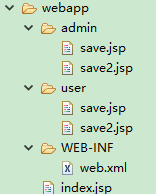
4.配置web.xml文件
<?xml version="1.0" encoding="UTF-8"?>

<web-app version="2.5" xmlns="http://java.sun.com/xml/ns/javaee" xmlns:xsi="http://www.w3.org/2001/XMLSchema-instance" xsi:schemaLocation="http://java.sun.com/xml/ns/javaee

    http://java.sun.com/xml/ns/javaee/web-app_2_5.xsd">

    <!-- 加载spring配置文件 -->

    <context-param>

        <param-name>contextConfigLocation</param-name>

        <param-value>classpath*:spring-*.xml</param-value>

    </context-param>

    <!-- 添加spring监听器 -->

    <listener>

        <listener-class>org.springframework.web.context.ContextLoaderListener</listener-class>

    </listener>

    <!-- 添加 spring-security : springSecurityFilterChain 过滤链 -->

    <filter>

        <filter-name>springSecurityFilterChain</filter-name>

        <filter-class>org.springframework.web.filter.DelegatingFilterProxy</filter-class>

    </filter>

    <filter-mapping>

        <filter-name>springSecurityFilterChain</filter-name>

        <url-pattern>/*</url-pattern>

    </filter-mapping>

    <welcome-file-list>

        <welcome-file>index.jsp</welcome-file>

    </welcome-file-list>

</web-app>
5.访问
访问index.jsp页面
http://localhost:9999/security3/ 会直接进入页面,因为配置文件中没有对这个目录进行配置,可以随意访问访问admin/save.jsp或admin/save2.jsp页面
http://localhost:9999/security3/admin/save.jsp 访问这个页面的时候,需要登录才能访问
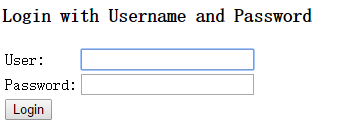
这个页面为spring自动生成。可以通过配置文件改成我们自己的登录页面。(下一节讲)
- 当你密码错误,页面会有相应提示
- 当你用user用户来登录的时候,会报403错误,表示你权限不足
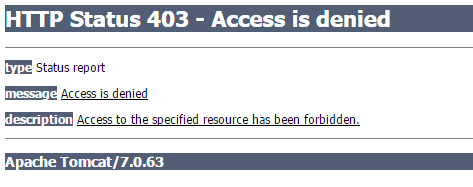
- 只有用admin登录才能进入。在spring-security.xml中配置了。
/admin/** --> hasRole('ROLE_ADMIN') --> admin用户
Spring-Security (学习记录一)--登录的更多相关文章
- spring security实现记录用户登录时间等信息
目录 spring security实现记录用户登录时间等信息 一.原理分析 二.实现方式 2.1 自定义AuthenticationSuccessHandler实现类 2.2 在spring-sec ...
- Spring Security 学习记录
一.核心拦截器详细说明 1.WebAsyncManagerIntegrationFilter 根据请求封装获取WebAsyncManager 从WebAsyncManager获取/注册Security ...
- SpringBoot + Spring Security 学习笔记(五)实现短信验证码+登录功能
在 Spring Security 中基于表单的认证模式,默认就是密码帐号登录认证,那么对于短信验证码+登录的方式,Spring Security 没有现成的接口可以使用,所以需要自己的封装一个类似的 ...
- [转]Spring Security学习总结一
[总结-含源码]Spring Security学习总结一(补命名空间配置) Posted on 2008-08-20 10:25 tangtb 阅读(43111) 评论(27) 编辑 收藏 所属分 ...
- Spring Security之多次登录失败后账户锁定功能的实现
在上一次写的文章中,为大家说到了如何动态的从数据库加载用户.角色.权限信息,从而实现登录验证及授权.在实际的开发过程中,我们通常会有这样的一个需求:当用户多次登录失败的时候,我们应该将账户锁定,等待一 ...
- SpringBoot + Spring Security 学习笔记(三)实现图片验证码认证
整体实现逻辑 前端在登录页面时,自动从后台获取最新的验证码图片 服务器接收获取生成验证码请求,生成验证码和对应的图片,图片响应回前端,验证码保存一份到服务器的 session 中 前端用户登录时携带当 ...
- [转]Spring Security学习总结二
原文链接: http://www.blogjava.net/redhatlinux/archive/2008/08/20/223148.html http://www.blogjava.net/red ...
- Spring Security学习笔记一
一.使用Spring Security 1.在pom 文件中添加Spring Security的依赖. <dependency> <groupId>org.springfram ...
- spring security 动态 修改当前登录用户的 权限
1.前言 spring security 可以获取当前登录的用户信息,同时提供了接口 来修改权限列表信息 , 使用这个方法 ,可以动态的修改当前登录用户权限. 那么问题来了... 如果我是管理员 ,如 ...
- Spring security 学习 (自助者,天助之!)
自己努力,何必要强颜欢笑的求助别人呢? 手心向下不求人! Spring security学习有进展哦: 哈哈! 1.页面都是动态生产的吧! 2.设置权限: a:pom.xml配置jar包 b:cr ...
随机推荐
- redis怎么实现FIFO队列思想
队列(FIFO)通过插入和弹出不同方向操作就可以实现,栈(FILO)插入和弹出相同方向的操作就可以实现:
- @staticmethod和@classmethod区别
转载自: https://www.cnblogs.com/wyongbo/p/python_static_method.html https://www.cnblogs.com/champaign/p ...
- 深入理解Magento – 第三章 – 布局,块和模板
深入理解Magento 作者:Alan Storm 翻译:Hailong Zhang 第三章 – 布局,块和模板 我们接着研究Magento.根据我们第二章讲的Magento MVC的架构,我们接下来 ...
- mybatis中配置文件头
<?xml version="1.0" encoding="UTF-8" ?> <!DOCTYPE mapper PUBLIC "- ...
- go new
go new 尽管没有构造函数,go有一个内置的函数new,可以用来分配一个类型需要的内存.new(X)和&X{}是等效的: goku := new(Saiyan) // 等效 goku := ...
- J2EE学习篇之--JQuery技术详解
前面我们讲解了的J2EE的技术都是服务端的技术,下面我们来看一下前端的一些开发技术,这一篇我们来看一下jQuery技术 简介: jQuery由美国人John Resig创建,至今已吸引了来自世界各地的 ...
- 生产环境用到的几个有用的Linux命令
有时候,几个有用的Linux命令可以很大的提高你的工作效率. 1.free -m 这个命令我暂时就只会这么使用,它可以查看服务器的内存资源 2.top 这个命令同样可以查看服务器的资源,当然我还是用它 ...
- Linux c基本知识整理
1.指针和引用的区别 1.指针是一个变量,变量存储一个地址指向内存中一个存储单元,需要单独分配内存空间.引用相当于变量的别名,不需要单独分配空间 2.引用必须初始化,指针可以先不进行初始化 3.指针可 ...
- 动态队列实现-----C语言
/***************************************************** Author:Simon_Kly Version:0.1 Date: 20170520 D ...
- Linux 下tomcat+jdk+mysql安装
JDK 1.用xftp把 jdk1.8.0_65上传到local下 给他赋予最高权限 1)切换到顶级目录 cd ~ 2)然后切换到上级目录 cd .. 3)切换到local路径下 cd /us ...