
解读Ubuntu的sources.list 和soucres.litsd
使用过Ubuntu的道友们都知道,默认地址是乌班图的org 配置的,对于国内长途跋涉的各位高手来讲真是艰辛;
所以我们一般在安装的时候会先修改服务器源地址使用国内的比如ali,清华或者华为的
源文件地址默认在 /etc/apt/sources.list,当然如果你安装第三方的一般我们喜欢在/etc/apt下建立一个sources.list.d 目录下再在它下面新建一个xxx.list 来存放第三方的安装的deb地址:
比如第三方谷歌浏览器deb的:
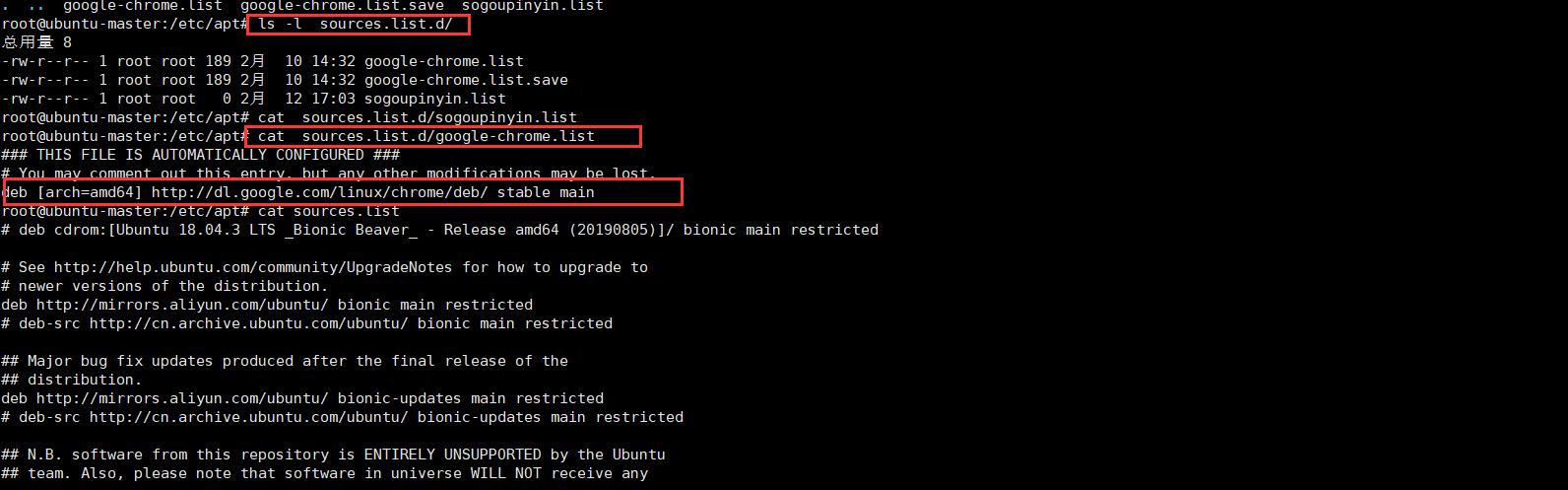
如果你嫌弃麻烦直接手动下载一个xxx.deb谁用dpkg -i xxx.deb 进行创建他会帮你创建sources.list.d 以及对应的.list dpkg 默认是没有的apt-get 自己装个
下面来介绍配置aliyun 的·服务器源:
vim /etc/apt/sources.list
删除所有的地址:粘贴如下:地址百度的,可以自己找,也可以用我的当然我也是百度的,谁没事背这玩意:
####阿里源地址

# https://opsx.alibaba.com/mirror

deb https://mirrors.aliyun.com/ubuntu/ bionic main restricted universe multiverse

deb https://mirrors.aliyun.com/ubuntu/ bionic-security main restricted universe multiverse

deb https://mirrors.aliyun.com/ubuntu/ bionic-updates main restricted universe multiverse

deb https://mirrors.aliyun.com/ubuntu/ bionic-proposed main restricted universe multiverse

deb https://mirrors.aliyun.com/ubuntu/ bionic-backports main restricted universe multiverse

# 仿照清华镜像源,注释了源码镜像以提高 apt update 速度,如有需要可自行取消注释,这个是源码安装的

# deb-src https://mirrors.aliyun.com/ubuntu/ xenial main restricted universe multiverse

# deb-src https://mirrors.aliyun.com/ubuntu/ xenial-security main restricted universe multiverse

# deb-src https://mirrors.aliyun.com/ubuntu/ xenial-updates main restricted universe multiverse

# deb-src https://mirrors.aliyun.com/ubuntu/ xenial-proposed main restricted universe multiverse

# deb-src https://mirrors.aliyun.com/ubuntu/ xenial-backports main restricted universe multiverse
# https://mirrors.tuna.tsinghua.edu.cn/help/ubuntu/
###清华大学源

# 默认注释了源码镜像以提高 apt update 速度,如有需要可自行取消注释

deb https://mirrors.tuna.tsinghua.edu.cn/ubuntu/ bionic main restricted universe multiverse

# deb-src https://mirrors.tuna.tsinghua.edu.cn/ubuntu/ bionic main restricted universe multiverse

deb https://mirrors.tuna.tsinghua.edu.cn/ubuntu/ bionic-updates main restricted universe multiverse

# deb-src https://mirrors.tuna.tsinghua.edu.cn/ubuntu/ bionic-updates main restricted universe multiverse

deb https://mirrors.tuna.tsinghua.edu.cn/ubuntu/ bionic-backports main restricted universe multiverse

# deb-src https://mirrors.tuna.tsinghua.edu.cn/ubuntu/ bionic-backports main restricted universe multiverse

deb https://mirrors.tuna.tsinghua.edu.cn/ubuntu/ bionic-security main restricted universe multiverse

# deb-src https://mirrors.tuna.tsinghua.edu.cn/ubuntu/ bionic-security main restricted universe multiverse
最后执行热更新就可以了:
sudo apt-get update

sudo apt-get upgrade

sudo apt-get install build-essential
解读Ubuntu的sources.list 和soucres.litsd的更多相关文章
- 关于ubuntu的sources.list总结
一.作用 文件/etc/apt/sources.list是一个普通可编辑的文本文件,保存了ubuntu软件更新的源服务器的地址.和sources.list功能一样的是/etc/apt/sources. ...
- [转] 关于ubuntu的sources.list总结
点击阅读原文 一.作用 文件/etc/apt/sources.list是一个普通可编辑的文本文件,保存了ubuntu软件更新的源服务器的地址.和sources.list功能一样的是/etc/apt/s ...
- 【转】关于Ubuntu的sources.list 的总结
一.作用 文件/etc/apt/sources.list是一个普通可编辑的文本文件,保存了ubuntu软件更新的源服务器的地址.和sources.list功能一样的是/etc/apt/sources. ...
- Ubuntu的sources.list
参考文章: https://blog.csdn.net/u012843189/article/details/80964287 位于/etc/apt/sources.list 其中 deb http: ...
- Ubuntu开发笔记
这些操作在ubuntu14.04.1或者ubuntu12.04.5中进行 首先,安装ubuntu12.04(LTS)版本 安装按照高级安装方式,系统分配40G如下: /dev/sda* ext4 ...
- Ubuntu的安装与配置
一.Ubuntu的安装与配置 Ubuntu 快速下载地址 1.安装VMwareTools 系统安装后,工具栏"虚拟机"-->"安装VMwareTools" ...
- 关于ubuntu中的软件安装
在ubuntu中一般使用apt-get来安装软件工具, 例如 sudo apt-get install g++ apt-get会在镜像库中找到你需要的软件镜像(例如 g++)来安装,那么apt-get ...
- 更换Ubuntu源为国内源的操作记录
我们都知道,Ubuntu的官方源对于国内用户来说是比较慢的,可以将它的源换成国内的源(比如阿里源),这样用起来就很快了.下面记录下更换操作: 首先了解下/etc/apt/sources.list文件 ...
- 安装 ubuntu 后,使用 sed 更换国内源
cd /etc/aptsed -i "s/archive.ubuntu.com/mirrors.aliyun.com/g" /etc/apt/sources.list也可以使用 1 ...
随机推荐
- linux中关机重启命令
shutdown 解释 关机重启命令 语法 shutdown [选项] 时间 -c 取消前一个关机命令 -h 关机 -r 重启 示例 # 现在立刻关机 shutdown -h now # 定时关机 s ...
- Linux分区工具-parted
parted用于操纵磁盘分区的程序,通常用于规则大小超过2T的分区,也可用于小分区的规划:它支持多种分区表格式,包括MS-DOS(MBR)和GPT:这对于为新操作系统创建空间,重新组织磁盘使用以及将数 ...
- Python——20200220Python123冲刺试卷 - 1
知识点:面向对象继承,数组组织,文件操作,数据类型 1.面向对象的继承:继承是指类之间共享属性和操作的性质 2.软件危机的原因不包括:软件成本不断提高 软件危机原因: 软件开发生产率低.软件过程不规范 ...
- 重构与动态为angularjs栏位赋值或获取值
先来看下面一段html: 这个ng-model名称带有一定的规律带有序号. 先来实现数据绑定,从数据取到数据后,为ng-model绑定相对应的值: var c = response.data $sco ...
- JS中函数的本质,定义、调用,以及函数的参数和返回值
要用面向对象的方式去编程,而不要用面向过程的方式去编程 对象是各种类型的数据的集合,可以是数字.字符串.数组.函数.对象…… 对象中的内容以键值对方式进行存储 对象要赋值给一个变量 var cat={ ...
- 《手把手教你构建自己的 Linux 系统》学习笔记(6)
目录 /dev 目录是干什么的? /proc 和 /sys 目录是干什么的? udev 这个软件是干什么用的? 目录映射是临时性的,还是永久性的? 命令行里大括号 "{}" 的作用 ...
- Python基础之程序暂停
当我们执行某些程序时,由于机器速度很快导致肉眼无法直接看到执行结果时程序便停止运行.这时候我们迫切需要在程序中暂停,专业术语叫做阻塞.下面列举几种常用的程序暂停方法: input()用法:直接在欲等待 ...
- 深入理解 C/C++ sizeof() 运算符
过去有一段时间一直以为带个括号的 \(sizeof()\) 是 \(C/C++\) 的原生函数QAQ. 其实不然,\(sizeof\) 同位运算符(^|&~!)一样是一种单目运算符,作用于变量 ...
- Intel 8086 标志寄存器及JCC指令表
汇编 JCC指令表 JCC指条件跳转指令,CC就是指条件码. JCC指令 中文含义 英文原意 检查符号位 典型C应用 JZ/JE 若为0则跳转:若相等则跳转 jump if zero;jump if ...
- Windows 使用 TCPing 工具来获取 TCP延迟、端口通顺情况、已禁Ping服务
https://elifulkerson.com/projects/tcping.php