
Android开发 UI布局
Android开发 UI布局
一、线性布局LinearLayout
什么是线性布局?
其实呢,线性布局就是把所有的孩子摆在同一条线上
 <?xml version="1.0" encoding="utf-8"?>

<LinearLayout

    xmlns:android="http://schemas.android.com/apk/res/android"

    android:layout_width="match_parent"

    android:layout_height="match_parent">

    <Button

        android:id="@+id/button"

        android:layout_width="wrap_content"

        android:layout_height="wrap_content"

        android:layout_weight="1"

        android:text="Button" />

    <Button

        android:id="@+id/button2"

        android:layout_width="wrap_content"

        android:layout_height="wrap_content"

        android:layout_weight="1"

        android:text="Button" />

    <Button

        android:id="@+id/button3"

        android:layout_width="wrap_content"

        android:layout_height="wrap_content"

        android:layout_weight="1"

        android:text="Button" />

</LinearLayout>
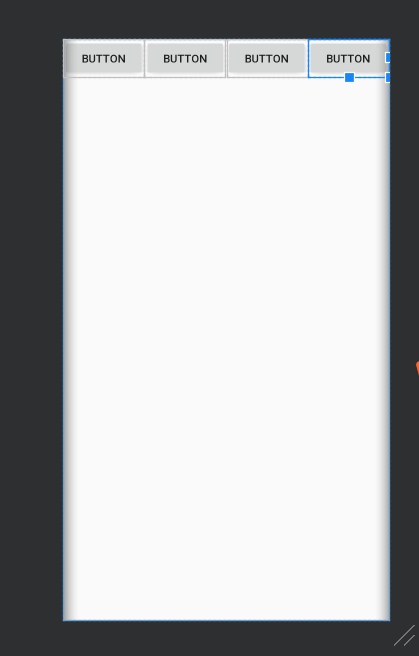
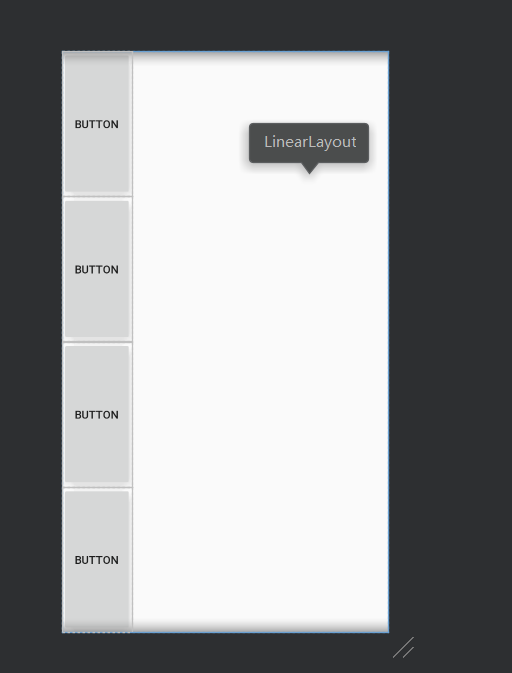
线性布局摆放的方向:我们可以通过orientation来修改LinerLayout的布局的摆放方向,它的值有两个,一个是horizontal(水平),另一个是vertical(竖直)
3、线性布局的权重
当有些时候,我们需要平均地给孩子分配宽度或高度,我们就可以使用权重;
有时候不平均,但点占的宽或高成比例,我们也可以使用权重。
android:layout_width="0th"
android:layout_weight="1"
将宽度设为零,权重设为1,即可平均。
权重就是把所有的数字加起来,上面的占的比例就是大小的比例。
二、相对布局RelativeLayout
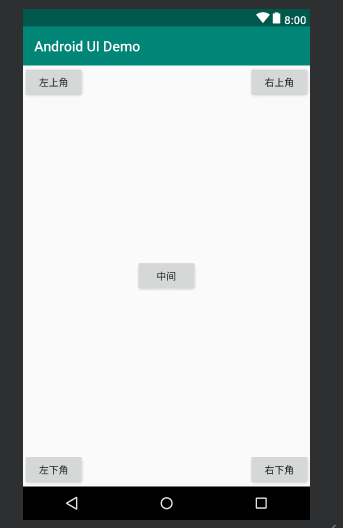
1、相对布局相对于父控件
<?xml version="1.0" encoding="utf-8"?>

<RelativeLayout

    xmlns:android="http://schemas.android.com/apk/res/android"

    android:orientation="vertical" android:layout_width="match_parent"

    android:layout_height="match_parent">

    <Button

        android:id="@+id/button5"

        android:layout_width="wrap_content"

        android:layout_height="wrap_content"

        android:layout_centerInParent="true"

        android:text="中间" />

    <Button

        android:id="@+id/button6"

        android:layout_width="wrap_content"

        android:layout_height="wrap_content"

        android:layout_alignParentRight="true"

        android:layout_alignParentTop="true"

        android:text="右上角" />

    <Button

        android:id="@+id/button7"

        android:layout_width="wrap_content"

        android:layout_height="wrap_content"

        android:layout_alignParentLeft="true"

        android:layout_alignParentTop="true"

        android:text="左上角" />

    <Button

        android:id="@+id/button8"

        android:layout_width="wrap_content"

        android:layout_height="wrap_content"

        android:layout_alignParentLeft="true"

        android:layout_alignParentBottom="true"

        android:text="左下角" />

    <Button

        android:id="@+id/button9"

        android:layout_width="wrap_content"

        android:layout_height="wrap_content"

        android:layout_alignParentRight="true"

        android:layout_alignParentBottom="true"

        android:text="右下角" />

</RelativeLayout>
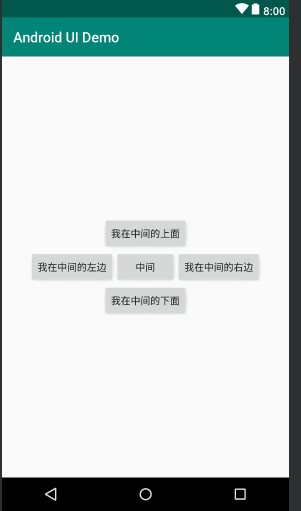
2、相对布局相对于同级控件
<?xml version="1.0" encoding="utf-8"?>

<RelativeLayout

    xmlns:android="http://schemas.android.com/apk/res/android"

    android:orientation="vertical" android:layout_width="match_parent"

    android:layout_height="match_parent">

    <Button

        android:id="@+id/center_button"

        android:layout_width="wrap_content"

        android:layout_height="wrap_content"

        android:layout_centerInParent="true"

        android:text="中间" />

    <Button

        android:layout_width="wrap_content"

        android:layout_height="wrap_content"

        android:layout_centerVertical="true"

        android:layout_toRightOf="@id/center_button"

        android:text="我在中间的右边"/>

        <Button

            android:layout_width="wrap_content"

            android:layout_height="wrap_content"

            android:layout_centerVertical="true"

            android:layout_toLeftOf="@id/center_button"

            android:text="我在中间的左边"/>

    <Button

        android:layout_width="wrap_content"

        android:layout_height="wrap_content"

        android:layout_centerHorizontal="true"

        android:layout_above="@id/center_button"

        android:text="我在中间的上面"/>

    <Button

        android:layout_width="wrap_content"

        android:layout_height="wrap_content"

        android:layout_centerHorizontal="true"

        android:layout_below="@id/center_button"

        android:text="我在中间的下面"/>

</RelativeLayout>
三、其它布局
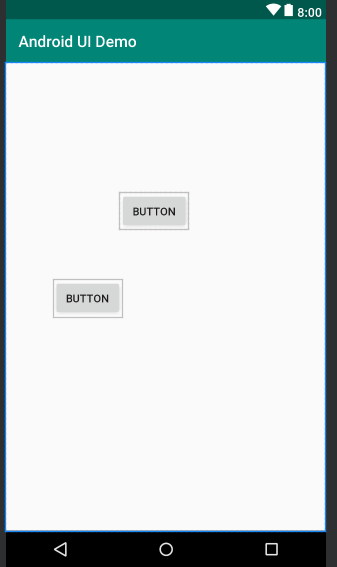
1、绝对布局AbsoluteLayout
依靠x、y控制自己的位置
<?xml version="1.0" encoding="utf-8"?>

<AbsoluteLayout

    xmlns:android="http://schemas.android.com/apk/res/android"

    android:orientation="vertical" android:layout_width="match_parent"

    android:layout_height="match_parent">

    <Button

        android:id="@+id/button5"

        android:layout_width="wrap_content"

        android:layout_height="wrap_content"

        android:layout_x="147dp"

        android:layout_y="167dp"

        android:text="Button" />

    <Button

        android:id="@+id/button6"

        android:layout_width="wrap_content"

        android:layout_height="wrap_content"

        android:layout_x="61dp"

        android:layout_y="279dp"

        android:text="Button" />

</AbsoluteLayout>
2、表格布局TableLayout
<?xml version="1.0" encoding="utf-8"?>

<TableLayout

    xmlns:android="http://schemas.android.com/apk/res/android"

    android:orientation="vertical"

    android:layout_width="match_parent"

    android:layout_height="match_parent">

    <TableRow>

        <Button

            android:layout_width="wrap_content"

            android:layout_height="wrap_content"

            android:text="1" />

        <Button

            android:layout_width="wrap_content"

            android:layout_height="wrap_content"

            android:text="2" />

        <Button

            android:layout_width="wrap_content"

            android:layout_height="wrap_content"

            android:text="3" />

    </TableRow>

    <TableRow>

        <Button

            android:layout_width="wrap_content"

            android:layout_height="wrap_content"

            android:text="4" />

        <Button

            android:layout_width="wrap_content"

            android:layout_height="wrap_content"

            android:text="5" />

        <Button

            android:layout_width="wrap_content"

            android:layout_height="wrap_content"

            android:text="6" />

    </TableRow>

    <TableRow>

        <Button

            android:layout_width="wrap_content"

            android:layout_height="wrap_content"

            android:text="7" />

        <Button

            android:layout_width="wrap_content"

            android:layout_height="wrap_content"

            android:text="8" />

        <Button

            android:layout_width="wrap_content"

            android:layout_height="wrap_content"

            android:text="9" />

    </TableRow>

</TableLayout>

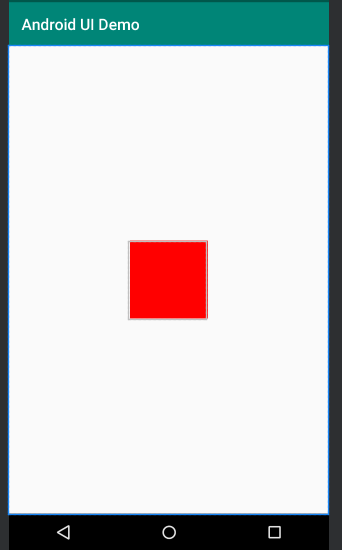
3、帧布局FrameLayout
<?xml version="1.0" encoding="utf-8"?>

<FrameLayout

    xmlns:android="http://schemas.android.com/apk/res/android"

    android:orientation="vertical"

    android:layout_width="match_parent"

    android:layout_height="match_parent">

  <View

      android:layout_width="100dp"

      android:layout_height="100dp"

      android:layout_gravity="center"

      android:background="#ff00"

      />

</FrameLayout>
四、布局中常用的单位
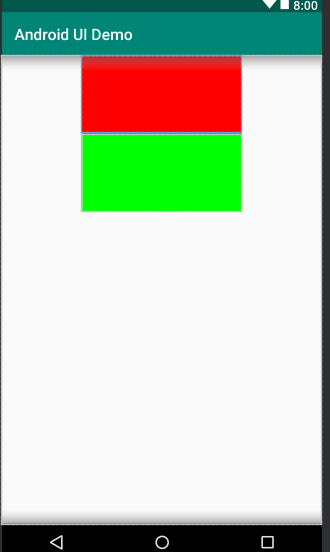
1、像素单位px
像素单位不建议使用,除非是手表,或者机顶盒
2、适配单位dp
推荐使用,因为可以实现适配
以160dp为基准,1dp=1px
3、字体单位sp
<?xml version="1.0" encoding="utf-8"?>

<LinearLayout xmlns:android="http://schemas.android.com/apk/res/android"

    android:orientation="vertical"

    android:layout_width="match_parent"

    android:layout_height="match_parent">

    <View

        android:layout_width="540px"

        android:layout_height="100dp"

        android:layout_gravity="center"

        android:background="#ff00"

        />

    <View

        android:layout_width="205dp"

        android:layout_height="100dp"

        android:layout_gravity="center"

        android:background="#00ff00"

        />

</LinearLayout>
Android开发 UI布局的更多相关文章
- Android开发--UI之Bundle的使用
Android开发–UI之Bundle的使用 最近,把之前学过的东西大体的整理了以下,并且想把学过的心得分享给大家.我自己做了一个小小的demo,以便说明具体的应用. 这里的两个界面是通过第一个界面输 ...
- Android开发---网格布局案例
Android开发---网格布局案例 效果图: 1.MainActivity.java package com.example.android_activity; import android.ap ...
- Android开发 --代码布局
Android开发 --代码布局 在线性布局LinearLayout里加入view比较简单,因为属性比较少,布局简单 示例,加入一个TextView LinearLayout layout = (Li ...
- Android开发 ---xml布局元素
1.android:orientation="vertical/horizontal" vertical为垂直布局, horizontal为水平布局 2.android:layou ...
- Android开发-动态布局小记
android动态布局相比静态布局,动态布局不用再将xml转变了布局代码,提高了一定的效率,当然可以忽略不记.动态布局主要是比较灵活,可以很快的在代码中直接修改布局,并直接使用控件进行业务逻辑开发.但 ...
- Android开发UI之开源项目第一篇——个性化控件(View)篇
原文:http://blog.csdn.net/java886o/article/details/24355907 本文为那些不错的Android开源项目第一篇——个性化控件(View)篇,主要介绍A ...
- Android开发UI之补间动画-布局添加动画
布局添加动画 使用步骤: 1.获取到布局的id RelativeLayout ly=(RelativeLayout)findViewById(R.id.layout); 2.设置动画样式 ScaleA ...
- Android开发UI之布局文件LinearLayout
LinearLayout-线性布局,该布局中的控件按照水平方向排列或者竖直方向排列. 通过属性android:orientation=""决定的,可选值:vertical和hori ...
- Android开发UI之给ListView设置布局动画效果
1.通过JAVA代码添加,资源文件基本上不修改 XML文件,只添加了一个ListView,就不贴XML文件的代码了. java代码: public class MainActivity extends ...
随机推荐
- Beego 输出数据格式JSON、XML、JSONP
JSON.XML.JSONP beego 当初设计的时候就考虑了 API 功能的设计,而我们在设计 API 的时候经常是输出 JSON 或者 XML 数据,那么 beego 提供了这样的方式直接输出: ...
- JN_0016:查找端口占用
Windows查看端口占用 一. 查看所有进程占用的端口 在开始-运行-cmd,输入:netstat –ano 可以查看所有进程 二.查看占用指定端口的程序 当你在用tomcat发布程序时,经常会 ...
- ABS与PC材质
PC材料和ABS材料都是最常用的塑料材质,它们在材质.价格.性能上都有不同点. (一)PC材料 优点:PC是一种综合性能优良的非晶型热塑性树脂,具有优异的电绝缘性.延伸性.尺寸稳定性及耐化学腐蚀性,较 ...
- nodejs events
EventEmitter类 events模块提供一个对象:events.EventEmitter,核心是事件触发和事件监听的封装. 大多数时候不会直接使用EventEmitter,而是在对象中继承它( ...
- Microsoft.EntityFrameworkCore.Internal.ServiceProviderCache的类型初始值设定项引发异常。 ---> System.IO.FileLoadException: 未能加载文件或程序集
场景: 安装程序到全新的环境的电脑时中(此时已经安装了能正常安装程序电脑的环境) 完整错误: Application_ThreadException:System.TypeInitialization ...
- Android 基础知识 -- Linux环境搭建
Android 开发工具下载网站:http://www.androiddevtools.cn/ 1 JDK 1.1 下载JDK,解压后放到/usr/lib/jvm/目录 sudo mv jdk1.7. ...
- WPF-命令-基础知识
命令模型的主要元素: 1.命令 2.命令绑定:命令连接到相关的应用程序逻辑 3.命令源:命令源触发命令, 4.命令目标:应用程序逻辑. -------------------------------- ...
- jQuery---创建和添加节点
创建和添加节点 //创建jq对象 var $li = $('<a href="http://web.itcast.cn" target="_blank"& ...
- redis中获取没有设置ttl过期时间的key
需求:redis作为一个内存型的数据库,我们需要对过期key保持关注,从info keyspace中可以看出有多少key没有设置过期时间,那么到底是哪些呢? 说明:关于redis ttl 的返回值,请 ...
- php 对象、json 、XML、数组互转
对象转json $json=json_encode($postObj,JSON_FORCE_OBJECT); json转对象 $obj=json_encode($json); json转数组 $arr ...