
netstat 显示当前网络连接的统计信息
C:\Users\Administrator\Desktop\hsqldb-2.3.2\data>netstat -h
Displays protocol statistics and current TCP/IP network connections.
NETSTAT [-a] [-b] [-e] [-f] [-n] [-o] [-p proto] [-r] [-s] [-t] [interval]
-a Displays all connections and listening ports.显示所有的连接和监听的端口
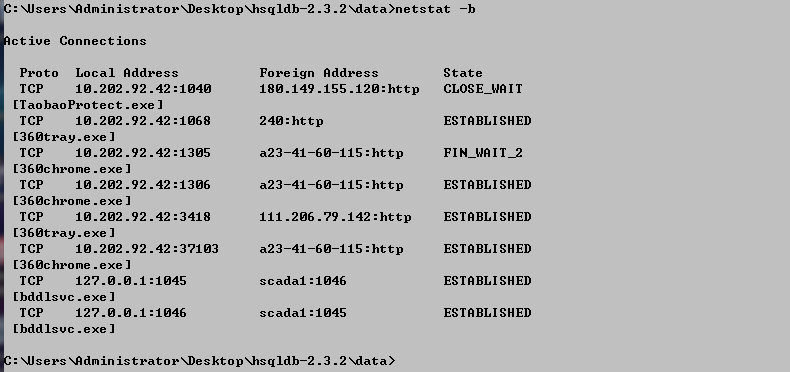
-b Displays the executable(可执行文件) involved in creating each connection or listening port. 显示用于创建每个连接或端口的可执行文件
In some cases well-known executables host multiple independent components, 有些情况下,某些知名的可执行文件与多个独立的组件相关
and in these cases the sequence of components involved in creating the connection or listening port is displayed.
In this case the executable name is in [] at the bottom,
on top is the component it called,
and so forth until TCP/IP was reached.
Note that this option can be time-consuming and will fail unless you have sufficient permissions.
-e Displays Ethernet statistics. This may be combined with the -s option.

-f Displays Fully Qualified Domain Names (FQDN) for foreign addresses.
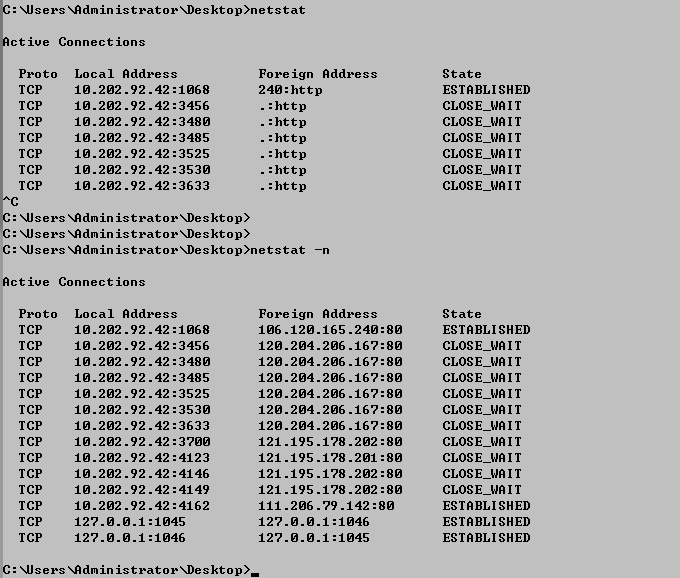
-n Displays addresses and port numbers in numerical form.
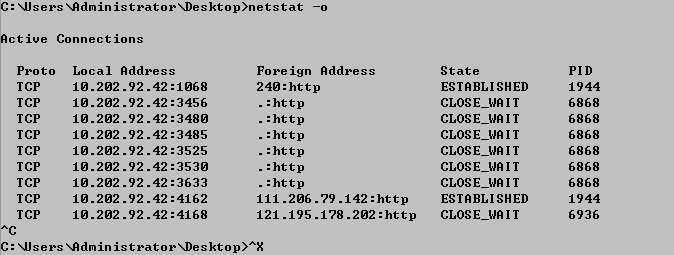
-o Displays the owning process ID associated with each connection. 显示每个连接关联的进程ID
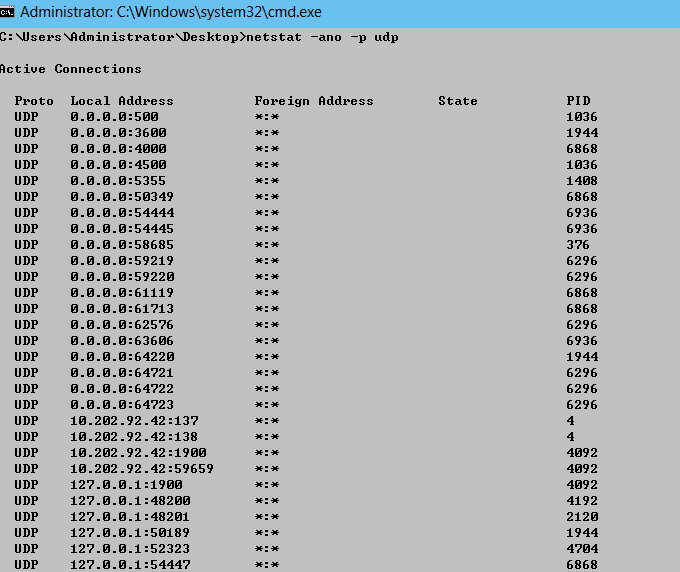
-p proto Shows connections for the protocol specified by proto; proto may be any of: TCP, UDP, TCPv6, or UDPv6.
显示指定协议的连接
If used with the -s option to display per-protocol statistics,
proto may be any of:IP, IPv6, ICMP, ICMPv6, TCP, TCPv6, UDP, or UDPv6.
-r Displays the routing table. 显示路由表
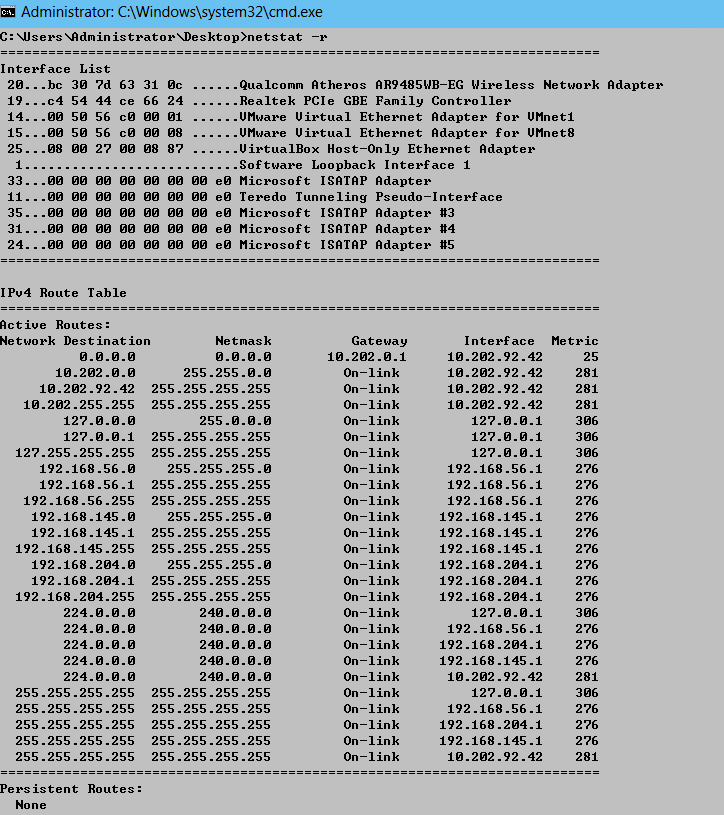
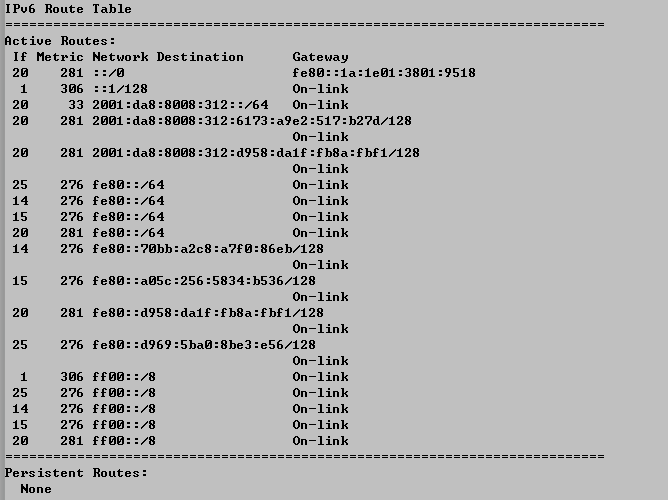
-s Displays per-protocol statistics. 显示每个协议的统计数据
By default, statistics are shown for IP, IPv6, ICMP, ICMPv6, TCP, TCPv6, UDP, and UDPv6;
the -p option may be used to specify a subset of the default.
-t Displays the current connection offload state.显示当前连接的卸载状态

interval Redisplays selected statistics, pausing interval seconds between each display.
指定间隔多少秒,重新显示统计数据,不指定仅显示一次
Press CTRL+C to stop redisplaying statistics.
If omitted, netstat will print the current configuration information once.
netstat 显示当前网络连接的统计信息的更多相关文章
- Windows 10无法显示无线网络连接
最近刚刚升级了一下操作系统,升级到了1903版本.正好又有一个HP的打印机安装了一下.结果,发现居然无法管理无线网络了.如果看不到图,请点我. 右击选择连接,也无法显示SSID. 驱动是从这个官网下载 ...
- sqlplus中显示sql执行计划和统计信息
31 ,32 , 33 ,34 keywords : oracle storage structure 最详细讲解: 1:doc 1 logical storage structure 2 ...
- netstat - 显示网络连接,路由表,接口状态,伪装连接,网络链路信息和组播成员组。
总览 SYNOPSIS netstat [address_family_options] [--tcp|-t] [--udp|-u] [--raw|-w] [--listening|-l] [--al ...
- 【Linux 运维】查看网络连接状态信息之netstat和ss命令详解
一.netstat 常用命令详解 通过man netstat可以查看netstat的帮助信息: netstat 命令:用于显示各种网络相关信息,如网络连接,路由表,接口状态,无效连接,组播成员 等等. ...
- Linux基础命令---netstat显示网络状态
netstat netstat指令可以显示当前的网络连接.路由表.接口统计信息.伪装连接和多播成员资格等信息. 此命令的适用范围:RedHat.RHEL.Ubuntu.CentOS.SUSE.open ...
- 负载均衡服务TCP端口健康检查成功,为什么在后端业务日志中出现网络连接异常信息?
负载均衡服务TCP端口健康检查成功,为什么在后端业务日志中出现网络连接异常信息? 原文: https://help.aliyun.com/document_detail/127193.html?spm ...
- linux管理网络连接指令
ethtool eth0 查看 eth0对应网卡的设置 ethtool -i eth0 查看 eth0网卡的驱动信息 ethtool -S eth0 查看网卡的统计信息 ethtool -s eth ...
- Linux 命令 - ss: 查看套接字统计信息
命令格式 ss [options] [ FILTER ] 命令参数 -h, --help 显示帮助信息. -V, --version 显示版本信息. -n, --numeric 不解析服务名称. -r ...
- SQL Server研究之统计信息—发现过期统计信息并处理具体解释
前言: 统计信息是关于谓词中的数据分布的主要信息源,假设不知道详细的数据分布,优化器不能获得预估的数据集.从而不能统计须要返回的数据. 在创建列的统计信息后,在DML操作如insert.upda ...
随机推荐
- Git clone远程仓库
git clone git@ip地址:/home/git_data/wechat.git
- Windows下更改pip镜像源
其实学习是一个逐步探索的过程.今天因为把带有中文的Python安装路径给改了,结果带来很大的麻烦,导致在命令行输入vietualenv和其他一些第三方模块都出现Fatal error in launc ...
- DirectX11笔记(六)--Direct3D渲染2--VERTEX BUFFER
原文:DirectX11笔记(六)--Direct3D渲染2--VERTEX BUFFER 版权声明:本文为博主原创文章,未经博主允许不得转载. https://blog.csdn.net/u0103 ...
- java 4对象群体的组织
两个接口 collecion接口 元素构成的元素的群体 map接口 键值对组成的群体 Array类 Vector ArrayList 在数组上构建的类 Java集合框架介绍 集成过得数据结构 查询方法 ...
- 计算机组成原理作业一 熟悉MIPS指令
第一题 .data outputd: .asciiz "Alpha","November","First","alpha" ...
- gitlab 添加本地项目
1.安装git https://git-scm.com/downloads 2.新建工程 3.创建密钥 a.桌面右键 b.cd ~/.ssh/ 如果提示 “ No such file or di ...
- 解决Apache日志"internal dummy connection"方法
最近查看服务器中apache日志,发现有大量的 OPTIONS * HTTP/1.0" 200 - "-" "Apache (internal dummy co ...
- Introduction to 3D Game Programming with DirectX 12 学习笔记之 --- 全书总结
原文:Introduction to 3D Game Programming with DirectX 12 学习笔记之 --- 全书总结 本系列文章中可能有很多翻译有问题或者错误的地方:并且有些章节 ...
- 集合--List&&ArrayList-LinkedList
1.8新特性 List接口中的replaceAll()方法,替换指定的元素,函数式接口编程 List 元素是有序的并且可以重复 四种add();方法 ArrayList(用于查询操作),底层是数组 ...
- nodeJs学习-06 模块化、系统模块、自定义模块、express框架
系统模块:http://nodejs.cn/api/events.html 自定义模块: require 请求:引入模块 module 模块:批量输出 exports 输出:单独输出 ...