
Android 应用程序集成Google 登录及二次封装
最新更新(2020/4/15)
最新有个项目要集成 google 登陆,我又又又又 重新做了一遍,发现很多重要 api 都变了,这里重新总结一下,用 Kotlin 编写。
首先依赖包已经更新到 18.0.0
api 'com.google.android.gms:play-services-auth:18.0.0'
GoogleLoginUtil 工具类:
package com.enjoy.literaturemodule.account.login.google

import android.content.Context

import androidx.fragment.app.FragmentActivity

import com.enjoy.library.utils.LogUtils

import com.enjoy.literaturemodule.R

import com.google.android.gms.auth.api.signin.*

import com.google.android.gms.common.api.ApiException

import com.google.android.gms.tasks.Task

/**

 * @author yanjun.zhao

 * @time 2020/4/15 3:20 PM

 * @desc Google 登陆

 */

class GoogleLoginUtil(var activity: FragmentActivity, private var googleSignListener: GoogleSignListener) {

    private var gso: GoogleSignInOptions? = null

    private var mGoogleSignClient: GoogleSignInClient? = null

    companion object {

        const val requestCode = 10

    }

    init {

        gso = GoogleSignInOptions.Builder(GoogleSignInOptions.DEFAULT_SIGN_IN)

                .requestEmail()

                .requestId()

                .requestIdToken(activity.getString(R.string.google_server_client_id))

                .requestProfile()

                .build()

        mGoogleSignClient = GoogleSignIn.getClient(activity, gso!!)

    }

    /**

     * 登陆

     */

    fun login() {

        var intent = mGoogleSignClient?.signInIntent

        activity.startActivityForResult(intent, requestCode)

    }

    /**

     * 退出登陆

     */

    fun signOut() {

        mGoogleSignClient?.signOut()

                ?.addOnCompleteListener {

                    googleSignListener?.googleLogoutSuccess()

                }

                ?.addOnFailureListener {

                    googleSignListener?.googleLogoutFail()

                }

    }

    /**

     * 是否 登陆过

     */

    fun hasLogin(context: Context): Boolean {

        var accout = GoogleSignIn.getLastSignedInAccount(context)

        if (accout == null) {

            //是新用户,没有登陆过

            return false

        } else {

            //老用户,已经登陆过

            //获取用户信息

            var displayName = accout?.displayName

            var email = accout?.email

            val id = accout?.id

            val photoUrl = accout?.photoUrl

            val familyName = accout?.familyName

            val givenName = accout?.givenName

            return true

        }

    }

    fun handleSignInResult(completedTask: Task<GoogleSignInAccount>) {

        try {

            var accout = completedTask.getResult(ApiException::class.java)

            //登陆成功

            var displayName = accout?.displayName

            var email = accout?.email

            val id = accout?.id

            val photoUrl = accout?.photoUrl

            val familyName = accout?.familyName

            val givenName = accout?.givenName

            LogUtils.d("google-displayName", displayName)

            LogUtils.d("google-email", email)

            LogUtils.d("google-photoUrl", photoUrl?.encodedPath)

            LogUtils.d("google-photoUrl", photoUrl?.toString())

            LogUtils.d("google-familyName", familyName)

            LogUtils.d("google-givenName", givenName)

            LogUtils.d("google-id", id)

            googleSignListener?.googleLoginSuccess()

        } catch (e: ApiException) {

            googleSignListener?.googleLoginFail()

        }

    }

    interface GoogleSignListener {

        fun googleLoginSuccess()

        fun googleLoginFail()

        fun googleLogoutSuccess()

        fun googleLogoutFail()

    }

}
Activity 使用
package com.enjoy.literaturemodule.account

import android.content.Intent

import android.os.Bundle

import android.util.Log

import androidx.fragment.app.FragmentActivity

import com.enjoy.literaturemodule.account.login.google.GoogleLoginUtil

import com.google.android.gms.auth.api.signin.GoogleSignIn

import kotlinx.android.synthetic.main.activity_login.*

/**

 * 登陆

 */

class LoginActivity : FragmentActivity(), GoogleLoginUtil.GoogleSignListener {

    private var googleLoginUtil: GoogleLoginUtil? = null

    override fun onCreate(savedInstanceState: Bundle?) {

        super.onCreate(savedInstanceState)

        googleLoginUtil = GoogleLoginUtil(this, this)

        //登陆

        google_signIn_bt.setOnClickListener {

            googleLoginUtil?.login()

        }

    }

    override fun onActivityResult(requestCode: Int, resultCode: Int, data: Intent?) {

        //google登陆

        if (requestCode == GoogleLoginUtil.requestCode) {

            var googleResultTask = GoogleSignIn.getSignedInAccountFromIntent(data)

            googleLoginUtil?.handleSignInResult(googleResultTask)

        }

        super.onActivityResult(requestCode, resultCode, data)

    }

    override fun googleLoginSuccess() {

        Log.e("google", "googleLoginSuccess")

    }

    override fun googleLoginFail() {

        Log.e("google", "googleLoginFail")

    }

    override fun googleLogoutSuccess() {

        Log.e("google", "googleLogoutSuccess")

    }

    override fun googleLogoutFail() {

        Log.e("google", "googleLogoutFail")

    }

}
在做的时候,发现一直登陆不成功 StatusCode = 12500 , 折腾了很久,才弄好,有两点需要注意:
注意事项1:
一旦添加了 google_server_client_id , 那么 客户端 google-services.json 一定要更新。
注意事项2:
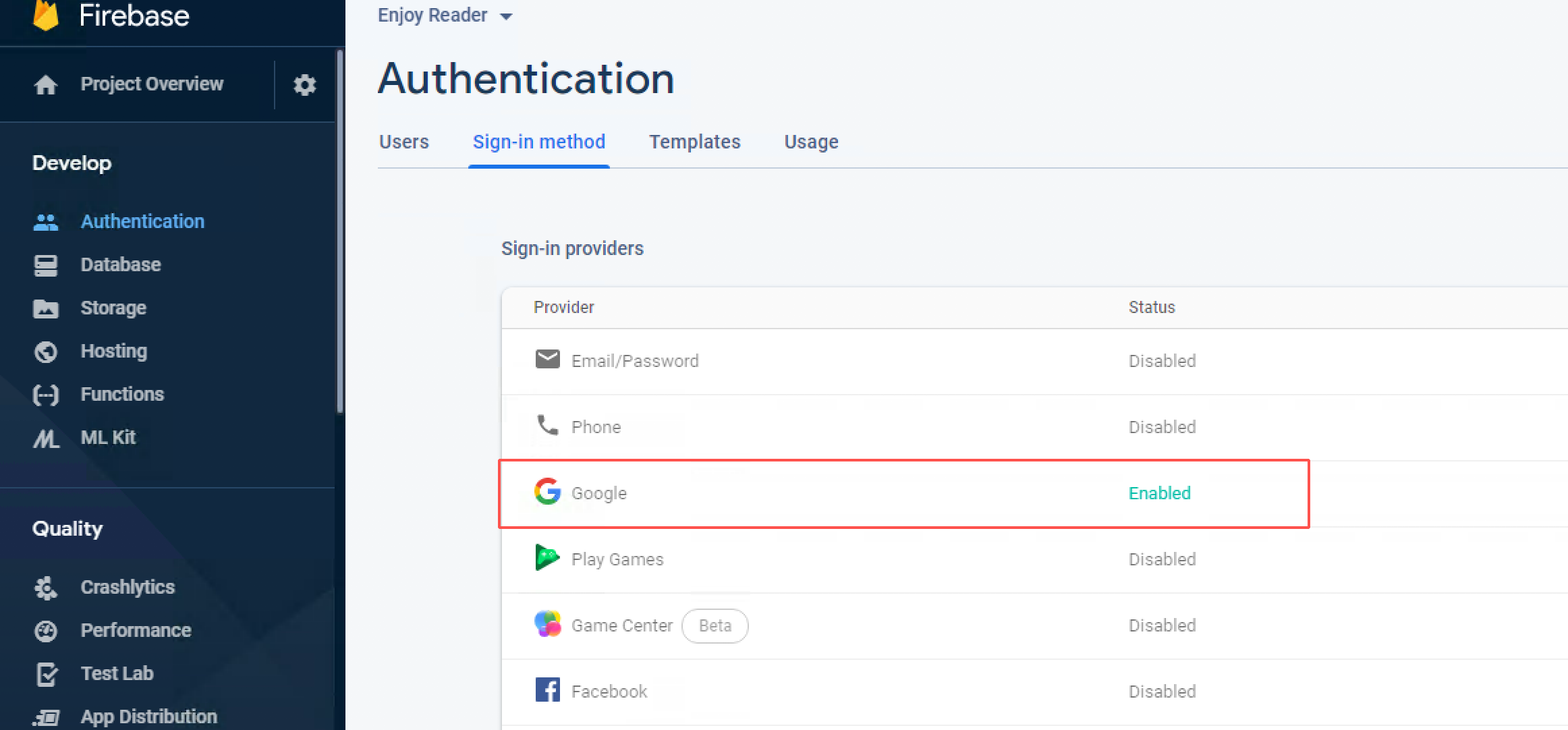
项目集成 Google 登陆,一定要在 Firebase 后台开启 Google 登陆功能,一定、一定、一定。
开启之前的状态 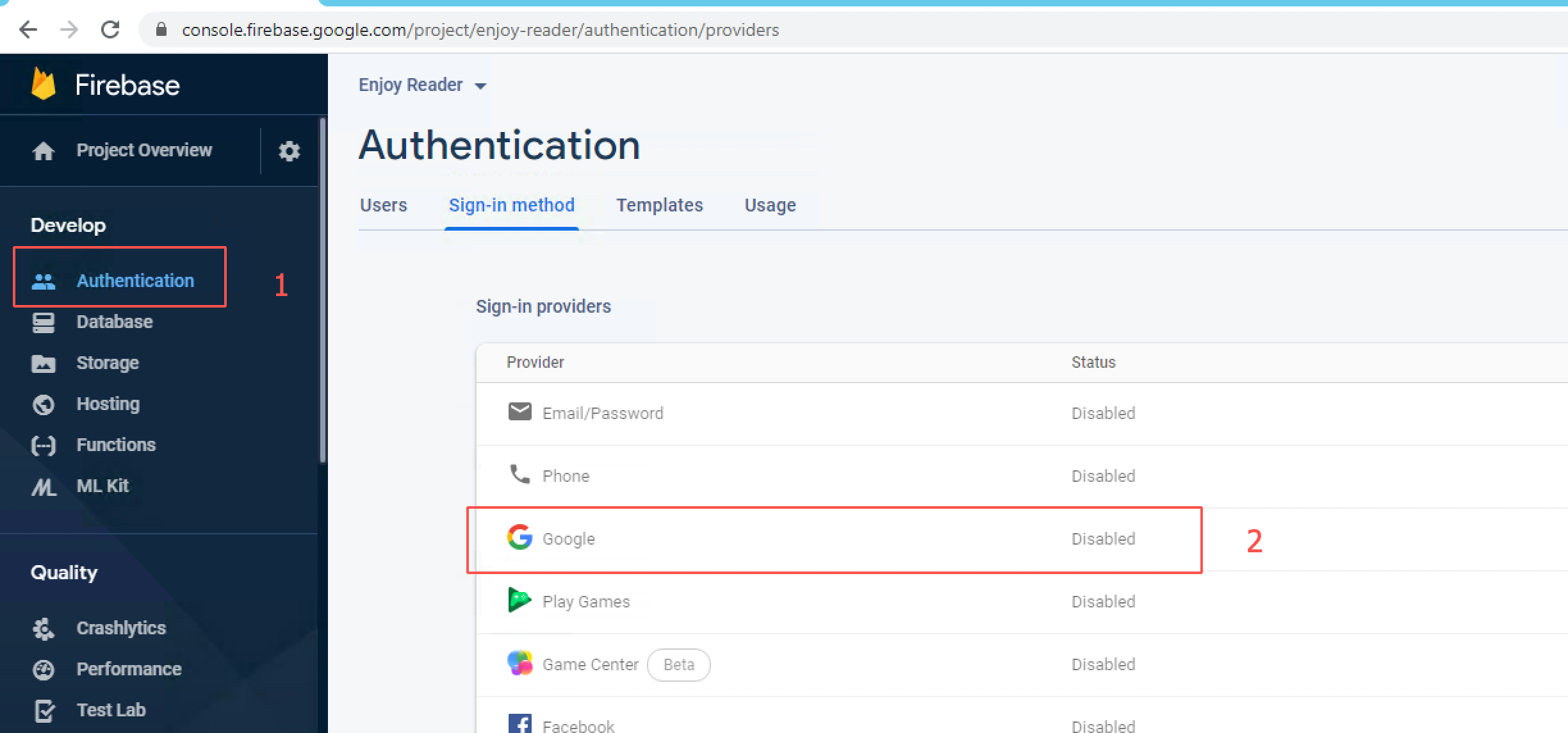
开启之后的状态:
补充:(2016/8/9)
有很多人留言或者发私信说一直登陆失败。然后我就自己写了一个demo,核心代码完全复制博客里面的 GoogleLogin (代码见第六个标题, 6、Google SDK 二次封装) 里面的代码,真的是一行代码都没有改,完完全全复制的。最后实现登陆成功,可见博客里面的代码是没有问题的。我在操作过程中,有几个关键的地方提一下。
1、权限问题:只需要添加联网权限即可
<uses-permission android:name="android.permission.INTERNET"></uses-permission>
2、签名问题
在开发者后台创建app的时候,需要添加 SHA-1的值,这个值是从你的签名里面获取的。注意,在你运行demo的时候,如果直接运行是不行的,因为直接运行,android studio 会为你的app使用默认签名,这个签名是系统自带的,这个签名的SHA-1值肯定和你真正的签名文件SHA-1值不一样,所以必然会登录失败。 你需要修改你的app debug 时的签名和 发布时的签名一致就好了。
正文:
谷歌登录API: https://developers.google.com/identity/sign-in/android/
1、注册并且登录google网站
2、进入google开发者平台创建应用
3、在开发者平台填写响应的信息,包括 应用名、包名、签名的SHA-1值
图1
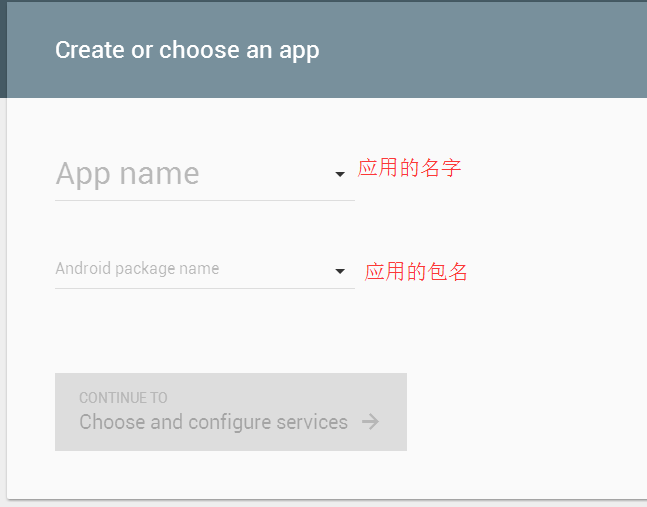
图2
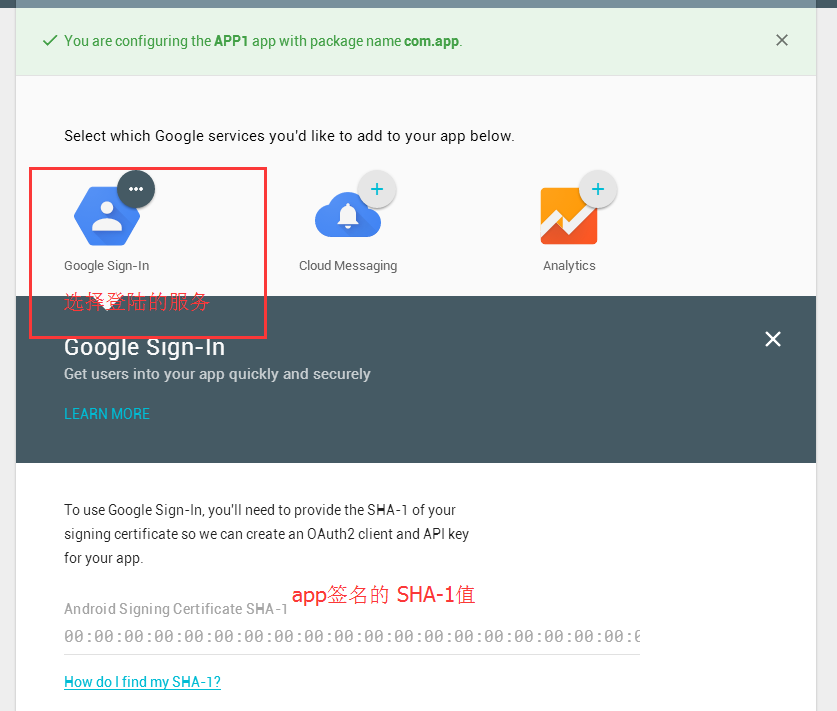
图3
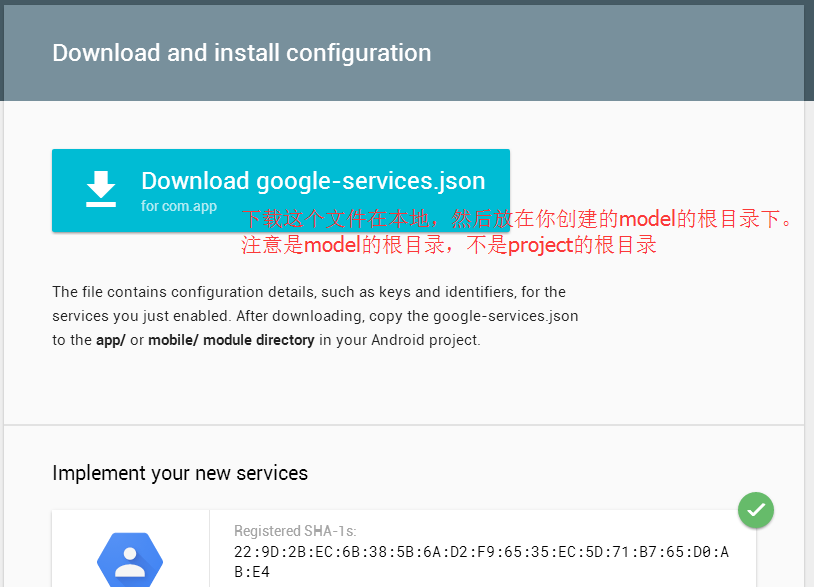
4、在项目中添加谷歌服务
4.1、在SDK Manager 里面下载 google service

4.2、在project目录下的build.gradle下添加
classpath 'com.google.gms:google-services:2.1.0-alpha4'
查看最新版本号:https://jcenter.bintray.com/com/google/gms/google-services/
4.3 在model目录下的build.gradle下添加
compile 'com.google.android.gms:play-services-auth:8.4.0'
5、代码实现
5.1、在布局文件中
  <com.google.android.gms.common.SignInButton

             android:id="@+id/google_signIn_bt"

             android:layout_width="wrap_content"

             android:layout_height="wrap_content" />

         <Button

             android:id="@+id/google_loginOut_bt"

             android:layout_width="match_parent"

             android:layout_height="wrap_content"

             android:text="google退出登录"

             android:layout_gravity="center"

             android:gravity="center"

             >

         </Button>
5.2、java代码
 package com.pegasus.map.presentation.ui.activity;

 import android.content.Intent;

 import android.os.Bundle;

 import android.view.View;

 import android.widget.Button;

 import com.google.android.gms.auth.api.Auth;

 import com.google.android.gms.auth.api.signin.GoogleSignInAccount;

 import com.google.android.gms.auth.api.signin.GoogleSignInOptions;

 import com.google.android.gms.auth.api.signin.GoogleSignInResult;

 import com.google.android.gms.common.ConnectionResult;

 import com.google.android.gms.common.SignInButton;

 import com.google.android.gms.common.api.GoogleApiClient;

 import com.google.android.gms.common.api.ResultCallback;

 import com.google.android.gms.common.api.Status;

 import com.pegasus.map.R;

 import com.pegasus.map.presentation.ui.base.BaseActivity;

 import butterknife.Bind;

 import butterknife.ButterKnife;

 /**

  * Created by ${zyj} on 2016/3/24.

  * 登录

  */

 public class LoginActivity1 extends BaseActivity implements GoogleApiClient.OnConnectionFailedListener , View.OnClickListener  {

     public int RequestCode = 10 ;

     @Bind( R.id.google_signIn_bt )

     public SignInButton google_signIn_bt ;

     @Bind( R.id.google_loginOut_bt )

     public Button google_loginOut_bt ;

     public GoogleSignInOptions gso ;

     public GoogleApiClient mGoogleApiClient ;

     @Override

     protected void onCreate(Bundle savedInstanceState) {

         super.onCreate(savedInstanceState);

         setContentView(R.layout.activity_login);

         ButterKnife.bind(this);

         init();

     }

     private void init() {

         //初始化谷歌登录服务

         gso = new GoogleSignInOptions.Builder(GoogleSignInOptions.DEFAULT_SIGN_IN)

                 .requestEmail()   //获取邮箱

                 .requestId()      //获取id 号

                 .requestIdToken("456212545785")  //获取token

                 .build();

         // Build a GoogleApiClient with access to GoogleSignIn.API and the options above.

         mGoogleApiClient = new GoogleApiClient.Builder( this )

                 .enableAutoManage( this , this )

                 .addApi(Auth.GOOGLE_SIGN_IN_API, gso)

                 .build();

         //登录

         google_signIn_bt.setSize(SignInButton.SIZE_STANDARD);

         google_signIn_bt.setScopes(gso.getScopeArray());

         google_signIn_bt.setOnClickListener(this) ;

         //退出

         google_loginOut_bt.setOnClickListener(this) ;

     }

     @Override

     protected void onActivityResult(int requestCode, int resultCode, Intent data) {

         super.onActivityResult(requestCode, resultCode, data);

         //谷歌登录成功回调

         if ( requestCode == RequestCode ) {

             GoogleSignInResult result = Auth.GoogleSignInApi.getSignInResultFromIntent(data);

             handleSignInResult( result ) ;

         }

     }

     @Override

     public void onConnectionFailed(ConnectionResult connectionResult) {

     }

     @Override

     public void onClick(View v) {

         switch ( v.getId() ){

             case R.id.google_signIn_bt :   //登录

                 signIn();

                 break;

             case R.id.google_loginOut_bt :

                 signOut();

                 break;

         }

     }

     /**

      * 登录

      */

     private void signIn() {

         Intent signInIntent = Auth.GoogleSignInApi.getSignInIntent(mGoogleApiClient);

         startActivityForResult(signInIntent, RequestCode );

     }

     /**

      * 退出

      */

     private void signOut() {

         Auth.GoogleSignInApi.signOut(mGoogleApiClient).setResultCallback(

                 new ResultCallback<Status>() {

                     @Override

                     public void onResult(Status status) {

                         // ...

                     }

                 });

     }

     private void handleSignInResult(GoogleSignInResult result) {

         if (result.isSuccess()) {

             // Signed in successfully, show authenticated UI.

             GoogleSignInAccount acct = result.getSignInAccount();

             //获取用户名

             String name = acct.getDisplayName() ;

             String email = acct.getEmail() ;

             String token = acct.getIdToken() ;

             String id = acct.getId() ;

         } else {

             // Signed out, show unauthenticated UI.

         }

     }

 }
6、Google SDK 二次封装
 package com.pegasus.map.presentation.utils;

 import android.content.Intent;

 import android.support.v4.app.FragmentActivity;

 import android.util.Log;

 import android.widget.Toast;

 import com.google.android.gms.auth.api.Auth;

 import com.google.android.gms.auth.api.signin.GoogleSignInAccount;

 import com.google.android.gms.auth.api.signin.GoogleSignInOptions;

 import com.google.android.gms.auth.api.signin.GoogleSignInResult;

 import com.google.android.gms.common.api.GoogleApiClient;

 import com.google.android.gms.common.api.ResultCallback;

 import com.google.android.gms.common.api.Status;

 import com.pegasus.map.R;

 /**

  * Created by ${zyj} on 2016/3/30.

  */

 public class GoogleLogin {

     public int requestCode = 10 ;

     private FragmentActivity activity ;

     public GoogleSignInOptions gso ;

     public GoogleApiClient mGoogleApiClient ;

     public GoogleApiClient.OnConnectionFailedListener listener ;

     private GoogleSignListener googleSignListener ;

     public GoogleLogin(FragmentActivity activity , GoogleApiClient.OnConnectionFailedListener listener ){

         this.activity = activity ;

         this.listener = listener ;

         //初始化谷歌登录服务

         gso = new GoogleSignInOptions.Builder(GoogleSignInOptions.DEFAULT_SIGN_IN)

                 .requestEmail()

                 .requestId()

                 .requestIdToken( activity.getString(R.string.google_server_client_id))

                 .requestProfile()

                 .build();

         // Build a GoogleApiClient with access to GoogleSignIn.API and the options above.

         mGoogleApiClient = new GoogleApiClient.Builder( activity )

                 .enableAutoManage( activity , listener )

                 .addApi(Auth.GOOGLE_SIGN_IN_API, gso)

                 .build();

     }

     /**

      * 登录

      */

     public void signIn() {

         Intent signInIntent = Auth.GoogleSignInApi.getSignInIntent(mGoogleApiClient);

         activity.startActivityForResult(signInIntent, requestCode);

     }

     /**

      * 退出登录

      */

     public void signOut() {

         Auth.GoogleSignInApi.signOut(mGoogleApiClient).setResultCallback(

                 new ResultCallback<Status>() {

                     @Override

                     public void onResult(Status status) {

                         if ( status.isSuccess() ){

                             if ( googleSignListener != null ){

                                 googleSignListener.googleLogoutSuccess();

                             }

                         }else {

                             if ( googleSignListener!= null ){

                                 googleSignListener.googleLogoutFail();

                             }

                         }

                     }

                 });

     }

     public String handleSignInResult(GoogleSignInResult result) {

         String res = "" ;

         if (result.isSuccess()) {

             //登录成功

             GoogleSignInAccount acct = result.getSignInAccount();

             res = "登录成功"

                     + "用户名为:" + acct.getDisplayName()

                     + "  邮箱为:" + acct.getEmail()

                     + " token为:" + acct.getIdToken()

                     + " 头像地址为:" + acct.getPhotoUrl()

                     + " Id为:" + acct.getId()

                     + " GrantedScopes为:" + acct.getGrantedScopes() ;

             Log.e("res", "res:"+res);

             Toast.makeText( activity, res, Toast.LENGTH_SHORT).show();

             if ( googleSignListener != null ){

                 googleSignListener.googleLoginSuccess();

             }

         } else {

             // Signed out, show unauthenticated UI.

             res = "-1" ;  //-1代表用户退出登录了 , 可以自定义

             Toast.makeText( activity , "退出登录", Toast.LENGTH_SHORT).show();

             if ( googleSignListener != null ){

                 googleSignListener.googleLoginFail();

             }

         }

         return res ;

     }

     public void setGoogleSignListener( GoogleSignListener googleSignListener ){

         this.googleSignListener = googleSignListener ;

     }

     public interface GoogleSignListener {

         void googleLoginSuccess();

         void googleLoginFail() ;

         void googleLogoutSuccess();

         void googleLogoutFail() ;

     }

 }
注意:当你把 GoogleLogin 类复制到你项目中的时候,activity.getString(R.string.google_server_client_id) 这一句会报错,可以先不用管,在6.5 部分会做说明
6.1 在activity里使用封装类
activity 实现 GoogleApiClient.OnConnectionFailedListener , GoogleLogin.GoogleSignListener 两个接口
6.2
 //初始化谷歌登录服务

 GoogleLogin googleLogin = new GoogleLogin( this , this ) ;

 googleLogin.setGoogleSignListener(this);
6.3
     @Override

     protected void onActivityResult(int requestCode, int resultCode, Intent data) {

         super.onActivityResult(requestCode, resultCode, data);

         //谷歌登录成功回调

         if (requestCode == googleLogin.requestCode ) {

             GoogleSignInResult result = Auth.GoogleSignInApi.getSignInResultFromIntent(data);

             googleLogin.handleSignInResult( result ) ;

         }

     }
6.4
 //登录

 googleLogin.signIn();

  //退出

 googleLogin.signOut();
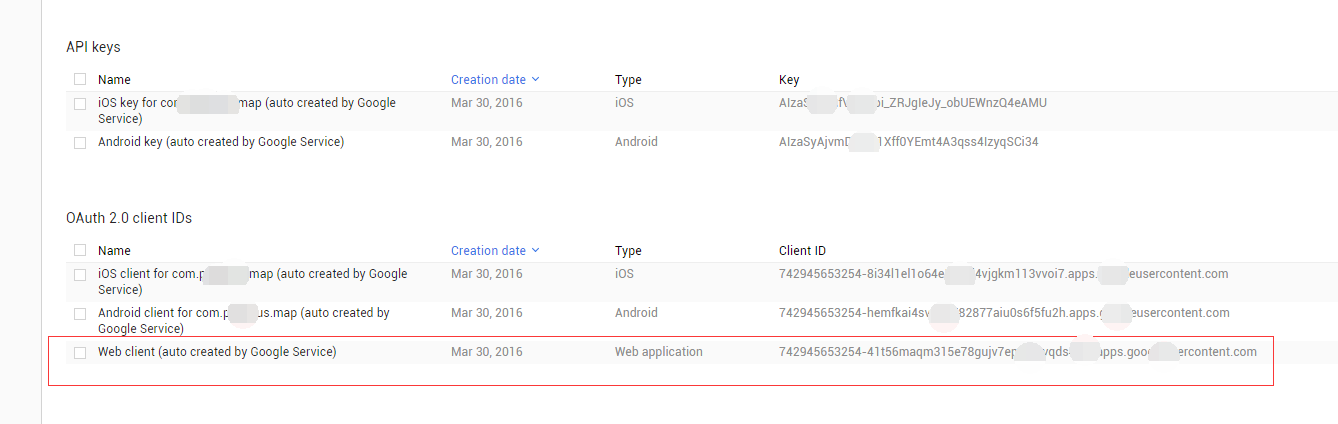
6.5 获取 google_server_client_id , 并在strings 里面配置
https://console.developers.google.com/projectselector/apis/credentials
在上面的网站里选择
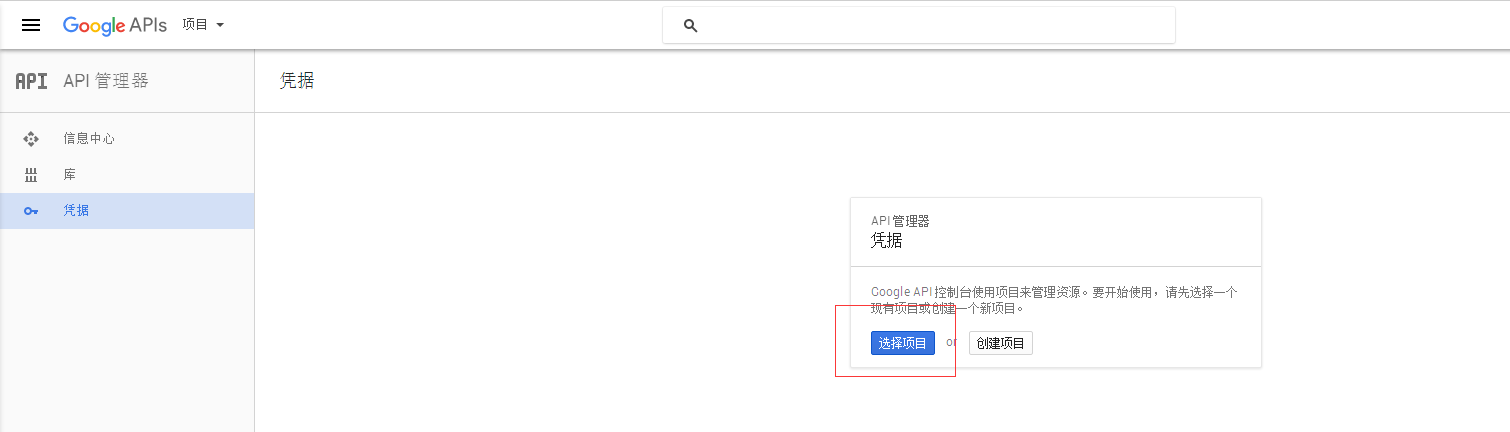
点击选择项目,然后选择你创建的app,进入下面一个界面,得到对应的Client ID
Android 应用程序集成Google 登录及二次封装的更多相关文章
- Android 应用程序集成FaceBook 登录及二次封装
1.首先在Facebook 开发者平台注册一个账号 https://developers.facebook.com/ 开发者后台 https://developers.facebook.com/ap ...
- 在Android App中集成Google登录
技术文章 来源:码农网 发布:2016-09-19 浏览:194 摘要:今天,几乎所有的web和移动app都自带谷歌和Facebook登录,这对app开发者和用户来说是一个非常有用的功能,因为几乎每个 ...
- android应用集成google登录
集成google登录之前需要有一下三点要求,只有具备一下两点要求才能集成google登录: 1,android 运行版本4.0及更新版本 2,android 设 ...
- ShareSDK 集成 Google+ 登录 400. Error:redirect_uri_mismatch 和 Error Domain=ShareSDKErrorDomain Code=204
最近在集成ShareSDK中 Google+ 登录授权时候 出现了如下几个问题 1. 400. Error:redirect_uri_mismatch 出现这种情况, redirectUri应 ...
- Android 学习笔记之AndBase框架学习(二) 使用封装好的进度框,Toast框,弹出框,确认框...
PS:渐渐明白,在实验室呆三年都不如在企业呆一年... 学习内容: 1.使用AbActivity内部封装的方法实现进度框,Toast框,弹出框,确认框... AndBase中AbActivity封 ...
- 社会化登录分享-Android SDK的二次封装和使用
本系列文章将第三方的登录分享功能进行二次封装,统一接口调用,简化了接不同平台登录分享的步骤. 0 系列文章 系列一 Android SDK的二次封装和使用 系列二 源码解析 系列三 微信SDK接入 系 ...
- Android应用程序开发之图片操作(二)——工程图片资源的加载及OOM的处理
(一)工程图片资源的加载方法 在Android应用程序开发之图片操作(一)中,详细说明了如何操作各种资源图片,只是有的没有附上示例代码,在此,我将针对项目工程中的图片资源的显示加载进行说明.官方说明, ...
- Android高级控件(三)—— 使用Google ZXing实现二维码的扫描和生成相关功能体系
Android高级控件(三)-- 使用Google ZXing实现二维码的扫描和生成相关功能体系 摘要 现在的二维码可谓是烂大街了,到处都是二维码,什么都是二维码,扫一扫似乎已经流行到习以为常了,今天 ...
- Android逆向破解表单登录程序
Android逆向破解表单登录程序 Android开发 ADT: android studio(as) 程序界面如下,登录成功时弹出通知登录成功,登录失败时弹出通知登录失败. 布局代码 <?xm ...
随机推荐
- 关于z-index鲜为人知的事情
关于z-index很少有人去深入的了解它,因为它看起来一点儿也不复杂,不就是谁的数字大,谁就显示在前面吗?然而今天所摘录的这篇博文,让我震惊了.我承认我从来没有花时间去看具体的z-index相关文档, ...
- css:图标与文字对齐的两种方法
(好久没写博客了,这几个月的积累比较零碎,记在本子上,现在开始整理归类) 在平时写页面的过程中,常遇到要把小图标与文字对齐的情况.比如: 总结了两种方法,代码量都比较少. 第一种 对img设置竖直方向 ...
- 【经验之谈】Windows环境下配置WordPress
前言 wordpress全球著名的开放博客平台,拥有成千上万个各式插件和不计其数的主题模板样式,使用php和mysql搭建,下面说下载windows环境下配置wordpress,经验之谈. 安装 关于 ...
- 解决 android 高低版本 webView 里内容 自适应屏幕的终极方法
转载请声明出处(http://www.cnblogs.com/linguanh/) 一,先说下我的情况,大家可以对号入座(嫌无聊请跳过) 我的项目要求是这样的,先从数据库里面拿出来html标签,因为加 ...
- SSH框架入门知识总结
chap01 领略清晰的MVC流程----Struts讲解技术资料.pdf 提取码:wwi5 chap02 体验控制反转的理念----Spring介绍技术文档.pdf 提取码:0mp3 ch ...
- 【Java心得总结三】Java泛型上——初识泛型
一.函数参数与泛型比较 泛型(generics),从字面的意思理解就是泛化的类型,即参数化类型.泛型的作用是什么,这里与函数参数做一个比较: 无参数的函数: public int[] newIntAr ...
- ZOJ Problem Set - 1350 The Drunk Jailer ac代码 memset
这是一道很简单的题目,题目大概意思说下:就是有n个监狱(编号从1到n),第一次全部打开,第二次打开编号为2的倍数的,第三次打开编号为3的倍数的,以此类推...最后问你有几个监狱是打开的 题目中我使用了 ...
- centos7 mysql数据库安装和配置
一.系统环境 yum update升级以后的系统版本为 [root@yl-web yl]# cat /etc/redhat-release CentOS Linux release 7.1.1503 ...
- 为 Web 设计师准备的 20 款 CSS3 工具
1.CSS3 Generator 2. Border Radius 3. CSS3 Maker 4. CSS3 Transforms 5. CSS3 Drop shadow generator 6. ...
- WinForm 代码实现以管理员身份运行
[STAThread] static void Main(string[] Args) { //获得当前登录的Windows用户标示 System.Security.Principal.Windows ...