
MAC Address-Table Move Update Feature
MAC Address-Table Move Update
The MAC address-table move update feature allows the switch to provide rapid bidirectional convergence when a primary (forwarding) link goes down and the standby link begins forwarding traffic.
Figure 1. MAC Address-Table Move Update Example. In the following figure, switch A is an access switch, and ports 1 and 2 on switch A are connected to uplink switches B and D through a Flex Links pair. Port 1 is forwarding traffic, and port 2 is in the backup state. Traffic from the PC to the server is forwarded from port 1 to port 3. The MAC address of the PC has been learned on port 3 of switch C. Traffic from the server to the PC is forwarded from port 3 to port 1.
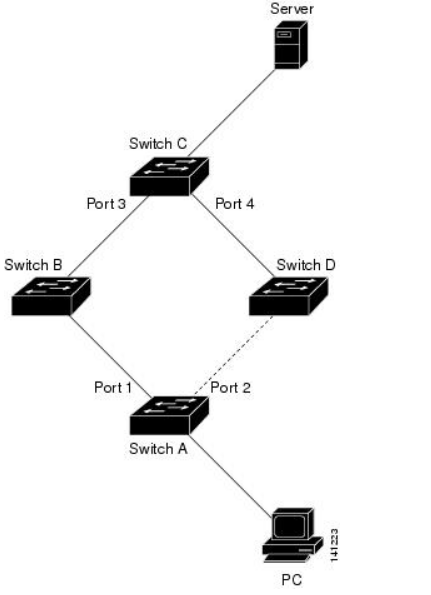
f the MAC address-table move update feature is not configured and port 1 goes down, port 2 starts forwarding traffic. However, for a short time, switch C keeps forwarding traffic from the server to the PC through port 3, and the PC does not get the traffic because port 1 is down. If switch C removes the MAC address of the PC on port 3 and relearns it on port 4, traffic can then be forwarded from the server to the PC through port 2.
If the MAC address-table move update feature is configured and enabled on the switches, and port 1 goes down, port 2 starts forwarding traffic from the PC to the server. The switch sends a MAC address-table move update packet from port 2. Switch C gets this packet on port 4 and immediately learns the MAC address of the PC on port 4, which reduces the reconvergence time.
You can configure the access switch, switch A, to send MAC address-table move update messages. You can also configure the uplink switches B, C, and D to get and process the MAC address-table move update messages. Whenswitch C gets a MAC address-table move update message from switch A, switch C learns the MAC address of the PC on port 4. Switch C updates the MAC address table, including the forwarding table entry for the PC.
Switch A does not need to wait for the MAC address-table update. The switch detects a failure on port 1 and immediately starts forwarding server traffic from port 2, the new forwarding port. This change occurs in less than 100 milliseconds (ms). The PC is directly connected to switch A, and the connection status does not change. Switch A does not need to update the PC entry in the MAC address table.
MAC Address-Table Move Update Configuration Guidelines
You can enable and configure this feature on the access switch to send the MAC address-table move updates.
You can enable and configure this feature on the uplink switches to get the MAC address-table move updates.
Configuring MAC Address-Table Move Update
SUMMARY STEPS
- configure terminal
- interface interface-id
- Use one of the following:
- switchport backup interface interface-id
- switchport backup interface interface-id mmu primary vlan vlan-id
- end
- mac address-table move update transmit
- end
| Step 3 |
Use one of the following:
Example: |
Configures a physical Layer 2 interface (or port channel), as part of a Flex Links pair with the interface. The MAC address-table move update VLAN is the lowest VLAN ID on the interface. Configure a physical Layer 2 interface (or port channel) and specifies the VLAN ID on the interface, which is used for sending the MAC address-table move update. When one link is forwarding traffic, the other interface is in standby mode. |
| Step 5 |
mac address-table move update transmit Example: |
Enables the access switch to send MAC address-table move updates to other switches in the network if the primary link goes down and the switch starts forwarding traffic through the standby link. |
Configuring a Switch to Obtain and Process MAC Address-Table Move Update Messages
SUMMARY STEPS
- configure terminal
- mac address-table move update receive
- end
Monitoring the MAC Address-Table Move Update
|
Command |
Purpose |
|---|---|
|
show mac address-table move update |
Displays the MAC address-table move update information on theswitch. |
MAC Address-Table Move Update Feature的更多相关文章
- OK335xS mac address hacking
/*********************************************************************** * OK335xS mac address hacki ...
- I.MX6 U-boot imxotp MAC address 写入
/***************************************************************************** * I.MX6 U-boot imxotp ...
- Python Ethical Hacking - MAC Address & How to Change(1)
MAC ADDRESS Media Access Control Permanent Physical Unique Assigned by manufacturer WHY CHANGE THE M ...
- mysql-You can’t specify target table for update in FROM clause错误
mysql中You can't specify target table for update in FROM clause错误的意思是说,不能先select出同一表中的某些值,再update这个表( ...
- Ubuntu 下,修改 Mac address
ifconfig // check Mac address sudo ifconfig eth0 down sudo ifconfig eth0 hw ether xx:xx:xx:xx: ...
- 【小错误】Device eth2 has different MAC address than expected, ignoring.
今天在搭建rac配置IP的时候报错显示如下: Device eth2 has different MAC address than expected, ignoring.[FAILED] 百度了下,问 ...
- mysql中You can’t specify target table for update in FROM clause错误解决方法
mysql中You can't specify target table for update in FROM clause错误的意思是说,不能先select出同一表中的某些值,再update这个表( ...
- 【转载】alter table move 和 alter table shrink space的区别
move 和shrink 的共同点1.收缩段2.消除部分行迁移3.消除空间碎片4.使数据更紧密 shrink 语法: alter table TABLE_NAME shrink space [com ...
- Find mac address
Windows Method 1: Using the Command Prompt 1 Click on the Start button. 2 Type cmd in the search b ...
随机推荐
- Java中new一个子类对象的同时并不会自动创建一个父类对象
首先重申一个概念:子类会继承父类所有非私有成员变量和方法,包括父类的构造方法 当创建一个子类对象时,首先开辟内存,然后调用类的构造函数,这里的构造函数由两部分组成,一部分是从父类继承而来的父类的构造方 ...
- 【Python】程序计时
- [POI2000] 公共串 - 后缀数组,二分
[POI2000] 公共串 Description 给出几个由小写字母构成的单词,求它们最长的公共子串的长度. Solution 预处理出后缀数组和高度数组,二分答案 \(k\) ,对于每一个连续的 ...
- 修改oracle数据库用户名和密码
第一步:连接数据库 使用ssh工具以root身份连接服务器, 然后切换到oracle用户:su - oracle(回车) 使用sqlplus连接数据库:sqlplus /nolog(回车) 以管理员身 ...
- JDK的安装与环境配置(Windows10)
1.安装JDK首先需要到官网下载jdk,下载地址为:https://www.oracle.com/technetwork/java/javase/downloads/index.html 目前官方已经 ...
- 三、统一威胁管理(UTM)
简介 统一威胁管理(Unified Threat Management),简称UTM. 2004年9月,IDC首度提出“统一威胁管理”的概念,即将防病毒.入侵检测和防火墙安全设备划归统一威胁管理(Un ...
- C#中字节数组byte[]和字符串string类型的相互转换
C#中字节数组byte[]和字符串string类型的相互转换: string转byte[]: byte[] byteArray = System.Text.Encoding.Default.GetBy ...
- fpga vga 显示
VGA(Video Graphics Array)是IBM在1987年随PS/2机一起推出的一种视频传输标准,具有分辨率高.显示速率快.颜色丰富等优点,在彩色显示器领域得到了广泛的应用.不支持热插拔, ...
- [Linux] Ubuntu18.04 安装之后配置过程
前言 最终还是安装了Ubuntu 虽然一开始想用Deepin 但是死活安装不上,我也很绝望(引导一直找不到 恢复BIOS默认设置也还是不行 所以 有些绝望啊....) 所以 为了让以后的我不再那么 ...
- Flink架构(五)- 检查点,保存点,与状态恢复
检查点,保存点,与状态恢复 Flink是一个分布式数据处理系统,这种场景下,它需要处理各种异常,例如进程终止.机器故障.网络中断等.因为tasks在本地维护它们的state,Flink必须确保在出现故 ...