
Angular2入门系列教程6-路由(二)-使用多层级路由并在在路由中传递复杂参数
上一篇:Angular2入门系列教程5-路由(一)-使用简单的路由并在在路由中传递参数
之前介绍了简单的路由以及传参,这篇文章我们将要学习复杂一些的路由以及传递其他附加参数。一个好的路由系统可以使我们的程序更好的工作。
假设你已经跟上了我们的进度。
我们来为我们的文章明细新增一个评论框;当我们在明细中点击评论的时候,在我们的明细页面显示评论,这里,我们就可以完全把明细页面看成一个独立的路由,可以建立自己的子路由页面,做一些评论,分享等操作。
那,首先在data目录下建立我们的评论实体Commen和评论服务Comment.service
 export class Comment{

     id:number;

     userName:string;

     content:string;

     blogId:number;

 }
 import {Comment} from './comment'

 export let Comments:Comment[]=[];

 export class CommentService

 {

     public AddComment(com:Comment)

     {

         com.id=this.GetMaxId();

         Comments.push(com);

     }

     public GetBlogComments(blogId:number):Comment[]

     {

         return Comments.filter(x=>x.blogId==blogId);

     }

     private GetMaxId():number

     {

         var maxId=1;

         Comments.forEach(x=>{

             if(x.id>maxId)

               maxId=x.id;

          });

          return maxId;

     }

 }
作为服务,我们的commen.service提供了获取相应博客的评论以及添加评论的功能!然后我们在app.module.ts中的provider数组中添加我们的CommnetService服务类
那么,数据准备好了,现在我们来建立我们的评论页面
在App文件夹下建立以下东西(希望你是用插件直接生成,这样可以节约很多时间,插件可以帮我们直接初始化这些组件,这样我们可以直接使用而不报错),但是我们先去处理路由问题,让我们可以在articleDetai中直接导航到这个组件
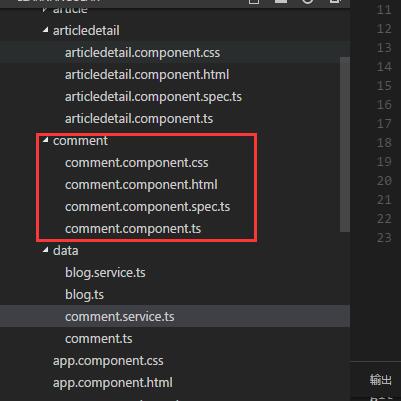
之前我们谈到的路由是要用<router-outlet></router-outlet>去显示组件,我们自然要在article.detail.html中添加这么一句话
然后为了我们能找文章明细中进行,导航,我们需要配置一下路由文件。这次,我们新建一个路由配置文件,我推荐这样做,因为,我们的程序始终是分模块的,不同模块用自己的路由就行了,而不是所有的路由都配置在一个文件中
我们在根目录(app.routing同级)下面建立articleDetail.routing.ts,键入一下代码
 import { NgModule }             from '@angular/core';

 import { RouterModule, Routes } from '@angular/router';

 import { CommentComponent }   from './comment/comment.component';

 import { ArticledetailComponent }   from './articledetail/articledetail.component';

 const articleDetailRoutes: Routes = [

   {

     path: 'articledetail/:id',

     component: ArticledetailComponent,

     children: [

       {

         path: 'comment',

         component: CommentComponent

       }

     ]

   }

 ];

 @NgModule({

   imports: [

     RouterModule.forChild(articleDetailRoutes)

   ],

   exports: [

     RouterModule

   ]

 })

 export class ArticleDetailRoutingModule { }
我们看到有个children的节点,这个就是我们配置路由子节点的地方
然后我们将app.routing.ts中关于articledetail的路由删掉
 const routes:Routes=[

 { path: 'article',component: ArticleComponent},

 { path: '',redirectTo:"/article",pathMatch: 'full'}

 ];
然后,我们在app.moudule.ts中添加本次路由相关的信息
 import { BrowserModule } from '@angular/platform-browser';

 import { NgModule } from '@angular/core';

 import { FormsModule } from '@angular/forms';

 import { HttpModule } from '@angular/http';

 import { AppRoutingModule } from './app.routing';

 import { ArticleDetailRoutingModule } from './articledetail.routing';

 import {BlogService} from './data/blog.service';

 import {CommentService} from './data/comment.service';

 import { AppComponent } from './app.component';

 import { ArticleComponent } from './article/article.component';

 import { ArticledetailComponent } from './articledetail/articledetail.component';

 import { CommentComponent } from './comment/comment.component';

 @NgModule({

   declarations: [

     AppComponent,

     ArticleComponent,

     ArticledetailComponent,

     CommentComponent

   ],

   imports: [

     BrowserModule,

     FormsModule,

     HttpModule,

     ArticleDetailRoutingModule,

     AppRoutingModule

   ],

   providers: [BlogService,CommentService],

   bootstrap: [AppComponent]

 })

 export class AppModule { }
路由可以用了,我们现在来到articleDetail组件,具体编写一下怎么路由
在html中添加代码
<button class="btn" (click)="doComment()">评论</button>
然后在ts中编写事件
doComment()

   {

      this.router.navigate(["comment"],{relativeTo:this.aRoute});

   }
好了,一切准备就绪,现在,我们的子路由可以用了,如果不出意外,点击评论按钮,你可以看到以下内容

到此,我们实现了多级路由,那么,现在来看看传递复杂参数,那,我们就把我们的博客的标题和id传过去吧
在articleDetail组件中的doComment编写
 doComment()

   {

      this.router.navigate(["comment",{id:this.blog.id,title:this.blog.title}],{relativeTo:this.aRoute})

   }
我们这里处理了两个参数,[]中"comment"表示要导航到的路由,{}里面的内容是我们传递的参数;relativeTo表示相对与aRoute的路径,我们先来看看这样做的效果
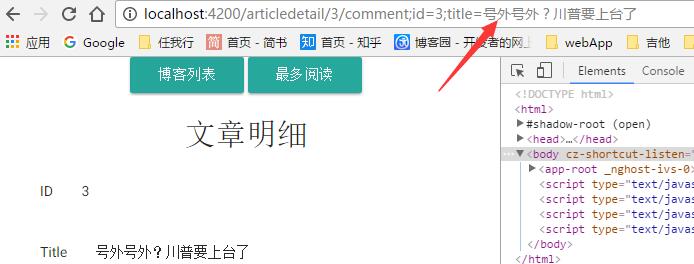
我们看到,在我们的地址栏,路由之外,用分号分割了我们传递的参数,这就是Angular2路由中传递参数的方式,之后我们要做的就是在我们的Comment里面接收这些参数,这里直接贴出我们的Comment组件的完整代码
comment.component.ts
 import { Component, OnInit,Input } from '@angular/core';

 import {ActivatedRoute,Params,Router} from '@angular/router';

 import { Location }     from '@angular/common';

 import {Comment} from '../data/comment';

 import {CommentService} from '../data/comment.service';

 import 'rxjs/add/operator/switchMap';

 @Component({

     selector: 'comment',

     templateUrl: './comment.component.html'

 })

 export class CommentComponent implements OnInit {

     BlogTitle:string;

     private comments:Comment[];

     private com:Comment=new Comment();

     private blogId:number;

     constructor(

         private cService: CommentService,

         private aRoute: ActivatedRoute,

         private router: Router,

         private location: Location

     ){}

     ngOnInit() {

             let id=this.aRoute.params

         .subscribe(params=>{

             this.comments=this.cService.GetBlogComments(+params["id"]);

             this.blogId=+params["id"];

             this.BlogTitle=params["title"];

         })

     }

     sumComment()

     {

         if(this.com.userName&&this.com.content)

         {

             this.com.blogId=this.blogId;

             this.cService.AddComment(this.com);

             this.comments=this.cService.GetBlogComments(this.blogId);

             console.log(this.comments);

             this.com=new Comment();

         }

     }

 }
html
 <div class="container">

     <h2>Blog: {{BlogTitle}}</h2>

 <div class="comment">

     <div class="section">

         <div *ngFor="let com of comments">

             <div>

                 <span>名字:</span>

                 <span>{{com.userName}}</span>

             </div>

             <div >

                 <span>评论内容:</span>

                 <span>{{com.content}}</span>

             </div>

             <div class="divider"></div>

         </div>

     </div>

 </div>

 <div class="divider red"></div>

 <div>

     <div class="section">

         <div class="">

         来,评论一下

         </div>

         <div>

             <input type="text" placeholder="你的名字" [(ngModel)]="com.userName" class="">

             <input type="text" placeholder="说点儿什么" [(ngModel)]="com.content" class="">

         </div>

         <div>

             <button class="btn" (click)="sumComment()">提交</button>

         </div>

     </div>

 </div>

 </div>
我们直接在代码里面通过route的params属性获取了路由参数,然后处理它;这里的params是一个Observable类型的,我们直接调用它的Subscribe方法(以后再介绍),获取到params,通过一些操作,将这些数据获取出来,显示在页面上,我们来看看我们做的效果
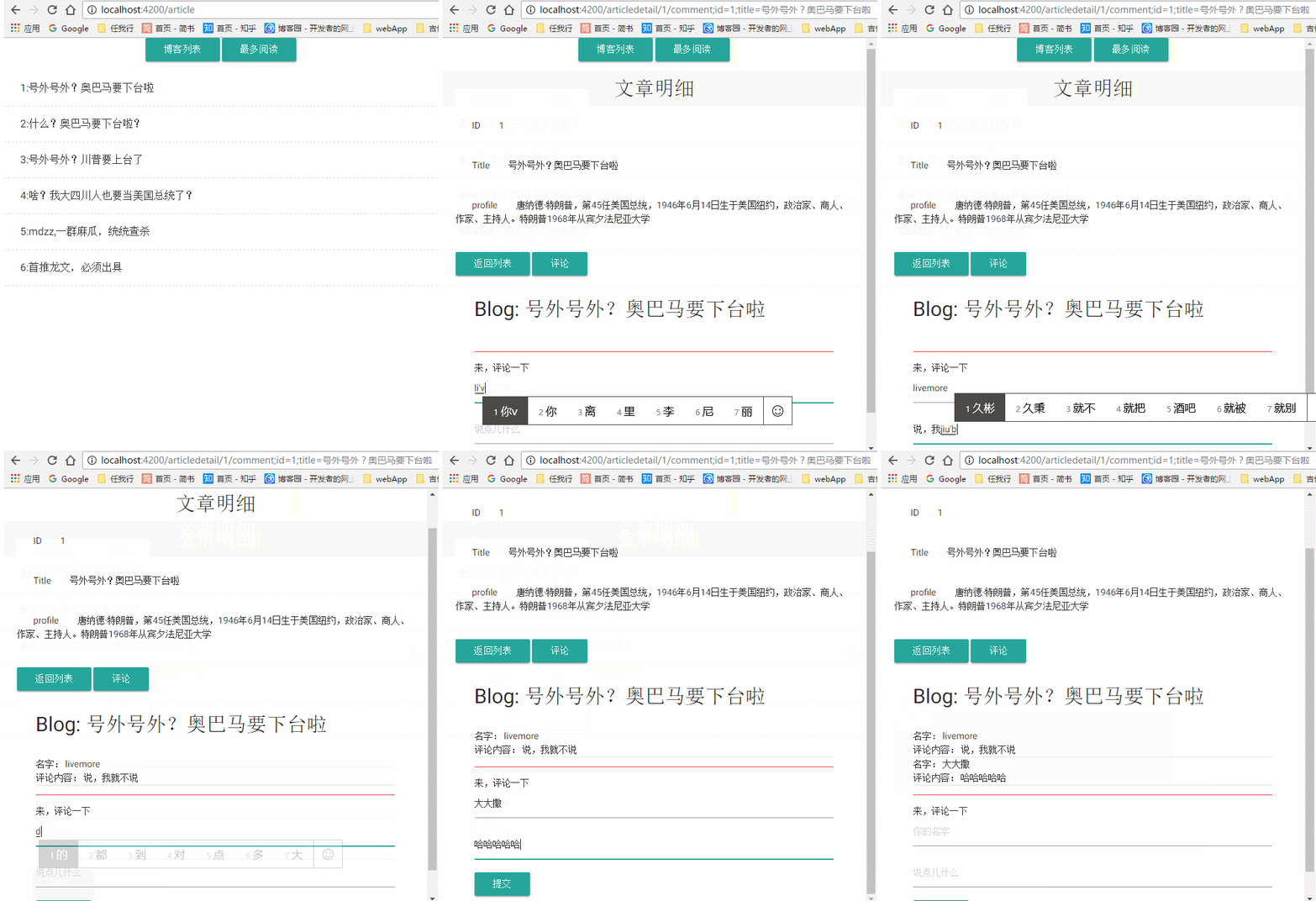
这就是我们本篇文章的内容!
也许,许多人会问了,我们可以直接在这里传递一个类的数据么,比如我们就直接传递blog:this.blog ,把整个Blog传递过去,那我只能告诉不可以,为什么?我们来看看Angular2路由参数的定义吧

这里的定义是key:string,也就是,我们的参数只能传递string类型的过去
我们并不推荐用这种方式传递很多参数到子组件中去,我们可以采用其他方式,比如localStorage;如果你非要这么做,也有解决方法,用JSON.stringify将你的类变成json字符串,到子组件接收之后,再用JSON.parse重新变成一个Object!(很蠢不是么?)
关于路由暂时就介绍这么多,Angular2有更多关于路由的知识,有兴趣的同学可以直接到官网去看,或者,我把这个系列写完了再回头写一个!在我看来,我们日常开发用不到那么多东西,就不在这里介绍了
更新ing。。。
项目已经放到了gitbub上,地址 https://github.com/SeeSharply/LearnAngular
本文章的提交 https://github.com/SeeSharply/LearnAngular/tree/8021af04eb463c31c110e058753ab19d918391af
Angular2入门系列教程6-路由(二)-使用多层级路由并在在路由中传递复杂参数的更多相关文章
- Angular2入门系列教程5-路由(一)-使用简单的路由并在在路由中传递参数
上一篇:Angular2入门系列教程-服务 上一篇文章我们将Angular2的数据服务分离出来,学习了Angular2的依赖注入,这篇文章我们将要学习Angualr2的路由 为了编写样式方便,我们这篇 ...
- Angular2入门系列教程7-HTTP(一)-使用Angular2自带的http进行网络请求
上一篇:Angular2入门系列教程6-路由(二)-使用多层级路由并在在路由中传递复杂参数 感觉这篇不是很好写,因为涉及到网络请求,如果采用真实的网络请求,这个例子大家拿到手估计还要自己写一个web ...
- Angular2入门系列教程4-服务
上一篇文章 Angular2入门系列教程-多个组件,主从关系 在编程中,我们通常会将数据提供单独分离出来,以免在编写程序的过程中反复复制粘贴数据请求的代码 Angular2中提供了依赖注入的概念,使得 ...
- 数据挖掘入门系列教程(十二)之使用keras构建CNN网络识别CIFAR10
简介 在上一篇博客:数据挖掘入门系列教程(十一点五)之CNN网络介绍中,介绍了CNN的工作原理和工作流程,在这一篇博客,将具体的使用代码来说明如何使用keras构建一个CNN网络来对CIFAR-10数 ...
- Angular2入门系列教程1-使用Angular-cli搭建Angular2开发环境
一直在学Angular2,百忙之中抽点时间来写个简单的教程. 2016年是前端飞速发展的一年,前端越来越形成了(web component)组件化的编程模式:以前Jquery通吃一切的田园时代一去不复 ...
- Angular2入门系列教程3-多个组件,主从关系
上一篇 Angular2项目初体验-编写自己的第一个组件 好了,前面简单介绍了Angular2的基本开发,并且写了一个非常简单的组件,这篇文章我们将要学会编写多个组件并且有主从关系 现在,假设我们要做 ...
- Angular2入门系列教程2-项目初体验-编写自己的第一个组件
上一篇 使用Angular-cli搭建Angular2开发环境 Angular2采用组件的编写模式,或者说,Angular2必须使用组件编写,没有组件,你甚至不能将Angular2项目启动起来 紧接着 ...
- 数据挖掘入门系列教程(二)之分类问题OneR算法
数据挖掘入门系列教程(二)之分类问题OneR算法 数据挖掘入门系列博客:https://www.cnblogs.com/xiaohuiduan/category/1661541.html 项目地址:G ...
- Angular2入门系列(五)———— 路由参数设置
Angular2入门系列(五)---- 路由参数设置路由配置: { path: '', component: CarProFile, children: [ { path: 'add', compon ...
随机推荐
- [高并发]Java高并发编程系列开山篇--线程实现
Java是最早开始有并发的语言之一,再过去传统多任务的模式下,人们发现很难解决一些更为复杂的问题,这个时候我们就有了并发. 引用 多线程比多任务更加有挑战.多线程是在同一个程序内部并行执行,因此会对相 ...
- 微软.NET Core RC2正式发布,横跨所有平台
.NET官方博客宣布了<Announcing .NET Core RC2 and .NET Core SDK Preview 1>,正式如期发布了.NET Core RC2, 现在可以放心 ...
- .NET Core中间件的注册和管道的构建(1)---- 注册和构建原理
.NET Core中间件的注册和管道的构建(1)---- 注册和构建原理 0x00 问题的产生 管道是.NET Core中非常关键的一个概念,很多重要的组件都以中间件的形式存在,包括权限管理.会话管理 ...
- UWP中实现自定义标题栏
UWP中实现自定义标题栏 0x00 起因 在UWP开发中,有时候我们希望实现自定义标题栏,例如在标题栏中加入搜索框.按钮之类的控件.搜了下资料居然在一个日文网站找到了一篇介绍这个主题的文章: http ...
- 使用python抓取婚恋网用户数据并用决策树生成自己择偶观
最近在看<机器学习实战>的时候萌生了一个想法,自己去网上爬一些数据按照书上的方法处理一下,不仅可以加深自己对书本的理解,顺便还可以在github拉拉人气.刚好在看决策树这一章,书里面的理论 ...
- 启用 Open vSwitch - 每天5分钟玩转 OpenStack(127)
Linux Bridge 和 Open vSwitch 是目前 OpenStack 中使用最广泛的两种虚机交换机技术. 前面各章节我们已经学习了如何用 Linux Bridge 作为 ML2 mech ...
- vue.js初探
前言 入手2016最火前端框架之一vue.js.大概从网上找了些资料看了下vue.js,从网上的资料来看只能惊叹其发展速度太快,让我意外的是其作者是华人的前提下作品这么受欢迎. 网上的博客和教程各种组 ...
- 应该是Angular2的一个bug?
为了应对未来的趋势,及时赶上下一趟互联网技术,我最近也在通过具体项目研究angular2,首先必须要吐槽的是,学习angular2的成本本身不高,但是一堆的工具.配置实在让人 很是焦灼,就像asp.n ...
- 【干货分享】流程DEMO-事务呈批表
流程名: 事务呈批表 业务描述: 办公采购.会议费用等事务的申请.流程发起时,会检查预算,如果预算不够,将不允许发起费用申请,如果预算够用,将发起流程,同时占用相应金额的预算,但撤销流程会释放相应金 ...
- xss和sql注入原理学习
8.4 Web跨站脚本攻击 8.4.1 跨站脚本攻击的原理(1) 跨站脚本在英文中称为Cross-Site Scripting,缩写为CSS.但是,由于层叠样式表 (Cascading Style ...