
13-flex
01 flex2个重要的概念
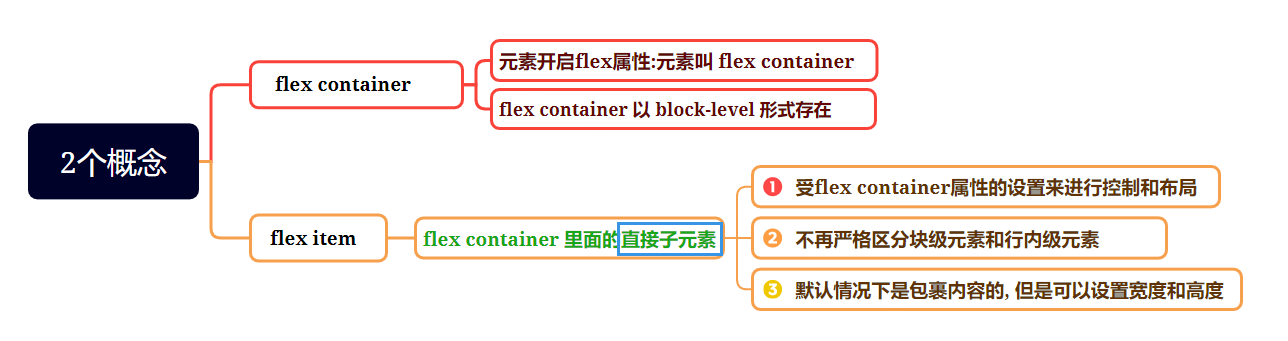
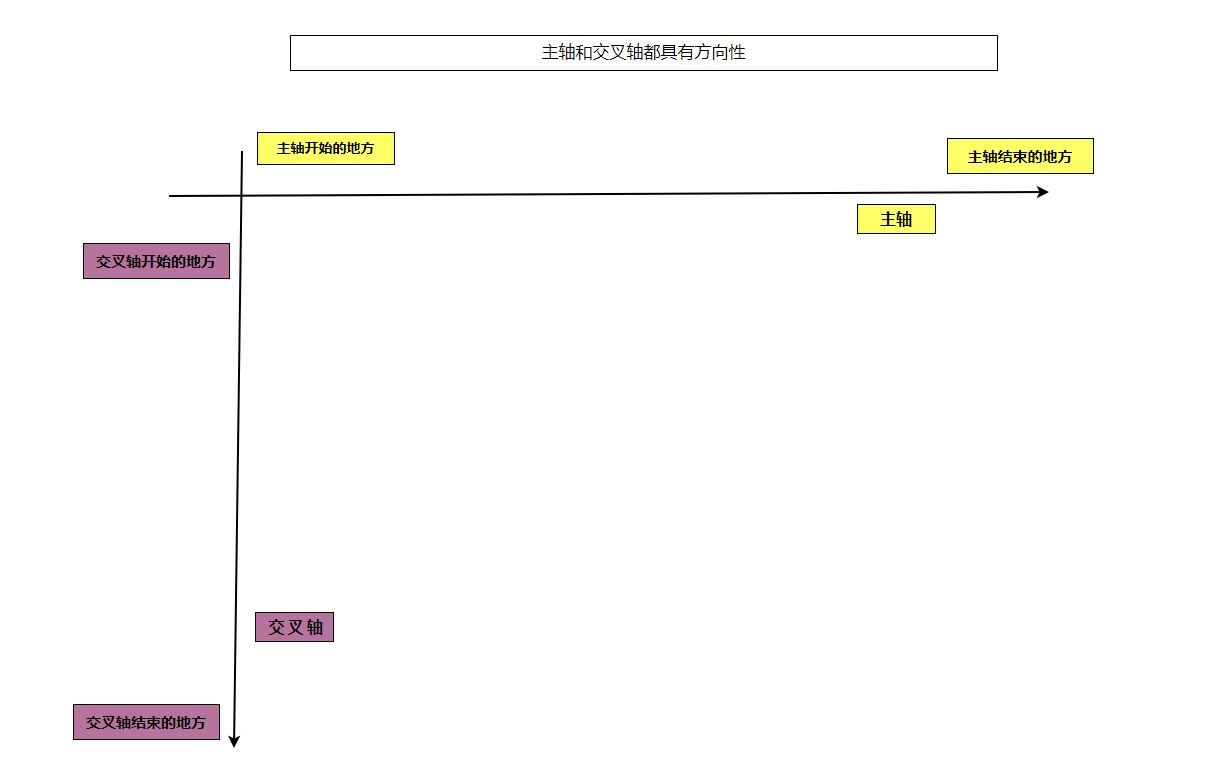
02 flex布局模型
03 flex相关属性
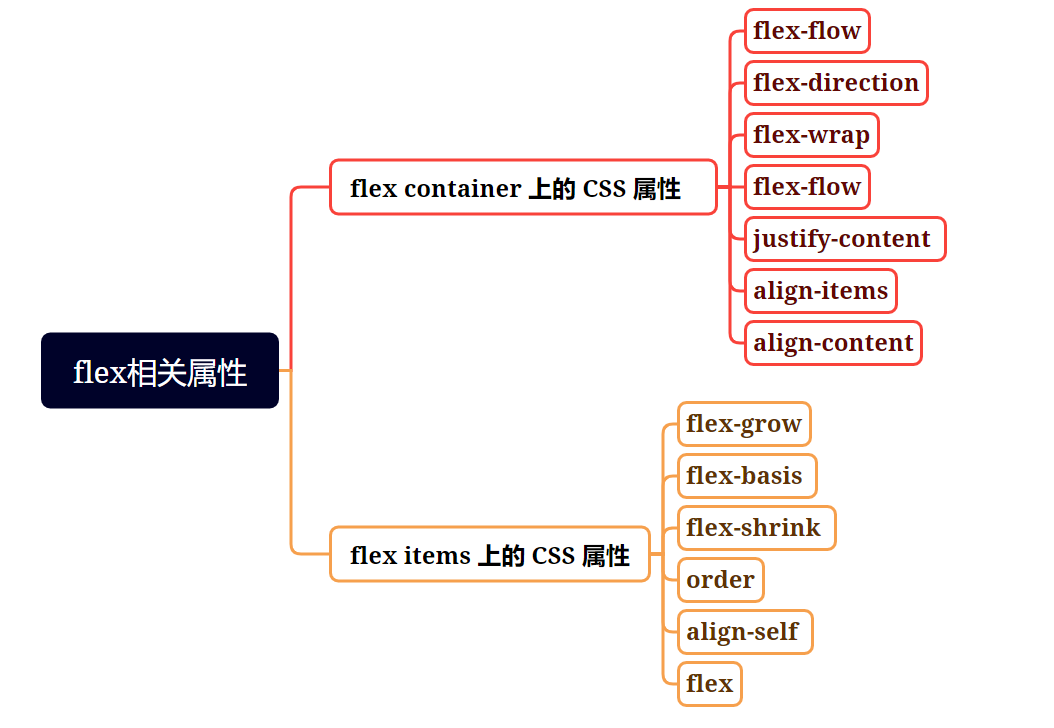
04 flex container相关属性
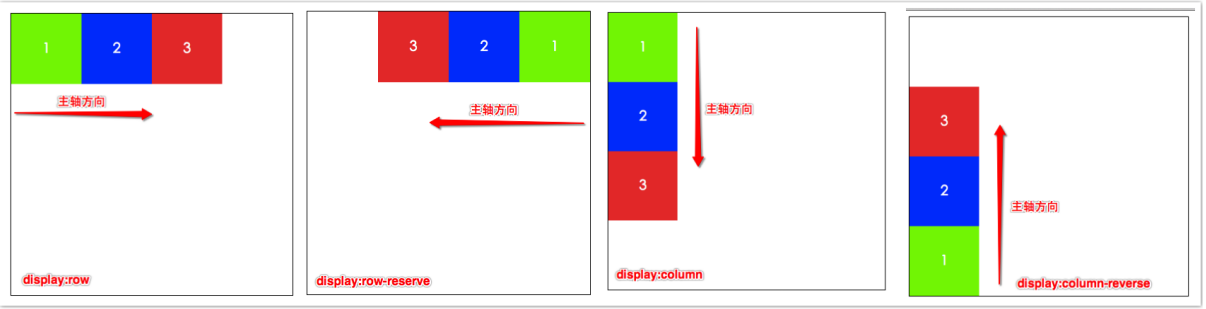
4.1 flex direction
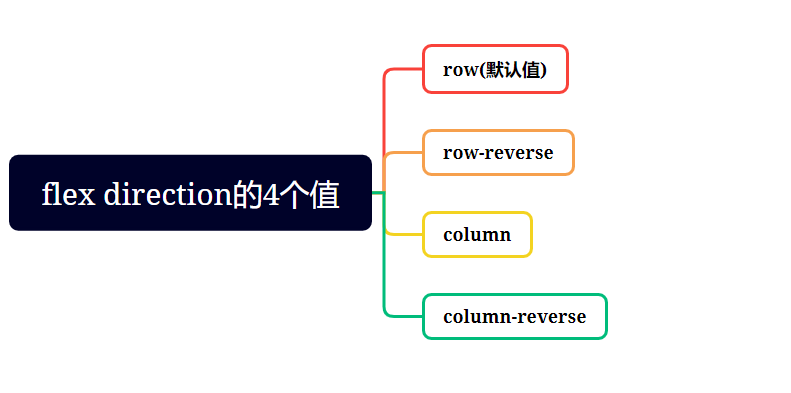
不同的值会改变主轴的方向
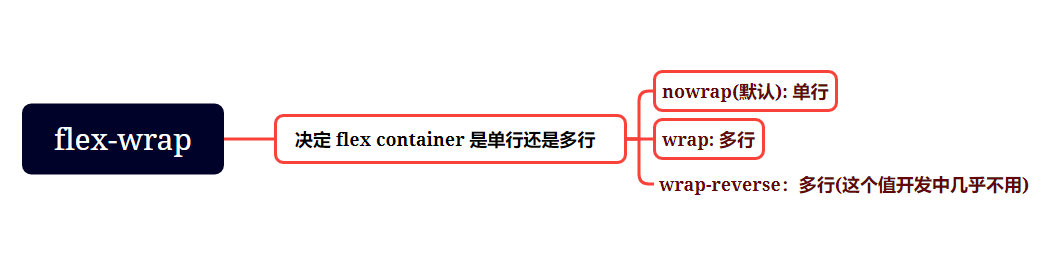
4.2 flex-wrap
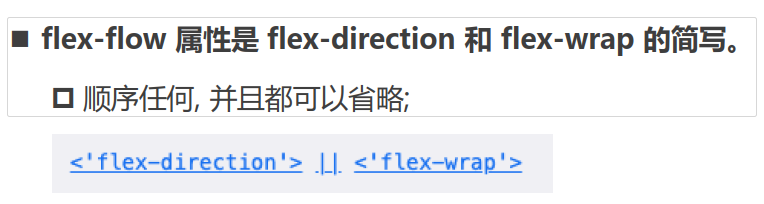
4.3 flex-flow
function getRandomColor() {

  return `rgb(${Math.random()*255}, ${Math.random()*255}, ${Math.random()*255})`

}

const itemEls = document.querySelectorAll(".item")

for (const item of itemEls) {

  item.style.backgroundColor = getRandomColor()

}
<!DOCTYPE html>

<html lang="en">

<head>

  <meta charset="UTF-8">

  <meta http-equiv="X-UA-Compatible" content="IE=edge">

  <meta name="viewport" content="width=device-width, initial-scale=1.0">

  <title>Document</title>

  <style>

    .container {

      display: flex;

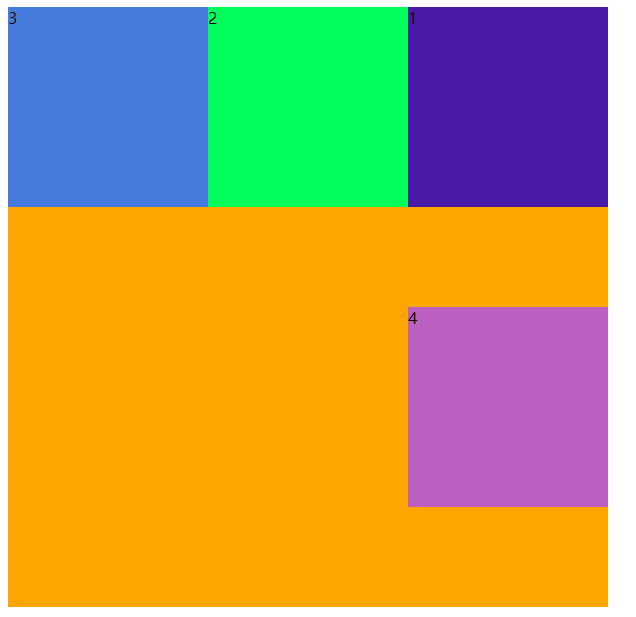
      flex-flow: row-reverse wrap;

      width: 600px;

      height: 600px;

      background-color: orange;

    }

    .item {

      width: 200px;

      height: 200px;

    }

  </style>

</head>

<body>

  <div class="container">

    <span class="item item1">1</span>

    <span class="item item2">2</span>

    <span class="item item3">3</span>

    <span class="item item4">4</span>

  </div>

  <script src="./color.js"></script>

</body>

</html>
4.4 justify-content
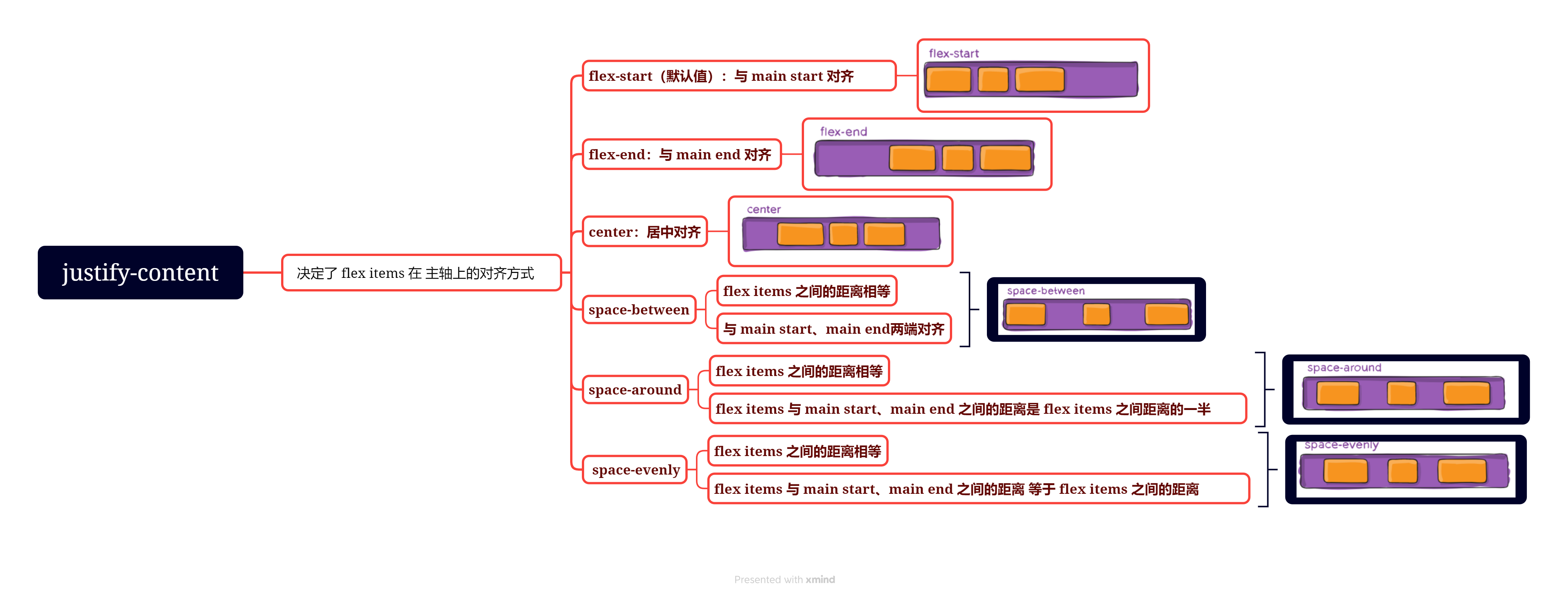
4.5 align-item
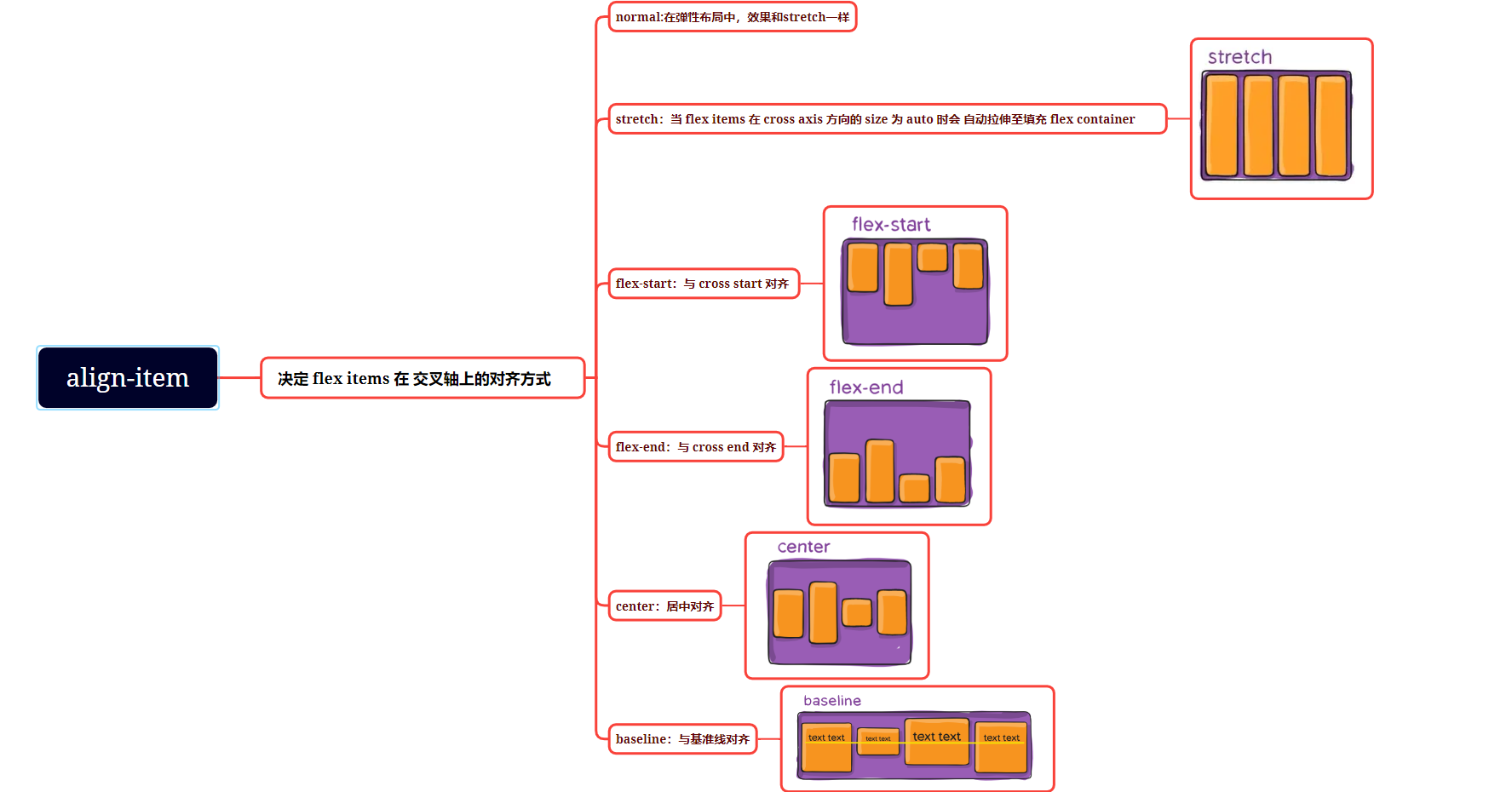
4.6 align-content
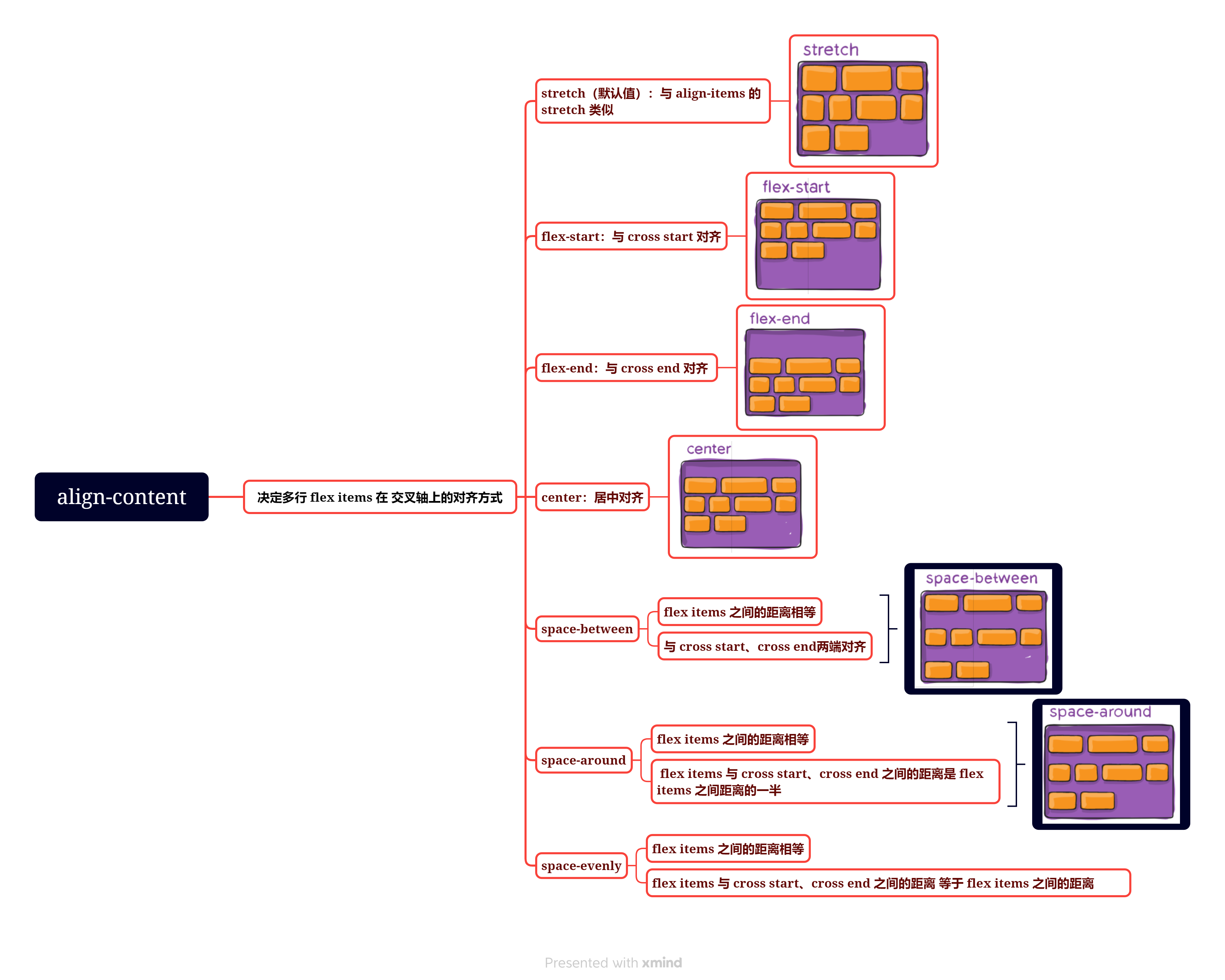
05 flex-item的属性
5.1 order
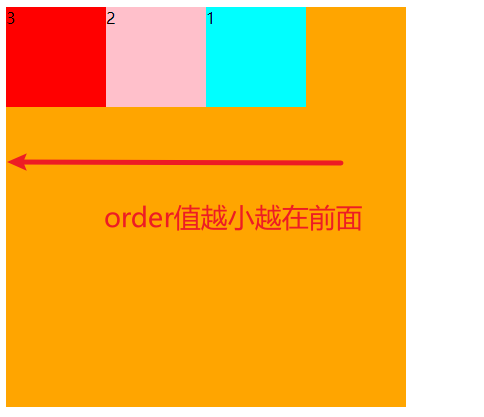
改变flex-item的排布顺序
如下代码
<!DOCTYPE html>

<html lang="en">

<head>

  <meta charset="UTF-8">

  <meta name="viewport" content="width=device-width, initial-scale=1.0">

  <title>Document</title>

  <style>

    .box {

      display: flex;

      width: 400px;

      height: 400px;

      background-color: orange;

    }

    .box .item {

      width: 100px;

      height: 100px;

    }

    .box .item1 {

      background-color: aqua;

    }

    .box .item2 {

      background-color: pink;

    }

    .box .item3 {

      background-color: red;

    }

  </style>

</head>

<body>

  <div class="box">

    <div class="item item1">1</div>

    <div class="item item2">2</div>

    <div class="item item3">3</div>

  </div>

</body>
效果如下图
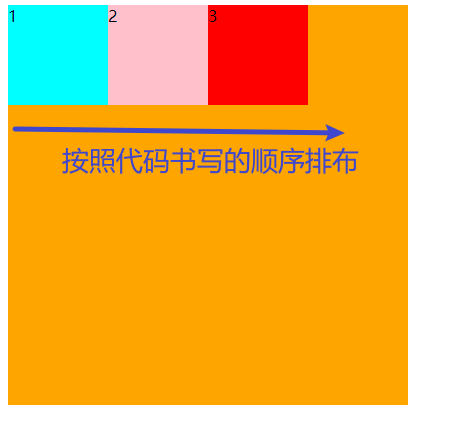
设置order可以改变顺序
<!DOCTYPE html>

<html lang="en">

<head>

  <meta charset="UTF-8">

  <meta name="viewport" content="width=device-width, initial-scale=1.0">

  <title>Document</title>

  <style>

    .box {

      display: flex;

      width: 400px;

      height: 400px;

      background-color: orange;

    }

    .box .item {

      width: 100px;

      height: 100px;

    }

    .box .item1 {

      order: 5;

      background-color: aqua;

    }

    .box .item2 {

      order: 4;

      background-color: pink;

    }

    .box .item3 {

      order: 3;

      background-color: red;

    }

  </style>

</head>

<body>

  <div class="box">

    <div class="item item1">1</div>

    <div class="item item2">2</div>

    <div class="item item3">3</div>

  </div>

</body>

</html>
效果如下
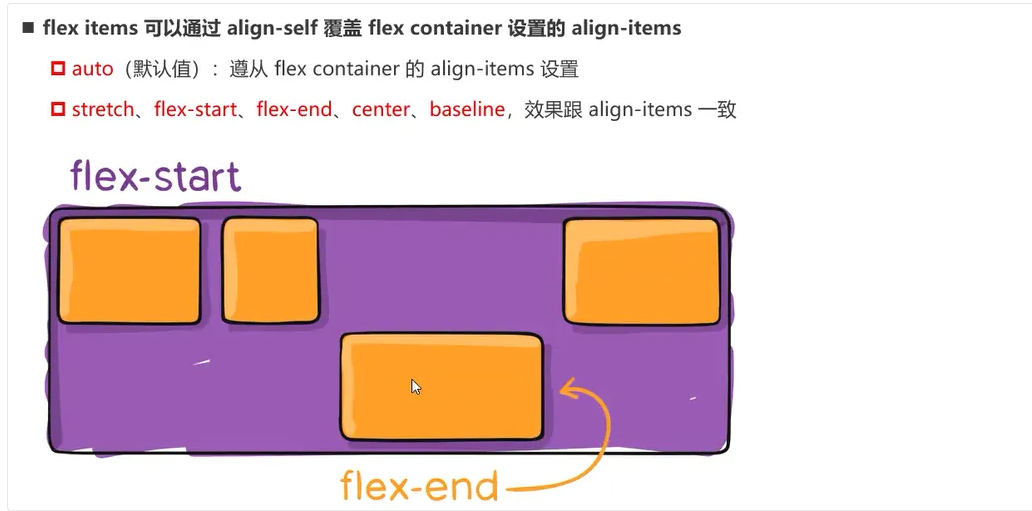
5.2 align-self
5.3 flex-grow
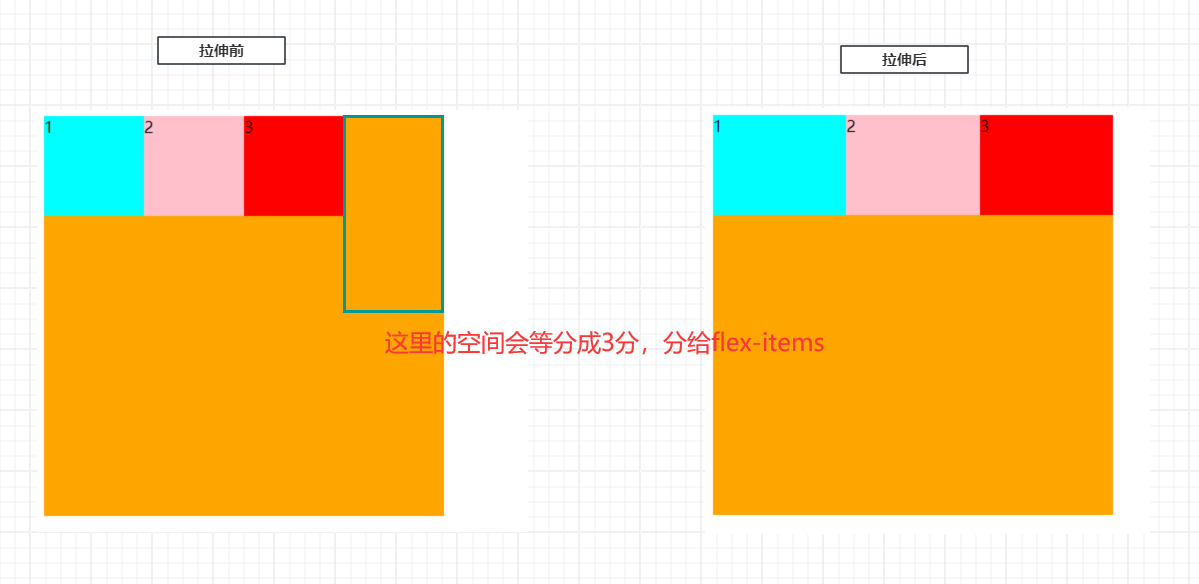
该属性决定了flex-items如何拉伸
5.3.1 默认情况
默认值为0
<!DOCTYPE html>

<html lang="en">

<head>

  <meta charset="UTF-8">

  <meta name="viewport" content="width=device-width, initial-scale=1.0">

  <title>Document</title>

  <style>

    .box {

      display: flex;

      width: 400px;

      height: 400px;

      background-color: orange;

    }

    .box .item {

      width: 100px;

      height: 100px;

    }

    .box .item1 {

      background-color: aqua;

    }

    .box .item2 {

      background-color: pink;

    }

    .box .item3 {

      background-color: red;

    }

  </style>

</head>

<body>

  <div class="box">

    <div class="item item1">1</div>

    <div class="item item2">2</div>

    <div class="item item3">3</div>

  </div>

</body>

</html>
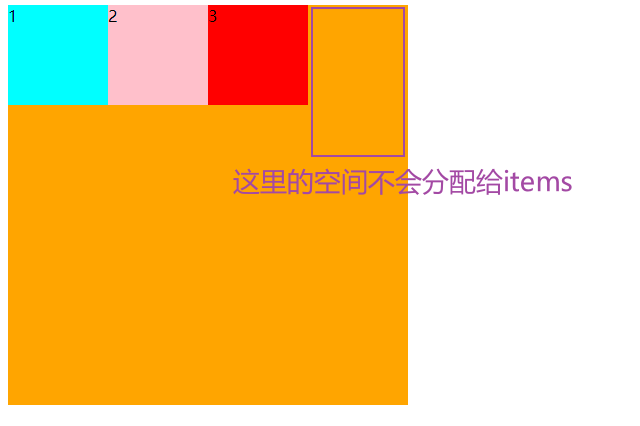
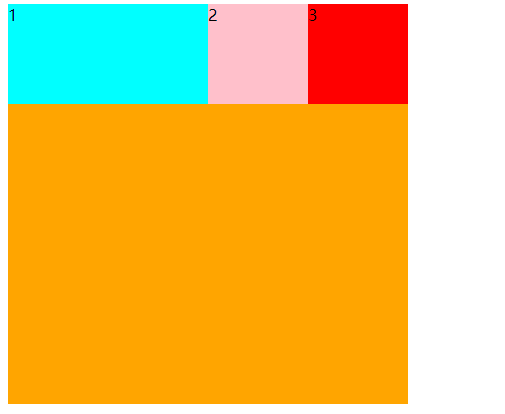
5.3.2 给其中1个flex-item设置
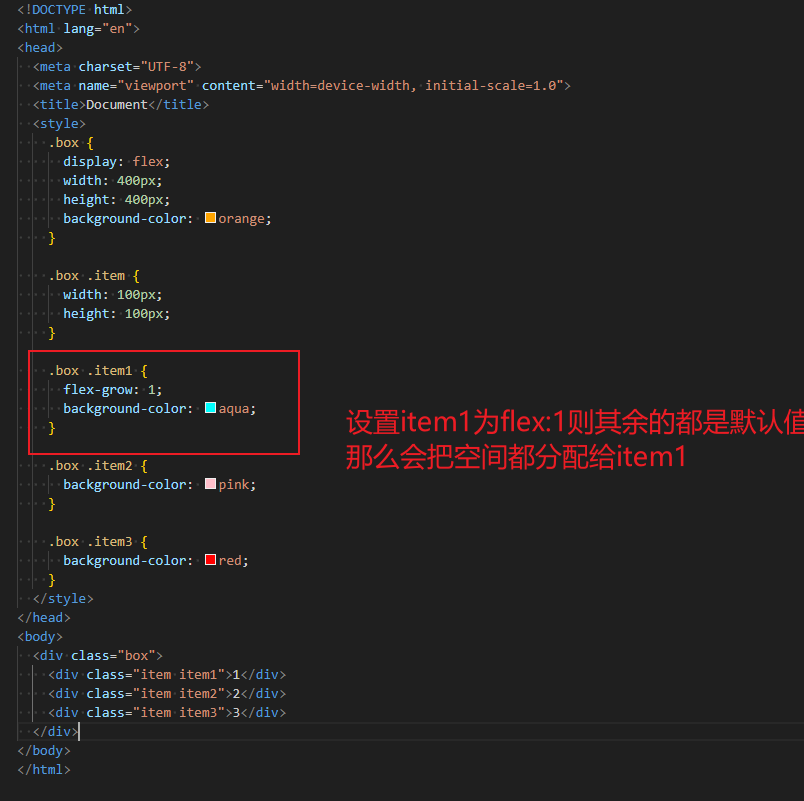
效果如下
5.3.3 所有flex-items都设置
<!DOCTYPE html>

<html lang="en">

<head>

  <meta charset="UTF-8">

  <meta name="viewport" content="width=device-width, initial-scale=1.0">

  <title>Document</title>

  <style>

    .box {

      display: flex;

      width: 400px;

      height: 400px;

      background-color: orange;

    }

    .box .item {

      flex-grow: 1;

      width: 100px;

      height: 100px;

    }

    .box .item1 {

      background-color: aqua;

    }

    .box .item2 {

      background-color: pink;

    }

    .box .item3 {

      background-color: red;

    }

  </style>

</head>

<body>

  <div class="box">

    <div class="item item1">1</div>

    <div class="item item2">2</div>

    <div class="item item3">3</div>

  </div>

</body>

</html>
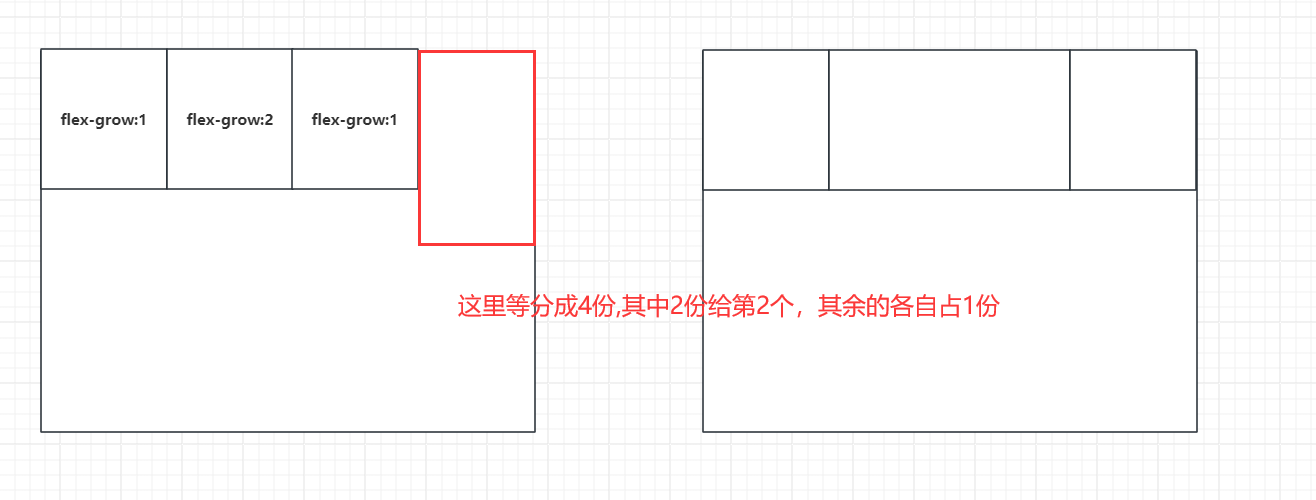
5.3.4 设置任意非负数
5.4 flex-shrink
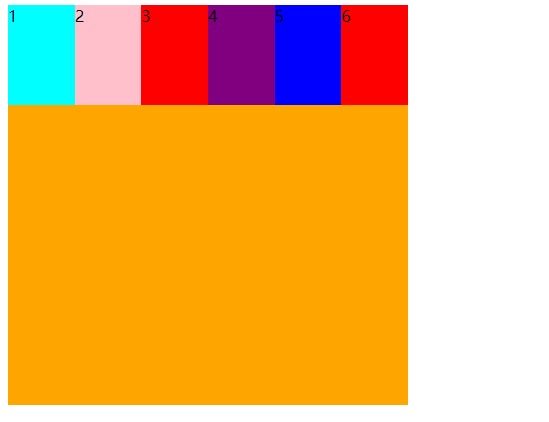
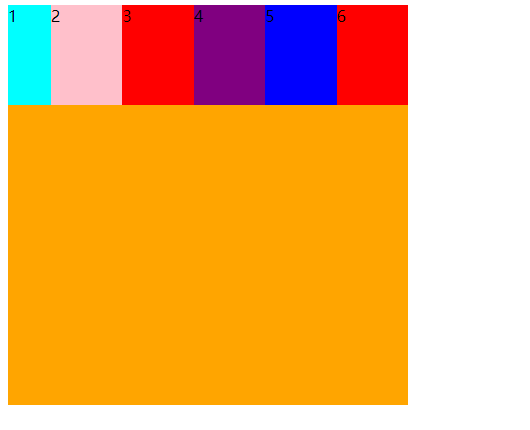
该属性决定flex items如何收缩,默认是为1表示收缩
<!DOCTYPE html>

<html lang="en">

<head>

  <meta charset="UTF-8">

  <meta name="viewport" content="width=device-width, initial-scale=1.0">

  <title>Document</title>

  <style>

    .box {

      display: flex;

      width: 400px;

      height: 400px;

      background-color: orange;

    }

    .box .item {

      width: 100px;

      height: 100px;

    }

    .box .item1 {

      /* flex-shrink: 2; */

      background-color: aqua;

    }

    .box .item2 {

      background-color: pink;

    }

    .box .item3 {

      background-color: red;

    }

    .box .item4 {

      background-color: purple;

    }

    .box .item5 {

      background-color: blue;

    }

    .box .item6 {

      background-color: red;

    }

  </style>

</head>

<body>

  <div class="box">

    <div class="item item1">1</div>

    <div class="item item2">2</div>

    <div class="item item3">3</div>

    <div class="item item4">4</div>

    <div class="item item5">5</div>

    <div class="item item6">6</div>

  </div>

</body>

</html>
设置压缩的值
<!DOCTYPE html>

<html lang="en">

<head>

  <meta charset="UTF-8">

  <meta name="viewport" content="width=device-width, initial-scale=1.0">

  <title>Document</title>

  <style>

    .box {

      display: flex;

      width: 400px;

      height: 400px;

      background-color: orange;

    }

    .box .item {

      width: 100px;

      height: 100px;

    }

    .box .item1 {

      flex-shrink: 2;

      background-color: aqua;

    }

    .box .item2 {

      background-color: pink;

    }

    .box .item3 {

      background-color: red;

    }

    .box .item4 {

      background-color: purple;

    }

    .box .item5 {

      background-color: blue;

    }

    .box .item6 {

      background-color: red;

    }

  </style>

</head>

<body>

  <div class="box">

    <div class="item item1">1</div>

    <div class="item item2">2</div>

    <div class="item item3">3</div>

    <div class="item item4">4</div>

    <div class="item item5">5</div>

    <div class="item item6">6</div>

  </div>

</body>

</html>
06 缩写语法
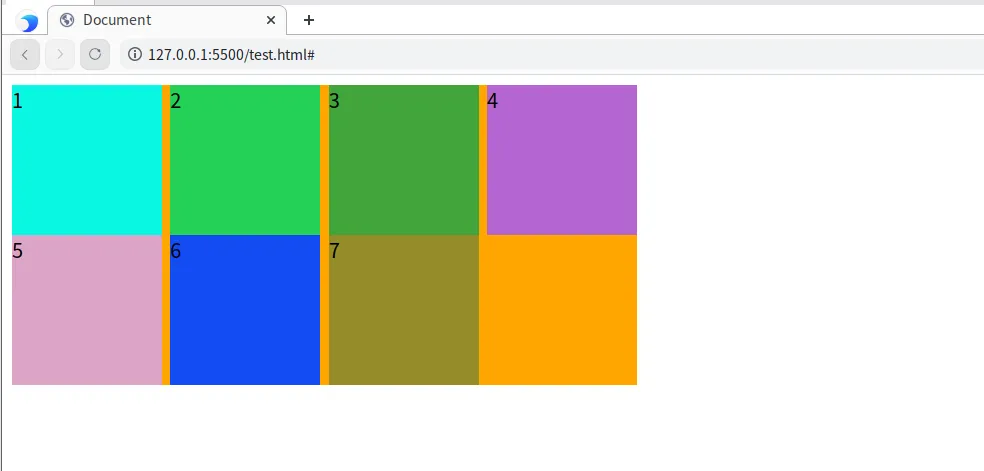
07 flex布局解决对齐问题
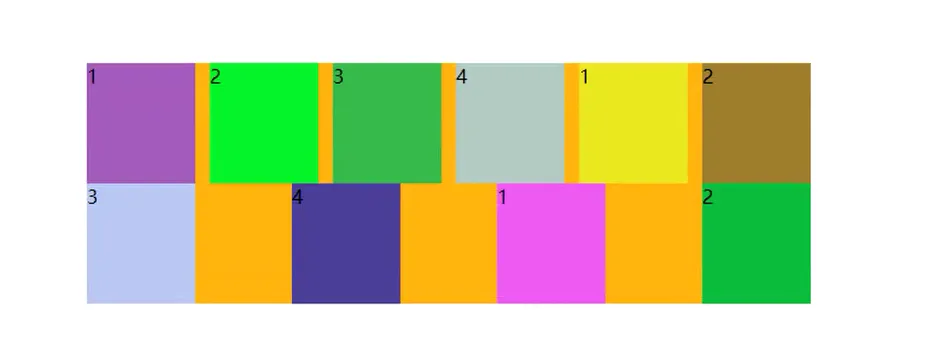
第一种方法就是把距离都算出来,但是这种扩展性不强
第二种方法
color.js代码
function getRandomColor(){

  return `rgb(${Math.random()*255}, ${Math.random()*255}, ${Math.random()*255})`

}

const itemEls = document.querySelectorAll(".item")

for (const item of itemEls){

  item.style.backgroundColor = getRandomColor()

}
<!DOCTYPE html>

<html lang="en">

<head>

   <meta charset="UTF-8">

   <meta http-equiv="X-UA-Compatible" content="IE=edge">

   <meta name="viewport" content="width=device-width, initial-scale=1.0">

   <title>Document</title>

   <style>

      .container {

         width: 500px;

         /* height: 500px; */

         background-color: orange;

         display: flex;

         flex-wrap: wrap;

         justify-content: space-between;

      }

      .item {

         width: 120px;

         height: 120px;

         background-color: red;

      }

   </style>

</head>

<body>

   <div class="container">

      <div class="item item1">1</div>

      <div class="item item2">2</div>

      <div class="item item3">3</div>

      <div class="item item4">4</div>

      <div class="item item5">5</div>

      <div class="item item6">6</div>

      <div class="item item7">7</div>

      <!-- <div class="item item8">8</div> -->

   </div>

   <script src="./color.js"></script>

</body>

</html>
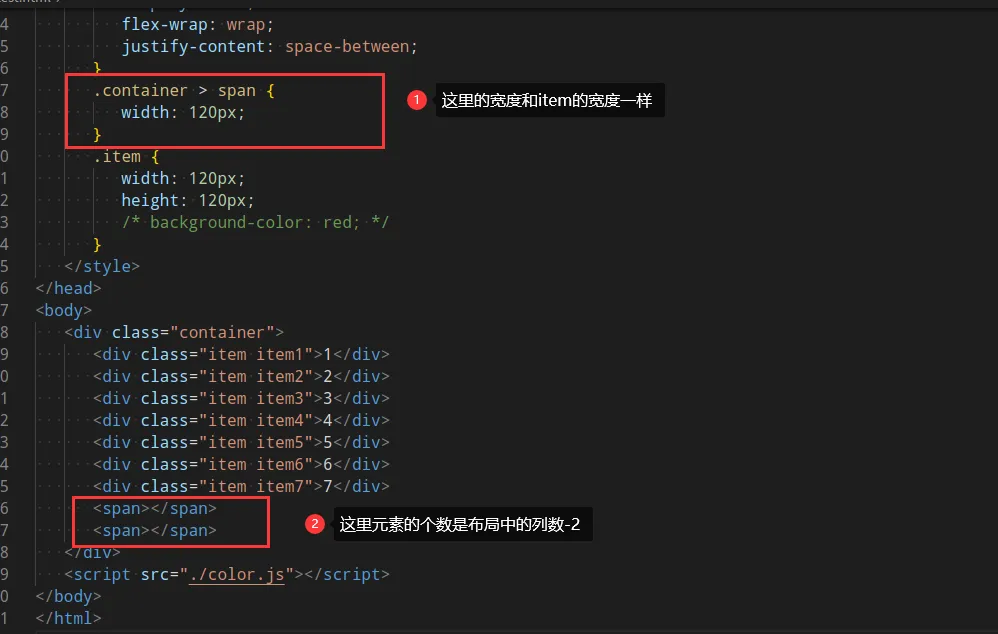
这样不用通过计算,可以让其余行的元素都是均匀排布
13-flex的更多相关文章
- 2017.11.13 flex 布局相关问题
一.今日任务:城市体验平台小程序的开发(由于数据还未完善,今天主要是 UI 布局的开发) 二.所遇问题 1. flex 布局问题: html: <view class="flex-sp ...
- 【转】【Flex】FLEX 学习网站分享
[转:http://hi.baidu.com/tanghecaiyu/item/d662fbd7f5fbe02c38f6f764 ] FLEX 学习网站分享 http://blog.minidx.co ...
- 基于restful注解(spring4.0.2整合flex+blazeds+spring-mvc)<一>
摘自: http://www.blogjava.net/liuguly/archive/2014/03/10/410824.html 参考官网:1.http://livedocs.adobe.com/ ...
- 轻轻松松学CSS:Flex布局
Flex布局就是"弹性布局",它可以简便.完整.响应式地实现各种页面布局.引入弹性布局的目的,当页面需要适应不同的屏幕大小确保元素拥有恰当的布局方式,对一个容器中的子元素进行排列 ...
- Web前端面试题整合,持续更新【可以收藏】
饭后闲来无事,把这几年带学生用的一些面试题整合一下,供上!拿走,不客气!应付一般公司的二面基本上是够用了.祝你早日拿到心仪的offer. css相关 1. 万能居中 1.margin: 0 auto; ...
- 天津政府应急系统之GIS一张图(arcgis api for flex)讲解(十三)台风模块
config.xml文件的配置如下: <widget label="台风" icon="assets/images/typhoon.png" config ...
- 天津政府应急系统之GIS一张图(arcgis api for flex)讲解(十一)路径导航模块
config.xml文件的配置如下: <widget label="路径导航" icon="assets/images/lujingdaohang.png" ...
- Eclipse开发环境设置(Maven+Spring MVC+Flex)
1. 环境设置 1.1. Java环境设置 1)JAVA_HOME D:\GreenSoftware\Java\Java8X64\jdk1.8.0_91 2)PATH ;%JAVA_HOME%/bin ...
- CM12.1/13.0编译教程
环境搭建 1.安装64位Ubuntu系统(实体安装.虚拟机安装均可) 注意:要求机器至少4G内存(虚拟机至少分配4G内存),硬盘至少100G空间(源码20G+,编译后整个目录约60~70G) 安装方法 ...
- FLEX各种特效集合
http://www.noupe.com/adobe/flex-developers-toolbox-free-components-themes-and-tutorials.html经典中的经典 h ...
随机推荐
- 我用 GitHub 9.8k 的 Go 语言 2D 游戏引擎写了个游戏
前言 hi,大家好,这里是白泽.今天给大家分享一个 GitHub 9.8k 的 Go 语言 2D 游戏引擎. https://github.com/hajimehoshi/ebiten 引擎的贡献者依 ...
- ITIL一定要去认证吗?哪个版本合适
关于ITIL的演进 ITIL是在演进发展中的,v1并不成功,v2 v3讲究流程与控制,其实都是偏向务虚,理论东西较多,能落地的少或许OGC的专家们自己也发现 光靠口头忽悠并不能说服最终用户接受ITIL ...
- golang向上取整、向下取整和四舍五入
一.概述 官方的math 包中提供了取整的方法,向上取整math.Ceil() ,向下取整math.Floor() 二.用法 package main import ( "fmt" ...
- golang将切片或数组进行分组
例子一: golang 数组分割 需求:给定一个数组和一个正整数,要求把数组分割成多个正整数大小的数组,如果不够分,则最后一个数组分到剩余的所有元素. package main import ( &q ...
- 包含Symbol类型的对象遍历取key使用Reflect.ownKeys
Reflect.ownKeys(target)等同于 Object.getOwnPropertyNames 与Object.getOwnPropertySymbols 之和
- PhiData 一款开发AI搜索、agents智能体和工作流应用的AI框架
引言 在人工智能领域,构建一个能够理解并响应用户需求的智能助手是一项挑战性的任务.PhiData作为一个开源框架,为开发者提供了构建具有长期记忆.丰富知识和强大工具的AI助手的可能性.本文将介绍Phi ...
- Vue cli之安装
1.安装node.js Node.js是一个新的后端(后台)语言,它的语法和JavaScript类似,所以可以说它是属于前端的后端语言,后端语言和前端语言的区别: 运行环境:后端语言一般运行在服务器端 ...
- 不使用循环语句用if和else实现循环
如果不使用循环语句,可以使用递归函数来实现循环的效果.递归函数是指在函数内部调用自身的函数.下面是一个使用递归函数来实现循环的示例: (初学者记得写include,这里是个普通函数,所以我没写) de ...
- itest work 开源接口测试&敏捷测试管理平台 9.5.0 GA_u3,优化及修复关键 BUG
(一)itest work 简介 itest work (爱测试) 一站式工作站让测试变得简单.敏捷,"好用.好看,好敏捷" ,是itest wrok 追求的目标.itest w ...
- kubernetes(k8s)
应用程序部署的演变过程 在部署应用程序的方式上,主要经历了三个时代 传统部署 互联网早期,会直接将应用程序部署在物理机上 优点: 简单,不需要其他技术的参与 缺点: 不能为应用程序定义资源使用边界,很 ...