
【Spring-Security】Re02 基础认证流程
一、权限认证模拟操作:
编写Security配置类:
package cn.zeal4j.configuration;

import org.springframework.context.annotation.Bean;

import org.springframework.context.annotation.Configuration;

import org.springframework.security.crypto.bcrypt.BCryptPasswordEncoder;

import org.springframework.security.crypto.password.PasswordEncoder;

/**

 * @author Administrator

 * @file IntelliJ IDEA Spring-Security-Tutorial

 * @create 2020 09 27 21:55

 */

@Configuration

public class SecurityConfiguration {

    @Bean

    public PasswordEncoder getPasswordEncoder() {

        return new BCryptPasswordEncoder();

    }

}
编写认证逻辑:
package cn.zeal4j.service;

import org.springframework.beans.factory.annotation.Autowired;

import org.springframework.security.core.authority.AuthorityUtils;

import org.springframework.security.core.userdetails.User;

import org.springframework.security.core.userdetails.UserDetails;

import org.springframework.security.core.userdetails.UserDetailsService;

import org.springframework.security.core.userdetails.UsernameNotFoundException;

import org.springframework.security.crypto.password.PasswordEncoder;

import org.springframework.stereotype.Service;

/**

 * @author Administrator

 * @file IntelliJ IDEA Spring-Security-Tutorial

 * @create 2020 09 27 21:57

 */

@Service

public class UserDetailsServiceImpl implements UserDetailsService {

    @Autowired

    private PasswordEncoder passwordEncoder;

    @Override

    public UserDetails loadUserByUsername(String username) throws UsernameNotFoundException {

        // 1、通过提供的用户名参数访问数据库,查询记录返回过来,如果记录不存在则抛出异常

        // username = "admin";

        if (!"admin".equals(username)) throw new UsernameNotFoundException("用户名不存在");

        // 2、查询出来的凭证是被加密了的,这里是模拟查询的密码

        String encode = passwordEncoder.encode("123456");

        // 权限不可以为空,所以需要这么一个工具方法简单实现

        return new User(username, encode, AuthorityUtils.commaSeparatedStringToAuthorityList("admin,normal"));

    }

}
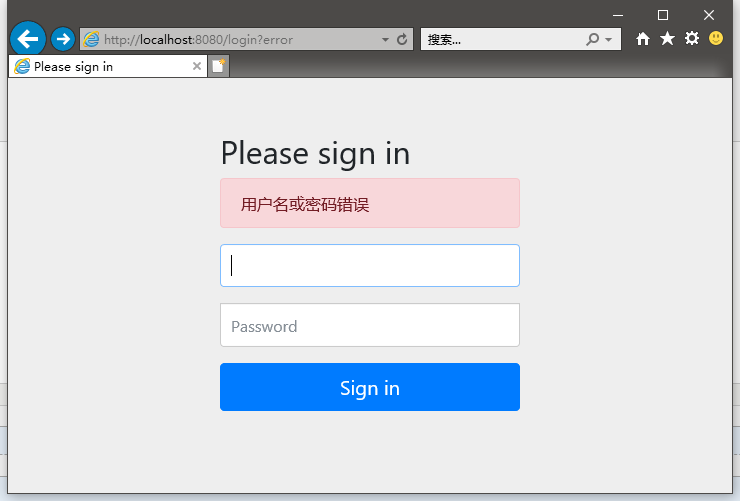
重启项目,登陆测试:
用户名称是admin,密码是123456
填写的不是admin也一样报这个错误,但是控制台并没有抛出我们设置的异常
也就是说,UserDetails对象交给其他Security的方法来判断了
二、自定义登陆页面
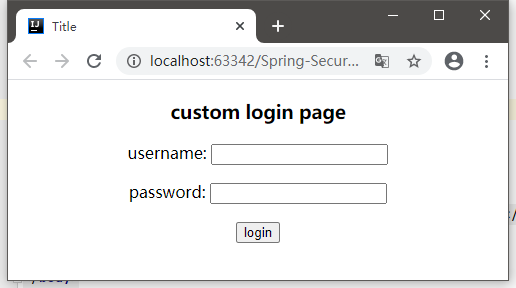
在static目录编写自己的登陆页面
<!DOCTYPE html>

<html lang="en">

<head>

    <meta charset="UTF-8">

    <title>Title</title>

    <style type="text/css">

        h3,p {

            text-align: center;

        }

    </style>

</head>

<body>

    <h3>custom login page</h3>

    <form method="post" action="/login.action" >

        <p>username: <input type="text" name="username"></p>

        <p>password: <input type="password" name="password"></p>

        <p><input type="submit" value="login"></p>

    </form>

</body>

</html>
在模版目录内编写main.html
<!DOCTYPE html>

<html lang="en">

<head>

    <meta charset="UTF-8">

    <title>Main-Page</title>

</head>

<body>

    <h3>This is main page</h3>

</body>

</html>

在之前的Security配置类中增加这些配置:
package cn.zeal4j.configuration;

import org.springframework.context.annotation.Bean;

import org.springframework.context.annotation.Configuration;

import org.springframework.security.config.annotation.web.builders.HttpSecurity;

import org.springframework.security.config.annotation.web.configuration.WebSecurityConfigurerAdapter;

import org.springframework.security.crypto.bcrypt.BCryptPasswordEncoder;

import org.springframework.security.crypto.password.PasswordEncoder;

/**

 * @author Administrator

 * @file IntelliJ IDEA Spring-Security-Tutorial

 * @create 2020 09 27 21:55

 */

@Configuration

public class SecurityConfiguration extends WebSecurityConfigurerAdapter {

    @Bean

    public PasswordEncoder getPasswordEncoder() {

        return new BCryptPasswordEncoder();

    }

    @Override

    protected void configure(HttpSecurity httpSecurity) throws Exception {

        httpSecurity.formLogin(). // 设置登陆行为方式为表单登陆

                loginPage("/login.html"). // 设置登陆页面URL路径

                loginProcessingUrl("/login.action"). // 设置表单提交URL路径

                successForwardUrl("/main.page"); // 设置认证成功跳转URL路径

        httpSecurity.authorizeRequests().

                antMatchers("/login.html").permitAll(). // 登陆页面允许任意访问

                anyRequest().authenticated(); // 其他请求均需要被授权访问

        // CSRF攻击拦截关闭

        httpSecurity.csrf().disable();

    }

}
因为main页面在模版目录中,所以需要一个控制器去跳转进去
package cn.zeal4j.controller;

import org.springframework.stereotype.Controller;

import org.springframework.web.bind.annotation.RequestMapping;

/**

 * @author Administrator

 * @file IntelliJ IDEA Spring-Security-Tutorial

 * @create 2020 09 27 22:35

 */

@Controller

public class LoginController {

    @RequestMapping("main.page")

    public String toMainPage() {

        return "main"; // 模版内的页面不允许重定向,忘了忘了

    }

}
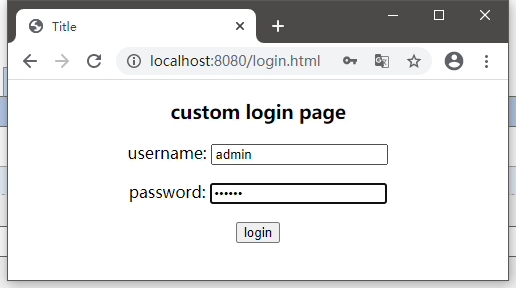
登陆逻辑不发生变化,启动项目访问测试:
成功跳转!!!
三、自定义登陆失败页面
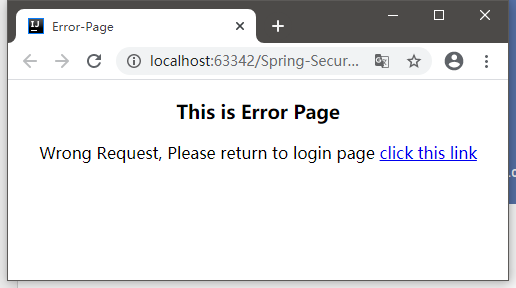
首先在static目录写一个登陆失败的页面
<!DOCTYPE html>

<html lang="en">

<head>

    <meta charset="UTF-8">

    <title>Error-Page</title>

    <style type="text/css">

        h3,p {

            text-align: center;

        }

    </style>

</head>

<body>

    <h3>This is Error Page</h3>

    <p>Wrong Request, Please return to login page <a href="/login.html">click this link</a></p>

</body>

</html>
Security的失败页面跳转也是由配置Bean的方法决定的,请求方式是POST请求
所以这个登陆失败的页面跳转也需要一个控制器处理,因为这个页面不在模版之内,所以可以使用重定向
package cn.zeal4j.configuration;

import org.springframework.context.annotation.Bean;

import org.springframework.context.annotation.Configuration;

import org.springframework.security.config.annotation.web.builders.HttpSecurity;

import org.springframework.security.config.annotation.web.configuration.WebSecurityConfigurerAdapter;

import org.springframework.security.crypto.bcrypt.BCryptPasswordEncoder;

import org.springframework.security.crypto.password.PasswordEncoder;

/**

 * @author Administrator

 * @file IntelliJ IDEA Spring-Security-Tutorial

 * @create 2020 09 27 21:55

 */

@Configuration

public class SecurityConfiguration extends WebSecurityConfigurerAdapter {

    @Bean

    public PasswordEncoder getPasswordEncoder() {

        return new BCryptPasswordEncoder();

    }

    @Override

    protected void configure(HttpSecurity httpSecurity) throws Exception {

        httpSecurity.formLogin(). // 设置登陆行为方式为表单登陆

                loginPage("/login.html"). // 设置登陆页面URL路径

                loginProcessingUrl("/login.action"). // 设置表单提交URL路径

                successForwardUrl("/main.page"). // 设置认证成功跳转URL路径 POST请求

                failureForwardUrl("/error.page");  // 设置认证失败跳转URL路径 POST请求

        httpSecurity.authorizeRequests().

                antMatchers("/login.html").permitAll(). // 登陆页面允许任意访问

                antMatchers("/error.html").permitAll(). // 失败跳转后重定向的页面也需要被允许访问

                anyRequest().authenticated(); // 其他请求均需要被授权访问

        // CSRF攻击拦截关闭

        httpSecurity.csrf().disable();

    }

}
注意授权的请求处理,匹配的URL是重定向的地址,而不是控制器的URL。
控制器方法:
package cn.zeal4j.controller;

import org.springframework.stereotype.Controller;

import org.springframework.web.bind.annotation.PostMapping;

import org.springframework.web.bind.annotation.RequestMapping;

/**

 * @author Administrator

 * @file IntelliJ IDEA Spring-Security-Tutorial

 * @create 2020 09 27 22:35

 */

@Controller

public class LoginController {

    @RequestMapping("main.page")

    public String toMainPage() {

        return "main"; // 模版内的页面不允许重定向,忘了忘了

    }

    @PostMapping("error.page") // 控制器不支持POST请求跳转解析, 需要控制器跳转 Resolved [org.springframework.web.HttpRequestMethodNotSupportedException: Request method 'POST' not supported]

    public String redirectToErrorPage() {

        return "redirect:/error.html"; // 重定向要写/标识 区分模版解析

    }

}
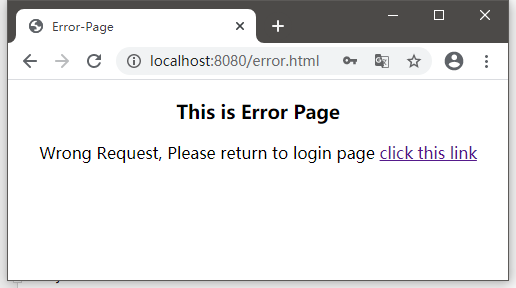
登陆失败测试:
【Spring-Security】Re02 基础认证流程的更多相关文章
- Spring Security 概念基础 验证流程
Spring Security 概念基础 验证流程 认证&授权 认证:确定是否为合法用户 授权:分配角色权限(分配角色,分配资源) 认证管理器(Authentication Manager) ...
- 认证与授权】Spring Security系列之认证流程解析
上面我们一起开始了Spring Security的初体验,并通过简单的配置甚至零配置就可以完成一个简单的认证流程.可能我们都有很大的疑惑,这中间到底发生了什么,为什么简单的配置就可以完成一个认证流程啊 ...
- 02 spring security 自定义用户认证流程
1. 自定义登录页面 (1)首先在static目录下面创建login.html 注意: springboot项目默认可以访问resources/resources, resources/s ...
- spring security 表单认证的流程
spring security表单认证过程 表单认证过程 Spring security的表单认证过程是由org.springframework.security.web.authentication ...
- [权限管理系统(四)]-spring boot +spring security短信认证+redis整合
[权限管理系统]spring boot +spring security短信认证+redis整合 现在主流的登录方式主要有 3 种:账号密码登录.短信验证码登录和第三方授权登录,前面一节Sprin ...
- Spring Security 的注册登录流程
Spring Security 的注册登录流程 数据库字段设计 主要数据库字段要有: 用户的 ID 用户名称 联系电话 登录密码(非明文) UserDTO对象 需要一个数据传输对象来将所有注册信息发送 ...
- Spring Security 自定义登录认证(二)
一.前言 本篇文章将讲述Spring Security自定义登录认证校验用户名.密码,自定义密码加密方式,以及在前后端分离的情况下认证失败或成功处理返回json格式数据 温馨小提示:Spring Se ...
- Spring Security 解析(二) —— 认证过程
Spring Security 解析(二) -- 认证过程 在学习Spring Cloud 时,遇到了授权服务oauth 相关内容时,总是一知半解,因此决定先把Spring Security .S ...
- Spring Security OAuth2.0认证授权二:搭建资源服务
在上一篇文章[Spring Security OAuth2.0认证授权一:框架搭建和认证测试](https://www.cnblogs.com/kuangdaoyizhimei/p/14250374. ...
- Spring Security OAuth2.0认证授权三:使用JWT令牌
Spring Security OAuth2.0系列文章: Spring Security OAuth2.0认证授权一:框架搭建和认证测试 Spring Security OAuth2.0认证授权二: ...
随机推荐
- Symbol.for()
当我们在不同的模块或文件中需要共享一个特定的Symbol时,可以使用Symbol.for()方法来实现. 假设我们有两个模块,分别是module1.js和module2.js.我们希望在这两个模块中使 ...
- kettle从入门到精通 第二十七课 邮件发送
1.我们平常在做数据同步的时候,担心转换或者job没有正常运行,需要加上监控机制,这个时候就会用到邮件功能. 下图是一个简单的测试邮件发送功能的转换.在kettle.properties文件中设置邮件 ...
- 使用极限网关助力 ES 集群无缝升级、迁移上/下云
在工作中大家可能会遇到以下这些场景: 自建 ES 集群需要平滑迁移到 XX 云: 从 XX 云将 ES 集群迁移到自建机房: ES 集群进行跨版本升级,同时保留回退能力: 这些场景往往都还有个共同的需 ...
- windows server 2016 远程桌面连接,发生身份验证错误。 要求的函数不受支持
远程桌面连接,发生身份验证错误. 要求的函数不受支持 客户端:WIN7 服务端:windows server 2016 在被远程的机器上-远程设置中-取消"仅允许运行使用网络级别身份验证的远 ...
- Java8 - sum求和,将 List 集合转为 Map,key去重(groupingBy),sorted排序
Java8 - sum求和,将 List 集合转为 Map,key去重(groupingBy),sorted排序 package com.example.core.mydemo.java8; publ ...
- ITMS-90717: 无效的应用程序商店图标
PS导入照片 图像->模式->索引颜色 透明度去掉打勾保存即可
- DHorse v1.5.1 发布,基于 k8s 的发布平台
版本说明 新增特性 支持k8s的v1.30.x版本: 优化特性 优化回滚功能: 修复注册来源的回滚问题: 新增和修改应用时校验应用名: 升级kubernetes-client至v6.13.0: 调整部 ...
- FPGA对EEPROM驱动控制(I2C协议)
本文摘要:本文首先对I2C协议的通信模式和AT24C16-EEPROM芯片时序控制进行分析和理解,设计了一个i2c通信方案.人为按下写操作按键后,FPGA(Altera EP4CE10)对EEPROM ...
- Linux 内核:设备驱动模型 学习总结
背景 其实之前就转载过别人针对Linux的设备驱动模型(Linux Device Driver Model,LDDM)的文章,但是受限于自身的能力,因此花了点时间重新学习了一下. 前人写的文章很好,我 ...
- 高通与At指令:ATFWD解析
背景 本章的内容是适用于AP侧AT指令开发调试的有关人员. 主要是介绍高通实现的ATFWD框架.在这需要说明一下的是,或许你对AT Command很了解了,但是却貌似都不知道ATFWD,这很正常,严格 ...