
安装numpy:conda install nampy==1.16 时报错An HTTP error occurred when trying to retrieve this URL.
安装numpy:conda install nampy==1.16 时报错An HTTP error occurred when trying to retrieve this URL.
HTTP errors are often intermittent, and a simple retry will get you on your way.
1、错误截图

2、方法一
原因是conda源加入了不知名的URL,现在不能使用了(或者废弃)
# 重置源配置

conda config --remove-key channels

# 重新添加清华源

conda config --add channels https://mirrors.tuna.tsinghua.edu.cn/anaconda/pkgs/free/

conda config --add channels https://mirrors.tuna.tsinghua.edu.cn/anaconda/pkgs/main/

conda config --add channels https://mirrors.tuna.tsinghua.edu.cn/anaconda/cloud/pytorch/

conda config --set show_channel_urls yes

# 查看效果

cat ~/.condarc
(TF117) PS C:\Users\Dell> cat ~/.condarc                                                                                ssl_verify: true

show_channel_urls: true

report_errors: true

channels:

  - https://mirrors.tuna.tsinghua.edu.cn/anaconda/cloud/pytorch/

  - https://mirrors.tuna.tsinghua.edu.cn/anaconda/pkgs/main/

  - https://mirrors.tuna.tsinghua.edu.cn/anaconda/pkgs/free/

  - defaults
失败!!
3、方法二
# 更新conda

conda update -n base conda
CondaError: Downloaded bytes did not match Content-Length

  url: https://mirrors.tuna.tsinghua.edu.cn/anaconda/pkgs/main/win-64/llvmlite-0.35.0-py37h34b8924_4.conda

  target_path: D:\Anaconda3\pkgs\llvmlite-0.35.0-py37h34b8924_4.conda

  Content-Length: 12989490

  downloaded bytes: 5160624

CondaHTTPError: HTTP 000 CONNECTION FAILED for url <https://mirrors.tuna.tsinghua.edu.cn/anaconda/pkgs/main/win-64/imagecodecs-2021.1.11-py37h5da4933_1.conda>

Elapsed: -

An HTTP error occurred when trying to retrieve this URL.

HTTP errors are often intermittent, and a simple retry will get you on your way.

CondaHTTPError: HTTP 000 CONNECTION FAILED for url <https://mirrors.tuna.tsinghua.edu.cn/anaconda/pkgs/main/win-64/matplotlib-base-3.3.4-py37h49ac443_0.conda>

Elapsed: -

An HTTP error occurred when trying to retrieve this URL.

HTTP errors are often intermittent, and a simple retry will get you on your way.

CondaHTTPError: HTTP 000 CONNECTION FAILED for url <https://mirrors.tuna.tsinghua.edu.cn/anaconda/pkgs/main/win-64/pandas-1.2.3-py37hf11a4ad_0.conda>

Elapsed: -

An HTTP error occurred when trying to retrieve this URL.

HTTP errors are often intermittent, and a simple retry will get you on your way.
conda update -all
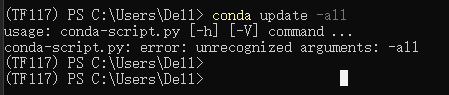
更新也出错!!
Collecting package metadata (current_repodata.json): done

Solving environment: done

# All requested packages already installed.

已经安装完毕了
从报错的情况看可能下载的太慢,之前清华源换了还是有问题。
在这里还原到默认状态。
conda config --remove-key channels
又按照报错信息手动删除了一些文件
警告conda.gateways.disk.delete:unlink_or_rename_to_trash(140):无法删除或重命名D:\ Anaconda3 \ pkgs \ qt-5.6.2-vc14_6.tar.bz2。 请手动删除此文件(您可能需要重新启动才能释放文件句柄)
警告conda.gateways.disk.delete:unlink_or_rename_to_trash(140):无法删除或重命名D:\ Anaconda3 \ pkgs \ qt-5.6.2-vc14_6 \ Library \ plugins \ sqldrivers \ qsqlite.dll。 请手动删除此文件(您可能需要重新启动才能释放文件句柄)
再升级一下
# conda

conda update conda

# anaconda(升级anaconda前需要先升级conda)

conda update anaconda

# anaconda-navigator

conda update anaconda-navigator

# spyder

conda update spyder

# 所有包

conda update --all

# 尽量避免使用conda update --all命令,可能会出现部分包降级的问题
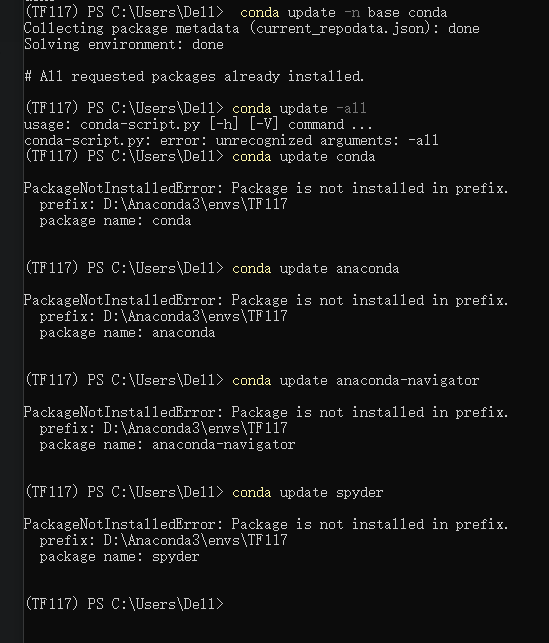
安装第一个命令过程后,我出现了一个错误:PackageNotInstalledError: Package is not installed in prefix,这个时候不用慌,输入conda的命令基本上都是报错,把终端关掉重新开启就解决了。原文链接:https://blog.csdn.net/sv2008337/article/details/80235482
试一下。
上面的都行了,OK!
# 修改频道

conda config --add channels conda-forge

conda config --set channel_priority flexible
你以为这样就解决了么?
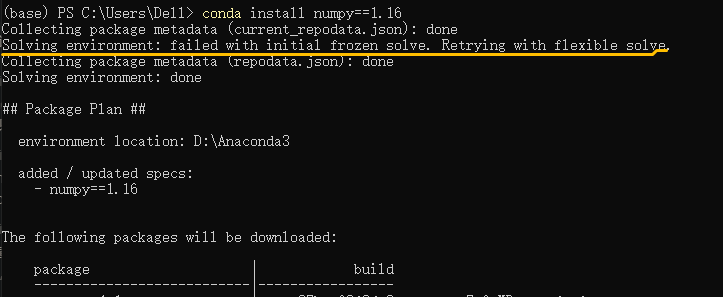
不!!这行故障还是存在。
先到这里,这就是我一下午找遍全网也没解决问题的脑残操作,希望观众老爷看了之后能够解决你的问题。
安装numpy:conda install nampy==1.16 时报错An HTTP error occurred when trying to retrieve this URL.的更多相关文章
- MyEclipse for Spring启动时报错"An internal error occurred during: 'Updating indexes'.Java heap space"的解决办法
问题 MyEclipse for Spring在启动时,报如下错误:An internal error occurred during: 'Updating indexes'.Java heap sp ...
- 添加数据时报错:An error occurred while updating the entries. See the inner exception for detail。
场景:前几天在项目开发时,有个bug经常出现,今天花了一整天,终于把它解决了.记录一下解决流程. 解决方法: 主要报错的地方在添加的部分: 1 foreach (var requestProperty ...
- anaconda在本地安装软件conda install
安装完anaconda后,想在mac下安装pytorch,但是在用官网提供的安装方法一直安装不上pytorch和torchvision,估计是被墙了 conda install pytorch tor ...
- Linux下安装mysql时报错:FATAL ERROR: please install the following Perl modules before executing ./scripts/mysql_install_db:Data::Dumper
如题,安装mysql过程中,执行scripts/mysql_install_db --user=mysql命令时报错: FATAL ERROR: please install the followin ...
- 修改 docker image 安装目录 (解决加载大image时报错:"no space left on device")
修改 docker image 安装目录 (解决加载大image时报错:"no space left on device" ) 基于Ubuntu16.04 docker版本: 17 ...
- 解决用anaconda安装scrapy后,在使用scrapy时报错
python版本为3.7 因为用anaconda安装scrapy非常方便,会自动下载所依赖的包, 所以就使用anaconda安装scrapy, 非常舒服,安装很成功 conda install scr ...
- python安装numpy、scipy、gensim以及报错unable to import 'smart_open.gcs', disabling that module处理
首先,安装gensim库,必须先安装numpy+mkl和scipy 安装顺序是依次安装numpy+kml.scipy.gensim,根据自己Python下载的版本进行下载 如果你的库里面有numpy. ...
- 安装tcpreplay时报错:configure: error: libdnet not found
安装tcpreplay时报错configure: error: libdnet not found 解决方法: 下载包libdnet-1.8.tar.gz并安装,依次执行: ./configure m ...
- 编译安装redis 3.2.9 make test 时报错
默认监听端口:6379(可以创建多个端口的配置文件) 源码安装: $ yum install tcl $ wget http://download.redis.io/releases/redis-3. ...
- mysql初始化时报错bin/mysqld: error while loading shared libraries: libnuma.so.1: cannot open shared object file: No such file or directory的处理
问题描述: 今天新安装了一个linux虚拟机,然后安装mysql 5.7.21,在进行初始化的时候,报错 bin/mysqld: error : cannot open shared object f ...
随机推荐
- Node 文件查找的优先级以及 Require 方法的文件查找策略
一.模块规范 NodeJS对CommonJS进行了支持和实现,让我们在开发node的过程中可以方便的进行模块化开发: 在Node中每一个js文件都是一个单独的模块 模块中包括CommonJS规范的核心 ...
- 关于mac使用figma以及企业微信3.1.18版本,CPU系统占用率飙升至70%
问题描述 使用一段时间正常,不知道是修改了什么设置,还是有什么软件冲突,导致cpu使用率极高 系统进程中有一个 kernel_task 占用了大量的cpu 并且该占用并不会消失,只要figma打开就会 ...
- Delta Lake基础介绍(商业版)
简介:介绍 Lakehouse 搜索引擎的设计思想,探讨其如何使用缓存,辅助数据结构,存储格式,动态文件剪枝,以及 vectorized execution 达到优越的处理性能. 作者:李洁杏,Da ...
- 【阿里云 CDP 公开课】 第二讲:CDH/HDP 何去何从
简介:Hadoop社区版CDH/HDP已经不再更新,也将终止服务.后续的平台路线图怎么规划?Cloudera CDP整合了CDH和HDP,有哪些性能提升和功能增强?如何平滑的进行迁移?本文结合CDH ...
- 钉钉宜搭亮相“第二届ISIG中国产业智能大会”:云钉低代码,构建企业酷应用
简介:低代码年度行业盛会!钉钉宜搭创始人叶周全受邀出席并发表主题演讲. 12月8日,由中国电子技术标准化研究院指导,RPA中国.LowCode低码时代.信创中国联合举办的"第二届ISIG中 ...
- 谈谈C++新标准带来的属性(Attribute)
简介: 从C++11开始,标准引入了一个新概念"属性(attribute)",本文将简单介绍一下目前在C++标准中已经添加的各个属性以及常用属性的具体应用. 作者 | 寒冬来源 | ...
- [Caddy2] The Caddy Web Server 常见 Caddyfile 模式
Caddyfile 是 JSON 配置的易用写法,支持通常用的功能,完整功能还是需要 JSON 配置的. 以下适用于 Caddy2 版本的配置. 静态文件服务器 example.com root * ...
- win10 uwp 简单制作一个 Path 路径绘制的图标按钮
本文告诉大家在 UWP 或 WinUI 3 里面如何简单制作一个由 Path 几何路径图形绘制的图标按钮 先在资源里面定义按钮的样式,重写 Template 属性,通过在 Template 里面放入 ...
- WPF 列表控件数据源绑定多个数据集合方法
在 WPF 用的多的列表控件如 ListBox 或 ListView 等,本文告诉大家在这些列表控件上进行绑定多个数据集合来源的多个实现方法.如有一个显示动物列表的控件,需要绑定的数据来源是阿猫和阿狗 ...
- K8s控制器---DaemonSet控制器(12)
一.DaemonSet控制器:概念.原理解读 1.1 DaemonSet概述 DaemonSet 控制器能够确保 k8s 集群所有的节点都运行一个相同的 pod 副本,当向 k8s 集群中增加 nod ...