
selenium报错:Message: stale element reference: element is not attached to the page document
在使用selenium时,报了一个错误
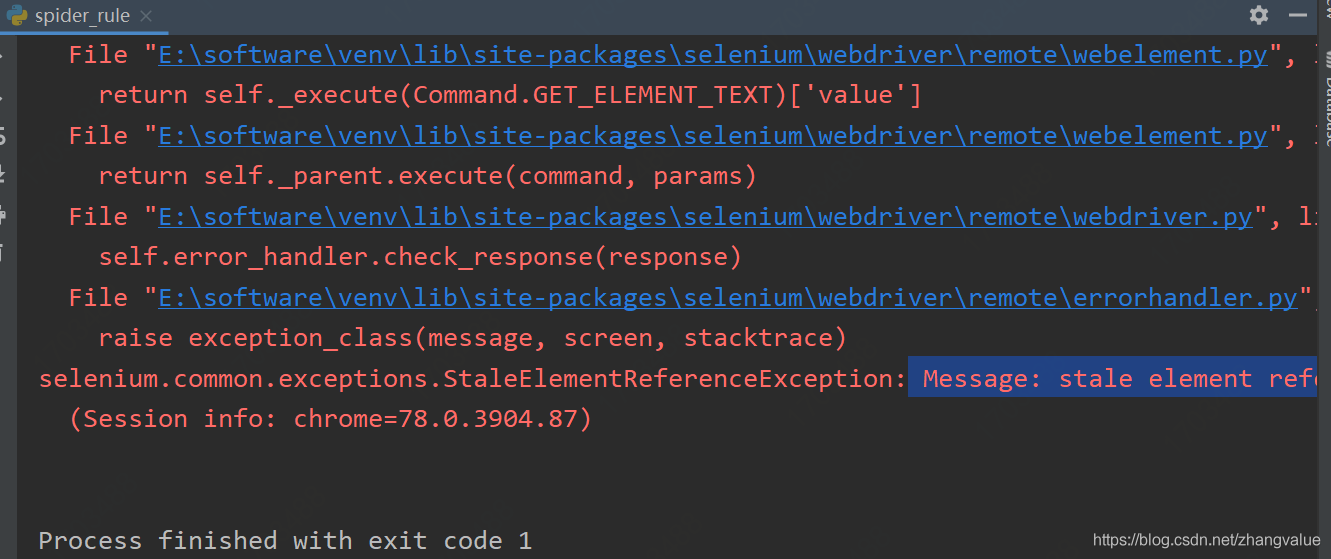
报错的原因:
所引用的元素已过时,不再依附于当前页面。通常情况下,这是因为页面进行了刷新或跳转
解决方法:
重新定位元素
代码示例:
# 旧代码(报错)

lists = self.root.find_elements_by_xpath('/html/body/table[4]/tbody/tr[2]/td/a')

for i in lists:

    self.root.get(i.get_attribute(''href))
# 新代码(解决方法)

lists = self.root.find_elements_by_xpath('/html/body/table[4]/tbody/tr[2]/td/a')

for j in range(len(lists)):

    self.root.find_elements_by_xpath('/html/body/table[4]/tbody/tr[2]/td/a')[j].click()
selenium报错:Message: stale element reference: element is not attached to the page document的更多相关文章
- appium报错Message: Cannot set the element to ‘XXXX’. Did you interact with the correct element?
appium+python+android 在定位到模块输入内容的时候遇到了一个问题 send_keys报错 appium报错Message: Cannot set the element to 'X ...
- python selenium 报错unknown error: cannot focus element 解决办法
登录框由于js限制,定位到元素后无法sendkey ,sendky报错如下: selenium.common.exceptions.WebDriverException: Message: unkno ...
- selenium.common.exceptions.StaleElementReferenceException: Message: stale element reference: element is not attached to the page document
抓取网页代码后,由于是在同一个li标签下,所以使用一次性抓取,所有的a标签,然后循环做不同的操作,但是抛出找不到元素异常. def office_page(_chrome: Chrome): sn = ...
- 关于报错stale element reference: element is not attached to the page document处理
1.现象 在执行脚本时,有时候引用一些元素对象会抛出如下异常 org.openqa.selenium.StaleElementReferenceException: stale element ref ...
- 报错stale element reference: element is not attached to the page document结局方案
今天在调试脚本时,遇到如下报错: org.openqa.selenium.StaleElementReferenceException: stale element reference: elemen ...
- stale element reference: element is not attached to the page document 异常
在执行脚本时,有时候引用一些元素对象会抛出如下异常 org.openqa.selenium.StaleElementReferenceException: stale element referenc ...
- Selenium报错:StaleElementReferenceException
一个学生在操作页面跳转时遇到一个Selenium报错, 如下图所示: StaleElementReferenceException: Message: stale element reference: ...
- selenium报错以及各解决方法
1.driver.findElement(By.name("wd")).sendKeys("selenium"); 报错:The method sendKeys ...
- 解决centos7下 selenium报错--unknown error: DevToolsActivePort file doesn't exist
解决centos7下 selenium报错--unknown error: DevToolsActivePort file doesn't exist 早上在linux下用selenium启动Chro ...
- selenium报错汇总
selenium报错汇总 报错:[error] Could not connect to Selenium Server. Have you started the Selenium Server y ...
随机推荐
- Oracle不走索引的原因
Oracle数据库操作中,为什么有时一个表的某个字段明明有索引,当观察一些语的执行计划确不走索引呢?如何解决呢?本文我们主要就介绍这部分内容,接下来就让我们一起来了解一下 . 不走索引大体有以下几个原 ...
- FreeRTOS教程2 任务管理
1.准备材料 正点原子stm32f407探索者开发板V2.4 STM32CubeMX软件(Version 6.10.0) Keil µVision5 IDE(MDK-Arm) 野火DAP仿真器 XCO ...
- 【python】使用百度api进行音频文件转写
[python]使用百度api进行音频文件转写 脚本目标: 智能云的音频文件转写文档只给了个demo,每次只能传1分钟以内的音频啥的,不好直接用,简单打包一下,做到把音频放文件夹,直接出转写结果就行了 ...
- IP对讲广播音频模块解决方案
需求分析 随着数字化进程的不断推进,对讲已经覆盖到了各行业各业.并且也逐渐呈现出场景分散化的特点.鉴于此,团队根据市场的变化,及时推出了一款标准化的模块,方便系统集成厂商集成和运用,从而达到节省开 ...
- 从API到Agent:万字长文洞悉LangChain工程化设计
我想做一个尝试,看看能不能用尽量清晰的逻辑,给"AI外行人士"(当然,我也是--)引入一下LangChain,试着从工程角度去理解LangChain的设计和使用.同时大家也可以将此 ...
- Docker 仓库国内镜像源
1.仓库镜像对应表 原始 镜像 docker.io ***.mirror.aliyuncs.com(点进去登录查看) hub-mirror.c.163.com dockerproxy.com quay ...
- ubuntu 14.04 x64 安装ia32-libs(时间点为2015.1.2)
PS:要转载请注明出处,本人版权所有. PS: 这个只是基于<我自己>的理解, 如果和你的原则及想法相冲突,请谅解,勿喷. 前置说明 本文发布于 2015-01-02 22:45:12 ...
- 大年学习linux(第二节---磁盘管理)
二.磁盘管理 文件系统配置文件 /etc/filesystems: 系统指定的测试挂载文件系统类型 /proc/filesystems: linux 系统已经加载的文件系统类型 /lib/module ...
- 广西首次!3DCAT实时云渲染助力南宁数字气象科普馆上线
11月17日,南宁市气象局举行数字气象科普馆上线发布仪式.目前,以气象为主题的三维虚拟数字气象科普馆在广西尚属首创.17日起,在微信搜索小程序南宁气象科普馆&就能在3DCAT实时云渲染技术助力 ...
- URLDNS利用链
原理 Java URLDNS链是通过readObject反序列化+DNS查询来确认反序列化利用点的存在.该利用链具有如下特点: [1] 只能发起 DNS 请求,不能进行其它利用. [2] 不限制 jd ...