
使用Netty实现文件传输的HTTP服务器和客户端
现在我们来用netty实现文件传输的HTTP服务器和客户端
pom依赖文件:
<?xml version="1.0" encoding="UTF-8"?>

<project xmlns="http://maven.apache.org/POM/4.0.0"

         xmlns:xsi="http://www.w3.org/2001/XMLSchema-instance"

         xsi:schemaLocation="http://maven.apache.org/POM/4.0.0 http://maven.apache.org/xsd/maven-4.0.0.xsd">

    <modelVersion>4.0.0</modelVersion>

    <groupId>org.example</groupId>

    <artifactId>jdk21Test001</artifactId>

    <version>1.0-SNAPSHOT</version>

    <properties>

        <maven.compiler.source>21</maven.compiler.source>

        <maven.compiler.target>21</maven.compiler.target>

        <project.build.sourceEncoding>UTF-8</project.build.sourceEncoding>

    </properties>

    <dependencies>

        <dependency>

            <groupId>io.netty</groupId>

            <artifactId>netty-all</artifactId>

            <version>4.1.86.Final</version>

        </dependency>

        <dependency>

            <groupId>org.projectlombok</groupId>

            <artifactId>lombok</artifactId>

            <version>1.18.30</version>

        </dependency>

        <dependency>

            <groupId>junit</groupId>

            <artifactId>junit</artifactId>

            <version>4.13.2</version>

        </dependency>

        <dependency>

            <groupId>jakarta.activation</groupId>

            <artifactId>jakarta.activation-api</artifactId>

            <version>2.1.2</version>

        </dependency>

        <dependency>

            <groupId>org.eclipse.angus</groupId>

            <artifactId>angus-mail</artifactId>

            <version>1.0.0</version>

        </dependency>

    </dependencies>

</project>
1、现在开始搞服务端代码。
服务端代码:
package com.netty.file;

import io.netty.bootstrap.ServerBootstrap;

import io.netty.channel.ChannelFuture;

import io.netty.channel.ChannelInitializer;

import io.netty.channel.EventLoopGroup;

import io.netty.channel.nio.NioEventLoopGroup;

import io.netty.channel.socket.SocketChannel;

import io.netty.channel.socket.nio.NioServerSocketChannel;

import io.netty.handler.codec.http.HttpObjectAggregator;

import io.netty.handler.codec.http.HttpRequestDecoder;

import io.netty.handler.codec.http.HttpResponseEncoder;

import io.netty.handler.stream.ChunkedWriteHandler;

public class HttpFileServer {

    private static final String DEFAULT_URL = "/src/main/resources/";

    public void run(final int port, final String url) throws Exception {

        EventLoopGroup bossGroup = new NioEventLoopGroup();

        EventLoopGroup workerGroup = new NioEventLoopGroup();

        try {

            ServerBootstrap b = new ServerBootstrap();

            b.group(bossGroup, workerGroup)

                    .channel(NioServerSocketChannel.class)

                    .childHandler(new ChannelInitializer<SocketChannel>() {

                        @Override

                        public void initChannel(SocketChannel ch) throws Exception {

                            ch.pipeline().addLast("http-decoder", new HttpRequestDecoder());

                            ch.pipeline().addLast("http-aggregator", new HttpObjectAggregator(65536));

                            ch.pipeline().addLast("http-encoder", new HttpResponseEncoder());

                            ch.pipeline().addLast("http-chunked", new ChunkedWriteHandler());

                            ch.pipeline().addLast("fileServerHandler", new HttpFileServerHandler(url));

                        }

                    });

            ChannelFuture future = b.bind("127.0.0.1", port).sync();

            System.out.println("HTTP文件目录服务器启动,网址是 : " + "http://127.0.0.1:" + port + url);

            future.channel().closeFuture().sync();

        } finally {

            bossGroup.shutdownGracefully();

            workerGroup.shutdownGracefully();

        }

    }

    public static void main(String[] args) throws Exception {

        int port = 8080;

        String url = DEFAULT_URL;

        new HttpFileServer().run(port, url);

    }

}
服务端处理器代码:
package com.netty.file;

import io.netty.buffer.ByteBuf;

import io.netty.buffer.Unpooled;

import io.netty.channel.*;

import io.netty.handler.codec.http.*;

import io.netty.handler.stream.ChunkedFile;

import io.netty.util.CharsetUtil;

import jakarta.activation.MimetypesFileTypeMap;

import java.io.File;

import java.io.FileNotFoundException;

import java.io.RandomAccessFile;

import java.io.UnsupportedEncodingException;

import java.net.URLDecoder;

import java.util.regex.Pattern;

public class HttpFileServerHandler extends SimpleChannelInboundHandler<FullHttpRequest> {

    private final String url;

    public HttpFileServerHandler(String url) {

        this.url = url;

    }

    @Override

    public void channelRead0(ChannelHandlerContext ctx, FullHttpRequest request) throws Exception {

        if (!request.decoderResult().isSuccess()) {

            sendError(ctx, HttpResponseStatus.BAD_REQUEST);

            return;

        }

        if (request.method() != HttpMethod.GET) {

            sendError(ctx, HttpResponseStatus.METHOD_NOT_ALLOWED);

            return;

        }

        final String uri = request.uri();

        final String path = sanitizeUri(uri);

        if (path == null) {

            sendError(ctx, HttpResponseStatus.FORBIDDEN);

            return;

        }

        File file = new File(path);

        if (file.isHidden() || !file.exists()) {

            sendError(ctx, HttpResponseStatus.NOT_FOUND);

            return;

        }

        if (file.isDirectory()) {

            if (uri.endsWith("/")) {

                sendListing(ctx, file);

            } else {

                sendRedirect(ctx, uri + '/');

            }

            return;

        }

        if (!file.isFile()) {

            sendError(ctx, HttpResponseStatus.FORBIDDEN);

            return;

        }

        RandomAccessFile randomAccessFile = null;

        try {

            randomAccessFile = new RandomAccessFile(file, "r");

        } catch (FileNotFoundException e) {

            sendError(ctx, HttpResponseStatus.NOT_FOUND);

            return;

        }

        long fileLength = randomAccessFile.length();

        HttpResponse response = new DefaultHttpResponse(HttpVersion.HTTP_1_1, HttpResponseStatus.OK);

        HttpUtil.setContentLength(response, fileLength);

        setContentTypeHeader(response, file);

        if (HttpUtil.isKeepAlive(request)) {

            response.headers().set(HttpHeaderNames.CONNECTION, HttpHeaderValues.KEEP_ALIVE);

        }

        ctx.write(response);

        ChannelFuture sendFileFuture;

        sendFileFuture = ctx.write(new ChunkedFile(randomAccessFile, 0, fileLength, 8192), ctx.newProgressivePromise());

        sendFileFuture.addListener(new ChannelProgressiveFutureListener() {

            @Override

            public void operationProgressed(ChannelProgressiveFuture future, long progress, long total) {

                if (total < 0) {

                    System.err.println("Transfer progress: " + progress);

                } else {

                    System.err.println("Transfer progress: " + progress + " / " + total);

                }

            }

            @Override

            public void operationComplete(ChannelProgressiveFuture future) {

                System.err.println("Transfer complete.");

            }

        });

        ChannelFuture lastContentFuture = ctx.writeAndFlush(LastHttpContent.EMPTY_LAST_CONTENT);

        if (!HttpUtil.isKeepAlive(request)) {

            lastContentFuture.addListener(ChannelFutureListener.CLOSE);

        }

    }

    private static final Pattern INSECURE_URI = Pattern.compile(".*[<>&\"].*");

    private String sanitizeUri(String uri) {

        try {

            uri = URLDecoder.decode(uri, "UTF-8");

        } catch (UnsupportedEncodingException e) {

            try {

                uri = URLDecoder.decode(uri, "ISO-8859-1");

            } catch (UnsupportedEncodingException e1) {

                throw new Error();

            }

        }

        if (!uri.startsWith(url)) {

            return null;

        }

        if (!uri.startsWith("/")) {

            return null;

        }

        uri = uri.replace('/', File.separatorChar);

        if (uri.contains(File.separator + '.') || uri.contains('.' + File.separator) || uri.startsWith(".") || uri.endsWith(".") || INSECURE_URI.matcher(uri).matches()) {

            return null;

        }

        return System.getProperty("user.dir") + File.separator + uri;

    }

    private static final Pattern ALLOWED_FILE_NAME = Pattern.compile("[A-Za-z0-9][-_A-Za-z0-9\\.]*");

    private static void sendListing(ChannelHandlerContext ctx, File dir) {

        FullHttpResponse response = new DefaultFullHttpResponse(HttpVersion.HTTP_1_1, HttpResponseStatus.OK);

        response.headers().set(HttpHeaderNames.CONTENT_TYPE, "text/html;charset=UTF-8");

        StringBuilder buf = new StringBuilder();

        String dirPath = dir.getPath();

        buf.append("<!DOCTYPE html>\r\n");

        buf.append("<html><head><title>");

        buf.append(dirPath);

        buf.append(" 目录:");

        buf.append("</title></head><body>\r\n");

        buf.append("<h3>");

        buf.append(dirPath).append(" 目录:");

        buf.append("</h3>\r\n");

        buf.append("<ul>");

        buf.append("<li>链接:<a href=\"../\">..</a></li>\r\n");

        for (File f : dir.listFiles()) {

            if (f.isHidden() || !f.canRead()) {

                continue;

            }

            String name = f.getName();

            if (!ALLOWED_FILE_NAME.matcher(name).matches()) {

                continue;

            }

            buf.append("<li>链接:<a href=\"");

            buf.append(name);

            buf.append("\">");

            buf.append(name);

            buf.append("</a></li>\r\n");

        }

        buf.append("</ul></body></html>\r\n");

        ByteBuf buffer = Unpooled.copiedBuffer(buf, CharsetUtil.UTF_8);

        response.content().writeBytes(buffer);

        buffer.release();

        ctx.writeAndFlush(response).addListener(ChannelFutureListener.CLOSE);

    }

    private static void sendRedirect(ChannelHandlerContext ctx, String newUri) {

        FullHttpResponse response = new DefaultFullHttpResponse(HttpVersion.HTTP_1_1, HttpResponseStatus.FOUND);

        response.headers().set(HttpHeaderNames.LOCATION, newUri);

        ctx.writeAndFlush(response).addListener(ChannelFutureListener.CLOSE);

    }

    private static void sendError(ChannelHandlerContext ctx, HttpResponseStatus status) {

        FullHttpResponse response = new DefaultFullHttpResponse(HttpVersion.HTTP_1_1, status, Unpooled.copiedBuffer("Failure: " + status.toString() + "\r\n", CharsetUtil.UTF_8));

        response.headers().set(HttpHeaderNames.CONTENT_TYPE, "text/plain; charset=UTF-8");

        ctx.writeAndFlush(response).addListener(ChannelFutureListener.CLOSE);

    }

    private static void setContentTypeHeader(HttpResponse response, File file) {

        MimetypesFileTypeMap mimeTypesMap = new MimetypesFileTypeMap();

        response.headers().set(HttpHeaderNames.CONTENT_TYPE, mimeTypesMap.getContentType(file.getPath()));

    }

    @Override

    public void exceptionCaught(ChannelHandlerContext ctx, Throwable cause) throws Exception {

        cause.printStackTrace();

        if (ctx.channel().isActive()) {

            sendError(ctx, HttpResponseStatus.INTERNAL_SERVER_ERROR);

        }

    }

}
在resource下面建立一个资源文件:index.html
<!DOCTYPE html>

<html lang="en">

<head>

    <meta charset="UTF-8">

    <title>hello</title>

</head>

<body>

  <h1>Hello World</h1>

</body>

</html>
这个时候,我们用浏览器就可以直接访问了。
运行项目:
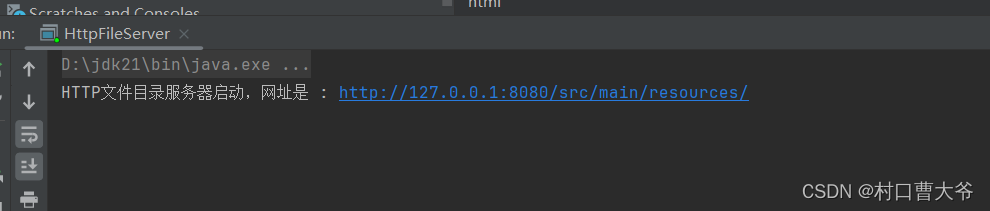
点击这个地址 http://127.0.0.1:8080/src/main/resources/ 这个地址。

点击index.html 可以直接显示出来。

2、现在我们开始搞客户端。
客户端代码:
package com.netty.file;

import io.netty.bootstrap.Bootstrap;

import io.netty.channel.ChannelFuture;

import io.netty.channel.ChannelInitializer;

import io.netty.channel.ChannelOption;

import io.netty.channel.EventLoopGroup;

import io.netty.channel.nio.NioEventLoopGroup;

import io.netty.channel.socket.SocketChannel;

import io.netty.channel.socket.nio.NioSocketChannel;

import io.netty.handler.codec.http.HttpObjectAggregator;

import io.netty.handler.codec.http.HttpRequestEncoder;

import io.netty.handler.codec.http.HttpResponseDecoder;

public class HttpFileClient {

    public void connect(String host, int port, final String fileName) throws Exception {

        EventLoopGroup group = new NioEventLoopGroup();

        try {

            Bootstrap b = new Bootstrap();

            b.group(group).channel(NioSocketChannel.class)

                    .option(ChannelOption.TCP_NODELAY, true)

                    .handler(new ChannelInitializer<SocketChannel>() {

                        @Override

                        public void initChannel(SocketChannel ch) throws Exception {

                            ch.pipeline().addLast("http-decoder", new HttpResponseDecoder());

                            ch.pipeline().addLast("http-aggregator", new HttpObjectAggregator(65536));

                            ch.pipeline().addLast("http-encoder", new HttpRequestEncoder());

                            ch.pipeline().addLast("fileClientHandler", new HttpFileClientHandler(fileName));

                        }

                    });

            ChannelFuture future = b.connect(host, port).sync();

            future.channel().closeFuture().sync();

        } finally {

            group.shutdownGracefully();

        }

    }

    public static void main(String[] args) throws Exception {

        String host = "127.0.0.1";

        int port = 8080;

        String fileName = "/src/main/resources/index.html";

        new HttpFileClient().connect(host, port, fileName);

    }

}
客户端处理器:
package com.netty.file;

import io.netty.buffer.ByteBuf;

import io.netty.channel.ChannelHandlerContext;

import io.netty.channel.SimpleChannelInboundHandler;

import io.netty.handler.codec.http.*;

import io.netty.util.CharsetUtil;

public class HttpFileClientHandler extends SimpleChannelInboundHandler<HttpObject> {

    private final String fileName;

    public HttpFileClientHandler(String fileName) {

        this.fileName = fileName;

    }

    @Override

    public void channelActive(ChannelHandlerContext ctx) throws Exception {

        HttpRequest request = new DefaultHttpRequest(HttpVersion.HTTP_1_1, HttpMethod.GET, fileName);

        request.headers().set(HttpHeaderNames.HOST, "127.0.0.1");

        request.headers().set(HttpHeaderNames.CONNECTION, HttpHeaderValues.CLOSE);

        request.headers().set(HttpHeaderNames.ACCEPT_ENCODING, HttpHeaderValues.GZIP.toString() + ',' + HttpHeaderValues.DEFLATE.toString());

        ctx.writeAndFlush(request);

    }

    @Override

    public void channelRead0(ChannelHandlerContext ctx, HttpObject msg) throws Exception {

        if (msg instanceof HttpResponse) {

            HttpResponse response = (HttpResponse) msg;

            System.out.println("STATUS: " + response.status());

            System.out.println("VERSION: " + response.protocolVersion());

            System.out.println();

            if (!response.status().equals(HttpResponseStatus.OK)) {

                ctx.close();

                return;

            }

        }

        if (msg instanceof HttpContent) {

            HttpContent content = (HttpContent) msg;

            ByteBuf buf = content.content();

            System.out.print(buf.toString(CharsetUtil.UTF_8));

            buf.release();

            if (msg instanceof LastHttpContent) {

                ctx.close();

            }

        }

    }

    @Override

    public void exceptionCaught(ChannelHandlerContext ctx, Throwable cause) throws Exception {

        cause.printStackTrace();

        ctx.close();

    }

}
在服务端启动的条件下,启动客户端。结果展示:

这里只是将它们输出到控制台而已,如果想要实现下载,只需要在输出的时候调用:
 FileChannel fileChannel = new RandomAccessFile(new File("index.html"), "rw").getChannel();

            buf.readBytes(fileChannel, buf.readableBytes());
这样就行了。
结果展示:
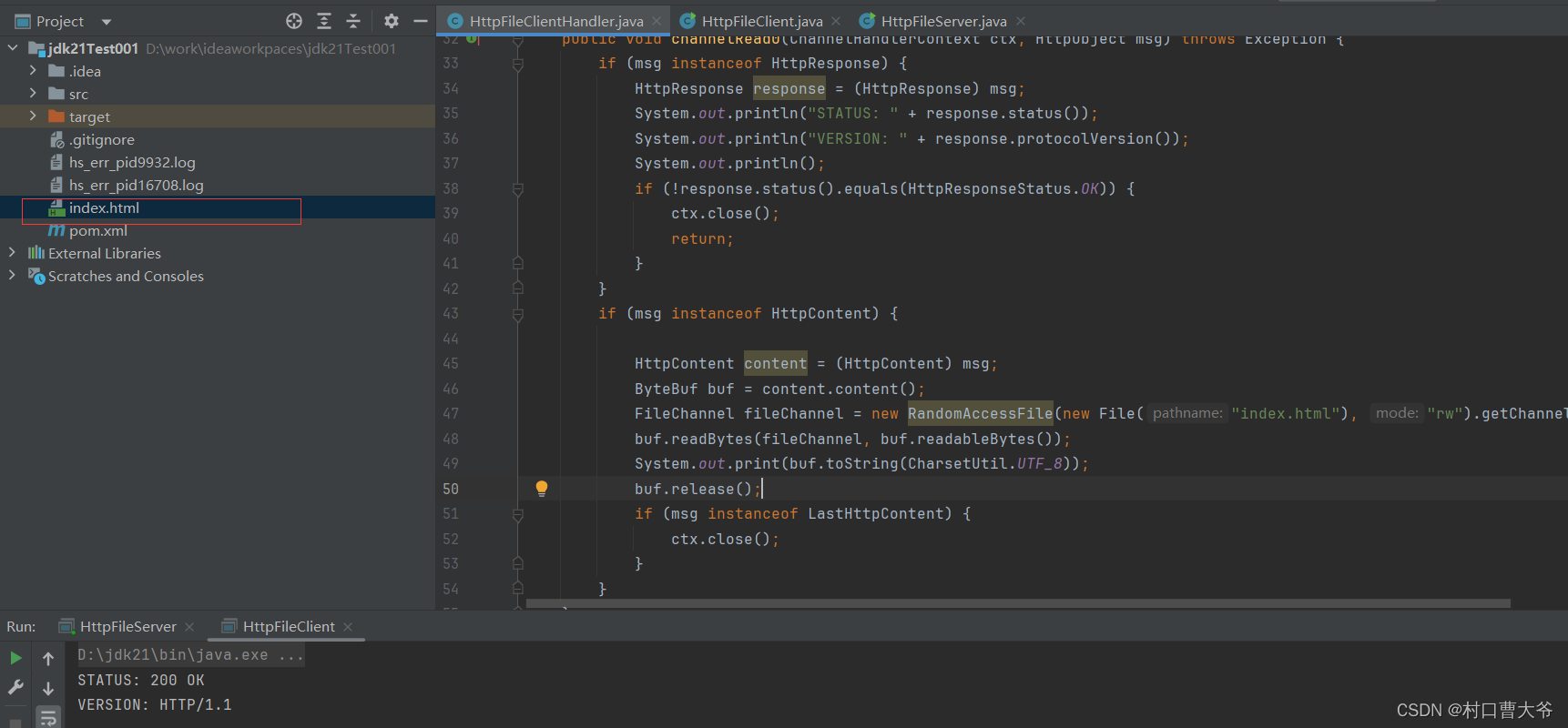
下载成功。
var code = "31f212ba-75f6-4571-85e0-e91b3e1bf086"使用Netty实现文件传输的HTTP服务器和客户端的更多相关文章
- Netty入门(二)时间服务器及客户端
在这个例子中,我在服务器和客户端连接被创立时发送一个消息,然后在客户端解析收到的消息并输出.并且,在这个项目中我使用 POJO 代替 ByteBuf 来作为传输对象. 一.服务器实现 1. 首先我们 ...
- Qt实现基于多线程的文件传输(服务端,客户端)
1. 效果 先看看效果图 这是传输文件完成的界面 客户端 服务端 2. 知识准备 其实文件传输和聊天室十分相似,只不过一个传输的是文字,一个传输的是文件,而这方面的知识,我已经在前面的博客写过了,不了 ...
- Netty进行文件传输
本次是利用TCP在客户端发送文件流,服务端就接收流,写入相应的文件. 实验的源文件是一个图片,假设地址是D:\\Koala.jpg,接收保存后的图片为D:\\test.jpg 原理就是将文件读取成by ...
- [转]WebApi 后端文件传输至远程服务器
/* 功能说明:微信退款需要有数字证书,而我们公司是做小程序平台的,会帮商家自动退款,所以会要求商家把微信证书上传至我们服务器,以便 微信退款. 使用HttpPostedFile 接受前端上传的文件, ...
- netty入坑第一步:了解netty和编写简单的Echo服务器和客户端
早期java API通过原生socket产生所谓的"blocking",大致过程是这样 这种的特点是每次只能处理一个请求,如果要实现多个请求并行,就还要分配一个新的线程来给每个客户 ...
- netty 3.9.2 UDP协议服务器和客户端DEMO
说明:基于netty 3.9.2的udp协议实现的(如果你使用的版本是4.X或5.X,请参考其他方法):程序的逻辑结构是,客户端发送给服务端一串数据,服务器端返回给客户端“A”.在进行游戏开发时需要对 ...
- linux下用scp命令在两个服务器之间传输文件,利用php_scp函数进行文件传输
在linux下利用scp进行文件传输, 从服务器下载文件 scp username@servername:/path/filename /path/filename 上传本地文件到服务器 scp /p ...
- 在windows 与Linux间实现文件传输(C++&C实现)
要实现windows与linux间的文件传输,可以通过socket网络编程来实现. 这次要实现的功能与<Windows下通过socket进行字符串和文件传输>中实现的功能相同,即客户端首先 ...
- WCF大文件传输
WCF传输文件的时候可以设置每次文件的传输大小,如果是小文件的时候,可以很方便的将文件传递到服务端,但是如果文件比较大的话,就不可取了 遇到大文件的话可以采取分段传输的方式进行文件传输 思路: 1.客 ...
- 转://ASM与文件系统之间文件传输
熟悉数据库运维的程序猿都知道,数据的备份重于一切,随着业务的发展,数据量也会越来越大,有时候备份集会放在文件系统上面,有的备份集会放在asm存储上面,实现文件系统到文件系统之间的文件传输很简单,cp或 ...
随机推荐
- 如何在工作中利用Prompt高效使用ChatGPT?
导读 AI 不是来替代你的,是来帮助你更好工作.用better prompt使用chatgpt,替换搜索引擎,让你了解如何在工作中利用Prompt高效使用ChatGPT. 01背景 现在 GPT 已经 ...
- 10、Spring之AOP概述
10.1.概念 AOP(Aspect Oriented Programming)是一种设计思想,是软件设计领域中的面向切面编程 AOP是面向对象编程(OOP)的一种补充和完善,OOP是纵向继承机制,A ...
- 手写RISC-V处理器(1)
由来 由于去年工作变动,有幸进入了芯片行业,但主要工作内容为基于RISC-V的嵌入式应用软件开发,几乎接触不到芯片设计的相关知识,然而随着工作的深入,越来越想探究一下运行在软件之下的CPU的世界,于是 ...
- 微服务下使用maven做多环境配置
分享技术,用心生活 前言:很多项目在开发,提测,上线时都会提前手动改一些配置文件来适应对应环境,麻烦不说了,而且也容易出错:生产环境的配置也容易暴露.基于此,我们基于spring cloud alib ...
- Iphone常用工具
iFunBox itools 百度助手 崩溃日志的路径 /var/mobile/Library/Logs/CrashReporter
- linux shell根据关键字用sed注释掉整行
一.将带有ab的行注释掉 # cat test # sed -i '/ab/s/^\(.*\)$/#\1/g' test ab是关键字 s是语法替换 ^是行首 $是行尾 \是转义符 数字1带表前述匹配 ...
- K8s 多集群实践思考和探索
作者:vivo 互联网容器团队 - Zhang Rong 本文主要讲述了一些对于K8s多集群管理的思考,包括为什么需要多集群.多集群的优势以及现有的一些基于Kubernetes衍生出的多集群管理架构实 ...
- Seata AT和XA模式
一.分布式事务产生得原因: 1.1.数据库分库分表 当数据库单表一年产生的数据超过1000W,那么就要考虑分库分表,具体分库分表的原理在此不做解释,以后有空详细说,简单的说就是原来的一个数据库变成了多 ...
- mount时候遇到写保护,将以只读方式挂载
mount时候遇到写保护,将以只读方式挂载 遇到 mount: 未知的文件系统类型"(null)" [root@localhost ~]# mount /dev/sdb /mnt/ ...
- SQL函数Intersect,except整理
1. 集合函数使用的规则 ① 每个集合要求列数量相同,列顺序相同. ② 每个集合显示的列,要求数据类型一致或者可隐式转换成同一数据类型 ③ 最终集合列名称与第一个集合的列名称一致 2. ...