
Jenkins配置SpringBoot项目启动脚本
背景
上一篇Jenkins配置介绍了Jenkins远程部署的相关配置和步骤,但是最后的部署脚本只适用于部署原始tomcat下的war包应用,由于现在大部分后台项目已经重构成标准的SpingCloud微服务架构,所以更新了部署脚本来兼容SpringBoot应用。
脚本编写
#!/bin/bash

#这里可替换为你自己的执行程序,其他代码无需更改

APP_NAME=intelligent-family.jar

TARGET_PATH=/apps/intelligent-family

source /etc/profile

BUILD_ID=dontKillMe

ls_date=`date +%Y%m%d`

#启动方法

start(){

        pid=`ps -ef|grep $APP_NAME|grep -v grep|awk '{print $2}'`

        if [ "$pid" ]; then

                echo "$APP_NAME is already running. pid=$pid ."

        else

                cp ~/$APP_NAME $TARGET_PATH

                nohup java -jar $APP_NAME --spring.profiles.active=prod >> /export/logs/intelligentFamily/intelligent-family.log-$ls_date 2>&1 &

                sleep 10

                echo "$APP_NAME now is running"

        fi

}

#停止方法

stop(){

        pid=`ps -ef|grep $APP_NAME|grep -v grep|awk '{print $2}'`

        if [ "$pid" ]; then

                kill -9 $pid

                echo "Pid:$pid stopped"

        else

                echo "$APP_NAME is not running"

        fi

}

#输出运行状态

status(){

        pid=`ps -ef|grep $APP_NAME|grep -v grep|awk '{print $2}'`

        if [ "$pid" ]; then

                echo "$APP_NAME is running. Pid is ${pid}"

        else

                echo "$APP_NAME is NOT running."

        fi

}

#根据输入参数,选择执行对应方法,不输入则执行使用说明

case "$1" in

        start)

                start

                ;;

        stop)

                stop

                ;;

        status)

                status

                ;;

        restart)

                stop

                sleep 5

                start

                ;;

      *)

                echo "Usage:{start|stop|status|restart}"

                ;;

esac

exit 0
变量说明
source /etc/profile 加载环境变量,再部署时jenkins会报 “nohup: failed to run command java: No such file or directory ” 的错误,但是手动启动脚本没问题,加上后问题解决。
BUILD_ID=dontKillMe 解决Jenkins构建完成会在自动关闭进程及其子进程的问题
ls_date=
date +%Y%m%d,日志文件重命名
使用说明
./display.sh restart 应用重新启动
./display.sh start 应用启动
./display.sh stop 应用停止
./display.sh status 应用运行状态
Q&A
jenkins部署时错误
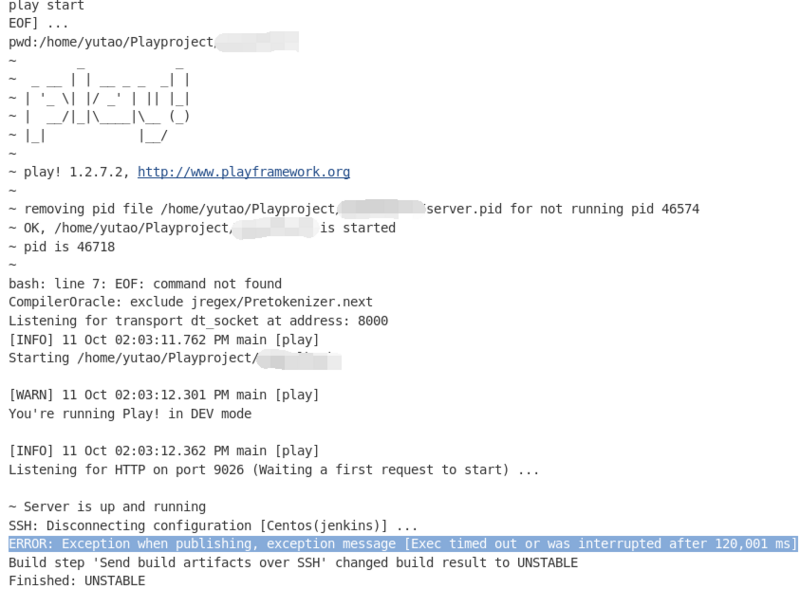
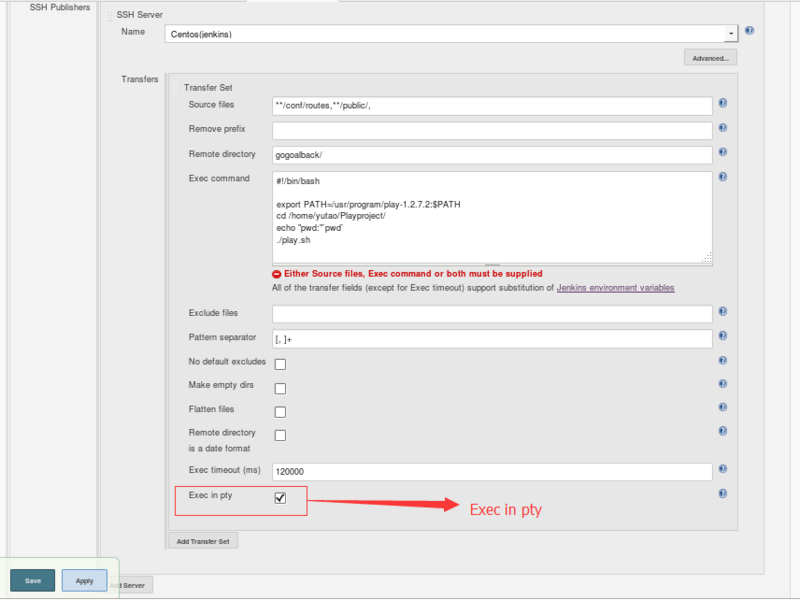
- 原因:因为你是从一个非tty环境执行脚本;Jenkins不能正常从你的脚本中退出。
- 解决办法:
Jenkins配置SpringBoot项目启动脚本的更多相关文章
- springboot 项目启动脚本
springboot项目启动可通过下面的shell脚本启动. startup.sh app=order-service-rest.jar appout=logs/${app/.jar/.out} ap ...
- windows jenkins 发布 springboot项目脚本
windows jenkins 发布 springboot项目脚本 1.关闭现有程序 (按端口关闭) [与按应用关闭 二选一] @echo off for /f "tokens=1-5&q ...
- springboot项目启动之后初始化自定义配置类
前言 今天在写项目的时候,需要再springboot项目启动之后,加载我自定义的配置类的一些方法,百度了之后特此记录下. 正文 方法有两种: 1. 创建自定义类实现 CommandLineRunner ...
- linux下的springboot项目启动文件
启动springboot项目的脚本文件,启动时./startup.sh即可,会先关闭原进程,再启一个新进程. 创建startup.sh 写入内容 #!/bin/bash clear echo &quo ...
- SpringBoot项目启动时链接数据库很慢
SpringBoot项目启动时链接数据库很慢 springboot项目在启动时候,如下图所示,链接数据库很慢 解决方法:在mysql 的配置文件中 配置 skip-name-resolve
- 【log4j】springboot项目启动 ,使用的druid数据源,log4j报错 log4j:WARN Please initialize the log4j system properly.
springboot项目启动 ,使用的druid数据源,log4j报错 -- :: --- [ restartedMain] o.hibernate.annotations.common.Versio ...
- Springboot项目启动不了。也不打印任何日志信息。
Springboot项目启动不了.也不打印任何日志信息. <!-- 在创建Spring Boot工程时,我们引入了spring-boot-starter,其中包含了spring-boot-sta ...
- springboot项目启动报错Failed to configure a DataSource: 'url' attribute is not specified and no embedde
springboot项目启动报错Failed to configure a DataSource: 'url' attribute is not specified and no embedde 创建 ...
- SpringBoot项目启动后再请求远程接口的实现方式
场景 有一个SpringBoot项目需要在启动后请求另一个远程服务拿取配置,而不是加载过程中去请求,可能会出现类没有实例化的场景,因此需要实现项目完全启动后再进行请求的场景. 解决 一般会有两种实现方 ...
- Springboot 项目启动后执行某些自定义代码
Springboot 项目启动后执行某些自定义代码 Springboot给我们提供了两种"开机启动"某些方法的方式:ApplicationRunner和CommandLineRun ...
随机推荐
- [转帖]耗时几个月,终于找到了JVM停顿十几秒的原因
https://www.cnblogs.com/codelogs/p/16060792.html 原创:打码日记(微信公众号ID:codelogs),欢迎分享,转载请保留出处. 简介# 最近我们系 ...
- CentOS7 安装Oracle11g的过程.
1. 安装preinstall https://www.cnblogs.com/mjiu/ 里面有一个简单方法: cd /etc/yum.repos.d wget http://yum.oracle. ...
- IBM Z15设备信息
- 将字符串变成数组split
字符串变成数组,常用来获取数组中我们需要的值. var str="http://op/adfie/life.png"; let arr=str.split('.'); consol ...
- ElasticSearch安装、插件介绍及Kibana的安装与使用详解
ElasticSearch安装.插件介绍及Kibana的安装与使用详解 1.安装 ElasticSearch 1.1 安装 JDK 环境 因为 ElasticSearch 是用 Java 语言编写的, ...
- Flask Paginate实现表格分页
flask_paginate 是 Flask 框架的一个分页扩展,用于处理分页相关的功能.它可以帮助你在 Flask Web 应用程序中实现分页功能,让用户可以浏览大量数据的不同部分.本篇博文重点讲述 ...
- 2.2 Windows驱动开发:内核自旋锁结构
提到自旋锁那就必须要说链表,在上一篇<内核中的链表与结构体>文章中简单实用链表结构来存储进程信息列表,相信读者应该已经理解了内核链表的基本使用,本篇文章将讲解自旋锁的简单应用,自旋锁是为了 ...
- 从嘉手札<2023-11-13>
1. 很多时候 成功并不等同于成长 成功是很多因素复合形成的一种结果 而并不等同于一个人阅历的丰富.认知的提高 2. 我一直认为 世界不属于投机者 也不属于堕落者 信念感在这个大数据泛滥.碎片化汹涌的 ...
- html 图片地图
<html> <head> <title></title> </head> <body> <img src="8 ...
- centos6.5安装MongoDB4.4.23
前言 1.目前MongoDB最新稳定版本是:6.0.8 2.MongoDB 5+和6+版本已不支持centos6.2+系统,参考https://docs.mongoing.com/install-mo ...