
【OpenGL ES】纹理贴图
1 前言
纹理贴图是指:将图片贴在模型的表面。
纹理贴图的本质是:将图片划分为一系列三角形,使得图片顶点序列与模型顶点序列中的顶点一一对应,对于模型中任意三角形内部的坐标和图片中对应三角形内部的坐标,可以通过插值,建立一一对应关系,模型中任意位置的颜色由其对应的图片位置的颜色填充。
本文完整代码资源见→【OpenGL ES】纹理贴图
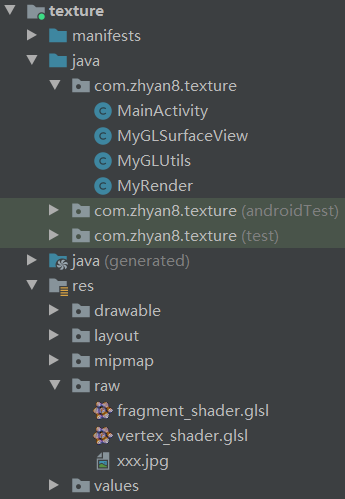
项目目录如下:
2 案例
MainActivity.java
package com.zhyan8.texture;

import android.opengl.GLSurfaceView;

import android.os.Bundle;

import androidx.appcompat.app.AppCompatActivity;

public class MainActivity extends AppCompatActivity {

    private GLSurfaceView mGlSurfaceView;

    @Override

    protected void onCreate(Bundle savedInstanceState) {

        super.onCreate(savedInstanceState);

        mGlSurfaceView = new MyGLSurfaceView(this);

        setContentView(mGlSurfaceView);

        mGlSurfaceView.setRenderer(new MyRender(this));

    }

    @Override

    protected void onResume() {

        super.onResume();

        mGlSurfaceView.onResume();

    }

    @Override

    protected void onPause() {

        super.onPause();

        mGlSurfaceView.onPause();

    }

}
MyGLSurfaceView.java
package com.zhyan8.texture;

import android.content.Context;

import android.opengl.GLSurfaceView;

import android.util.AttributeSet;

public class MyGLSurfaceView extends GLSurfaceView {

    public MyGLSurfaceView(Context context) {

        super(context);

        setEGLContextClientVersion(3);

    }

    public MyGLSurfaceView(Context context, AttributeSet attrs) {

        super(context, attrs);

        setEGLContextClientVersion(3);

    }

}
MyRender.java
package com.zhyan8.texture;

import android.content.Context;

import android.opengl.GLES30;

import android.opengl.GLSurfaceView;

import java.nio.FloatBuffer;

import javax.microedition.khronos.egl.EGLConfig;

import javax.microedition.khronos.opengles.GL10;

public class MyRender implements GLSurfaceView.Renderer {

    private FloatBuffer vertexBuffer;

    private FloatBuffer textureBuffer;

    private MyGLUtils mGLUtils;

    private float[] mvpMatrix = new float[16];

    private int mvpMatrixLocation;

    private int mTextureId;

    public MyRender(Context context) {

        mGLUtils = new MyGLUtils(context);

        getFloatBuffer();

    }

    @Override

    public void onSurfaceCreated(GL10 gl, EGLConfig eglConfig) {

        //设置背景颜色

        GLES30.glClearColor(0.1f, 0.2f, 0.3f, 0.4f);

        //编译着色器

        final int vertexShaderId = mGLUtils.compileShader(GLES30.GL_VERTEX_SHADER, R.raw.vertex_shader);

        final int fragmentShaderId = mGLUtils.compileShader(GLES30.GL_FRAGMENT_SHADER, R.raw.fragment_shader);

        //链接程序片段

        int programId = mGLUtils.linkProgram(vertexShaderId, fragmentShaderId);

        GLES30.glUseProgram(programId);

        mvpMatrixLocation = GLES30.glGetUniformLocation(programId, "mvpMatrix");

        mTextureId = mGLUtils.loadTexture(R.raw.xxx);

    }

    @Override

    public void onSurfaceChanged(GL10 gl, int width, int height) {

        //设置视图窗口

        GLES30.glViewport(0, 0, width, height);

        mGLUtils.transform(width, height, mvpMatrix);

    }

    @Override

    public void onDrawFrame(GL10 gl) {

        //将颜色缓冲区设置为预设的颜色

        GLES30.glClear(GLES30.GL_COLOR_BUFFER_BIT);

        GLES30.glUniformMatrix4fv(mvpMatrixLocation, 1, false, mvpMatrix, 0);

        //启用顶点的数组句柄

        GLES30.glEnableVertexAttribArray(0);

        GLES30.glEnableVertexAttribArray(1);

        //准备顶点坐标和纹理坐标

        GLES30.glVertexAttribPointer(0, 3, GLES30.GL_FLOAT, false, 0, vertexBuffer);

        GLES30.glVertexAttribPointer(1, 2, GLES30.GL_FLOAT, false, 0, textureBuffer);

        //激活纹理

        GLES30.glActiveTexture(GLES30.GL_TEXTURE);

        //绑定纹理

        GLES30.glBindTexture(GLES30.GL_TEXTURE_2D, mTextureId);

        //绘制贴图

        GLES30.glDrawArrays(GLES30.GL_TRIANGLE_FAN, 0, 4);

        //禁止顶点数组句柄

        GLES30.glDisableVertexAttribArray(0);

        GLES30.glDisableVertexAttribArray(1);

    }

    private void getFloatBuffer() {

        float[] vertex = new float[] {

                1f, 1f, 0f,     //V0

                -1f, 1f, 0f,    //V1

                -1f, -1f, 0f,   //V2

                1f, -1f, 0f     //V3

        };

        float[] texture = {

                1f, 0f,     //V0

                0f, 0f,     //V1

                0f, 1.0f,   //V2

                1f, 1.0f    //V3

        };

        vertexBuffer = mGLUtils.getFloatBuffer(vertex);

        textureBuffer = mGLUtils.getFloatBuffer(texture);

    }

}
MyGLUtils.java
package com.zhyan8.texture;

import android.content.Context;

import android.graphics.Bitmap;

import android.graphics.BitmapFactory;

import android.opengl.GLES30;

import android.opengl.GLUtils;

import android.opengl.Matrix;

import java.io.BufferedReader;

import java.io.InputStream;

import java.io.InputStreamReader;

import java.nio.ByteBuffer;

import java.nio.ByteOrder;

import java.nio.FloatBuffer;

public class MyGLUtils {

    private Context mContext;

    private Bitmap mBitmap;

    public MyGLUtils(Context context) {

        mContext = context;

    }

    public FloatBuffer getFloatBuffer(float[] floatArr) {

        FloatBuffer fb = ByteBuffer.allocateDirect(floatArr.length * Float.BYTES)

            .order(ByteOrder.nativeOrder())

            .asFloatBuffer();

        fb.put(floatArr);

        fb.position(0);

        return fb;

    }

    //通过代码片段编译着色器

    public int compileShader(int type, String shaderCode){

        int shader = GLES30.glCreateShader(type);

        GLES30.glShaderSource(shader, shaderCode);

        GLES30.glCompileShader(shader);

        return shader;

    }

    //通过外部资源编译着色器

    public int compileShader(int type, int shaderId){

        String shaderCode = readShaderFromResource(shaderId);

        return compileShader(type, shaderCode);

    }

    //链接到着色器

    public int linkProgram(int vertexShaderId, int fragmentShaderId) {

        final int programId = GLES30.glCreateProgram();

        //将顶点着色器加入到程序

        GLES30.glAttachShader(programId, vertexShaderId);

        //将片元着色器加入到程序

        GLES30.glAttachShader(programId, fragmentShaderId);

        //链接着色器程序

        GLES30.glLinkProgram(programId);

        return programId;

    }

    //从shader文件读出字符串

    private String readShaderFromResource(int shaderId) {

        InputStream is = mContext.getResources().openRawResource(shaderId);

        BufferedReader br = new BufferedReader(new InputStreamReader(is));

        String line;

        StringBuilder sb = new StringBuilder();

        try {

            while ((line = br.readLine()) != null) {

                sb.append(line);

                sb.append("\n");

            }

            br.close();

        } catch (Exception e) {

            e.printStackTrace();

        }

        return sb.toString();

    }

    //加载纹理贴图

    public int loadTexture(int resourceId) {

        BitmapFactory.Options options = new BitmapFactory.Options();

        options.inScaled = false;

        mBitmap = BitmapFactory.decodeResource(mContext.getResources(), resourceId, options);

        final int[] textureIds = new int[1];

        // 生成纹理id

        GLES30.glGenTextures(1, textureIds, 0);

        // 绑定纹理到OpenGL

        GLES30.glBindTexture(GLES30.GL_TEXTURE_2D, textureIds[0]);

        GLES30.glTexParameteri(GLES30.GL_TEXTURE_2D, GLES30.GL_TEXTURE_MIN_FILTER, GLES30.GL_LINEAR_MIPMAP_LINEAR);

        GLES30.glTexParameteri(GLES30.GL_TEXTURE_2D, GLES30.GL_TEXTURE_MAG_FILTER, GLES30.GL_LINEAR);

        // 加载bitmap到纹理中

        GLUtils.texImage2D(GLES30.GL_TEXTURE_2D, 0, mBitmap, 0);

        // 生成MIP贴图

        GLES30.glGenerateMipmap(GLES30.GL_TEXTURE_2D);

        // 取消绑定纹理

        GLES30.glBindTexture(GLES30.GL_TEXTURE_2D, 0);

        return textureIds[0];

    }

    //调整图片宽高适配屏幕尺寸

    public void transform(int width, int height, float[] matrix) {

        int mapWidth = mBitmap.getWidth();

        int mapHeight = mBitmap.getHeight();

        float mapRatio = mapWidth / (float)mapHeight;

        float ratio = width / (float)height;

        float w = 1.0f;

        float h = 1.0f;

        if (mapRatio > ratio) { //宽度最大,高度适配

            h = mapRatio / ratio;

        } else { //高度最大,宽度适配

            w = ratio / mapRatio;

        }

        Matrix.orthoM(matrix, 0, -w, w, -h, h,-1, 1);

    }

}
vertex_shader.glsl
#version 300 es

layout (location = 0) in vec4 aPosition;

layout (location = 1) in vec2 aTextureCoord;

uniform mat4 mvpMatrix;

out vec2 vTexCoord;

void main() {

     gl_Position  = mvpMatrix * aPosition;

     vTexCoord = aTextureCoord;

}

//attribute vec4 aPosition;

//attribute vec2 aTextureCoord;

//uniform mat4 mvpMatrix;

//varying vec2 vTexCoord;

//void main() {

//     gl_Position  = mvpMatrix * aPosition;

//     vTexCoord = aTextureCoord;

//}
顶点着色器的作用:进行矩阵变换位置、根据光照公式计算顶点颜⾊、⽣成 / 变换纹理坐标,并且把位置和纹理坐标发送到片元着色器。
顶点着色器中,如果没有指定默认精度,则 int 和 float 的默认精度都为 highp。
fragment_shader.glsl
#version 300 es

precision mediump float;

uniform sampler2D uTextureUnit;

in vec2 vTexCoord;

out vec4 fragColor;

void main() {

     fragColor = texture(uTextureUnit, vTexCoord);

}

//precision mediump float;

//uniform sampler2D uTextureUnit;

//varying vec2 vTexCoord;

//void main() {

//     gl_FragColor = texture2D(uTextureUnit, vTexCoord);

//}
片元着色器的作用:处理经光栅化阶段生成的每个片元,计算每个像素的颜色和透明度。
在片元着色器中,浮点值没有默认的精度值,每个着色器必须声明一个默认的 float 精度。
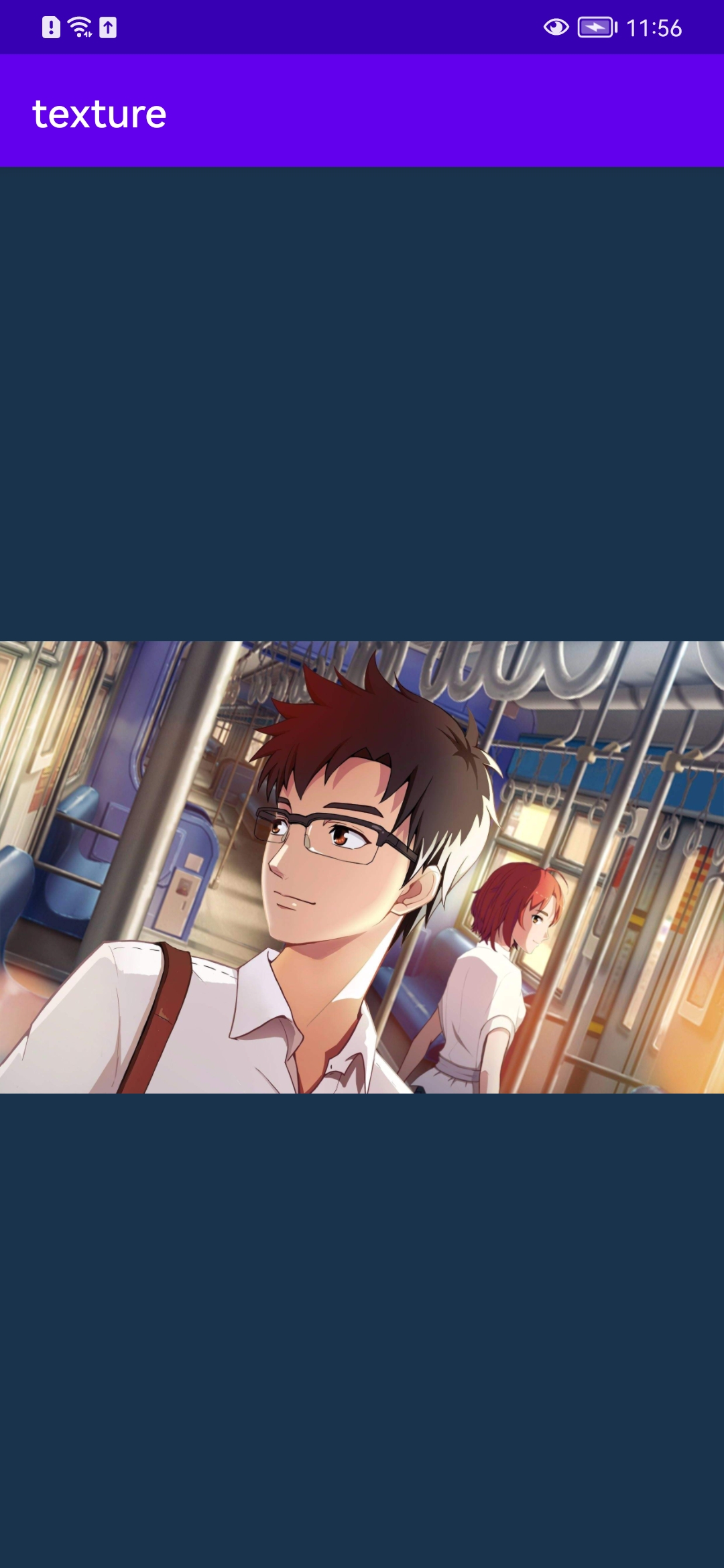
运行结果:
声明:本文转自【OpenGL ES】纹理贴图
【OpenGL ES】纹理贴图的更多相关文章
- Android OpenGL ES 开发(九): OpenGL ES 纹理贴图
一.概念 一般说来,纹理是表示物体表面的一幅或几幅二维图形,也称纹理贴图(texture).当把纹理按照特定的方式映射到物体表面上的时候,能使物体看上去更加真实.当前流行的图形系统中,纹理绘制已经成为 ...
- android ndk调用OpenGL 实现纹理贴图Texture
android ndk调用OpenGL 实现纹理贴图Texture 时间 2014-06-25 05:24:39 CSDN博客 原文 http://blog.csdn.net/chrisfxs/a ...
- OpenGL ES: 纹理采样 texture sample
Sampler (GLSL) Sampler通常是在Fragment shader(片元着色器)内定义的,这是一个uniform类型的变量,即处理不同的片元时这个变量是一致不变的.一个sampler和 ...
- 一文详解 OpenGL ES 纹理颜色混合
在OpenGL中绘制的时候,有时候想使新画的颜色和已经有的颜色按照一定的方式进行混合.例如:想使物体拥有半透明的效果,或者绘制叠加光亮的效果,这时候就需要用到OpenGLES混合. 如上图所示,为石头 ...
- opengl学习笔记(四):openCV读入图片,openGL实现纹理贴图
在opengl中实现三维物体的纹理贴图的第一步就是要读入图片,然后指定该图片为纹理图片. 首先利用opencv的cvLoadImage函数把图像读入到内存中 img = cvLoadImage(); ...
- OpenGL之纹理贴图(Texture)
学习自: https://learnopengl-cn.github.io/01%20Getting%20started/06%20Textures/ 先上一波效果图: 实际上就是:画了一个矩形,然后 ...
- OpenGL(二十二) gluBuild2DMipmaps 加载Mip纹理贴图
当纹理被用于渲染一个面积比它本身小很多的对象时,会由于纹理图像的降采样率不足而导致混叠现象,主要的表现特征是纹理图像的闪烁,出现纹理躁动.特别是在场景远近移动变换时,这种闪烁情况更为明显,严重可能会影 ...
- TextureView+SurfaceTexture+OpenGL ES来播放视频(三)
引自:http://www.jianshu.com/p/291ff6ddc164 做好的Demo截图 opengl-video 前言 讲了这么多,可能有人要问了,播放视频用个android封装的Vid ...
- Android OpenGL ES 开发
OpenGL(Open Graphics Library) 是开放图形库,是一个跨平台的图形 API.OpenGL ES(OpenGL for Embedded System)是专为移动端提供的一个子 ...
- OpenGL ES着色器语言之变量和数据类型(一)(官方文档第四章)和varying,uniform,attribute修饰范围
OpenGL ES着色器语言之变量和数据类型(一)(官方文档第四章) 所有变量和函数在使用前必须声明.变量和函数名是标识符. 没有默认类型,所有变量和函数声明必须包含一个声明类型以及可选的修饰符. ...
随机推荐
- 使用pip安装pycharm插件时,要使用管理员权限打开cmd安装
1.问题 安装到一半报错 报错1 报错2 2.解决 解决1 原文:https://blog.csdn.net/weixin_44899752/article/details/128372969 下面是 ...
- 揭秘 Docker 网络:手动实现 Docker 桥接网络
本文将带领读者探索 Docker 桥接网络模型的内部机制,通过手动实现 veth pair.bridge.iptables 等关键技术,揭示网络背后的运作原理. 如果你对云原生技术充满好奇,想要深入了 ...
- [转帖]数据库的快照隔离级别(Snapshot Isolation)
https://www.cnblogs.com/gered/p/10251744.html 总结:已提交读快照只影响语句级别的锁定行为,而快照隔离影响整个事务. 转自:https://www.cnb ...
- Chrome浏览器不同版本兼容性的验证方法
Chrome浏览器不同版本兼容性的验证方法 背景 上周客户现场有出现使用国产信创设备上面的奇安信浏览器出现兼容性的问题. 开发认为是测试不全面导致. 认为测试应该必须测试过特定浏览器才可以进行说明. ...
- [转帖]Ubuntu Server安装图形界面
最早接触到的Linux系统是Ubuntu 10.04,当时在自己的一台Win7笔记本电脑上安装的Win/Ubuntu双系统,Ubuntu简洁的操作界面给我留下了深刻的印象. 后来开始做一些服务器开发, ...
- 使用shell进行简单分析增量更新时间的方法
使用shell进行简单分析增量更新时间的方法 思路 产品里面更新增量时耗时较久, 想着能够简单分析下哪些补丁更新时间久 哪些相同前缀的补丁更新的时间累积较久. 本来想通过全shell的方式进行处理 但 ...
- linux使用脚本给文件的最后一行不换行的方式插入一句话
处理一下 sed -i '$s/$/&,xxxx.com/' /deploy/mailfailstart
- 程序调试利器——GDB使用指南
作者:京东科技 孙晓军 # 1\. GDB介绍 GDB是GNU Debugger的简称,其作用是可以在程序运行时,检测程序正在做些什么.GDB程序自身是使用C和C++程序编写的,但可以支持除C和C++ ...
- 百度指数 Cipher-Text、百度翻译 Acs-Token 逆向分析
K 哥之前写过一篇关于百度翻译逆向的文章,也在 bilibili 上出过相应的视频,最近在 K 哥爬虫交流群中有群友提出,百度翻译新增了一个请求头参数 Acs-Token,如果不携带该参数,直接按照以 ...
- NetCore高级系列文章03---中间件
.net web 一路发展过来,经历了 .net webfrom. .net Mvc ..net core不论哪种架构,都会对用户的请求到达服务器后经历一系列类似于管道的处理.在.net webfro ...