
tcl/tk demo
环境及版本说明:
OSX10.9
tclsh -> tclsh8.5
wish -> wish8.5
查看本机运行环境:
 which wish;

2 /usr/bin/wish
 which tclsh;

 /usr/bin/tclsh
Demo功能说明:
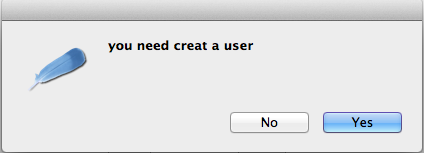
用户登录窗口,输入用户名,密码.与文件中存储内容校验,如果相等,则提示"登录成功",否则提示"是否需要新建用户",点击"否"退出messageBox,点击"是"新建用户.内容追加写入文件.
 #!/usr/bin/wish -f

 #

 # this is test login, Tk-style

 set filename "usrfile.pwd";

 proc splitf { str index } {

     set y [ split $str | ];

     list  $y;

     set w [ lindex $y $index ];

     return $w;

 }

 proc checkinfo {name pwd} {

     global filename;

     set iflag ;

     set isUser ;

     if { $name eq "" || $pwd eq "" } {

         return ;

     }

     set fileId [ open $filename r ];

     while { [ gets $fileId line ] >=  } {

         set nameInfile [ splitf $line  ];

         set cmp [ string compare $name $nameInfile ];

         if { $cmp !=  } {

             set isUser [ expr $isUser +  ];

         } elseif { $cmp ==  } {

             set pwdInfile [ splitf $line  ];

             set cmp [ string compare $pwd $pwdInfile ];

             if { $cmp ==  } {

                 close $fileId;

                 return ; #login successful

             } else {

                 close $fileId;

                 return ; #err user pwd

             }

         }

         set iflag [ expr $iflag +  ];

     }

     close $fileId;

     if { $iflag ==  } {

         return ; #file is null,creat user;

     }

     if { $iflag == $isUser } {

         return ; #creat user

     }

 }

 proc process { uname pwd } {

     global filename;

     set returnCheck [ checkinfo $uname $pwd ];

     switch -- $returnCheck {

          { tk_messageBox -type ok -message "you are login successful" }

          { set answer [ tk_messageBox -type yesno -icon question \

                  -message "you need creat a user" ] ;

                 switch -- $answer {

                     no { }

                     yes { puts stdout [ createusr $uname $pwd ] }

                 }

             }

         //003 { tk_messageBox -type ok -icon warning -message "$filename file is null" }

          { tk_messageBox -type ok -icon error -message "input err of user pwd" }

          { tk_messageBox -type ok -icon info -message "user and pwd is not null" }

         default { tk_messageBox -type ok -icon error -message "system err" }

     }

 }

 proc createusr { uname pwd } {

     global filename;

     set fileId [ open $filename a ];

     puts $fileId "$uname|$pwd" ;

     close $fileId;

     return ;

 }

 wm title . LOGIN

 wm maxsize .

 wm minsize .

 wm resizable .

 wm geometry . 500x300++

 label .ulname -text "userName"

 entry .tuname -textvariable name

 label .ulpwd -text "userPwd"

 entry .tupwd -textvariable pwd

 button .bOK -text OK \

   -command { puts stdout [ process $name $pwd] }

 button .bExit -text Exit \

   -command {exit}

 place .ulname -x  -y

 place .tuname -x  -y

 place .ulpwd -x  -y

 place .tupwd -x  -y

 place .bOK -x  -y

 place .bExit -x  -y
wish tk.tcl


配置文件格式:
 cat usrfile.pwd
2 userTmp|abc123
此Demo涉及控件,语法.足够日常使用.望对新学者有点帮助.
特别需要注意:
1- 所有的关键字与{ 等之间一定要有空格,否则无法解析.
错误: proc sum{arg1 arg2}{
正确: proc sum { arg1 arg2 } {
2- proc if switch等需要用{}包含的body 左括号一定要写到 if {} { 与关键字同行
 proc sum { arg1 arg2 }

 {

   ....

 }
以上代码将提示:
Error in startup script: wrong # args: should be "proc name args body"
while executing
"proc sum {arg1 arg2} "
(file "a.tcl" line 3)
需要修改为:
 proc sum { arg1 arg2 } {

   ....

 }
学习网站:
http://www.tcl.tk/man/tcl8.5/TclCmd/contents.htm
http://www2.tcl.tk/1062
http://blog.csdn.net/dulixin/article/category/366323
read-only access to git repository:
git clone https://github.com/galoishelley/tcltk
tcl/tk demo的更多相关文章
- Tcl Tk Introduction
Tcl Tk Introduction eryar@163.com 摘要Abstract:Tcl/Tck脚本可以很容易实现用户自定义的命令,方便的创建图形化的用户界面GUI,所以Tcl和Tk的应用领域 ...
- python INFO: Can't locate Tcl/Tk libs and/or headers
安装opencv的时候遇到这个错误: python INFO: Can't locate Tcl/Tk libs and/or headers 参考如下文章解决这个问题: http://www.ver ...
- freewrap——将tcl/tk脚本转变为可执行文件
FreeWrap可以把TCL/TK的脚本和二进制文件打包成应用程序,FreeWrap将所有的文件组合成一个单独的可执行文件. FreeWrap的原理是把脚本和tcl/tk解释器和库文件都打包 ...
- 用Tcl/Tk脚本计算圆周率
读了阮一峰的蒙特卡罗方法入门,用概率统计的方式求解棘手的数学问题还挺有意思的,尤其是利用正方形和它的内切圆之间的面积关系来建模求解圆周率的方法精巧又简单,比投针实验好理解也好实现多了.建模可不是M ...
- Tcl/tk缩放Truetype字体时的精度问题
最近有国内新客户抱怨我们产品显示的原理图太不专业了,在原理图上使用宋体GB2312设计好中文图表,经过几次缩放时,表格内的文字居然会跑到表格外边,更要命的是打印出来的文档也存在同样的问题. 我研究了一 ...
- linux下ruby使用tcl/tk编程环境设置
正常情况下最新的ruby都是不带tcl/tk选项编译的,所以我们在运行tcl/tk代码时都会发生找不到tk库的错误.解决办法很简单只要以tcl/tk选项编译ruby即可. 这里以ubuntu 15.0 ...
- Mac OS X下让ruby支持tcl/tk
我记得在老早在OS X10.8下使用ruby1.9.x的时候只要到下载安装ActiveTcl8.5,没怎么配置就运行tk好好的.但是近日想重新执行下tk代码,发现在require 'tk'的时候就报错 ...
- pgtksh -- PostgreSQL Tcl/Tk shell 客户端
SYNOPSIS pgtksh [filename [argument...]] DESCRIPTION 描述 pgtksh 是一个带有 PostgreSQL 数据库访问函数扩展的 Tcl/Tk sh ...
- tcl/tk实例详解——glob使用例解
glob命令 这里以实例的形式解释一下glob命令的用法,很多时候纯粹的语法讲解根本讲不清楚,往往没有一个例子清晰,一下就glob命令进行一些分析,环境为Tclsh85,操作系统为windows XP ...
随机推荐
- HDU 1556 Color the ball - from lanshui_Yang
Problem Description N个气球排成一排,从左到右依次编号为1,2,3....N.每次给定2个整数a b(a <= b),lele便为骑上他的“小飞鸽"牌电动车从气球a ...
- Redis 入门之编译安装
Redis是一个开源的使用ANSI C语言编写.支持网络.可基于内存亦可持久化的日志型.Key-Value数据库,并提供多种语言的API.从2010年3月15日起,Redis的开发工作由VMware主 ...
- DOM和jQuery
一.DOM 在学习DOM之前你应该已经具备了以下三个知识点的应用:HTML CSS javascript DOM 是 W3C(万维网联盟)的标准. W3C DOM 标准被分为 3 个不同的部分: 核心 ...
- PHP中output control
Output Control 函数可以让你自由控制脚本中数据的输出.它非常地有用,特别是对于:当你想在数据已经输出后,再输出文件头的情况.输出控制函数不对使用 header() 或 setcookie ...
- LeetCode_Length of Last Word
Given a string s consists of upper/lower-case alphabets and empty space characters ' ', return the l ...
- SPI总线的4种工作模式
spi总线的4种工作模式 0 to 4 modes SPI接口的全称是"Serial Peripheral Interface",意为串行外围接口,是Motorola首先在其MC6 ...
- unity3d 导出 Excel
我在unity里需要导出成Excel格式,试了一些方法,其中用c#的com组件的我还没成功不知道该怎么在unity里调用,(如果哪位大哥用别的方法在unity里成功了,可以交流下,最好给我一个小dem ...
- C语言中long类型,int类型
long类型表示long int,一般简写为long,注意long不表示long double.虽然有时候会有sizeof(long)=sizeof(int),long int与int是不同的: 16 ...
- UESTC_邱老师玩游戏 2015 UESTC Training for Dynamic Programming<Problem G>
G - 邱老师玩游戏 Time Limit: 3000/1000MS (Java/Others) Memory Limit: 65535/65535KB (Java/Others) Submi ...
- find命令笔记
find 命令: 文件查找:locate: 非实时,模糊匹配,查找是根据全系统文件数据库进行的:# updatedb, 手动生成文件数据库速度快 find: 实时 精确 支持众 ...