
DataGrid( 数据表格) 组件[5]
本节课重点了解 EasyUI 中 DataGrid(数据表格)组件的使用方法,这个组件依赖于
Panel(面板)、Resizeable(调整大小)、LinkButton(按钮)、Pageination(分页)组件。
一. 新增功能

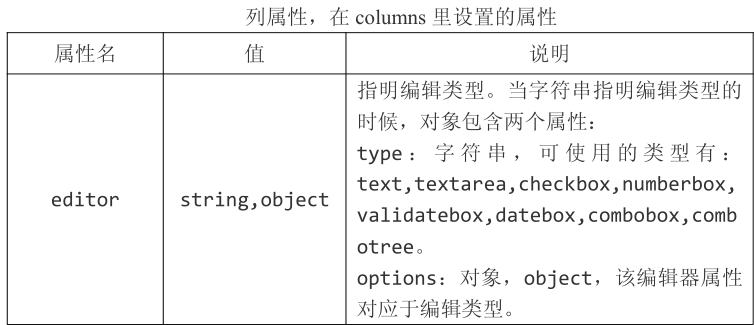
columns : [[
{
field : 'user',
title : '帐号',
sortable : true,
width : 100,
editor : {
type : 'validatebox',
options : {
required : true,
},
},
},
{
field : 'email',
title : '邮件',
sortable : true,
width : 100,
editor : {
type : 'validatebox',
options : {
required : true,
validType: 'email',
},
},
},
{
field : 'date',
title : '创建时间',
sortable : true,
width : 100,
editor : {
type : 'datetimebox',
options : {
required : true,
},
},
},
]],
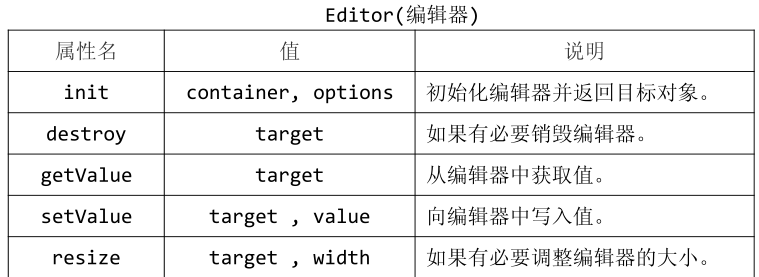
//扩展 dateTimeBox
$.extend($.fn.datagrid.defaults.editors, {
datetimebox : {
init: function(container, options){
var input = $('<input type="text">').appendTo(container);
options.editable = false;
input.datetimebox(options);
return input;
},
getValue: function(target){
return $(target).datetimebox('getValue');
},
setValue: function(target, value){
$(target).datetimebox('setValue', value);
},
resize: function(target, width){
$(target).datetimebox('resize', width);
},
destroy : function (target) {
$(target).datetimebox('destroy');
},
}
});
//实现添加方法
obj = {
editRow : false,
search : function () {
$('#box').datagrid('load', {
user : $.trim($('input[name="user"]').val()),
date_from : $('input[name="date_from"]').val(),
date_to : $('input[name="date_to"]').val(),
});
},
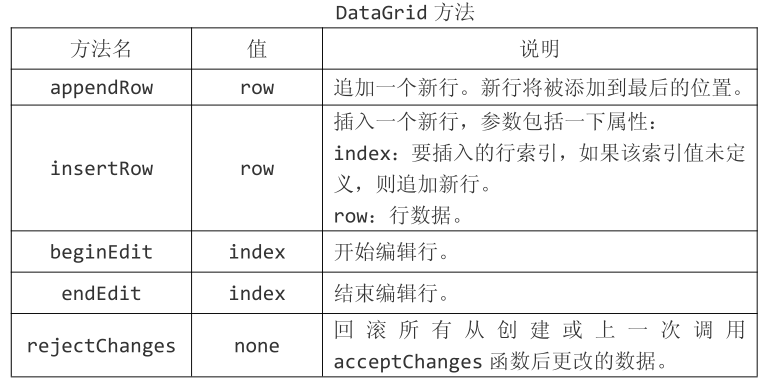
add : function () {
$('#save').show();
$('#redo').show();
if (!this.editRow) {
$('#box').datagrid('endEdit', this.editRow);
} else {
$('#box').datagrid('insertRow', {
index : 0,
row : {
//date : (new Date()).Format("yyyy-MM-dd hh:mm:ss"),
},
});
$('#box').datagrid('beginEdit', 0);
this.editRow = true;
}
},
save : function () {
$('#save,#redo').hide();
this.editRow = false;
//将新增的一行设置为结束编辑状态
$('#box').datagrid('endEdit', 0);
},
redo : function () {
$('#save,#redo').hide();
this.editRow = false;
$('#box').datagrid('rejectChanges');
},
};
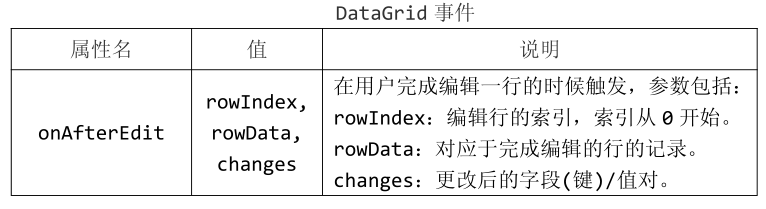
onAfterEdit : function (rowIndex, rowData, changes) {
console.log(rowData)
},
L //HTML 部分
<div style="margin-bottom:5px">
<a href="#" class="easyui-linkbutton" iconCls="icon-add"
plain="true" onclick="obj.add();">添加</a>
<a href="#" class="easyui-linkbutton" iconCls="icon-edit"
plain="true">修改</a>
<a href="#" class="easyui-linkbutton" iconCls="icon-remove"
plain="true">删除</a>
<a href="#" class="easyui-linkbutton" iconCls="icon-save"
plain="true" style="display:none;" id="save" onclick="obj.save();">保存
</a>
<a href="#" class="easyui-linkbutton" iconCls="icon-redo"
plain="true" style="display:none;" id="redo" onclick="obj.redo();">取消编
辑</a>
</div>
DataGrid( 数据表格) 组件[5]的更多相关文章
- DataGrid( 数据表格) 组件[9]
本节课重点了解 EasyUI 中 DataGrid(数据表格)组件的使用方法,这个组件依赖于Panel(面板).Resizeable(调整大小).LinkButton(按钮).Pageination( ...
- DataGrid( 数据表格) 组件[8]
本节课重点了解 EasyUI 中 DataGrid(数据表格)组件的使用方法,这个组件依赖于Panel(面板).Resizeable(调整大小).LinkButton(按钮).Pageination( ...
- DataGrid( 数据表格) 组件[7]
本节课重点了解 EasyUI 中 DataGrid(数据表格)组件的使用方法,这个组件依赖于Panel(面板).Resizeable(调整大小).LinkButton(按钮).Pageination( ...
- DataGrid( 数据表格) 组件[6]
本节课重点了解 EasyUI 中 DataGrid(数据表格)组件的使用方法,这个组件依赖于Panel(面板).Resizeable(调整大小).LinkButton(按钮).Pageination( ...
- DataGrid( 数据表格) 组件[4]
本节课重点了解 EasyUI 中 DataGrid(数据表格)组件的使用方法,这个组件依赖于Panel(面板).Resizeable(调整大小).LinkButton(按钮).Pageination( ...
- DataGrid( 数据表格) 组件[3]
本节课重点了解 EasyUI 中 DataGrid(数据表格)组件的使用方法,这个组件依赖于Panel(面板).Resizeable(调整大小).LinkButton(按钮).Pageination( ...
- DataGrid( 数据表格) 组件[2]
本节课重点了解 EasyUI 中 DataGrid(数据表格)组件的使用方法,这个组件依赖于Panel(面板).Resizeable(调整大小).LinkButton(按钮).Pageination( ...
- DataGrid( 数据表格) 组件[1]
本节课重点了解 EasyUI 中 DataGrid(数据表格)组件的使用方法,这个组件依赖于Panel(面板).Resizeable(调整大小).LinkButton(按钮).Pageination( ...
- 第二百二十二节,jQuery EasyUI,DataGrid(数据表格)组件
jQuery EasyUI,DataGrid(数据表格)组件 学习要点: 1.加载方式 2.分页功能 本节课重点了解 EasyUI 中 DataGrid(数据表格)组件的使用方法,这个组件依赖于 Pa ...
随机推荐
- iOS 天气应用代码中文介绍
天气应用 解释请求参数 q: 表示Location(可以给出城市名字;或者直接给城市的经纬度) 例子:q=beijing 例子 q=48.834,2.394 num_of_days: 需要预报的天数 ...
- php curl操作
<?php // $curl=curl_init(); // $url="http://localhost/cc/get.php?lo=ccc"; // curl_setop ...
- mac brew 安装包下载失败解决
1.FQ或者用别的方式把安装包下载下来 2.查看缓存存储目录 brew --cache 3.将下载的包拷贝到缓存目录中,再此执行安装命令,如果安装还是去下载,检查下缓存目录是否多出一个下载中的文件,将 ...
- 13 hbase连接
Configuration conf=new Configuration(); String zookeeper=""; String clientport="; Str ...
- Python正则表达式一
推荐 http://www.cnblogs.com/huxi/archive/2010/07/04/1771073.html#!comments 这篇博客超好,建议收藏. 不过对于正则表达式小白,他没 ...
- 重装eclipse要做的事(二)---设置工作空间默认编码
在Eclipse的开发使用中,我们经常使用的是UTF-8,但是刚刚安装的或者是导入的项目是其他编码的默认是GBK的,这就造成我们的项目乱码,一些中文解析无法查看,对我们的开发造成不便. 我使用的是My ...
- Js判断密码强度并显示提示信息
用javascipt实现的Ajax判断密码强弱的功能,大多数有用户注册功能的网站,都会有这么一个功能,作为WEB程序员,应该会写这种小模块哦,不懂的就看下这个例子,觉得挺简单,当初帮助了不少人学会了密 ...
- symfony框架在中国移动cmwap网络下访问的问题
最近用symfony框架给手机app做后台,发现在中国移动cmwap网络下会出现问题,所有请求都路由到根路径了 左图为原始$_SERVER对象,右图为$request->server对象由于re ...
- 转:单片机C语言中的data,idata,xdata,pdata,code
从数据存储类型来说,8051系列有片内.片外程序存储器,片内.片外数据存储器,片内程序存储器还分直接寻址区和间接寻址类型,分别对应code.data.xdata.idata以及根据51系列特点而设定的 ...
- 51单片机C语言学习笔记7:关于.c文件和.h文件
1)h文件作用 1 方便开发:包含一些文件需要的共同的常量,结构,类型定义,函数,变量申明: 2 提供接口:对一个软件包来说可以提供一个给外界的接口(例如: stdio.h). 2)h文件里应该有什么 ...