
java 定义mysql树形菜单
数据库中的数据如下:
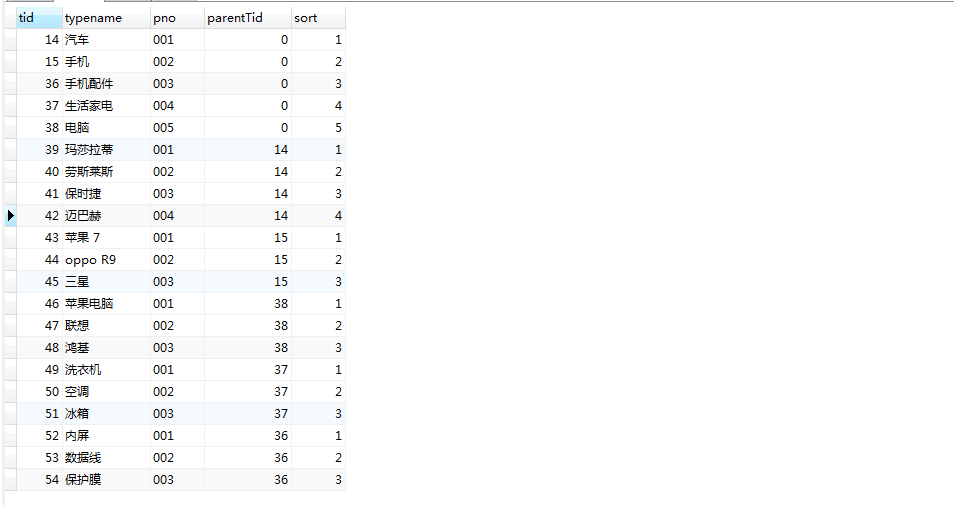
1.首先在Dao中实现查找方法
public List<ProductType> findAllByRoot() {

			//定义集合,添加ProductType对象

			List<ProductType> list = new ArrayList<ProductType>();

			//查询语句,查询producttype表中的所有数据

			String sql = "SELECT * FROM producttype ";

			try {

				//采用从C3P0获取connection连接

				connection = jdbcUtil.getConnection();

				//预编译

				preparedStatement = connection.prepareStatement(sql);

				resultSet = preparedStatement.executeQuery();

				while (resultSet.next()) {

					//定义ProductType对象,封装信息,并添加到集合当中,返回

					ProductType productType = new ProductType();

					productType.setTid(resultSet.getInt(1));

					productType.setTypename(resultSet.getString(2));

					productType.setPno(resultSet.getString(3));

					productType.setParentTid(resultSet.getInt(4));

					productType.setSort(resultSet.getInt(5));

					list.add(productType);

				}

			} catch (SQLException e) {

				e.printStackTrace();

			}finally {

				//关闭连接

				jdbcUtil.closeAll(resultSet, preparedStatement, connection);

			}

			return list;

		}
2.定义工具类
package com.bw.shop.util;

import java.util.ArrayList;

import java.util.List;

import com.bw.shop.bean.ProductType;

import com.bw.shop.dao.impl.ProductTypeDaoImpl;

public class TypeTree {

	private List<ProductType> list = null;

	//list所所有数据

	private StringBuffer sb = new StringBuffer();

	// 瓶装结果

	String s = ""; // var tree1 = new WebFXTreeItem('电脑整机','javascript:cx(1)');

	String x = ""; // tree.add(tree1);

	public StringBuffer getSb() {

		return sb;

	}

	public TypeTree(List<ProductType> list) {

		this.list = list;

		// list所所有数据

		addTree(0);

		// 从跟节点0开始调用

	}

	// 调用递归方法 ,该方法就是 将生产 js 字符串存入StringBuffer中

	public void addTree(int parentTid) {

		for (ProductType productType : list) {

			if (productType.getParentTid() == parentTid) {

				// var tree1 = new WebFXTreeItem('电脑整机','javascript:cx(1)');

				s = "var tree" + productType.getTid()

						+ " = new WebFXTreeItem('" + productType.getTypename()

						+ "','javascript:cx(" + productType.getTid() + ")');";

				sb.append(s + "\n");

				// tree.add(tree1);

				if (parentTid == 0) {

					x = "tree.add(tree" + productType.getTid() + ");";

				} else {

					x = "tree" + productType.getParentTid() + ".add(tree"

							+ productType.getTid() + ");";

				}

				sb.append(x + "\n");

				addTree(productType.getTid());// 递归调用 查看当前的数据的子分类

			}

		}

	}

	//返回结果

	public static String getTree() {

		return new TypeTree(new ProductTypeDaoImpl().findAllByRoot()).getSb()

				.toString();

	}

}
3.页面赋值
<%@ page contentType="text/html; charset=UTF-8" %>

<%@page import="com.bw.shop.util.TypeTree"%>

<script language="javascript">

function cx(tid){

	if(tid==0){

		document.baseInfoForm.action="productTypeRoot.jsp";

	}else{

		document.baseInfoForm.action="productTypeList.jsp";

	}

   document.getElementById("tid").value=tid;

   document.baseInfoForm.submit();

}

  </script>

<html>

<head>

<title>菜单</title>

<meta http-equiv="Content-Type" content="text/html; charset=UTF-8">

<style type="text/css">

<!--

.mouse{

	cursor: hand;

	font-size: 9pt;

}

.selected{

	background-color:#003366;

	color: #FFFFFF;

	/*font-weight:bold*/

}

div {

	white-space:nowrap;

	color: #FFFFFF;

}

-->

</style>

<link href="css/style.css" rel="stylesheet" type="text/css">

<link rel="StyleSheet" href="css/xtree.css" type="text/css" />

<script type="text/javascript" src="js/xtree.js"></script>

</head>

<body class="body_left">

<script type="text/javascript">

    //实例一个根节点new WebFXTree( 节点名,节点事件  )

	var tree = new WebFXTree('商品类别管理','javascript:cx(0)');

    //设置样式

	tree.setBehavior('classic');

    <%=TypeTree.getTree()%>

	document.write(tree);

</script>

<form name="baseInfoForm" method="post" action="" target="typeright"    >

  <input name="pageNo" type="hidden" value="1" id="pageNo">

  <input name="tid" type="hidden" value="" id="tid"  >

</form>

</body>

</html>
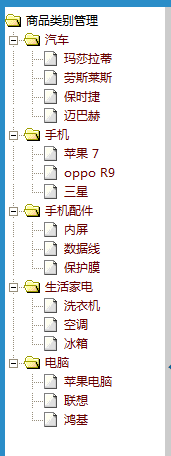
运行结果如下:
java 定义mysql树形菜单的更多相关文章
- JAVA递归生成树形菜单
递归生成一个如图的菜单,编写两个类数据模型Menu.和创建树形的MenuTree.通过以下过程实现: 1.首先从菜单数据中获取所有根节点. 2.为根节点建立次级子树并拼接上. 3.递归为子节点建立次级 ...
- java树形菜单实现
java树形菜单实现 公司表: 部门表: 实体类: public class Node { private Integer companyId;//公司id private String compan ...
- java构建树形菜单递归工具类
1.设计菜单实体 import java.util.List; public class Menu { //菜单id private Long id; //父节点id private Long par ...
- java 传入list集合 返回树形菜单,for循环遍历
public List<SysPermissionVO> getTreeMenu(List<SysPermissionVO> list,SysPermissionVO sysP ...
- SSH框架CRUD+树形菜单案例
今天结合了案例来写ssh的增删改查 表设计 t_ssh_tree t_vue_user book 核心配置文件 struts-base.xml <?xml version="1.0 ...
- easyui实现树形菜单Tab功能、layout布局
一:常见三种前端ui框架 在初学者入门的状态下,我们常见的前端框架有三种且都有自己的官方网站: 1.easyui:官方网站(http://www.jeasyui.net/) 基于jquery的用户页面 ...
- Android 多级树形菜单
在Android里要实现树形菜单,都是用ExpandableList(也有高手自己继承ListView或者LinearLayout来做),但是ExpandableList一般只能实现2级树形菜单... ...
- dtree实现动态加载树形菜单,动态插入树形菜单
1.导入 dtree文件 dtree.css img文件夹 dtree.js 2. 建立对应 的数据库 1 父ID name id 3 建立连接 ...
- EasyUI创建异步树形菜单和动态添加标签页tab
创建异步树形菜单 创建树形菜单的ul标签 <ul class="easyui-tree" id="treeMenu"> </ul> 写j ...
随机推荐
- GBK编码和UTF-8编码互转的大坑
这几天遇到一个BUG,问题很简单,解决却花了3.4天,特意记录下来. linux环境下,将默认编码设置为GBK以后,运行GBK编码的脚本,调用一个Java的jar包,然后总jar包中返回GBK字符串. ...
- Ubuntu 14.04 配置vsftpd实现FTP服务器 - 通过FTP连接AWS
测试主机:亚马逊AWS EC2 系统:Ubuntu 14.04 想用AWS来做服务器玩,结果发现其不能像简单使用阿里云服务器那样用ftp连接,反正也不熟悉ftp服务器搭建,那就乘这个机会学习一下如何利 ...
- Linux命令之 文件归档管理
1.文件相关知识 Linux怎样保存文件 数据 -这里数据就是文件的内容 元数据 -在linux系统中,所有与某个文件相关的额外信息都保存在一个叫做i-节点(inode)的节构中 文件名 -文件名保存 ...
- oop实现方法与属性继承
<script> /*父类 Person*/ function Person(name,age){ this.name=name; this.age=age; } Person.proto ...
- Mac系统配置多个git账号
1.进入ssh目录 #cd ~/.ssh/ 2.用ssh-keygen命令生成一组新的id_rsa_new和id_rsa_new.pub #ssh-keygen -t rsa -C"new ...
- JavaScript 客户端JavaScript之 脚本化文档
客户端JavaScript的存在把静态HTML转变为交互式的Web应用程序,脚本化Web页面的内容正是JavaScript存在的理由. 一个文档对象模型或者说DOM就是一个API,它定义了如何访问 ...
- 多线程08-Callable和Future
1.简介 Callable是一个接口,与Runnable类似,包含一个必须实现的call方法,可以启动为让另一个线程来执行,执行Callable可以得到一个Future对象 该对象可以监听Callab ...
- MySQL递归查询所有子节点,树形结构查询
--表结构 CREATE TABLE `address` ( `id` int(11) NOT NULL AUTO_INCREMENT, `code_value` varchar(32) DEFAUL ...
- 1.2 Coin 项目
自2009年起,Coin便是Java 7(和Java 8)中一个开源的子项目.创建Coin项目是为了反映Java语言中的微小变动: 修改Java语言,按不同的修改方式及其复杂度依次分为:类库.工具提供 ...
- 自己动手写框架——IoC的实现
先看看 IoC百度百科 优化过程 namespace Test { class Program { static void Main(string[] args) { //场景 某公司客服要回访一些客 ...