
Jenkins+Git+Fastlane+Fir CI集成
上一篇有讲关于fastlane自动化部署,本篇将会着重讲关于fastlane的实际应用。
目标:
- 利用自动化jenkins打包工具,自动拉取git仓库代码
- 不需要通过手动
检查修改xcode中项目配置修改(provisioning,codesigning) - 支持多渠道(chanel,appstore,enterprise,develop,adhoc)
- 支持一键上传appstore(首次需要输入账户,密码)
- 企业版本自动上传序号dsym文件到对应平台(fir的hdbug平台)
创建fastlane文件
进入项目目录在终端输入fastlane init命令,会要求输入Apple ID信息按照提示输入即可,选择是否deliver等初始化工作按照上篇讲解即可。操作完成即可看到下图所示的基本内容,下面会对图中文件一一讲解:
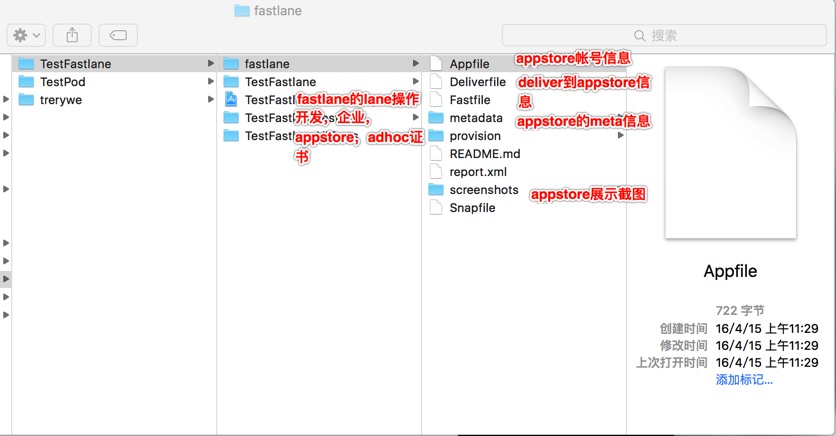
fastlane源码解析
一. 统一管理fastlane操作脚本文件
1.外界控制版本号,并且控制渠道AdHoc AppStore Develop InHouse
1 |
versionNumber=$2 # 1.0.0 |
2.根据外界传递的数据控制,调用fastlane的lane操作
1 |
basicLanes="AdHoc Release Develop InHouse" |
二. Appfile文件修改
1.同一个app,appfile控制渠道(appstore非appstore的)。当然也可以通过控制多个app区分不同的lane即可
1 |
app_identifier "com.tww.test" # App Store的版本的app_idendifier |
三. Deliverfile文件修改
1.上传appstore的deliver文件
1 |
app_identifier "com.tww.test" # The bundle identifier of your app |
四. Fastfile文件修改
1.修改app identifier(就是bundle id,例如:com.husor.beibei)注意xcode7.0以上苹果改了CFBundleIdentifier or PRODUCT_BUNDLE_IDENTIFIER
1 |
update_app_identifier( |
2.修改team(teamid)
1 |
def prepare_update_project_team(team_id) update_project_team( |
3.修改info_plist(就是bundle id,例如:com.tww.test)
1 |
def prepare_update_info_plist(app_id) |
4.修改版本号和build号(修改为外部传入的版本,例如:1.0.0和100)
1 |
def prepare_version(options) |
5.修改签名的配置,配置对应的provision file,事先将个provisioning放入provision文件内容,关于怎么找到对应的provison可以通过xcode配置正确后,查看project文件(/Users/tianww/Library/MobileDevice/Provisioning Profiles/)找到后复制到这里。
1 |
def prepare_version(options) |
6.编译打包为ipa使用gym,当然首先要安装gym。
1 |
def generate_ipa(typePrefix,options,exportMethod,codeSignID) |
或者使用shenzhen ,但是发现使用shenzhen比gym的要大
1 |
def generate_ipa(typePrefix,options,exportMethod,codeSignID) |
7.构建不同的lane,处理不同的包。
1 |
# 企业版 证书打包 |
参考
fastlane actions所有的actions的详细讲解。当然我们也可以在terminate中输入以下命令:
1
2fastlane actions(会列出所有的action)
fastlane action deliver(单独详细的列出deliver的action对应的所有的内容)
- 使用fastlane实现iOS持续集成
- gym actions,关于gym中选择命令
Jenkins+Git+Fastlane+Fir CI集成的更多相关文章
- Jenkins +git +python 进行持续集成进行接口测试(接口测试jenkins持续集成篇)
使用jenkins+git+python脚本进行持续集成的接口测试,在jenkins平台,利用插件等,把管理代码的git仓库的代码更新下来进行持续接口测试,python进行开发测试脚本,git进行远程 ...
- 环境部署(七):linux下Jenkins+Git+JDK持续集成
前面几篇博客介绍了linux下安装Jenkins.Git.JDK以及Git基础教程和Git关联github等内容,这篇博客,介绍下如何在linux服务器中利用它们构建持续集成环境... 一.准备工作 ...
- Jenkins+GitHub+Xcode+fir搭了一个持续集成环境
enkins+GitHub+Xcode+fir搭了一个持续集成环境 字数826 阅读5699 评论44 喜欢49 原文链接 Coding Duck 今天用Jenkins+GitHub+Xcode+fi ...
- 「持续集成实践系列」Jenkins 2.x 搭建CI需要掌握的硬核要点
1. 前言 随着互联网软件行业快速发展,为了抢占市场先机,企业不得不持续提高软件的交付效率.特别是现在国内越来越多企业已经在逐步引入DevOps研发模式的变迁,在这些背景催促之下,对于企业研发团队所需 ...
- 「持续集成实践系列 」Jenkins 2.x 构建CI自动化流水线常见技巧
在上一篇文章中,我们介绍了Jenkins 2.x实现流水线的两种语法,以及在实际工作中该如何选择脚本式语法或声明式语法.原文可查阅:「持续集成实践系列」Jenkins 2.x 搭建CI需要掌握的硬核要 ...
- jenkins + Git 搭建持续集成环境
持续集成通过自动化构建.自动化测试以及自动化部署加上较高的集成频率保证了开发系统中的问题能迅速被发现和修复,降低了集成失败的风险,使得系统在开发中始终保持在一个稳定健康的集成状态.jenkins是目前 ...
- Jenkins+maven+git+sonar 系统持续集成&代码单測管理
Jenkins+maven+git+sonar 系统持续集成&代码单測管理 Jenkins的安装 Jenkins是基于Java开发的一种持续集成工具,用于监控持续反复的工作.功能包含: 1.持 ...
- Jenkins+Git 持续集成
持续集成是必要的! 希望达到的效果是:开发同事签入代码后,对应的站点可以自动实现更新.目前还只在在内部服务器上实现开发环境中的站点更新,不涉及到线上的发布. 目前使用Jenkins实现这样的持续集成. ...
- Linux下Jenkins+git+gradle持续集成环境搭建
Linux下Jenkins+git+gradle持续集成环境搭建 来源:IT165收集 发布日期:2014-08-22 21:45:50 我来说两句(0)收藏本文 一.项目介绍 和 linux ...
随机推荐
- 16)PHP, set_include_path
代码展示: <!DOCTYPE html PUBLIC "-//W3C//DTD XHTML 1.0 Transitional//EN" "http://www.w ...
- 菜鸟cmake使用
cmake是用过把源码生成visual studio 工程的工具,也就是生成.sln文件.他会把相应的库依赖都自动添加上. cmake有个CMakeLists.txt (具体语法这里先不介绍) 我都是 ...
- nginx简单安装
虚拟机首先要求ping www.baidu.com 下载: 解压: 创建用户: [root@nginx ~]# useradd -M -s /sbin/nologin nginx-M 不创建加目录 ...
- 限制客户端同账号同IP多终端登录
打开SoftEther VPN Server Manager工具,连接上节点 1.管理虚拟HUB--管理用户--双击用户--安全策略--最大多重登录数设置为1 2.管理虚拟HUB--虚拟HUB属性-- ...
- Matlab高级教程_第三篇:Matlab转码C/C++方式(混编)_第一部分
0. 其实Matlab的转码混编大多数就是为了现成的算法函数不用再写了,2就是为了方便提高代码运行速度用C语言去运行. 1. MEX文件: Mex文件是一种可在matlab环境中嗲用C语言(或fort ...
- Maven 仓库搜索服务和私服搭建
Maven 仓库搜索服务 使用maven进行日常开发的时候,一个常见问题就是如何寻找需要的依赖,我们可能只知道需要使用类库的项目名称,但是添加maven依赖要求提供确切的maven坐标,这时就可以使用 ...
- class.forName() 和 classLoader 的区别
相同点: java中class.forName() 和 classLoader 都可用来对类进行加载 不同店: 1.class.forName()除了将类的 .class ...
- listening-conversation|信息简写|Generally|回答|矛盾
听力可以刷分,但是要求高.听力流程是听.笔记.读题和确定答案,不能回看.Conversation快速且不完整.素材内容主要是生命科学,社科(人类学:考古学),艺术,自然科学(地质). 难点分析: 词汇 ...
- OfficeCommandbarViewer20171005.rar
OfficeCommandbarViewer用于查看Office各组件工具栏和控件信息的一款软件. 采用了本地XML文件的方式,所以使用本工具不需要提前打开任何Office组件. 动态图: 下载地址: ...
- java成神之路
一.基础篇 1.1 JVM 1.1.1. Java内存模型,Java内存管理,Java堆和栈,垃圾回收 http://www.jcp.org/en/jsr/detail?id=133 http://i ...