
可视化---matplotlib
中文乱码
# 解决matplotlib显示中文问题

# 指定默认字体

plt.rcParams[font.sans-serif]=['SimHei']

# 解决保存图像是负号'-'显示为方块的问题

plt.rcParams['axes.unicode_minus']=False
多画布
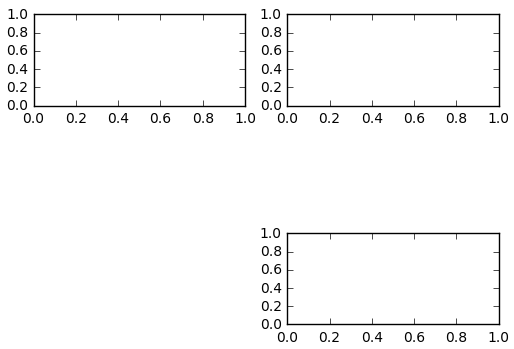
#add_subplot(first,second,index) first means number of Row,second means number of Column.

import matplotlib.pyplot as plt

fig = plt.figure()

ax1 = fig.add_subplot(3,2,1)

ax2 = fig.add_subplot(3,2,2)

ax2 = fig.add_subplot(3,2,6)

plt.show()
折线图
#xlabel(): accepts a string value, which gets set as the x-axis label.

#ylabel(): accepts a string value, which is set as the y-axis label.

#title(): accepts a string value, which is set as the plot title.

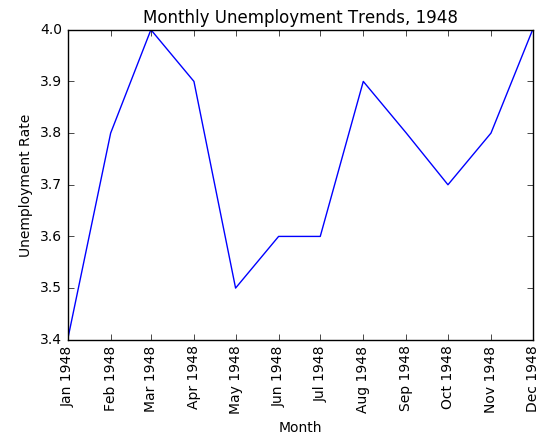
plt.plot(first_twelve['DATE'], first_twelve['VALUE'])

plt.xticks(rotation=90)

plt.xlabel('Month')

plt.ylabel('Unemployment Rate')

plt.title('Monthly Unemployment Trends, 1948')

plt.show()
多条线
unrate['MONTH'] = unrate['DATE'].dt.month

unrate['MONTH'] = unrate['DATE'].dt.month

fig = plt.figure(figsize=(6,3))

plt.plot(unrate[0:12]['MONTH'], unrate[0:12]['VALUE'], c='red')

plt.plot(unrate[12:24]['MONTH'], unrate[12:24]['VALUE'], c='blue')

plt.show()

柱状图
import matplotlib.pyplot as plt

from numpy import arange

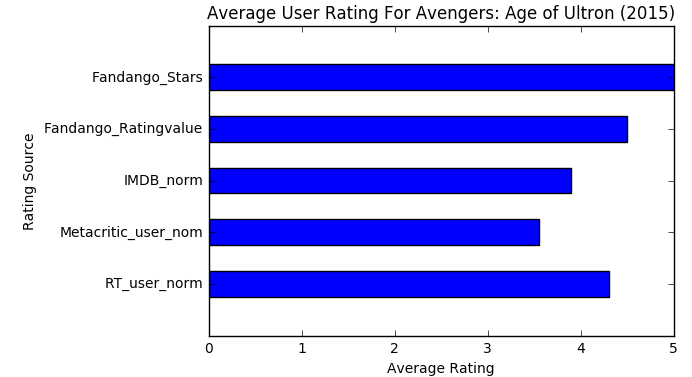
num_cols = ['RT_user_norm', 'Metacritic_user_nom', 'IMDB_norm', 'Fandango_Ratingvalue', 'Fandango_Stars']

bar_widths = norm_reviews.ix[0, num_cols].values

bar_positions = arange(5) + 0.75

tick_positions = range(1,6)

fig, ax = plt.subplots()

ax.barh(bar_positions, bar_widths, 0.5)

ax.set_yticks(tick_positions)

ax.set_yticklabels(num_cols)

ax.set_ylabel('Rating Source')

ax.set_xlabel('Average Rating')

ax.set_title('Average User Rating For Avengers: Age of Ultron (2015)')

plt.show()
直方图
fig, ax = plt.subplots()

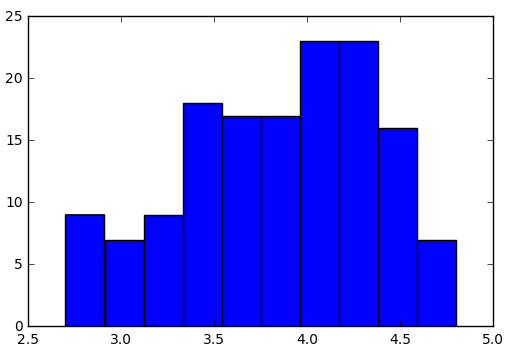
ax.hist(norm_reviews['Fandango_Ratingvalue'])

#ax.hist(norm_reviews['Fandango_Ratingvalue'],bins=20)

#ax.hist(norm_reviews['Fandango_Ratingvalue'], range=(4, 5),bins=20)

plt.show()
柱状图VS直方图
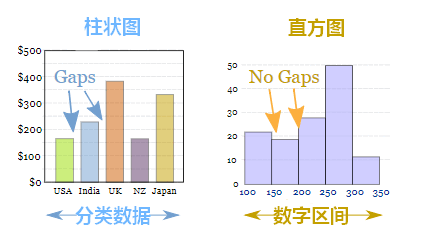
区别:
1.直方图展示数据的分布,柱状图比较数据的大小。
2.直方图X轴为定量数据,柱状图X轴为分类数据。
3.直方图柱子无间隔,柱状图柱子有间隔
散点图
#Switching Axes

fig = plt.figure(figsize=(5,10))

ax1 = fig.add_subplot(2,1,1)

ax2 = fig.add_subplot(2,1,2)

ax1.scatter(norm_reviews['Fandango_Ratingvalue'], norm_reviews['RT_user_norm'])

ax1.set_xlabel('Fandango')

ax1.set_ylabel('Rotten Tomatoes')

ax2.scatter(norm_reviews['RT_user_norm'], norm_reviews['Fandango_Ratingvalue'])

ax2.set_xlabel('Rotten Tomatoes')

ax2.set_ylabel('Fandango')

plt.show()

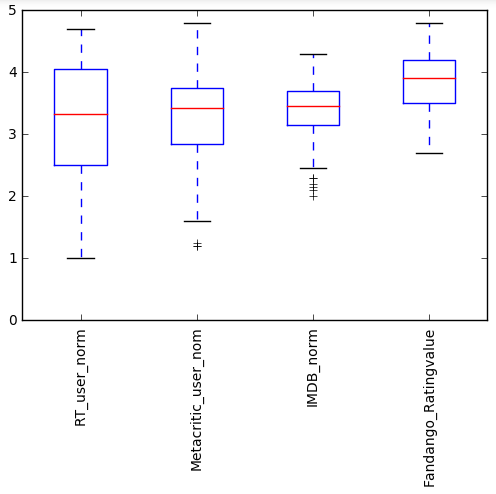
箱线图
num_cols = ['RT_user_norm', 'Metacritic_user_nom', 'IMDB_norm', 'Fandango_Ratingvalue']

fig, ax = plt.subplots()

ax.boxplot(norm_reviews[num_cols].values)

ax.set_xticklabels(num_cols, rotation=90)

ax.set_ylim(0,5)

plt.show()
可视化---matplotlib的更多相关文章
- Python数据可视化matplotlib和seaborn
Python在数据科学中的地位,不仅仅是因为numpy, scipy, pandas, scikit-learn这些高效易用.接口统一的科学计算包,其强大的数据可视化工具也是重要组成部分.在Pytho ...
- python可视化--matplotlib
matplotlib在python中一般会与numpy同时出现,解决一些科学计算和数据的可视化问题. matplotlib其实就是matlib在python中的实现,因此不会有太大的难度,而由于pyt ...
- python 爬虫与数据可视化--matplotlib模块应用
一.数据分析的目的(利用大数据量数据分析,帮助人们做出战略决策) 二.什么是matplotlib? matplotlib: 最流行的Python底层绘图库,主要做数据可视化图表,名字取材于MATLAB ...
- 数据可视化matplotlib、seaborn、pydotplus
如需转发,请注明出处:小婷儿的python https://www.cnblogs.com/xxtalhr/p/10486560.html 一.数据可视化 data.mat 链接:https://p ...
- 数据可视化——Matplotlib(1)
导入相关模块 import matplotlib.pyplot as plt import pandas as pd import numpy as np 基本图表 散点图:scatter N = 1 ...
- Python数据可视化--matplotlib
抽象化|具体化: 如盒形图 | 现实中的图 功能性|装饰性:没有装饰和渲染 | 包含艺术性美学上的装饰 深度表达|浅度表达:深入层次的研究探索数据 | 易于理解的,直观的表示 多维度|单一维度:数据的 ...
- python数据可视化-matplotlib入门(7)-从网络加载数据及数据可视化的小总结
除了从文件加载数据,另一个数据源是互联网,互联网每天产生各种不同的数据,可以用各种各样的方式从互联网加载数据. 一.了解 Web API Web 应用编程接口(API)自动请求网站的特定信息,再对这些 ...
- Python数据可视化Matplotlib——Figure画布背景设置
之前在今日头条中更新了几期的Matplotlib教学短视频,在圈内受到了广泛好评,现应大家要求,将视频中的代码贴出来,方便大家学习. 为了使实例图像显得不单调,我们先将绘图代码贴上来,此处代码对Fig ...
- Python可视化----------matplotlib.pylot
1 >>> import matplotlib.pyplot as plt 2 >>> plt.axis([0,5,0,20]) 3 [0, 5, 0, 20] 4 ...
- 绘图和可视化---matplotlib包的学习
matplotlib API函数都位于matplotlib.pyplot模块,通常引入约定为:import matplotlib.pyplot as plt 1.Figure和Subplot 图像都位 ...
随机推荐
- AI 伴游小精灵
北京市商汤科技开发有限公司面向青少年研发了一款智能伴游机器人-- AI 伴游小精灵.一经推出,深受孩子们的喜爱,可爱又机智的小精灵会想出很多有趣的小游戏来启迪孩子们思考.今天,小精灵给你提出了一个神奇 ...
- Day 21:网络编程(2)
以课程中feiQ为例,feiQ作为一个典型的网络编程应用,用一段代码尝试给自己的发送消息 import java.io.IOException; import java.net.DatagramPac ...
- 基础语法-循环结构for
基础语法-循环结构for 作者:尹正杰 版权声明:原创作品,谢绝转载!否则将追究法律责任. 一.for循环格式 for(初始化表达式;循环条件表达式;循环后的操作表达式){ 执行语句(循环体); } ...
- QT设计
MFC是跨平台的一个界面开发的类库 框架是什么呢? 1.基础模块 2.机制交互(数据传输) 3.多种语言 QT core QT gui QT widget QT 1.基础模块 2.拓展模块 3.too ...
- buildroot经验
1.可以运行bulilroot下面的孙可编写的build.sh文件,自动配置和编译 2.如何添加要下载和编译的包? 如要下载和编译libevent, 可以通过make menuconfig, 然后搜索 ...
- Shiro密码处理
散列算法一般用于生成数据的摘要信息,是一种不可逆的算法,一般适合存储密码之类的数据,常见的散列算法如 MD5.SHA等.一般进行散列时最好提供一个 salt(盐),比如加密密码"admin& ...
- stm32h7 开发板学习
按键和 IO 之间连接一个 1K 电阻,可以防止当 IO 被配置为高电平输出的时候,按下按键,导致 VDD 和 GND 直接连通.
- SVM手撕公式
卓越源于坚持,努力须有方向. 如上图所示,有一堆训练数据的正负样本,标记为:,假设有一个超平面H:,可以把这些样本正确无误地分割开来,同时存在两个平行于H的超平面H1和H2: 使离H最近的正负样本刚好 ...
- 《Thinking in Java》位运算
按位操作符: 首先先记住一件事,方便理解:是否对应正负对应10. 1.与(&):11得1,10得0,00得0. 2.或(|):11得1,10得1,00得0. 3.异或(^):11得0,10得1 ...
- NtQueryObject 获得内核对象使用计数
一个内核对象有两个计数器:一个是句柄计数,句柄是给用户态用的:另一个是指针计数,也叫引用计数,因为核心态也常常用到内核对象,为了方便,在核心态的代码用指针直接访问对象,所以Object Manag ...