
Source Insight 中的 Auto Indenting
编码过程中,希望输入花括号时能自动对齐,Source Insigth 应如何设置?
先来看一下Source Insight 中的帮助。
“
Auto Indenting
The auto-indenting feature controls the level of indentation as you type new text. Source Insight supports Simple and Smart types of auto-indentation. Not all languages support the Smart level.
Auto Indent Type
Specifies the type of auto-indenting. Automatic indenting occurs when you insert new lines.
• None No special indenting occurs. Source Insight will return the insertion point to the very beginning of the next line when you insert a new line or word wrap.
• Simple Source Insight will automatically indent text to line up with the previous or following line.
• Smart Source Insight will automatically increase or decrease the indentation level when you insert new lines. Not all languages support smart indenting. If this button is selected, then the Smart Indent Options are applied.
Smart Indent Options
These check boxes determine how the smart indenting affects open and closing curly braces.
|
Desired Indent Style |
Check box setting |
|
if (x) { } |
Clear both boxes. |
|
if (x) { } |
Select both boxes |
|
if (x) { } |
Select Indent Open Brace; |
”
依次打开“Options” –> “Document Options…” –> “Auto Indent…”,如下图
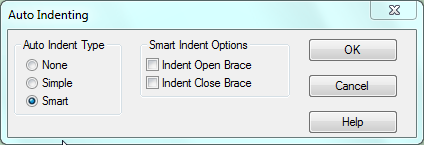
Auto Indenting:
- None -- 不作任何变动
- Simple -- 按下回车键后,光标跳到下一行的起始处
- Smart -- 按下回车键后,根据“Smart Indent Options”的设置,自动缩进
Smart Indent Options:
见上图,说明得很清楚了。
Source Insight 中的 Auto Indenting的更多相关文章
- 在source insight中集成astyle
转自:http://www.cnblogs.com/xuxm2007/archive/2013/04/06/3002390.html 好吧,我有代码格式的强迫症,代码不整齐,我看的都头疼,之前一直喜欢 ...
- Source Insight 中使用 AStyle 代码格式工具
Source Insight 中使用 AStyle 代码格式工具 彭会锋 2015-05-19 23:26:32 Source Insight是较好的代码阅读和编辑工具,不过source in ...
- AStyle代码格式工具在source insight中的使用
一.AStyle下载路径 Astyle为开源项目,支持C/C++和java的代码格式化 Home Page: http://astyle.sourceforge.net/ Project Page: ...
- source insight 中tab键的设置
转:http://xinzero.com/source-insight-code-alignment-ended.html source insight代码对齐Tab键终极版 以前也写过一个sourc ...
- source insight中的快捷键总结
1.快捷键 1,Shift+F8高亮显示指定字符. 2,Ctrl+F找出来的结果用F4,F3前进后退查找. 3,Alt+,后退alt+.前进查找关键字. 4,Alt+G或者F5跳转到某个固定的行号. ...
- Source Insight 中调用Notepad++
options>custom commands 指令为 "E:\Program Files (x86)\Notepad++\notepad++.exe" %f 其中%f表示S ...
- Source insight 中 标题栏路径显示完整路径的方法
在source insight 的标题栏中显示完整路径名的方法.Options -> Preferences -> Display -> Trim long path names w ...
- Source Insight中的多行注释
转自:http://www.cnblogs.com/dongzhiquan/archive/2013/03/04/2943448.html 我们经常要对一整段代码进行注释,很多代码编辑器都提供了这样的 ...
- ubuntu14.04中 gedit 凝视能显示中文,而source insight中显示为乱码的解决的方法
1.乱码显示情况: watermark/2/text/aHR0cDovL2Jsb2cuY3Nkbi5uZXQvcjc3NjgzOTYy/font/5a6L5L2T/fontsize/400/fill/ ...
随机推荐
- Spring Bean 后置处理器
Bean 后置处理器允许在调用初始化方法前后对 Bean 进行额外的处理. BeanPostProcessor 接口定义回调方法,你可以实现该方法来提供自己的实例化逻辑,依赖解析逻辑等. 你也可以在 ...
- Codeblocks运行按钮变灰,卡程序编译
实际上,当我们点击绿色运行按钮运行之后,.exe文件会开始运行,当我们点击红色调试按钮之后,会开始调试. 因此当我们在运行卡住之后,点击红色调试按钮,实际上并没有真正的结束程序,只是将窗口隐藏起来,我 ...
- Docker 入门:容器
容器看着像机器,实际是进程,是一个运行时程序. 要操作一个 Docker 容器,只需要执行 docker container 命令. 可以通过 help 查看 run 运行容器 基础使用: docke ...
- ES[7.6.x]学习笔记(十一)与SpringBoot结合
在前面的章节中,我们把ES的基本功能都给大家介绍完了,从ES的搭建.创建索引.分词器.到数据的查询,大家发现,我们都是通过ES的API去进行调用,那么,我们在项目当中怎么去使用ES呢?这一节,我们就看 ...
- Java之预定义
作为Java初学者的我,提供一个类似C#的预处理机制.若有不足之处,敬请各位大佬指正(感觉没有,哈哈哈哈哈哈)! Java 没有类似 C++的宏,也没有类似C#的预定义 #if...#endif C# ...
- [Android应用开发] 05.广播和服务
*:first-child { margin-top: 0 !important; } body > *:last-child { margin-bottom: 0 !important; } ...
- Java动态代理与静态代理以及它能为我们做什么
相信我们在网上和平时学习和工作中或多或少都接触过Java的代理模式,经常听到什么静态代理.动态代理的一些名词.但我们是否真的很清楚这些呢?至少我在面试时,发现很多人并不很清楚. 首先代理比较好理解,就 ...
- 动态ip服务器 动态ip服务器的连接方式
动态IP服务器指的是在需要的时候才进行随机IP地址分配的服务器.所谓动态就是指当你每一次上网时,电信会随机分配一个IP地址,服务器作为我们设为的大脑,拥有自己独立的账户及密码,通过远程连接动态IP服务 ...
- docker环境下的Grafana安装
一.参考资源:https://grafana.com/docs/grafana/latest/installation/docker/ 二.过程 1.安装grafana 查看可用image [root ...
- 一文带你深入理解JVM,看完之后你还敢说你懂JVM吗?颠覆you认知
前言 今天带大家深入理解JVM,从入门到精通,希望大家能够喜欢~~~ 概念 JVM是可运行 Java 代码的假想计算机 ,包括一套字节码指令集.一组寄存器.一个栈.一个垃圾回收,堆 和 一个存储方法域 ...