
App的数据如何用python抓取
- 使用抓包工具
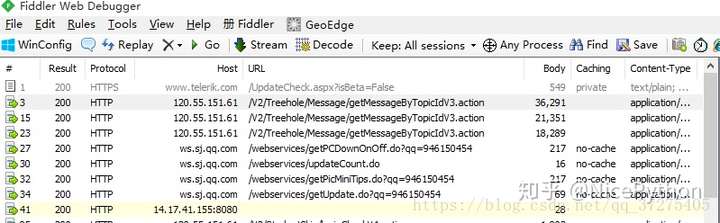
- 手机使用代理,app所有请求通过抓包工具
- 获得接口,分析接口
- 反编译apk获取key
- 突破反爬限制
- 夜神模拟器
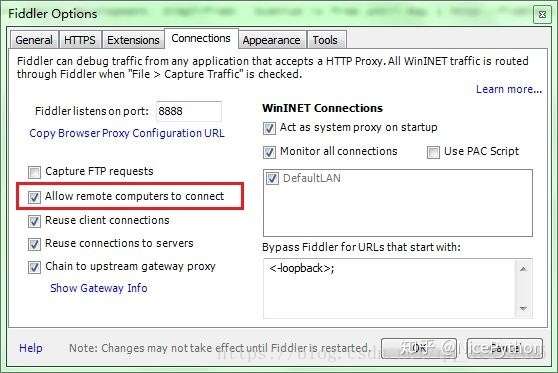
- Fiddler
- Pycharm

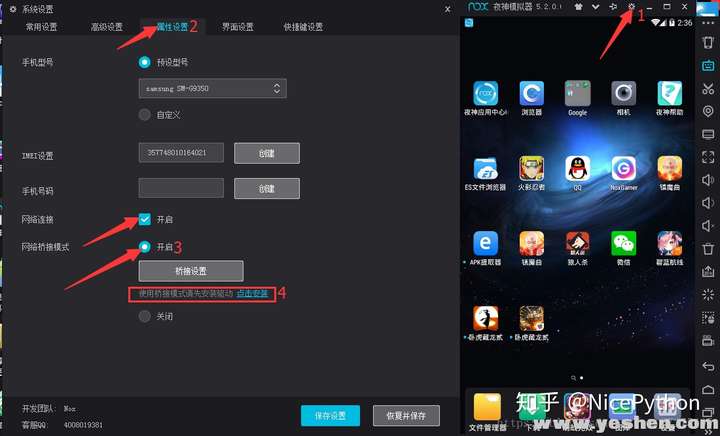
- 夜神模拟器下载完成之后,傻瓜式的安装一下!
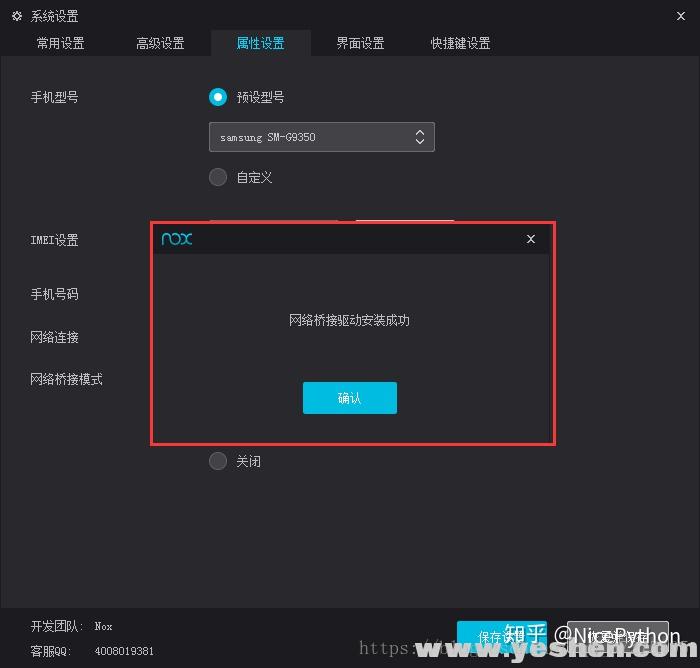
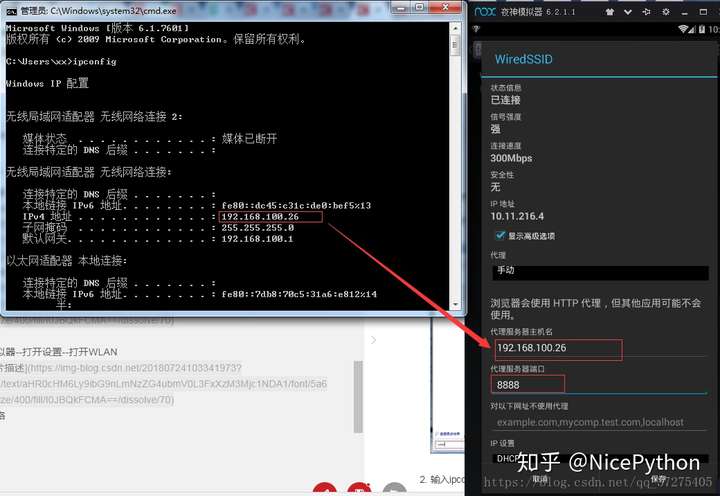
- 首先将当前手机网络桥接到本电脑网络 实现互通
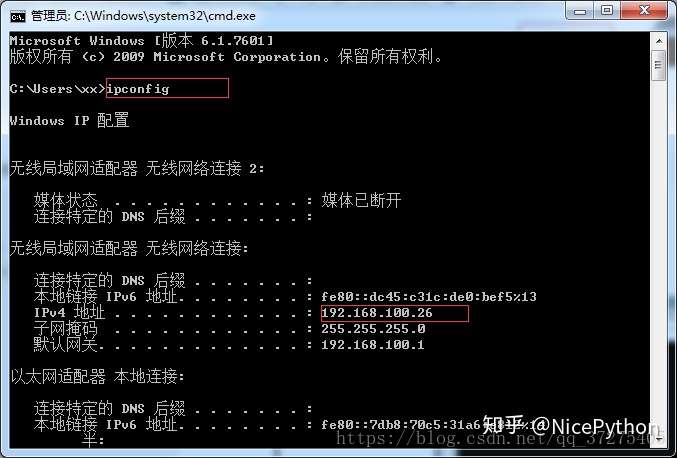
- 打开主机cmd


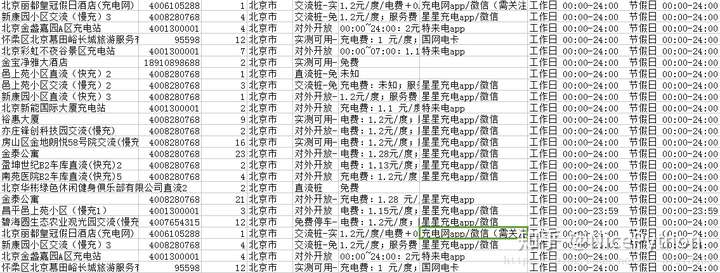
部分python代码分享:
import requests

import city

import json

import jsonpath

import re

city_list = city.jsons

tags_list = city.Tag

def city_func(city_id):

    try:

        city = jsonpath.jsonpath(city_list, '$..sub[?(@.code=={})]'.format(int(city_id)))[0]["name"]

    except:

        city = jsonpath.jsonpath(city_list, '$[?(@.code=={})]'.format(int(city_id)))[0]["name"]

    return city

def tags_func(tags_id):

    tags_join = []

    if tags_id:

        for tags in tags_id:

            t = jsonpath.jsonpath(tags_list,'$..spotFilterTags[?(@.id=={})]'.format(int(tags)))

            tags_join.append(t[0]["title"])

    return ('-'.join(tags_join))

def split_n(ags):

    return re.sub('\n','  ',ags)

def request(page):

    print('开始下载第%d页'%page)

    url = 'https://app-api.chargerlink.com/spot/searchSpot'

    two_url = "https://app-api.chargerlink.com/spot/getSpotDetail?spotId={d}"

    head = {

        "device": "client=android&cityName=%E5%8C%97%E4%BA%AC%E5%B8%82&cityCode=110106&lng=116.32154281224254&device_id=8A261C9D60ACEBDED7CD3706C92DD68E&ver=3.7.7&lat=39.895024107858724&network=WIFI&os_version=19",

        "appId": "20171010",

        "timestamp": "1532342711477",

        "signature": "36daaa33e7b0d5d29ac9c64a2ce6c4cf",

        "forcecheck": "1",

        "Content-Type": "application/x-www-form-urlencoded",

        "Content-Length": "68",

        "Host": "app-api.chargerlink.com",

        "Connection": "Keep-Alive",

        "User-Agent": "okhttp/3.2.0"

    }

    data = {

        "userFilter[operateType]": 2,

        "cityCode": 110000,

        "sort": 1,

        "page": page,

        "limit": 10,

    }

    response = requests.post(url,data=data,headers=head)

    #获取数据

    data = response.json()

    for i in data['data']:

        c = []

        id = i['id']

        name = i["name"] #充电桩名

        phone = i["phone"] #手机号

        num = i['quantity'] #有几个充电桩

        city = city_func(i["provinceCode"]) #城市

        tags =tags_func(i["tags"].split(','))#标签

        message = c + [id,name,phone,num,city,tags]

        parse_info(two_url.format(d=id),message)

def parse_info(url,message):

    #打开文件

    with open('car.csv','a',encoding='utf-8')as c:

        head = {

            "device": "client=android&cityName=&cityCode=&lng=116.32154281224254&device_id=8A261C9D60ACEBDED7CD3706C92DD68E&ver=3.7.7&lat=39.895024107858724&network=WIFI&os_version=19",

            "TOKEN": "036c8e24266c9089db50899287a99e65dc3bf95f",

            "appId": "20171010",

            "timestamp": "1532357165598",

            "signature": "734ecec249f86193d6e54449ec5e8ff6",

            "forcecheck": "1",

            "Host": "app-api.chargerlink.com",

            "Connection": "Keep-Alive",

            "User-Agent": "okhttp/3.2.0",

        }

        #发起详情请求

        res = requests.get(url,headers=head)

        price = split_n(jsonpath.jsonpath(json.loads(res.text),'$..chargingFeeDesc')[0]) #价钱

        payType = jsonpath.jsonpath(json.loads(res.text),'$..payTypeDesc')[0] #支付方式

        businessTime =split_n(jsonpath.jsonpath(json.loads(res.text),'$..businessTime')[0]) #营业时间

        result = (message + [price,payType,businessTime])

        r = ','.join([str(i) for i in result])+',\n'

        c.write(r)

def get_page():

    url = 'https://app-api.chargerlink.com/spot/searchSpot'

    head = {

        "device": "client=android&cityName=%E5%8C%97%E4%BA%AC%E5%B8%82&cityCode=110106&lng=116.32154281224254&device_id=8A261C9D60ACEBDED7CD3706C92DD68E&ver=3.7.7&lat=39.895024107858724&network=WIFI&os_version=19",

        "appId": "20171010",

        "timestamp": "1532342711477",

        "signature": "36daaa33e7b0d5d29ac9c64a2ce6c4cf",

        "forcecheck": "1",

        "Content-Type": "application/x-www-form-urlencoded",

        "Content-Length": "68",

        "Host": "app-api.chargerlink.com",

        "Connection": "Keep-Alive",

        "User-Agent": "okhttp/3.2.0"

    }

    data = {

        "userFilter[operateType]": 2,

        "cityCode": 110000,

        "sort": 1,

        "page": 1,

        "limit": 10,

    }

    response = requests.post(url, data=data, headers=head)

    # 获取数据

    data = response.json()

    total = (data["pager"]["total"])

    page_Size = (data["pager"]["pageSize"])

    totalPage = (data['pager']["totalPage"])

    print('当前共有{total}个充电桩,每页展示{page_Size}个,共{totalPage}页'.format(total=total,page_Size=page_Size,totalPage=totalPage))

if __name__ == '__main__':

    get_page()

    start = int(input("亲,请输入您要获取的开始页:"))

    end = int(input("亲,请输入您要获取的结束页:"))

    for  i in range(start,end+1):

        request(i)

App的数据如何用python抓取的更多相关文章
- 如何用python抓取js生成的数据 - SegmentFault
如何用python抓取js生成的数据 - SegmentFault 如何用python抓取js生成的数据 1赞 踩 收藏 想写一个爬虫,但是需要抓去的的数据是js生成的,在源代码里看不到,要怎么才能抓 ...
- (转)如何用python抓取网页并提取数据
最近一直在学这部分,今日发现一篇好文,虽然不详细,但是轮廓是出来了: 来自crifan:http://www.crifan.com/crawl_website_html_and_extract_inf ...
- 使用 Python 抓取欧洲足球联赛数据
Web Scraping在大数据时代,一切都要用数据来说话,大数据处理的过程一般需要经过以下的几个步骤 数据的采集和获取 数据的清洗,抽取,变形和装载 数据的分析,探索和预测 ...
- 关于python抓取google搜索结果的若干问题
关于python抓取google搜索结果的若干问题 前一段时间一直在研究如何用python抓取搜索引擎结果,在实现的过程中遇到了很多的问题,我把我遇到的问题都记录下来,希望以后遇到同样问题的童 ...
- Python抓取百度百科数据
前言 本文整理自慕课网<Python开发简单爬虫>,将会记录爬取百度百科"python"词条相关页面的整个过程. 抓取策略 确定目标:确定抓取哪个网站的哪些页面的哪部分 ...
- 使用python抓取并分析数据—链家网(requests+BeautifulSoup)(转)
本篇文章是使用python抓取数据的第一篇,使用requests+BeautifulSoup的方法对页面进行抓取和数据提取.通过使用requests库对链家网二手房列表页进行抓取,通过Beautifu ...
- 使用Python抓取猫眼近10万条评论并分析
<一出好戏>讲述人性,使用Python抓取猫眼近10万条评论并分析,一起揭秘“这出好戏”到底如何? 黄渤首次导演的电影<一出好戏>自8月10日在全国上映,至今已有10天,其主演 ...
- python抓取网页例子
python抓取网页例子 最近在学习python,刚刚完成了一个网页抓取的例子,通过python抓取全世界所有的学校以及学院的数据,并存为xml文件.数据源是人人网. 因为刚学习python,写的代码 ...
- Python抓取页面中超链接(URL)的三中方法比较(HTMLParser、pyquery、正则表达式) <转>
Python抓取页面中超链接(URL)的3中方法比较(HTMLParser.pyquery.正则表达式) HTMLParser版: #!/usr/bin/python # -*- coding: UT ...
随机推荐
- 使用Keras进行深度学习:(七)GRU讲解及实践
####欢迎大家关注我们的网站和系列教程:http://www.tensorflownews.com/,学习更多的机器学习.深度学习的知识! 介绍 GRU(Gated Recurrent Unit) ...
- Python第七章-面向对象高级
面向对象高级 一. 特性 特性是指的property. property这个词的翻译一直都有问题, 很多人把它翻译为属性, 其实是不恰当和不准确的. 在这里翻译成特性是为了和属性区别开来. 属性是指的 ...
- python—time模块
timetime模块提供各种时间相关的功能,与时间相关的模块有:time,datetime,calendar等. 时间有三种表示方式,一种是时间戳.一种是格式化时间.一种是时间元组.时间戳和格式化时间 ...
- 移动端rem布局实现(vw)
什么是rem?在W3C官网上是这样描述的:“font size of the root element (根元素的字体大小)”.就是说rem是相当于html的,因为网页的默认字体大小是 16px,所以 ...
- 操作系统-IO与显示器
1. 让外设工作起来 只要给相应的控制器中的寄存器发一个指令 向设备控制器的寄存器写不就可以了吗? 需要查寄存器地址.内容的格式和语义.操作系统需要给用户提供一个简单视图---文件视图,这样方便 总的 ...
- [leetcode] 树(Ⅱ)
All questions are simple level. Construct String from Binary Tree Question[606]:You need to construc ...
- findbugs过滤R.java文件
在第一次使用findbugs时检查出100多个Bad pratice,仔细一看原来全是R文件里面的类名首字母没有大写导致的. 于是只有自己在findbugs设置界面中添加过滤条件来忽略掉R文件. 在F ...
- 手把手教你分析Mysql死锁问题
前言 前几天跟一位朋友分析了一个死锁问题,所以有了这篇图文详细的博文,哈哈~ 发生死锁了,如何排查和解决呢?本文将跟你一起探讨这个问题 准备好数据环境 模拟死锁案发 分析死锁日志 分析死锁结果 环境准 ...
- spring官方为什么放弃spring social项目及替代方案
spring social 1.6之后官方不在维护该项目, spring boot 2.x之后也不在提供spring social的 Autoconfiguration. 原因: https://sp ...
- django类视图的装饰器验证
django类视图的装饰器验证 django类视图的get和post方法是由View内部调用dispatch方法来分发,最后调用as_view来完成一个视图的流程. 函数视图可以直接使用对应的装饰器 ...