
nginx 变量相关的map模块与split_clients模块及geo模块和geoip模块及keepalive介绍
Syntax: map string $variable { ... }  # 表示string匹配到{}里的值或变量赋值给$variable

Default: —

Context: http

Syntax: map_hash_bucket_size size;

Default: map_hash_bucket_size 32|64|128;

Context: http

Syntax: map_hash_max_size size;

Default: map_hash_max_size 2048;

Context: http
配置
[root@python vhast]# cat mo.conf

map $http_host $name {

	hostnames;

	default 0;

	~map\.tao\w+\.org.cn 1;

	*.taohui.org.cn 2;

	map.taohui.tech 3;

	map.taohui.* 4;

	}

map $http_user_agent $mobile {

	default 0;

	"~Opera Mini" 1;

	}

server {

	listen 10001;

	default_type text/plain;

	location /{

		return 200 "$http_host:$name:$mobile\n";

	}

}
测试
[root@python vhast]# curl -H 'Host: map.tao123.org.cn' 127.0.0.1:10001

map.tao123.org.cn:1:0

[root@python vhast]# curl -H 'Host: map.taohui.pub' 127.0.0.1:10001

map.taohui.pub:4:0

[root@python vhast]# curl -H 'Host: map.taohui.tech' 127.0.0.1:10001

map.taohui.tech:3:0
split_clients 指令介绍

Syntax: split_clients string $variable { ... }

Default: —

Context: http
配置
split_clients "${http_testcli}" $variant {

	0.51% .one;

	20.0% .two;

	50.5% .three;

	#40% .four;

	* "";

}

server {

	server_name split_clients.com;

	default_type text/plain;

	location /{

		return 200 'ABtest$variant\n';

	}

}
测试
[root@python vhast]# curl -H 'testcli: 456152gy323v' split_clients.com/

ABtest.two

[root@python vhast]# curl -H 'testcli: 4561238852ohugy323v' split_clients.com/

ABtest.three

[root@python vhast]# curl -H 'testcli: 45' split_clients.com/

ABtest.two

[root@python vhast]# curl -H 'testcli: 45ftdr' split_clients.com/

ABtest
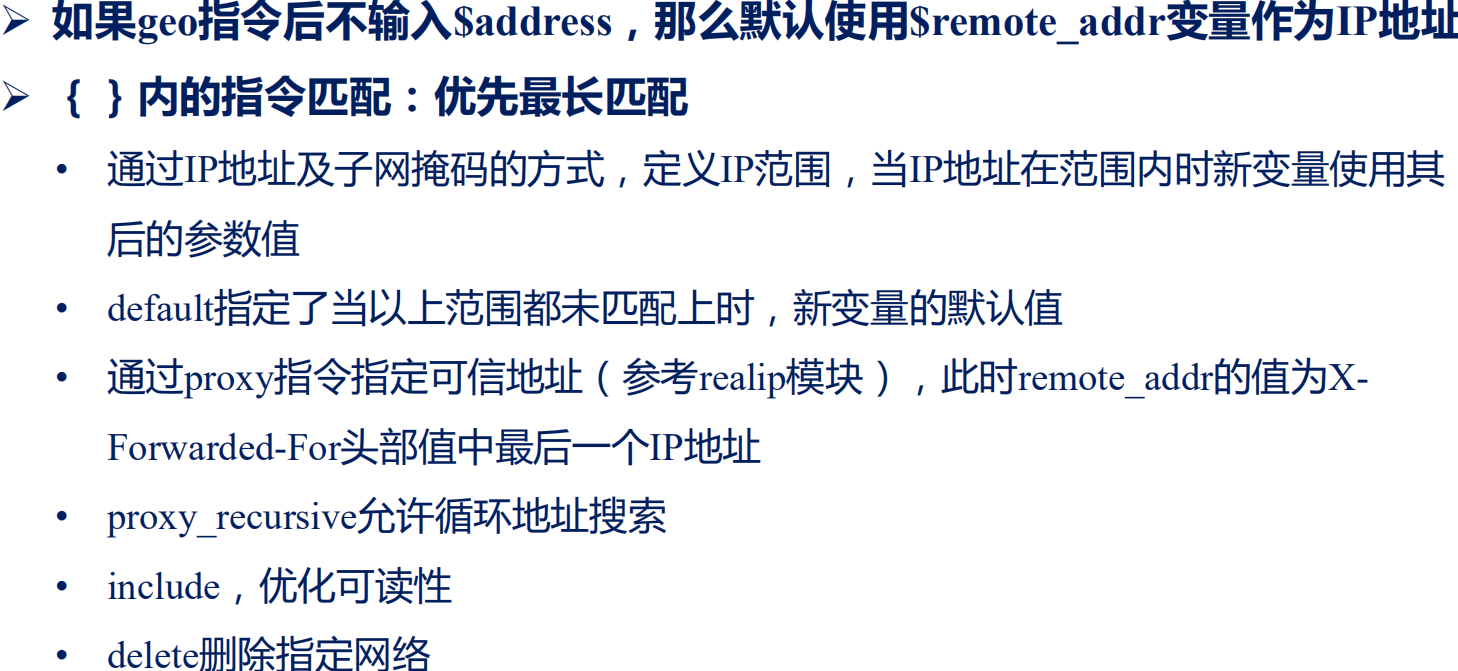
geo模块:根据IP创建新变量
指令
Syntax: geo [$address] $variable { ... }

Default: —

Context: http
配置
server {

        server_name split_clients.com;

        default_type text/plain;

        location /{

                return 200 '$country\n';

        }

}

geo $country {

        default ZZ;

        #include conf/geo.conf;

        proxy 192.168.183.4;

        127.0.0.0/24 US;

        127.0.0.1/32 RU;

        10.1.0.0/16 RU;

        192.168.1.0/24 UK;

        }
测试
[root@python vhast]# curl -H 'X-Forwarded-For: 10.1.0.0,127.0.0.2'

split_clients.com

US

[root@python vhast]# curl -H 'X-Forwarded-For: 10.1.0.0,127.0.0.1' split_clients.com

RU

[root@python vhast]# curl -H 'X-Forwarded-For: 10.1.0.0,127.0.0.1,1.2.3.4' split_clients.com

ZZ
使用变量查找用户地理位置geoip模块;默认未启用此功能;--with-http_geoip_module 编译进去
安装模块依赖的库
yum -y install GeoIP GeoIP-devel GeoIP-data
编译安装依赖库
wget https://github.com/maxmind/geoip-api-c/releases/download/v1.6.12/GeoIP-1.6.12.tar.gz

tar xf GeoIP-1.6.12.tar.gz

cd GeoIP-1.6.12/

./configure

make && make install
重新编译nginx
[root@python nginx-1.15.9]# ./configure --prefix=/data/web --sbin-path=/usr/bin --user=nginx --group=nginx --with-http_stub_status_module --with-http_auth_request_module --with-http_sub_module --add-module=/root/nginx-http-concat --with-http_addition_module --with-http_

secure_link_module --with-http_geoip_module

[root@python nginx-1.15.9]# make

[root@python nginx-1.15.9]# mv /usr/bin/nginx{,.07.13.16.31}

[root@python nginx-1.15.9]# mv objs/nginx /usr/bin/
指令介绍
Syntax: geoip_country file;#指定国家的地址文件

Default: —

Context: http

Syntax: geoip_proxy address | CIDR;  #信任的IP地址

Default: —

Context: http
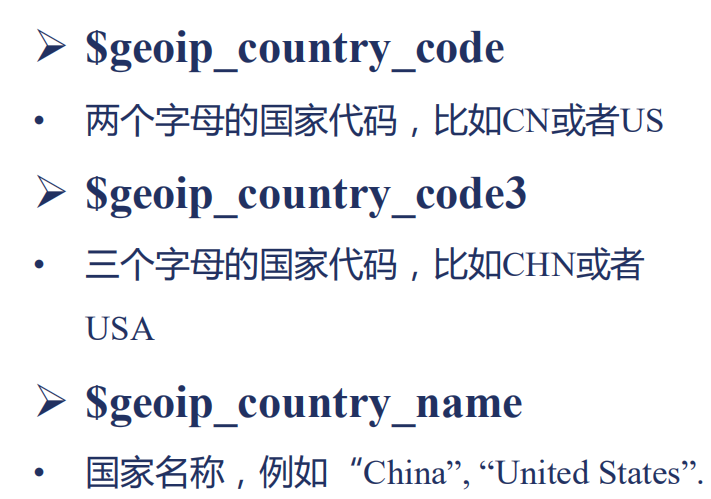
变量介绍

配置在http字段配置
server {

	server_name split_clients.com;

	default_type text/plain;

	location /{

		return 200 'country:$geoip_country_code,$geoip_country_code3,$geoip_country_name

country from city:$geoip_city_continent_code,$geoip_city_country_code3,$geoip_city_country_name\n';

	}

}

geo $country {

	default ZZ;

	#include conf/geo.conf;

	proxy 192.168.183.4;

	127.0.0.0/24 US;

	127.0.0.1/32 RU;

	10.1.0.0/16 RU;

	192.168.1.0/24 UK;

	}

geoip_country  /usr/share/GeoIP/GeoIP-initial.dat;

geoip_city   /usr/share/GeoIP/GeoIPCity-initial.dat;

geoip_proxy 192.168.183.4/32;

geoip_proxy_recursive on;
测试
[root@python vhast]# curl -H 'X-Forwarded-For: 104.248.224.193,121.8.98.197' split_clients.com

country:CN,CHN,China

country from city:AS,CHN,China

[root@python vhast]# curl -H 'X-Forwarded-For: 104.248.224.193' split_clients.com

country:US,USA,United States

country from city:NA,USA,United States

[root@python vhast]# curl -H 'X-Forwarded-For: 77.48.21.58' split_clients.com

country:CZ,CZE,Czech Republic

country from city:EU,CZE,Czech Republic
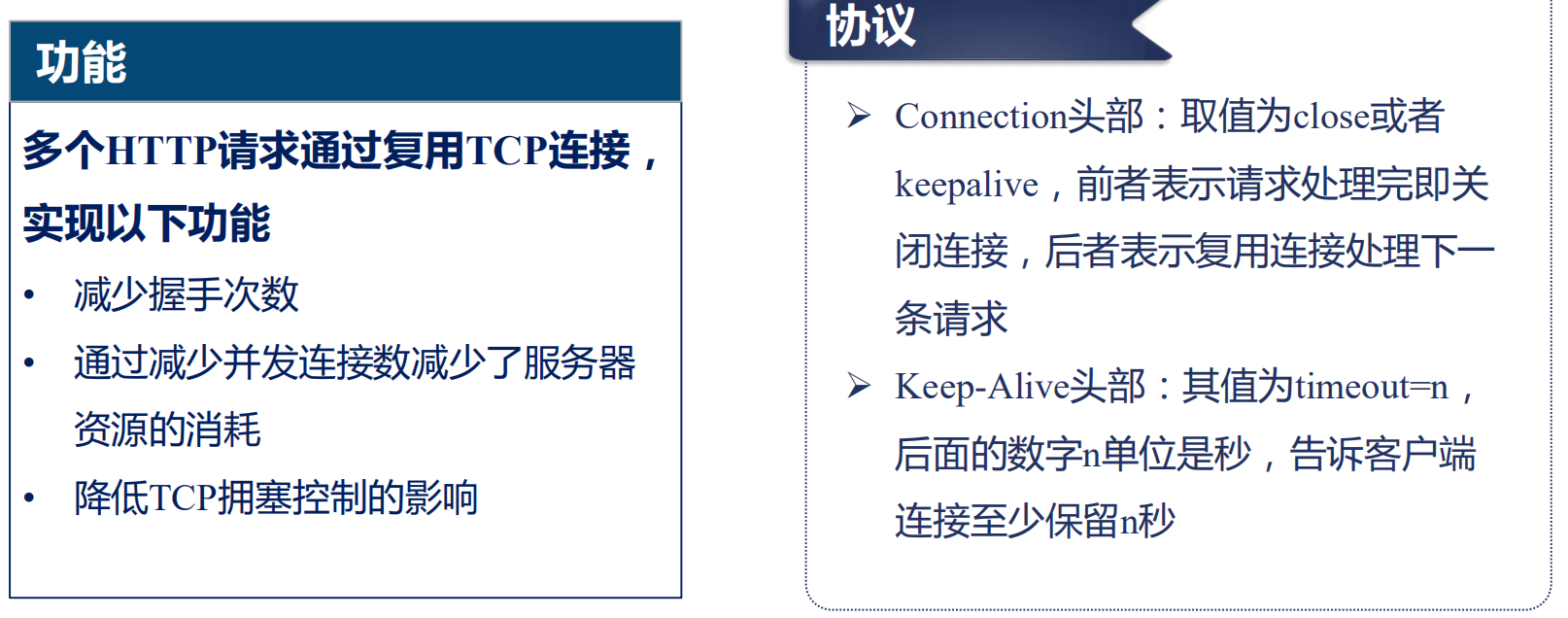
keepalive模块
指令介绍
Syntax: keepalive_disable none | browser ...;#对某些浏览器不适应此功能

Default: keepalive_disable msie6;

Context: http, server, location

Syntax: keepalive_requests number;   #表示在一个http最多执行多少个请求默认100

Default: keepalive_requests 100;

Context: http, server, location

Syntax: keepalive_timeout timeout [header_timeout];  跟两个时间,第一个是当请求完第一次后多长时间没请求我就断开连接默认75秒;第二个表示向浏览器返回这个连接保持的时间

Default: keepalive_timeout 75s;

Context: http, server, location
nginx 变量相关的map模块与split_clients模块及geo模块和geoip模块及keepalive介绍的更多相关文章
- Nginx Rewrite相关功能-ngx_http_rewrite_module模块指令
Nginx Rewrite相关功能-ngx_http_rewrite_module模块指令 作者:尹正杰 版权声明:原创作品,谢绝转载!否则将追究法律责任.
- Nginx 变量漫谈(四)
在设置了“取处理程序”的情况下,Nginx 变量也可以选择将其值容器用作缓存,这样在多次读取变量的时候,就只需要调用“取处理程序”计算一次.我们下面就来看一个这样的例子: map $args ...
- 我眼中的 Nginx(三):Nginx 变量和变量插值
张超:又拍云系统开发高级工程师,负责又拍云 CDN 平台相关组件的更新及维护.Github ID: tokers,活跃于 OpenResty 社区和 Nginx 邮件列表等开源社区,专注于服务端技术的 ...
- Nginx变量的实现机制
Nginx有两种定义变量的方式,一种是在配置文件中使用set指令(由rewrite模块提供支持),另一种是在模块内定义变量. 变量相关结构体: struct ngx_http_variable_s { ...
- Nginx 变量漫谈(八)
与 $arg_XXX 类似,我们在 (二) 中提到过的内建变量 $cookie_XXX 变量也会在名为 XXX 的 cookie 不存在时返回特殊值“没找到”: location /test ...
- Nginx 变量漫谈(三)
也有一些内建变量是支持改写的,其中一个例子是 $args. 这个变量在读取时返回当前请求的 URL 参数串(即请求 URL 中问号后面的部分,如果有的话 ),而在赋值时可以直接修改参数串.我们来看一个 ...
- Nginx使用GeoIP模块来限制地区访问
举例比如限制泰国地区的IP访问: 前提条件,安装了http geoip 或stream geoip模块的Nginx Plus或者开源nginx Maxmind的GeoLite Legacy数据库 1. ...
- Nginx Rewrite相关功能
目录 Nginx Rewrite相关功能 ngx_http_rewrite_module模块指令: if指令: set指令: break指令: return指令: rewrite_log指令: rew ...
- Nginx 变量漫谈(七)
在 (一) 中我们提到过,Nginx 变量的值只有一种类型,那就是字符串,但是变量也有可能压根就不存在有意义的值.没有值的变量也有两种特殊的值:一种是“不合法”(invalid),另一种是“没找到”( ...
随机推荐
- A task in a suit and a tie:paraphrase generation with semantic augmentation解读
1.该算法核心:在seq2seq模型的编码器中增加语义的frame 和 roles 2.上图为算法整个流程: 1).首先输入一句话s,SLING会使用frame和role label注释输入语句s,然 ...
- Drawer 侧边栏、以及侧边栏内 容布局
一.Flutter Drawer 侧边栏 在 Scaffold 组件里面传入 drawer 参数可以定义左侧边栏,传入 endDrawer 可以定义右侧边栏.侧边栏默认是隐藏的,我们可以通过手指滑动显 ...
- C语言创建共享库(动态库)步骤
C语言创建共享库(动态库)步骤: 创建sth.c,共享库源文件: //sth.c库源程序 unsigned long long sth(unsigned int x, unsigned int y) ...
- redis 基础操作教程
1.linux 安装redis : Linux 下安装 下载地址:http://redis.io/download,下载最新稳定版本. 本教程使用的最新文档版本为 2.8.17,下载并安装: $ wg ...
- Dart语言学习(三)Dart数值型
一.类型 数值型有 num,int, double num a = ; a = 12.5; print(a); print(a.runtimeType); ; // b = 20.5; print( ...
- uniGUI之FDQuery(28)
1]基本设置FDQuery1.Connection2]执行查询SQL语句3]执行 非查询SQL语句4]返回所有数据 和所有 列名 1]基本设置FDQuery1.Connection 一定要 放一个 ...
- 获取表格数据转换为JSON字符串
核心代码JavaScript代码: 方法一 function sc () { var myTable=document.getElementById("myTable"); //获 ...
- Spring Boot Json 之 Jackjson Fastjson
Json 是目前互联网应用使用最为广泛的信息交换格式之一.Spring Boot 内置了 Jackson .Json 在应用中主要体现在以下功能: 序列化 反序列化 字段格式化 验证自动化 目前长用的 ...
- [C/C++] _tprintf() 输出不了汉字
在前面加一个 setlocale(LC_ALL, ""); //必须得有这行 否则不能输出中文 注意得加locale头文件 #include<stdio.h> #inc ...
- 安装ubuntu18.04.3全过程
目录 一.安装ubuntu18.04.3操作系统 二.系统设置 三.非开发常用软件安装 四.开发常用软件安装 五.ubuntu相关知识 六.参考文章链接 正文 一.安装ubuntu18.04.3操作系 ...