
日志分析工具ELK(三)
目前官网更新特别快,不到半年时间就更新了好几个版本,目前最新的是5.1
以下安装配置使用4.5版本的
https://www.elastic.co/guide/en/kibana/4.5/index.html
Installing Kibana with yum

#yum 安装Kibana

Warning #警告

The repositories set up in this procedure are not compatible with distributions using version 3 of rpm, such as CentOS version 5.

#如果你的系统是rpm版本3或者是centos 5的话存储库是不兼容的

1.Download and install the public signing key:

#下载并安装公共签名的密钥

rpm--import https://packages.elastic.co/GPG-KEY-elasticsearch

2.Create a file named kibana.repo in the /etc/yum.repos.d/ directory with the following contents:

#添加yum源在/etc/yum.repos.d/目录下名字命名为kibana.repo

[kibana-4.5]

name=Kibana repository for 4.5.x packages

baseurl=http://packages.elastic.co/kibana/4.5/centos

gpgcheck=1

gpgkey=http://packages.elastic.co/GPG-KEY-elasticsearch

enabled=1

3.Install Kibana by running the following command:

yum install kibana

Configure Kibana to automatically start during bootup. If your distribution is using the System V version of init (check with ps -p 1), run the following command:

#加入开机自启动,可以使用ps -p 1 查看,如果系统是使用版本init的,使用以下命令

chkconfig --add kibana

4. If your distribution is using systemd, run the following commands instead:

#如果你的发行版使用systemd,运行以下命令

sudo/bin/systemctl daemon-reload

sudo/bin/systemctl enable kibana.service

配置

[root@linux-node1 config]# grep "^[a-Z]" /opt/kibana/config/kibana.yml

server.port: 5601 #端口

server.host: "0.0.0.0" #允许访问主机,建议内网

elasticsearch.url: "http://192.168.230.128:9200" #es的地址

kibana.index: ".kibana"  #索引

systemctl start kibana #启动

netstat -ntpl|grep 5601 #检查

tcp        0      0 0.0.0.0:5601            0.0.0.0:*               LISTEN      6937/node

登陆IP加端口http://192.168.230.128:5601

创建索引

模式允许您使用*通配符定义动态索引名称。例子:logstash - *

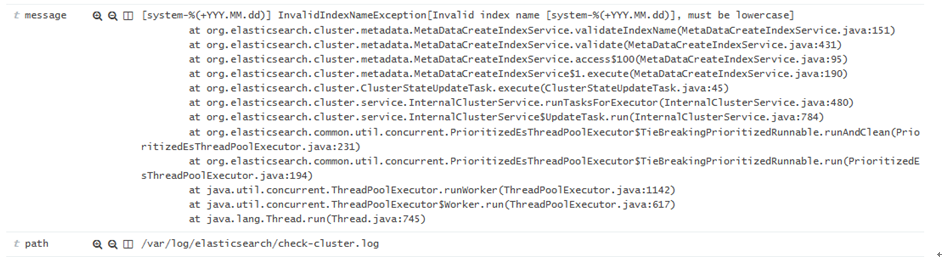
下面是es-error-*

点击Discover【发现】默认是最后十五分钟,我们把它改为今天

现在我们点击开看到的事件是一个完整的
Logstash收集Nginx日志
centos7系统库中默认是没有nginx的rpm包的,所以我们自己需要先更新下rpm依赖库

(1)使用yum安装nginx需要包括Nginx的库,安装Nginx的库

#rpm -Uvh http://nginx.org/packages/centos/7/noarch/RPMS/nginx-release-centos-7-0.el7.ngx.noarch.rpm

(2)使用下面命令安装nginx

#yum install nginx

(3)启动Nginx

#service nginx start

或

#systemctl start nginx.service

运行日志用json格式输出

#http段加如下信息(日志位置根据业务自行调整)

#nginx配置文件

[root@linux-node1 nginx]# cat nginx.conf

user  nginx;

worker_processes  1;

error_log  /var/log/nginx/error.log warn;

pid        /var/run/nginx.pid;

events {

    worker_connections  1024;

}

http {

    include       /etc/nginx/mime.types;

    default_type  application/octet-stream;

    log_format  main  '$remote_addr - $remote_user [$time_local] "$request" '

'$status $body_bytes_sent "$http_referer" '

'"$http_user_agent" "$http_x_forwarded_for"';

log_format json '{ "@timestamp": "$time_iso8601", '#在http段添加json格式的日志

'"@version": "1",'

'"client": "$remote_addr", '

'"url": "$uri", '

'"status": "$status", '

'"domain": "$host", '

'"host": "$server_addr", '

'"size": "$body_bytes_sent", '

'"responsetime": "$request_time", '

'"referer": "$http_referer",'

'"ua": "$http_user_agent"'

'}';

#access_log  /var/log/nginx/access.log  main;  #将原有的注释

    sendfile        on;

#tcp_nopush     on;

    keepalive_timeout  65;

#gzip  on;

    include /etc/nginx/conf.d/*.conf;

}

[root@linux-node1 conf.d]# cat default.conf

server {

    listen       80;

    server_name  localhost;

#charset koi8-r;

#access_log  /var/log/nginx/log/host.access.log  main; #注释原有的

   access_log  /var/log/nginx/access_json.log  json;#在server段添加日志格式

    location /{

        root   /usr/share/nginx/html;

        index  index.html index.htm;

}

#刷新nginx,就已经有日志了

[root@linux-node1 conf.d]# cd /var/log/nginx/

[root@linux-node1 nginx]# ls

access_json.log  access_json.log-20170210  error.log

#tail -f access_json.log 查看到的日志格式如下

{"@timestamp":"2017-02-11T09:53:38+08:00","@version":"","client":"192.168.230.1","url":"/index.html","status":"","domain":"192.168.230.128","host":"192.168.230.128","size":"","responsetime":"0.000","referer":"-","ua":"Mozilla/5.0 (Windows NT 10.0; Win64; x64) AppleWebKit/537.36 (KHTML, like Gecko) Chrome/51.0.2704.79 Safari/537.36 Edge/14.14393"}

#检查并重新启动

[root@linux-node1 ~]# nginx -t

nginx: the configuration file /etc/nginx/nginx.conf syntax is ok

nginx: configuration file /etc/nginx/nginx.conf test is successful

[root@linux-node1 ~]# service nginx restart

Redirecting to /bin/systemctl restart  nginx.service

#先来测试一下

[root@linux-node1 ~]# cat json.conf

input {

file{

type=>"access_nginx"

        path =>"/var/log/nginx/access_json.log"

        codec =>"json"

}

}

output {

    stdout {

        codec=>"rubydebug"

}

}

#运行,刷新访问nginx的地址http://192.168.230.128 ,让其生成日志,然后屏幕有输出就表示正常

/opt/logstash/bin/logstash -f json.conf

[root@linux-node1 conf.d]# cat all.conf

input{

  syslog {

type=>"system-syslog"

    host =>"192.168.230.128"

    port =>""

}

file{#增加的内容

    path =>"/var/log/nginx/access_json.log"

    codec => json

    start_position =>"beginning"

type=>"nginx-log"

}

file{

     path =>"/var/log/messages"

type=>"system"

     start_position =>"beginning"

}

file{

     path =>"/var/log/elasticsearch/check-cluster.log"

type=>"es-error"

     start_position =>"beginning"

        codec => multiline {

           pattern =>"^\["

           negate => true

           what =>"previous"

}

}

}

output{

if[type]=="system"{

    elasticsearch {

        hosts =>["192.168.230.128:9200"]

        index =>"system-%{+YYY.MM.dd}"

}

}

if[type]=="es-error"{

        elasticsearch {

                hosts =>["192.168.230.128:9200"]

                index =>"es-error-%{+YYY.MM.dd}"

}

}

if[type]=="system-syslog"{

        elasticsearch {

                hosts =>["192.168.230.128:9200"]

                index =>"system-syslog-%{+YYY.MM.dd}"

}

}

if[type]=="nginx-log"{#增加的内容

        elasticsearch {

                hosts =>["192.168.230.128:9200"]

                index =>"nginx-log-%{+YYY.MM.dd}"

}

}

}
点击连接,数据浏览

Kibana上添加展示,点击Settings 添加

添加完再点击Discover 选择nginx-log* ,日期选择今天,也可以选择15分钟前

Logstash收集syslog日志
#Input plugins,输入插件,找到syslog

https://www.elastic.co/guide/en/logstash/2.3/input-plugins.html

系统日志,网络设备日志都可以收集

我们先来测试一下,工作环境我们是先测试好,然后整合到一个配置文件中

[root@linux-node1 ~]# cat syslog.conf

input {

 syslog {

type=>"systcm-syslog"

    host =>"192.168.230.128"

    port =>""

}

}

output {

 stdout {

    codec =>"rubydebug"

}

}

然后

/opt/logstash/bin/logstash  -f syslog.conf

[root@linux-node1 ~]# netstat -ntpl|grep514

tcp6       00192.168.230.128:514:::*                    LISTEN      2998/java

修改配置文件

/etc/rsyslog.conf文件

[root@linux-node1 ~]# tail -2/etc/rsyslog.conf

*.*@@192.168.230.128:514#所有日志,所有级别

# ### end of the forwarding rule ###

打开另一个窗口重启,那边就收到就对了

[root@linux-node1 ~]# systemctl restart rsyslog

打开另外一个窗口测试发送hehe

[root@linux-node1 ~]# logger "hehe"
查看显示如下,说明已经OK

测试完成我们再把它添加到all.conf文件中
[root@linux-node1 ~]# cat all.conf

input{

  syslog {  #添加的syslog

type=>"system-syslog"

    host =>"192.168.230.128"

    port =>""

}

file{

     path =>"/var/log/messages"

type=>"system"

     start_position =>"beginning"

}

file{

     path =>"/var/log/elasticsearch/check-cluster.log"

type=>"es-error"

     start_position =>"beginning"

        codec => multiline {

           pattern =>"^\["

           negate => true

           what =>"previous"

}

}

}

output{

if[type]=="system"{

    elasticsearch {

        hosts =>["192.168.230.128:9200"]

        index =>"system-%{+YYY.MM.dd}"

}

}

if[type]=="es-error"{

        elasticsearch {

                hosts =>["192.168.230.128:9200"]

                index =>"es-error-%{+YYY.MM.dd}"

}

}

if[type]=="system-syslog"{ #添加的system-syslog

        elasticsearch {

                hosts =>["192.168.230.128:9200"]

                index =>"system-syslog-%{+YYY.MM.dd}"

}

}

}
登录Elasticsearch

登录Kibana
Settings -->+Add news添加索引system-syslog*然后create创建

点击Discover选择刚才创建的索引,日期选择Today

测试输入sisi

[root@linux-node1 ~]# logger "sisi"

[root@linux-node1 ~]# logger "sisi"
在Kibana中搜索关键字就可以找到

日志分析工具ELK(三)的更多相关文章
- 日志分析工具ELK配置详解
日志分析工具ELK配置详解 一.ELK介绍 1.1 elasticsearch 1.1.1 elasticsearch介绍 ElasticSearch是一个基于Lucene的搜索服务器.它提供了一个分 ...
- 日志分析工具ELK(五)
八.Kibana实践 选择绝对时间和相对时间 搜索 还可以添加相关信息 自动刷新页面时间,也可以关闭 创建图像,可视化 编辑Markdown,创建一个值班联系表 值班联系表 保存 再创建一个饼图;查看 ...
- 日志分析工具ELK(一)
一.ELK介绍 1.1 elasticsearch 1.1.1 elasticsearch介绍 ElasticSearch是一个基于Lucene的搜索服务器.它提供了一个分布式多用户能力的全文搜索引擎 ...
- 日志分析工具ELK(二)
五.Logstash日志收集实践 在学习Logstash之前,我们需要先了解以下几个基本概念: logstash收集日志基本流程: input-->codec-->filter--> ...
- 日志分析工具ELK(四)
Logstash收集TCP日志 #Input plugins TCP插件 所需的配置选项 tcp { port =>... } [root@linux-node1 ~]# cat tcp.con ...
- GoAccess日志分析工具使用文档
----Sevck 2016/3/4 17:24:13 #1软件说明: GoAccess是一款开源.实时,运行在命令行终端下的web日志分析工具.该工具提供快速.多样的HTTP状态统计,可以令管理员不 ...
- Linux 日志分析工具之awstats
一.awstats 是什么 官方网站:AWStats is a free powerful and featureful tool that generates advanced web, strea ...
- Eventlog Analyzer日志管理系统、日志分析工具、日志服务器的功能及作用
Eventlog Analyzer日志管理系统.日志分析工具.日志服务器的功能及作用 Eventlog Analyzer是用来分析和审计系统及事件日志的管理软件,能够对全网范围内的主机.服务器.网络设 ...
- 集中式日志分析平台 - ELK Stack - 安全解决方案 X-Pack
大数据之心 关注 0.6 2017.02.22 15:36* 字数 2158 阅读 16457评论 7喜欢 9 简介 X-Pack 已经作为 Elastic 公司单独的产品线,前身是 Shield, ...
随机推荐
- CSS躬行记(2)——伪类和伪元素
一.伪类选择器 伪选择器弥补了常规选择器的不足,能够实现一些特殊情况下的样式,例如在鼠标悬停时或只给字符串中的第一个字符指定样式.与类选择器类似,可以从HTML元素的class属性中查看到,但伪选择器 ...
- BFS、DFS ——J - Nightmare
J - Nightmare Ignatius had a nightmare last night. He found himself in a labyrinth with a time bomb ...
- pyspider_初始
一.简介 1.1.简介 pyspider 是一个使用python编写,并且拥有强大功能web界面的爬虫框架. 强大的web界面可进行脚本编辑,任务监控,项目管理,结果查看等功能. pyspider支持 ...
- stylus--安装及使用方法
stylus介绍 Stylus 是一个CSS的预处理框架,2010年产生,来自Node.js社区,主要用来给Node项目进行CSS预处理支持,所以 Stylus 是一种新型语言,可以创建健壮的.动态的 ...
- centos 64位安装jpeg-6b
先安装libtool和libtool-ltdl-devel 用find命令查找config.sub和config.guess文件 find / -name config.sub find / -nam ...
- 微信小程序分享至朋友圈的方法
最近研究怎么实现微信小程序分享至朋友圈,对就是朋友圈. 微信小程序目前没有直接提供方法来将小程序分享至朋友圈,不过可以采用曲线救国的方式来达到目的. 方法分两步: 1.通过浏览器将希望分享的东西风向至 ...
- Kafka,RocketMQ,RabbitMQ部署与使用体验
前言 近期在研究各种消息队列方案,为了有一个直观的使用体验,我把Kafka,RocketMQ,RabbitMQ各自部署了一遍,并使用了最基本的生产与消费消息功能.在部署过程中也遇到一些问题,特此记录. ...
- python3(二十四) subClas
""" 继承的多态 """ __author__ = 'shaozhiqi' # -----------------父类---------- ...
- 使用StopWatch类来计时 (perf4j-0.9.16.jar 包里的类)
public class StopWatch { static public int AN_HOUR = 60 * 60 * 1000; static public int A_MINUTE = 60 ...
- 软件包管理rpm和yum
rpm的使用: 安装的包相关包信息会保存在/var/lib/rpm目录下的文件中 安装参数: -i install安装 -v 显示详细信息 -h 打印####号 -V 校验软件包,会到/var/lib ...