
GIT Learning
一、Why Git
1.1 Git是分布式的,本地的版本管理
chect out代码后会在自己的机器上克隆一个自己的版本库,即使你在没有网络的环境,你仍然能够提交文件,查看历史版本记录,创建项目分支,等不需要远程或架设服务器就能做到本地版本管理.
1.2 不污染子目录的track文件
svn每个子目录都要扔一个.svn.这个实在是.. .(我想很多人都碰到过svn lock folder的情况.实在让人气急败坏.实际上.svn文件就是罪魁祸首.各种clean up无果. delelte后svn up异常.真是.. 摔!.去你妹的svn.)
1.3 强大的branch
超轻量级的branch建立.(实际只是建立文件指针).推荐根据的git workflow的开发流程.将workspace分成几区.master dev feature hotfix区等.开发层次就出来了.
1.4 merge工具的强力
git根据commit ticket依次再进行一次merge.提高了merge成功率.避免svn merge中的难堪.即使merge失败.也不会生成乱七八糟的版本文件.简单修改后.commit就是.
二、 Git安装配置
2.1 安装
ubuntu: sudo apt-get install gitwindows: 去 http://code.google.com/p/msysgit/ 下载安装2.2 配置文件
你可以在.gitconfig文件中防止git的全局配置。文件位于用户的home目录。 上述已经提到每次提交都会保存作者和提交者的信息,这些信息都可以保存在全局配置中。
2.3 配置用户信息
# Configure the user which will be used by git

# Of course you should use your name

git config --global user.name "Example Surname"

# Same for the email address

git config --global user.email "your.email@gmail.com"

# Set default so that all changes are always pushed to the repository

git config --global push.default "matching"
2.4 查看配置信息
git config --list2.5 SSH Keys
SSH key 可以让你在你的电脑和 Git @ OSC 之间建立安全的加密连接。
生成sshkey
# Creates a new ssh key using the provided email

ssh-keygen -t rsa -C "xxxxx@xxxxx.com"
在~/.ssh/id_rsa.pub中是生成的public key,复制文件中的全部内容并把他添加到ssh公钥管理中, Git @ OSC 的公钥管理页面如下链接: http://git.oschina.net/keys.
三. Git库管理
3.1 clone
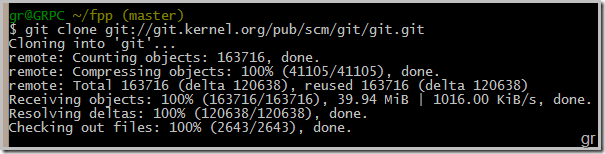
可以clone命令去clone别人公开的代码了。git clone git://git.kernel.org/pub/scm/git/git.git
3.2 创建仓库,添加文件,提交修改
# Initialize the local Git repository

git init

# Add all (files and directories) to the Git repository

git add .

# Make a commit of your file to the local repository

git commit -m "Initial commit"

# Show the log file

git log
先添加修改文件到提交索引,之后才能进行提交。
3.3 添加远程库
要添加一个新的远程仓库,可以指定一个简单的名字,以便将来引用,运行
git remote add [shortname] [url]:$ git remote add pb git://github.com/paulboone/ticgit.git
$ git remote -v
origin git://github.com/schacon/ticgit.git
pb git://github.com/paulboone/ticgit.git3.4 从远程仓库抓取数据
格式: git fetch [retmote-name]
git fetch pb3.5 推送数据到远程仓库
格式: git push [remote-name]
git push origin test:master // 提交本地test分支作为远程的master分支
git push origin test:test // 提交本地test分支作为远程的test分支git push pb master:testing3.6 分支
#新建分支test

git branch test

#切换到test分支

git checkout test

#将本地的test推送到远端

git push origin test:test

#切换到master分支

git checkout master

#将test分支合并到master分支

git merge test

#删除本地test分支

git branch -d test

#左面为空,远程的test分支将被删除

git push origin :test

四. SVN迁移到GIT
4.1 先建立users.txt,格式如下:
gr = ge rui <forgerui@gmail.com>
4.2 或者通过以下命令获取用户列表(需要perl支持)
$ svn log --xml | grep -P "^<author" | sort -u | \

    perl -pe 's/<author>(.*?)<\/author>/$1 = /' > users.txt
4.3 获取svn版本库信息:
$ git svn clone http://192.168.135.115:8080/svn/fpp

    --authors-file=users.txt --no-metadata -s fpp
4.4 将所有的旧分支都变成真正的 Git 分支,所有的旧标签也变成真正的 Git 标签
进入到项目的目录,运行如下命令:
$ cp -Rf .git/refs/remotes/tags/* .git/refs/tags/

$ rm -Rf .git/refs/remotes/tags

$ cp -Rf .git/refs/remotes/* .git/refs/heads/

$ rm -Rf .git/refs/remotes
4.5 新增远程服务器
git remote add myproject git@git.oschina.net:bairuiworld/myproject.git4.6 让所有分支标签都上传
git push myproject --all
欢迎访问我的个人主页: www.forgerui.tk
GIT Learning的更多相关文章
- Git Learning - By reading ProGit
Today I begin to learn to use Git. I learn from Pro Git. And I recommend it which is an excellent bo ...
- Git Learning Part III - working remotely (Github)
help document of Github : https://help.github.com/ 1 upload 1.1 new update Initialize a repository ...
- Git Learning Part II - Working locally
file status life circle basic: modified: Examples: untracked: unmodified: modified: Git branching ...
- Git Learning Part I - Install Git and configure it
Why we need 'Git' GIt version control: 1. record the history about updating code and deleting code 2 ...
- git 学习(1) ----- git 本地仓库操作
最近在项目中使用git了,在实战中才知道,以前学习的git 知识只是皮毛,需要重新系统的学一下,读了一本叫 Learn Git in a Month of Lunches 的书籍,这本书通俗易懂,使 ...
- Git初级
一,安装git 一键安装 Mac 或 Windows. 二,下载一个工具书 Git 命令手册 free Git cheat sheet 三,安装完成之后需要先配置两个基本配置:用户名和邮箱 $ git ...
- Git/Github Learning
通过网上查找资料,我了解到Git/Github是一款免费.开源的分布式版本控制系统,它可以敏捷高效地处理任何或小或大的项目.同时,它是一个开源的分布式版本控制系统,用以有效.高速的处理从很小到非常大的 ...
- Learning Git by Animations
https://hujiaweibujidao.github.io/blog/2016/05/20/learning-git-by-animations/ http://learngitbranchi ...
- Git命令回顾
团队从Eclipse迁移到Android Studio之后,也从SVN迁移到Git了. 一直忙于需求迭代无暇做迁移,现在才开始做,相见恨晚,好东西,高大上,词穷. 回顾和记录一下git的一些基本操作. ...
随机推荐
- Codeforces Round #307 (Div. 2) E. GukiZ and GukiZiana 分块
E. GukiZ and GukiZiana Time Limit: 20 Sec Memory Limit: 256 MB 题目连接 http://codeforces.com/contest/55 ...
- Redis_字典
阅读本文之前要了解的两件事情,第一,Redis是一种Key-Value数据库,第二,字典是一种保存键值对的抽象数据结构.所以不难猜出字典在Redis中应用一定很广泛,实际上,Redis数据库的底层实现 ...
- Mysql命令alter add:增加表的字段
alter add命令用来增加表的字段. alter add命令格式:alter table 表名 add字段 类型 其他; 例如,在表MyClass中添加了一个字段passtest,类型为int(4 ...
- java Date比较
package com.horizon.test; import org.apache.commons.lang.time.DateUtils; public class Hello3 { publi ...
- MyReport:DataGrid的打印和打印预览
本文说明怎样使用MyReport来实现Flex DataGrid组件的自己主动化打印预览和打印功能. 实现代码 <? xmlversion="1.0" encoding=&q ...
- ztree使用系列四(ztree实现同级拖拽排序并将排序结果保存数据库)
ztree这个系列的最后一篇,也是ztree功能强大的体现之中的一个--排序功能. ztree能够实现全部节点之间任意的拖拽排序功能.我这里依据须要实现了仅仅同意同级之间任意拖拽排序,事实上原理都一样 ...
- git无法连接bitbucket/github时,出现"Permission deied(publickey)"
Permission denied (publickey). fatal: Could not read from remote repository. Please make sure you ha ...
- centos下编译安装mysql5.6
CentOS 6.4下编译安装MySQL 5.6.14 参考:http://www.cnblogs.com/xiongpq/p/3384681.html 概述: CentOS 6.4下通过yum安装的 ...
- Java项目经验——程序员成长的关键(转载)
Java就是用来做项目的!Java的主要应用领域就是企业级的项目开发!要想从事企业级的项目开发,你必须掌握如下要点:1.掌握项目开发的基本步骤2.具备极强的面向对象的分析与设计技巧3.掌握用例驱动.以 ...
- JQuery实现回车代替Tab键(按回车跳到下一栏)
一个提交按钮以后,用户如果按了键盘的回车键,默认情况下,就会提交这个表单了.这样对于用户输入各个表单项目,用户体验很不好,输入完一个项目,或者用鼠标选择下一个项目,或者用键盘的Tab键选中下一个项目. ...