
Nginx - Configuration File Syntax
Configuration Directives
The Nginx configuration file can be described as a list of directives organized in a logical structure. The entire behavior of the application is defined by the values that you give to those directives.
By default, Nginx makes use of one main configuration file. Now let's take a quick peek at the first few lines of this initial setup:
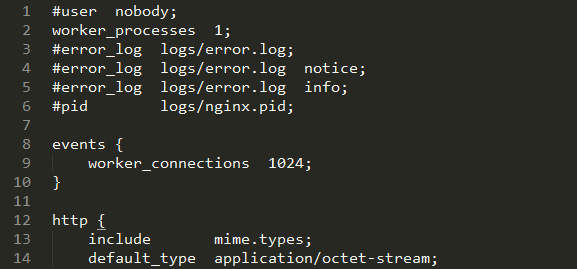
A closer look at the first two lines:
#user nobody;
worker_processes 1;
As you can probably make out from the # character, the first line is a comment. In other words, a piece of text that is not interpreted and has no value whatsoever. Its sole purpose is to be read by whoever opens the file, or to temporarily disable parts of an existing configuration section. You may use the # character at the beginning of a line or following a directive.
The second line is an actual statement—a directive. The first bit (worker_processes) represents a setting key to which you append one or more values. In this case, the value is 1, indicating that Nginx should function with a single worker process (more information about this particular directive is given in further sections).
Note: Directives always end with a semicolon (;).
Each directive has a unique meaning and defines a particular feature of the application. It may also have a particular syntax. For example, the worker_process directive only accepts one numeric value, whereas the user directive lets you specify up to two character strings—one for the user account (the Nginx worker processes should run as) and a second for the user group.
Nginx works in a modular way, and as such, each module comes with a specific set of directives. The most fundamental directives are part of the Nginx Core module and will be detailed in Core Module Directives.
Organization and Inclusions
In the preceding screenshot, you may have noticed a particular directive—include.
include mime.types;
As the name suggests, this directive will perform an inclusion of the specified file. In other words, the contents of the file will be inserted at this exact location. Here is a practical example that will help you understand:
nginx.conf:
user nginx nginx;
worker_processes 4;
include other_settings.conf;
other_settings.conf:
error_log logs/error.log;
pid logs/nginx.pid;
The final result, as interpreted by Nginx, is as follows:
user nginx nginx;
worker_processes 4;
error_log logs/error.log;
pid logs/nginx.pid;
Inclusions are processed recursively. In this case, you have the possibility to use the include directive again in the other_settings.conf file in order to include yet another file.
In the initial configuration setup, there are two files at use — nginx.conf and mime.types. However, in the case of a more advanced configuration, there may be five or more files, as described in the following table:
| Standard name | Description |
| nginx.conf | Base configuration of the application. |
| mime.types | A list of file extensions and their associated MIME types. |
| fastcgi.conf | FastCGI-related configuration. |
| proxy.conf | Proxy-related configuration. |
| sites.conf | Configuration of the websites served by Nginx, also known as virtual hosts. It's recommended to create separate files for each domain. |
These filenames were defined conventionally, nothing actually prevents you from regrouping your FastCGI and proxy settings into a common file named proxy_and_fastcgi_config.conf.
Note that the include directive supports filename globbing. In other words, filenames referenced with the * wildcard, where * may match zero, one, or more consecutive characters:
include sites/*.conf;
This will include all files with a name that ends with .conf in the sites folder. This mechanism allows you to create a separate file for each of your websites and include them all at once.
Be careful when including a file — if the specified file does not exist, the configuration checks will fail, and Nginx will not start:
[alex@example sbin]# ./nginx -t

[emerg]: open() "/usr/local/nginx/conf/dummyfile.conf" failed (2: No such file or directory) in /usr/local/nginx/conf/nginx.conf:48
The previous statement is not true for inclusions with wildcards. Moreover, if you insert include dummy*.conf in your configuration and test it (whether there is any file matching this pattern on your system or not), here is what should happen:
[alex@example sbin]# ./nginx –t

the configuration file /usr/local/nginx/conf/nginx.conf syntax is ok

configuration file /usr/local/nginx/conf/nginx.conf test is successful
Directive blocks
Directives are brought in by modules — if you activate a new module, a specific set of directives becomes available. Modules may also enable directive blocks, which allow for a logical construction of the configuration:
events {
worker_connections 1024;
}
The events block that you can find in the default configuration file is brought in by the Events Module. The directives that the module enables can only be used within that block — in the preceding example, worker_connections will only make sense in the context of the events block. There is one important exception though — some directives may be placed at the root of the configuration file because they have a global effect on the server. The root of the configuration file is also known as the main block.
Note that in some cases, blocks can be nested into each other, following a specific logic:
http {
server {
listen 80;
server_name example.com;
access_log /var/log/nginx/example.com.log;
location ^~ /admin/ {
index index.php;
}
}
}
This example shows how to configure Nginx to serve a website, as you can tell from the http block (as opposed to, say, imap, if you want to make use of the mail server proxy features).
Within the http block, you may declare one or more server blocks. A server block allows you to configure a virtual host. The server block, in this example, contains some configuration that applies to all requests with a Host HTTP header exactly matching example.com.
Within this server block, you may insert one or more location blocks. These allow you to enable settings only when the requested URI matches the specified path.
Last but not least, configuration is inherited within children blocks. The access_log directive (defined at the server block level in this example) specifies that all HTTP requests for this server should be logged into a text file. This is still true within the location child block, although you have the possibility of disabling it by reusing the access_log directive:
[…]
location ^~ /admin/ {
index index.php;
access_log off;
}
[…]
In this case, logging will be enabled everywhere on the website, except for the /admin/ location path. The value set for the access_log directive at the server block level is overridden by the one at the location block level.
Advanced language rules
There are a number of important observations regarding the Nginx configuration file syntax. These will help you understand certain syntax rules that may seem confusing if you have never worked with Nginx before.
Directives Accept Specific Syntaxes
You may indeed stumble upon complex syntaxes that can be confusing at first sight:
rewrite ^/(.*)\.(png|jpg|gif)$ /image.php? file=$1&format=$2 last;
Syntaxes are directive-specific. While the listen directive may only accept a port number to open a listening socket, the location block or the rewrite directive support complex expressions in order to match particular patterns.
Later on, we will approach a module (the Rewrite Module) which allows for a much more advanced logical structure through the if, set, break, and return directives and the use of variables. With all of these new elements, configuration files will begin to look like programming scripts. Anyhow, the more modules we discover, the richer the syntax becomes.
Diminutives in Directive Values
Finally, you may use the following diminutives for specifying a file size in the context of a directive value:
- k or K: Kilobytes
- m or M: Megabytes
As a result, the following two syntaxes are correct and equal:
client_max_body_size 2M;
client_max_body_size 2048k;
Additionally, when specifying a time value, you may use the following shortcuts:
- ms: Milliseconds
- s: Seconds
- m: Minutes
- h: Hours
- d: Days
- w: Weeks
- M: Months (30 days)
- y: Years (365 days)
This becomes especially useful in the case of directives accepting a period of time as a value:
client_body_timeout 3m;
client_body_timeout 180s;
client_body_timeout 180;
Note that the default time unit is seconds; the last two lines above thus result in an identical behavior. It is also possible to combine two values with different units:
client_body_timeout 1m30s;
client_body_timeout '1m 30s 500ms';
The latter variant is enclosed in quotes since values are separated by spaces.
Variables
Modules also provide variables that can be used in the definition of directive values. For example, the Nginx HTTP Core module defines the $nginx_version variable. Variables in Nginx always start with "$" — the dollar sign. When setting the log_format directive, you may include all kinds of variables in the format string:
[…]
location ^~ /admin/ {
access_log logs/main.log;
log_format main '$pid - $nginx_version - $remote_addr';
}
[…]
Note that some directives do not allow you to use variables:
error_log logs/error-$nginx_version.log;
The preceding directive is valid, syntax-wise. However, it simply generates a file named error-$nginx_version.log, without parsing the variable.
String Values
Character strings that you use as directive values can be written in three forms. First, you may enter the value without quotes:
root /home/example.com/www;
However, if you want to use a particular character, such as a blank space (" "), a semicolon (;), or curly brace ({ and }), you will need to either prefix said character with a backslash (\), or enclose the entire value in single or double quotes:
root '/home/example.com/my web pages';
Nginx makes no difference whether you use single or double quotes. Note that variables inserted in strings within quotes will be expanded normally, unless you prefix the $ character with a backslash (\).
Nginx - Configuration File Syntax的更多相关文章
- nginx configuration
Now that you know how to manage the service itself, you should take a few minutes to familiarize you ...
- php编译完php.ini加载问题-Loaded Configuration File (none)
编译安装php7时指定了--with-config-file-path=/usr/local/php7/etc,修改了 php.ini 的配置后重启,但就是不生效. 出现Loaded Configur ...
- 配置phpmemcache扩展,Loaded Configuration File (none)
首先我来描述问题: 编译安装完php的扩展库memcache后,在php.ini文件中添加了memcache.so的配置文件 extension=/usr/local/php5.6.27/lib/ph ...
- 解决Scala Play框架在Git Bash运行的异常:Could not find configuration file ../framework/sbt/sbt.boot.properties
Git Bash+ConEmu可以模拟Linux强大的命令行.不过在结合Scala和Play时,需要注意如下事项: 1. Scala的安装在64位操作系统下,默认会放在“C:\Program File ...
- Error: Cannot open main configuration file '//start' for reading! 解决办法
当执行service nagios start启动nagios时,报错:Error: Cannot open main configuration file '//start' for reading ...
- phpmyadmin Wrong permissions on configuration file, should not be world writable!
巴拉巴拉,实际场景是这样,因为有需要,所以想用django 做个rest服务给其他平台提供服务,发现以前正常的页面都无法运行,奇怪发现有一个页面提示连接不上mysql 难道mysql挂了,打开phpm ...
- springMVC+mybatis 进行单元测试时 main SqlSessionFactoryBean - Parsed configuration file: 'class path resource' 无限的读取xml文件
今天终于写完的Dao层的操作,怀着无比激动的心情,进行单元测试,就在最后一个方法,对的就是最后一个方法,启动单元测试就会报以下错误: [2016-05-11 18:25:01,691] [WARN ] ...
- [Bug]IIs Cannot read configuration file due to insufficient permissions
摘要 在部署站点的时候,遇到这样的问题Cannot read configuration file due to insufficient permissions 解决办法 在服务器上部署站点,浏览的 ...
- How to find configuration file MySQL uses?
http://www.dbasquare.com/2012/04/01/how-to-find-mysql-configuration-file/ A customer called me today ...
随机推荐
- TypeScript学习笔记(二):基本数据类型及数据转换
数据类型 我们来看看TypeScript中的基本数据类型都有哪些. boolean 布尔值,支持true和false. var isDone: boolean = false; 默认为undefine ...
- Lua学习笔记(二):基本语法
Lua学习指南:http://www.lua.org/manual/ 首先我们要明确的一点是:在Lua中,除了关键字外一切都是变量. Lua关键字 可以查看这个地址:http://www.lua.or ...
- disque概要
做项目过程接触到disque,记录一下. disque是redis之父开源的基于内存的分布式作业队列,用c语言实现的非阻塞网络服务器. disque的设计目标:Its goal is to captu ...
- 腾讯云centos6.5下部署django环境
基于腾讯云CentOS6.5的环境 首先说下需要用到的软件 1.gcc环境 腾讯云默认是没有gcc编译器的,需要手动安装一下:yum install gcc 2.python环境 因为我用的cento ...
- C语言根据日期取其位于一年中的第几天
#include <iostream> #include <stdlib.h> using namespace std; bool isLeapYear( int iYear ...
- 教你50招提升ASP.NET性能(十九):静态集合
(30)Static collections 招数30: 静态集合 If a collection is static, make sure it only contains the objects ...
- cc2530 makefile简略分析 <contiki学习之三>
前面将contiki的makefile框架都理了下,这篇就以cc2530为收篇吧,也即makefile分析就该到此为止了. contiki/examples/cc2530dk 打开Makefile如下 ...
- Hadoop on Mac with IntelliJ IDEA - 4 制作jar包
本文讲述使用IntelliJ IDEA打包Project的过程,即,打jar包. 环境:Mac OS X 10.9.5, IntelliJ IDEA 13.1.4, Hadoop 1.2.1 Hado ...
- PostgreSQL的 initdb 源代码分析之十八
继续分析: setup_conversion(); 展开: 其实质是: 运行命令:"/home/pgsql/project/bin/postgres" --single -F -O ...
- Web项目的三层架构和MVC架构异同
http://www.cnblogs.com/zhhh/archive/2011/06/10/2077519.html 又看到有人在问三层架构和MVC的关系,感觉这种问题有点教条化了.因为它们都在逻辑 ...