
iOS UIGestureRecognizer与UIMenuController(内容根据iOS编程)
UIGestureRecognizer 对象会截取本应由视图处理的触摸事件。当某个UIGestureRecognizer对象识别出特定的手势后,就会向指定的对象发送指定的消息。iOS SDK默认提供若干中UIGestureRecoginezer对象。本章我们将继续更新 JXTouchTracker ,借助由iOS SDK提供的三种 UIGestureRecogniezer对象,用户可以选择、移动、删除线条。
- UIGestureRecognizer子类
在为应用添加手势识别功能时,需要针对特定的手势创建响应的UIGestureRecognizer子类对象,而不是直接使用UIGestureRecognizer对象。iOS SDK提供了多种能够处理不同手势的UIGestureRecognizer子类。
使用UIGestureRecognizer子类对象时,除了要设置目标动作对,还要将该子类对象“附着”在某个视图上。当该子类对象根据当前附着的视图所发生的触摸事件识别出相应的手势时,就会向指定的目标对象发送指定的动作消息。由UIGestureRecognizer对象发出的动作消息都会遵守以下规范:
- (void)action:(UIGestureRecognizer *)gestureRecognizer
UIGestureRecognizer对象在识别手势时,会截取本应由其附着的视图自行处理的触摸事件。因此,附着了 UIGestureRecognizer 对象的视图可能不会受到常规的 UIResponder 消息,例如,不会收到: - (void)touchesBegan:(NSSet<UITouch *> *)touches withEvent:(UIEvent *)event 消息。
- 用UITapGestureRecognizer对象识别点击手势
下面为我们应用添加一个功能,当用户双击屏幕时,会清除屏幕上的所有线条。
#import "JXDrawView.h"

#import "JXLine.h"

@interface JXDrawView ()

/** 保存当前正在绘制线条 */

@property (nonatomic,strong) JXLine * currentLine;

/** 保存已经绘制完成的线条 */

@property (nonatomic,strong) NSMutableArray * finishedLines;

/** 保存正在绘制的多条直线 */

@property (nonatomic,strong) NSMutableDictionary * linesInProgress;

@end

@implementation JXDrawView

- (instancetype)initWithFrame:(CGRect)frame {

    self = [super initWithFrame:frame];

    if (self) {

        self.linesInProgress = [NSMutableDictionary dictionary];

        self.finishedLines = [NSMutableArray array];

        self.backgroundColor = [UIColor grayColor];

        // 支持多点触摸

        self.multipleTouchEnabled = YES;

        // 添加点击事件

        UITapGestureRecognizer * doubleTapRecoginzer = [[UITapGestureRecognizer alloc] initWithTarget:self action:@selector(doubleTap:)];

        doubleTapRecoginzer.numberOfTapsRequired = ;

        [self addGestureRecognizer:doubleTapRecoginzer];

    }

    return self;

}

// 添加手势

- (void)doubleTap:(UIGestureRecognizer *)tap {

    [self.linesInProgress removeAllObjects];

    [self.finishedLines removeAllObjects];

    [self setNeedsDisplay];

}

- (void)strokeLine:(JXLine *)line {

    UIBezierPath * bp = [UIBezierPath bezierPath];

    bp.lineWidth = ;

    bp.lineCapStyle = kCGLineCapRound;

    [bp moveToPoint:line.begin];

    [bp addLineToPoint:line.end];

    [bp stroke];

}

- (void)drawRect:(CGRect)rect {

    // 用黑色表示已经绘制完成的线条

    [[UIColor blackColor] set];

    for (JXLine * line in self.finishedLines) {

        [self strokeLine:line];

    }

    // 用红色绘制正在画的线条

    [[UIColor redColor] set];

    for (NSValue * key in self.linesInProgress) {

        [self strokeLine:self.linesInProgress[key]];

    }

}

- (void)touchesBegan:(NSSet<UITouch *> *)touches withEvent:(UIEvent *)event {

    for (UITouch * t in touches) {

        CGPoint location = [t locationInView:self];

        JXLine * line = [[JXLine alloc] init];

        line.begin = location;

        line.end = location;

        NSValue * key = [NSValue valueWithNonretainedObject:t];

        self.linesInProgress[key] = line;

    }

    [self setNeedsDisplay];

}

- (void)touchesMoved:(NSSet<UITouch *> *)touches withEvent:(UIEvent *)event {

    for (UITouch * t in touches) {

        NSValue * key = [NSValue valueWithNonretainedObject:t];

        JXLine * line = self.linesInProgress[key];

        line.end = [t locationInView:self];

    }

    [self setNeedsDisplay];

}

- (void)touchesEnded:(NSSet<UITouch *> *)touches withEvent:(UIEvent *)event {

    for (UITouch *t in touches) {

        NSValue * key = [NSValue valueWithNonretainedObject:t];

        JXLine * line = self.linesInProgress[key];

        [self.finishedLines addObject:line];

        [self.linesInProgress removeObjectForKey:key];

    }

    [self setNeedsDisplay];

}

- (void)touchesCancelled:(NSSet<UITouch *> *)touches withEvent:(UIEvent *)event {

    for (UITouch *t in touches) {

        NSValue * key = [NSValue valueWithNonretainedObject:t];

        [self.linesInProgress removeObjectForKey:key];

    }

    [self setNeedsDisplay];

}

@end
构建并运行,同时我们可以检测触摸事件发生的顺序:
- (void)touchesBegan:(NSSet<UITouch *> *)touches withEvent:(UIEvent *)event

- (void)doubleTap:(UIGestureRecognizer *)tap

- (void)touchesCancelled:(NSSet<UITouch *> *)touches withEvent:(UIEvent *)event
由于 UIGestureRecognizer 对象会通过截取触摸事件来识别手势,因此在UIGestureRecognizer 对象识别出手势之前,UIView 会收到所有 UIResponder 消息。对于 UITapGestureRecognizer来说,在识别出点击手势之前,UIView 会收到 - (void)touchesBegan:(NSSet<UITouch *> *)touches withEvent:(UIEvent *)event 消息:在识别出点击手势之后,UITapGestureRecognizer 会自行处理相关触摸事件,由这些触摸事件所引发的 UIResponder 消息将不会再发送给 UIView 。直到 UITapGestureRecognizer 检测出点击手势已经结束,UIView 才会重新收到 UIResponder 消息( - (void)touchesBegan:(NSSet<UITouch *> *)touches withEvent:(UIEvent *)event )
为了在识别出点击手势之前避免向 UIView 发送 - (void)touchesBegan:(NSSet<UITouch *> *)touches withEvent:(UIEvent *)event 消息。我们需要在代码中做如下修改:
#import "JXDrawView.h"

#import "JXLine.h"

@interface JXDrawView ()

/** 保存当前正在绘制线条 */

@property (nonatomic,strong) JXLine * currentLine;

/** 保存已经绘制完成的线条 */

@property (nonatomic,strong) NSMutableArray * finishedLines;

/** 保存正在绘制的多条直线 */

@property (nonatomic,strong) NSMutableDictionary * linesInProgress;

@end

@implementation JXDrawView

- (instancetype)initWithFrame:(CGRect)frame {

    self = [super initWithFrame:frame];

    if (self) {

        self.linesInProgress = [NSMutableDictionary dictionary];

        self.finishedLines = [NSMutableArray array];

        self.backgroundColor = [UIColor grayColor];

        // 支持多点触摸

        self.multipleTouchEnabled = YES;

        // 添加点击事件

        UITapGestureRecognizer * doubleTapRecoginzer = [[UITapGestureRecognizer alloc] initWithTarget:self action:@selector(doubleTap:)];

        doubleTapRecoginzer.numberOfTapsRequired = ;

        // 为了避免在识别出点击手势之前出发touches手势

        doubleTapRecoginzer.delaysTouchesBegan  = YES;

        [self addGestureRecognizer:doubleTapRecoginzer];

    }

    return self;

}

// 添加手势

- (void)doubleTap:(UIGestureRecognizer *)tap {

    [self.linesInProgress removeAllObjects];

    [self.finishedLines removeAllObjects];

    [self setNeedsDisplay];

}

- (void)strokeLine:(JXLine *)line {

    UIBezierPath * bp = [UIBezierPath bezierPath];

    bp.lineWidth = ;

    bp.lineCapStyle = kCGLineCapRound;

    [bp moveToPoint:line.begin];

    [bp addLineToPoint:line.end];

    [bp stroke];

}

- (void)drawRect:(CGRect)rect {

    // 用黑色表示已经绘制完成的线条

    [[UIColor blackColor] set];

    for (JXLine * line in self.finishedLines) {

        [self strokeLine:line];

    }

    // 用红色绘制正在画的线条

    [[UIColor redColor] set];

    for (NSValue * key in self.linesInProgress) {

        [self strokeLine:self.linesInProgress[key]];

    }

}

- (void)touchesBegan:(NSSet<UITouch *> *)touches withEvent:(UIEvent *)event {

    for (UITouch * t in touches) {

        CGPoint location = [t locationInView:self];

        JXLine * line = [[JXLine alloc] init];

        line.begin = location;

        line.end = location;

        NSValue * key = [NSValue valueWithNonretainedObject:t];

        self.linesInProgress[key] = line;

    }

    [self setNeedsDisplay];

}

- (void)touchesMoved:(NSSet<UITouch *> *)touches withEvent:(UIEvent *)event {

    for (UITouch * t in touches) {

        NSValue * key = [NSValue valueWithNonretainedObject:t];

        JXLine * line = self.linesInProgress[key];

        line.end = [t locationInView:self];

    }

    [self setNeedsDisplay];

}

- (void)touchesEnded:(NSSet<UITouch *> *)touches withEvent:(UIEvent *)event {

    for (UITouch *t in touches) {

        NSValue * key = [NSValue valueWithNonretainedObject:t];

        JXLine * line = self.linesInProgress[key];

        [self.finishedLines addObject:line];

        [self.linesInProgress removeObjectForKey:key];

    }

    [self setNeedsDisplay];

}

- (void)touchesCancelled:(NSSet<UITouch *> *)touches withEvent:(UIEvent *)event {

    for (UITouch *t in touches) {

        NSValue * key = [NSValue valueWithNonretainedObject:t];

        [self.linesInProgress removeObjectForKey:key];

    }

    [self setNeedsDisplay];

}

@end
- 同时添加多种触摸手势
接下来我们为应用中添加单击手势,让用户可以选择屏幕上的线条
#import "JXDrawView.h"

#import "JXLine.h"

@interface JXDrawView ()

/** 保存当前正在绘制线条 */

@property (nonatomic,strong) JXLine * currentLine;

/** 保存已经绘制完成的线条 */

@property (nonatomic,strong) NSMutableArray * finishedLines;

/** 保存正在绘制的多条直线 */

@property (nonatomic,strong) NSMutableDictionary * linesInProgress;

@end

@implementation JXDrawView

- (instancetype)initWithFrame:(CGRect)frame {

    self = [super initWithFrame:frame];

    if (self) {

        self.linesInProgress = [NSMutableDictionary dictionary];

        self.finishedLines = [NSMutableArray array];

        self.backgroundColor = [UIColor grayColor];

        // 支持多点触摸

        self.multipleTouchEnabled = YES;

        // 添加点击事件

        UITapGestureRecognizer * doubleTapRecoginzer = [[UITapGestureRecognizer alloc] initWithTarget:self action:@selector(doubleTap:)];

        doubleTapRecoginzer.numberOfTapsRequired = ;

        // 为了避免在识别出点击手势之前出发touches手势

        doubleTapRecoginzer.delaysTouchesBegan  = YES;

        [self addGestureRecognizer:doubleTapRecoginzer];

        // 添加单机事件

        UITapGestureRecognizer * tapRecognizer = [[UITapGestureRecognizer alloc] initWithTarget:self action:@selector(tap:)];

        tapRecognizer.delaysTouchesBegan = YES;

        [self addGestureRecognizer:tapRecognizer];

    }

    return self;

}

// 添加单机事件

- (void)tap:(UIGestureRecognizer *)tap {

    NSLog(@"%s",__func__);

}

// 添加手势

- (void)doubleTap:(UIGestureRecognizer *)tap {

    [self.linesInProgress removeAllObjects];

    [self.finishedLines removeAllObjects];

    [self setNeedsDisplay];

}

- (void)strokeLine:(JXLine *)line {

    UIBezierPath * bp = [UIBezierPath bezierPath];

    bp.lineWidth = ;

    bp.lineCapStyle = kCGLineCapRound;

    [bp moveToPoint:line.begin];

    [bp addLineToPoint:line.end];

    [bp stroke];

}

- (void)drawRect:(CGRect)rect {

    // 用黑色表示已经绘制完成的线条

    [[UIColor blackColor] set];

    for (JXLine * line in self.finishedLines) {

        [self strokeLine:line];

    }

    // 用红色绘制正在画的线条

    [[UIColor redColor] set];

    for (NSValue * key in self.linesInProgress) {

        [self strokeLine:self.linesInProgress[key]];

    }

}

- (void)touchesBegan:(NSSet<UITouch *> *)touches withEvent:(UIEvent *)event {

    for (UITouch * t in touches) {

        CGPoint location = [t locationInView:self];

        JXLine * line = [[JXLine alloc] init];

        line.begin = location;

        line.end = location;

        NSValue * key = [NSValue valueWithNonretainedObject:t];

        self.linesInProgress[key] = line;

    }

    [self setNeedsDisplay];

}

- (void)touchesMoved:(NSSet<UITouch *> *)touches withEvent:(UIEvent *)event {

    for (UITouch * t in touches) {

        NSValue * key = [NSValue valueWithNonretainedObject:t];

        JXLine * line = self.linesInProgress[key];

        line.end = [t locationInView:self];

    }

    [self setNeedsDisplay];

}

- (void)touchesEnded:(NSSet<UITouch *> *)touches withEvent:(UIEvent *)event {

    for (UITouch *t in touches) {

        NSValue * key = [NSValue valueWithNonretainedObject:t];

        JXLine * line = self.linesInProgress[key];

        [self.finishedLines addObject:line];

        [self.linesInProgress removeObjectForKey:key];

    }

    [self setNeedsDisplay];

}

- (void)touchesCancelled:(NSSet<UITouch *> *)touches withEvent:(UIEvent *)event {

    for (UITouch *t in touches) {

        NSValue * key = [NSValue valueWithNonretainedObject:t];

        [self.linesInProgress removeObjectForKey:key];

    }

    [self setNeedsDisplay];

}

@end
构建并运行。可以发现,点击一次可以正确识别出单击手势,控制台会输出单击方法信息;但是如果我们双击,应用将无法识别出正确的单击手势,单击双击手势方法都会执行。
如果需要为视图添加多种手势,就需要考虑这些手势之间的关系。双击手势包含两次单击,为了避免 UITapGestureRecognizer 将双击时间分拆为两个单击事件,可以设置UITapGestureRecognizer 在单击后暂时不进行识别,知道确定不是双击手势后再识别为单击手势。
#import "JXDrawView.h"

#import "JXLine.h"

@interface JXDrawView ()

/** 保存当前正在绘制线条 */

@property (nonatomic,strong) JXLine * currentLine;

/** 保存已经绘制完成的线条 */

@property (nonatomic,strong) NSMutableArray * finishedLines;

/** 保存正在绘制的多条直线 */

@property (nonatomic,strong) NSMutableDictionary * linesInProgress;

@end

@implementation JXDrawView

- (instancetype)initWithFrame:(CGRect)frame {

    self = [super initWithFrame:frame];

    if (self) {

        self.linesInProgress = [NSMutableDictionary dictionary];

        self.finishedLines = [NSMutableArray array];

        self.backgroundColor = [UIColor grayColor];

        // 支持多点触摸

        self.multipleTouchEnabled = YES;

        // 添加点击事件

        UITapGestureRecognizer * doubleTapRecoginzer = [[UITapGestureRecognizer alloc] initWithTarget:self action:@selector(doubleTap:)];

        doubleTapRecoginzer.numberOfTapsRequired = ;

        // 为了避免在识别出点击手势之前出发touches手势

        doubleTapRecoginzer.delaysTouchesBegan  = YES;

        [self addGestureRecognizer:doubleTapRecoginzer];

        // 添加单机事件

        UITapGestureRecognizer * tapRecognizer = [[UITapGestureRecognizer alloc] initWithTarget:self action:@selector(tap:)];

        tapRecognizer.delaysTouchesBegan = YES;

        // 用来防止将双击事件拆分为单击

        [tapRecognizer requireGestureRecognizerToFail:doubleTapRecoginzer];

        [self addGestureRecognizer:tapRecognizer];

    }

    return self;

}

// 添加单机事件

- (void)tap:(UIGestureRecognizer *)tap {

    NSLog(@"%s",__func__);

}

// 添加手势

- (void)doubleTap:(UIGestureRecognizer *)tap {

    [self.linesInProgress removeAllObjects];

    [self.finishedLines removeAllObjects];

    [self setNeedsDisplay];

}

- (void)strokeLine:(JXLine *)line {

    UIBezierPath * bp = [UIBezierPath bezierPath];

    bp.lineWidth = ;

    bp.lineCapStyle = kCGLineCapRound;

    [bp moveToPoint:line.begin];

    [bp addLineToPoint:line.end];

    [bp stroke];

}

- (void)drawRect:(CGRect)rect {

    // 用黑色表示已经绘制完成的线条

    [[UIColor blackColor] set];

    for (JXLine * line in self.finishedLines) {

        [self strokeLine:line];

    }

    // 用红色绘制正在画的线条

    [[UIColor redColor] set];

    for (NSValue * key in self.linesInProgress) {

        [self strokeLine:self.linesInProgress[key]];

    }

}

- (void)touchesBegan:(NSSet<UITouch *> *)touches withEvent:(UIEvent *)event {

    for (UITouch * t in touches) {

        CGPoint location = [t locationInView:self];

        JXLine * line = [[JXLine alloc] init];

        line.begin = location;

        line.end = location;

        NSValue * key = [NSValue valueWithNonretainedObject:t];

        self.linesInProgress[key] = line;

    }

    [self setNeedsDisplay];

}

- (void)touchesMoved:(NSSet<UITouch *> *)touches withEvent:(UIEvent *)event {

    for (UITouch * t in touches) {

        NSValue * key = [NSValue valueWithNonretainedObject:t];

        JXLine * line = self.linesInProgress[key];

        line.end = [t locationInView:self];

    }

    [self setNeedsDisplay];

}

- (void)touchesEnded:(NSSet<UITouch *> *)touches withEvent:(UIEvent *)event {

    for (UITouch *t in touches) {

        NSValue * key = [NSValue valueWithNonretainedObject:t];

        JXLine * line = self.linesInProgress[key];

        [self.finishedLines addObject:line];

        [self.linesInProgress removeObjectForKey:key];

    }

    [self setNeedsDisplay];

}

- (void)touchesCancelled:(NSSet<UITouch *> *)touches withEvent:(UIEvent *)event {

    for (UITouch *t in touches) {

        NSValue * key = [NSValue valueWithNonretainedObject:t];

        [self.linesInProgress removeObjectForKey:key];

    }

    [self setNeedsDisplay];

}

@end
构建并运行应用,单击屏幕,UITapGestureRecognizer 会稍作停顿,确定是单击手势之后再执行 tap: 方法。而双击之后就不会执行这个方法了。
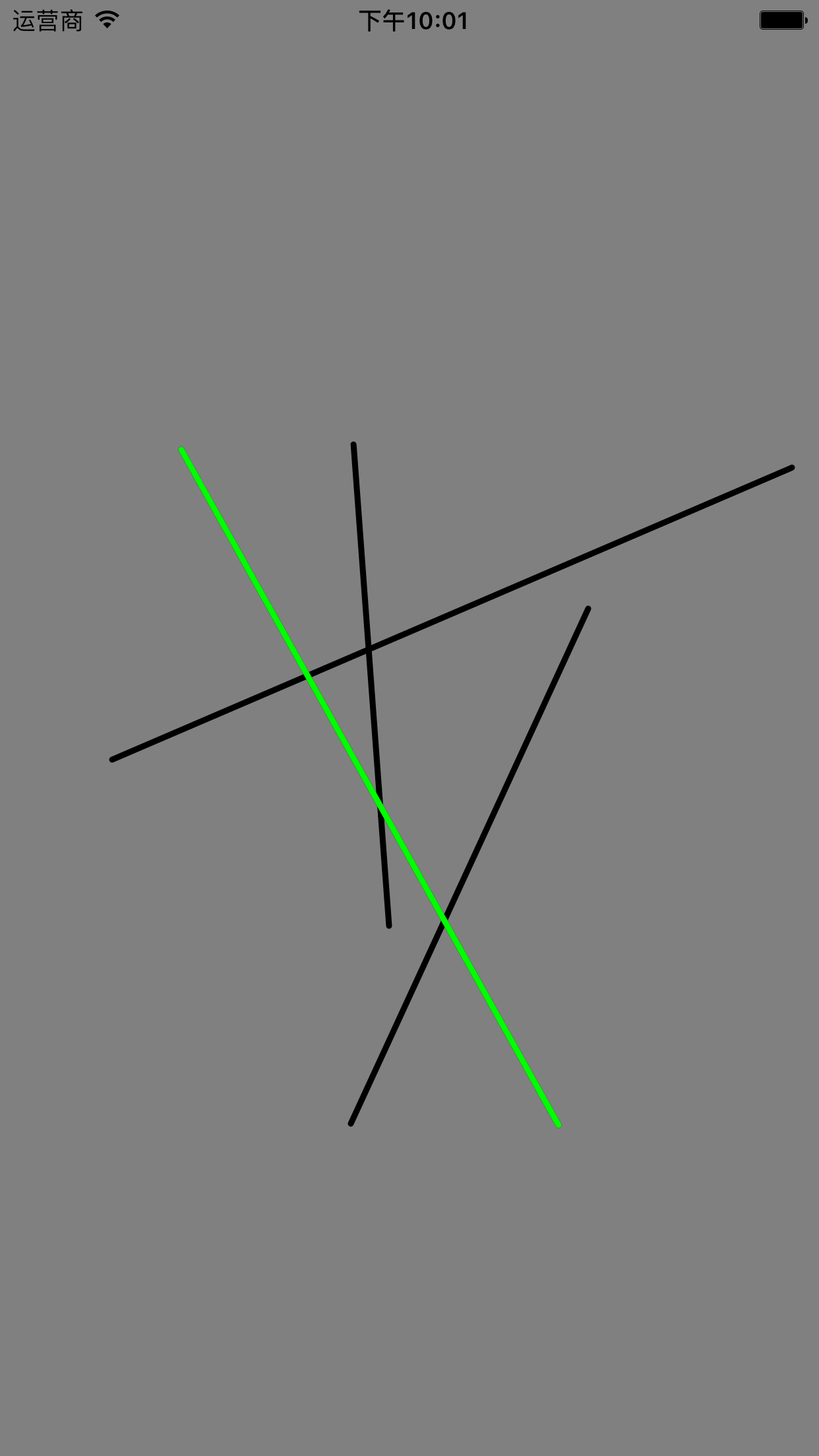
现在为项目 添加单击选择线条功能。
#import "JXDrawView.h"

#import "JXLine.h"

@interface JXDrawView ()

/** 保存已经绘制完成的线条 */

@property (nonatomic,strong) NSMutableArray * finishedLines;

/** 保存正在绘制的多条直线 */

@property (nonatomic,strong) NSMutableDictionary * linesInProgress;

/** 保存选中的线条 */

@property (nonatomic,weak) JXLine * selectedLine;

@end

@implementation JXDrawView

- (instancetype)initWithFrame:(CGRect)frame {

    self = [super initWithFrame:frame];

    if (self) {

        self.linesInProgress = [NSMutableDictionary dictionary];

        self.finishedLines = [NSMutableArray array];

        self.backgroundColor = [UIColor grayColor];

        // 支持多点触摸

        self.multipleTouchEnabled = YES;

        // 添加点击事件

        UITapGestureRecognizer * doubleTapRecoginzer = [[UITapGestureRecognizer alloc] initWithTarget:self action:@selector(doubleTap:)];

        doubleTapRecoginzer.numberOfTapsRequired = ;

        // 为了避免在识别出点击手势之前出发touches手势

        doubleTapRecoginzer.delaysTouchesBegan  = YES;

        [self addGestureRecognizer:doubleTapRecoginzer];

        // 添加单机事件

        UITapGestureRecognizer * tapRecognizer = [[UITapGestureRecognizer alloc] initWithTarget:self action:@selector(tap:)];

        tapRecognizer.delaysTouchesBegan = YES;

        // 用来防止将双击事件拆分为单击

        [tapRecognizer requireGestureRecognizerToFail:doubleTapRecoginzer];

        [self addGestureRecognizer:tapRecognizer];

    }

    return self;

}

// 添加单机事件

- (void)tap:(UIGestureRecognizer *)tap {

    NSLog(@"%s",__func__);

    CGPoint point = [tap locationInView:self];

    self.selectedLine = [self lineAtPoint:point];

    [self setNeedsDisplay];

}

// 添加手势

- (void)doubleTap:(UIGestureRecognizer *)tap {

    [self.linesInProgress removeAllObjects];

    [self.finishedLines removeAllObjects];

    [self setNeedsDisplay];

}

// 画线

- (void)strokeLine:(JXLine *)line {

    UIBezierPath * bp = [UIBezierPath bezierPath];

    bp.lineWidth = ;

    bp.lineCapStyle = kCGLineCapRound;

    [bp moveToPoint:line.begin];

    [bp addLineToPoint:line.end];

    [bp stroke];

}

- (void)drawRect:(CGRect)rect {

    // 用黑色表示已经绘制完成的线条

    [[UIColor blackColor] set];

    for (JXLine * line in self.finishedLines) {

        [self strokeLine:line];

    }

    // 用红色绘制正在画的线条

    [[UIColor redColor] set];

    for (NSValue * key in self.linesInProgress) {

        [self strokeLine:self.linesInProgress[key]];

    }

    if (self.selectedLine) {

        [[UIColor greenColor] set];

        [self strokeLine:self.selectedLine];

    }

}

// 根据传入的位置找出距离最近的那个对象

- (JXLine *)lineAtPoint:(CGPoint)p {

    // 找出离p最近的JXLine对象

    for (JXLine * line in self.finishedLines) {

        CGPoint start = line.begin;

        CGPoint end = line.end;

        // 检查线条的若干个点

        for (float t = 0.0; t <= 1.0; t += 0.05) {

            float x = start.x + t * (end.x - start.x);

            float y = start.y + t * (end.y - start.y);

            // 如果线条的某个点和p的距离在20点以内,就返回响应的JXLIne对象

            if (hypot(x-p.x, y-p.y) < 20.0) {

                return line;

            }

        }

    }

    // 如果没有找到符合条件的线条,就返回nil

    return nil;

}

- (void)touchesBegan:(NSSet<UITouch *> *)touches withEvent:(UIEvent *)event {

    for (UITouch * t in touches) {

        CGPoint location = [t locationInView:self];

        JXLine * line = [[JXLine alloc] init];

        line.begin = location;

        line.end = location;

        NSValue * key = [NSValue valueWithNonretainedObject:t];

        self.linesInProgress[key] = line;

    }

    [self setNeedsDisplay];

}

- (void)touchesMoved:(NSSet<UITouch *> *)touches withEvent:(UIEvent *)event {

    for (UITouch * t in touches) {

        NSValue * key = [NSValue valueWithNonretainedObject:t];

        JXLine * line = self.linesInProgress[key];

        line.end = [t locationInView:self];

    }

    [self setNeedsDisplay];

}

- (void)touchesEnded:(NSSet<UITouch *> *)touches withEvent:(UIEvent *)event {

    for (UITouch *t in touches) {

        NSValue * key = [NSValue valueWithNonretainedObject:t];

        JXLine * line = self.linesInProgress[key];

        [self.finishedLines addObject:line];

        [self.linesInProgress removeObjectForKey:key];

    }

    [self setNeedsDisplay];

}

- (void)touchesCancelled:(NSSet<UITouch *> *)touches withEvent:(UIEvent *)event {

    for (UITouch *t in touches) {

        NSValue * key = [NSValue valueWithNonretainedObject:t];

        [self.linesInProgress removeObjectForKey:key];

    }

    [self setNeedsDisplay];

}

@end
构建并运行:
- UIMenuController
下面我们要为应用添加另一个功能:当用户选中某根线条时,我们要在用户手指按下的位置显示一个菜单。这个菜单要为用户提供一个删除选项。iOS提供了一个名为 UIMenuController 的类,可以用来显示这类菜单。
每个iOS应用只有一个 UIMenuController 对象。当应用要显示该对象时,要现为他设置一组 UIMenuItem 对象,然后设置显示位置,最后将其设置为可见。
#import "JXDrawView.h"

#import "JXLine.h"

@interface JXDrawView ()

/** 保存已经绘制完成的线条 */

@property (nonatomic,strong) NSMutableArray * finishedLines;

/** 保存正在绘制的多条直线 */

@property (nonatomic,strong) NSMutableDictionary * linesInProgress;

/** 保存选中的线条 */

@property (nonatomic,weak) JXLine * selectedLine;

@end

@implementation JXDrawView

- (instancetype)initWithFrame:(CGRect)frame {

    self = [super initWithFrame:frame];

    if (self) {

        self.linesInProgress = [NSMutableDictionary dictionary];

        self.finishedLines = [NSMutableArray array];

        self.backgroundColor = [UIColor grayColor];

        // 支持多点触摸

        self.multipleTouchEnabled = YES;

        // 添加点击事件

        UITapGestureRecognizer * doubleTapRecoginzer = [[UITapGestureRecognizer alloc] initWithTarget:self action:@selector(doubleTap:)];

        doubleTapRecoginzer.numberOfTapsRequired = ;

        // 为了避免在识别出点击手势之前出发touches手势

        doubleTapRecoginzer.delaysTouchesBegan  = YES;

        [self addGestureRecognizer:doubleTapRecoginzer];

        // 添加单机事件

        UITapGestureRecognizer * tapRecognizer = [[UITapGestureRecognizer alloc] initWithTarget:self action:@selector(tap:)];

        tapRecognizer.delaysTouchesBegan = YES;

        // 用来防止将双击事件拆分为单击

        [tapRecognizer requireGestureRecognizerToFail:doubleTapRecoginzer];

        [self addGestureRecognizer:tapRecognizer];

    }

    return self;

}

// 添加单机事件

- (void)tap:(UIGestureRecognizer *)tap {

    CGPoint point = [tap locationInView:self];

    self.selectedLine = [self lineAtPoint:point];

    // 当有选中线条时

    if (self.selectedLine) {

        // 是视图成为 UIMenuItem 动作消息的目标

        [self becomeFirstResponder];

        // 获取 UIMenuController 对象

        UIMenuController * menu = [UIMenuController sharedMenuController];

        // 创建一个新的标题为“Delete”的UIMenuItem对象

        UIMenuItem * deleteItem = [[UIMenuItem alloc] initWithTitle:@"Delete" action:@selector(deleteLine:)];

        menu.menuItems = @[deleteItem];

        // 先为 UIMenuController 对象设置显示区域,然后将其设置为可见

        [menu setTargetRect:CGRectMake(point.x, point.y, , ) inView:self];

        [menu setMenuVisible:YES animated:YES];

    } else {

        // 如果没有选中的线条,就隐藏 UIMenuController 对象

        [[UIMenuController sharedMenuController] setMenuVisible:NO animated:YES];

    }

    [self setNeedsDisplay];

}

// 添加手势

- (void)doubleTap:(UIGestureRecognizer *)tap {

    [self.linesInProgress removeAllObjects];

    [self.finishedLines removeAllObjects];

    [self setNeedsDisplay];

}

// 画线

- (void)strokeLine:(JXLine *)line {

    UIBezierPath * bp = [UIBezierPath bezierPath];

    bp.lineWidth = ;

    bp.lineCapStyle = kCGLineCapRound;

    [bp moveToPoint:line.begin];

    [bp addLineToPoint:line.end];

    [bp stroke];

}

- (void)drawRect:(CGRect)rect {

    // 用黑色表示已经绘制完成的线条

    [[UIColor blackColor] set];

    for (JXLine * line in self.finishedLines) {

        [self strokeLine:line];

    }

    // 用红色绘制正在画的线条

    [[UIColor redColor] set];

    for (NSValue * key in self.linesInProgress) {

        [self strokeLine:self.linesInProgress[key]];

    }

    if (self.selectedLine) {

        [[UIColor greenColor] set];

        [self strokeLine:self.selectedLine];

    }

}

// 根据传入的位置找出距离最近的那个对象

- (JXLine *)lineAtPoint:(CGPoint)p {

    // 找出离p最近的JXLine对象

    for (JXLine * line in self.finishedLines) {

        CGPoint start = line.begin;

        CGPoint end = line.end;

        // 检查线条的若干个点

        for (float t = 0.0; t <= 1.0; t += 0.05) {

            float x = start.x + t * (end.x - start.x);

            float y = start.y + t * (end.y - start.y);

            // 如果线条的某个点和p的距离在20点以内,就返回响应的JXLIne对象

            if (hypot(x-p.x, y-p.y) < 20.0) {

                return line;

            }

        }

    }

    // 如果没有找到符合条件的线条,就返回nil

    return nil;

}

- (void)touchesBegan:(NSSet<UITouch *> *)touches withEvent:(UIEvent *)event {

    for (UITouch * t in touches) {

        CGPoint location = [t locationInView:self];

        JXLine * line = [[JXLine alloc] init];

        line.begin = location;

        line.end = location;

        NSValue * key = [NSValue valueWithNonretainedObject:t];

        self.linesInProgress[key] = line;

    }

    [self setNeedsDisplay];

}

- (void)touchesMoved:(NSSet<UITouch *> *)touches withEvent:(UIEvent *)event {

    for (UITouch * t in touches) {

        NSValue * key = [NSValue valueWithNonretainedObject:t];

        JXLine * line = self.linesInProgress[key];

        line.end = [t locationInView:self];

    }

    [self setNeedsDisplay];

}

- (void)touchesEnded:(NSSet<UITouch *> *)touches withEvent:(UIEvent *)event {

    for (UITouch *t in touches) {

        NSValue * key = [NSValue valueWithNonretainedObject:t];

        JXLine * line = self.linesInProgress[key];

        [self.finishedLines addObject:line];

        [self.linesInProgress removeObjectForKey:key];

    }

    [self setNeedsDisplay];

}

- (void)touchesCancelled:(NSSet<UITouch *> *)touches withEvent:(UIEvent *)event {

    for (UITouch *t in touches) {

        NSValue * key = [NSValue valueWithNonretainedObject:t];

        [self.linesInProgress removeObjectForKey:key];

    }

    [self setNeedsDisplay];

}

@end
要显示 UIMenuController 对象,还要满足一个条件:显示UIMenuController对象的UIView对象必须是当前UIWindow对象的第一响应对象。这也是为什么在 tap: 方法中起始部分会向JXDrawView 发送 becomeFirstResponder 消息。如果要将某个自定义的UIView子类对象设置为第一响应对象,就必须覆盖该对象的 canBecomeFirstResponder 方法:
// 将某个自定义的UIView子类对象设置为第一响应对象,就必须覆盖此类方法

- (BOOL)canBecomeFirstResponder {

    return YES;

}
实现删除选中线条方法:
#import "JXDrawView.h"

#import "JXLine.h"

@interface JXDrawView ()

/** 保存已经绘制完成的线条 */

@property (nonatomic,strong) NSMutableArray * finishedLines;

/** 保存正在绘制的多条直线 */

@property (nonatomic,strong) NSMutableDictionary * linesInProgress;

/** 保存选中的线条 */

@property (nonatomic,weak) JXLine * selectedLine;

@end

@implementation JXDrawView

- (instancetype)initWithFrame:(CGRect)frame {

    self = [super initWithFrame:frame];

    if (self) {

        self.linesInProgress = [NSMutableDictionary dictionary];

        self.finishedLines = [NSMutableArray array];

        self.backgroundColor = [UIColor grayColor];

        // 支持多点触摸

        self.multipleTouchEnabled = YES;

        // 添加点击事件

        UITapGestureRecognizer * doubleTapRecoginzer = [[UITapGestureRecognizer alloc] initWithTarget:self action:@selector(doubleTap:)];

        doubleTapRecoginzer.numberOfTapsRequired = ;

        // 为了避免在识别出点击手势之前出发touches手势

        doubleTapRecoginzer.delaysTouchesBegan  = YES;

        [self addGestureRecognizer:doubleTapRecoginzer];

        // 添加单机事件

        UITapGestureRecognizer * tapRecognizer = [[UITapGestureRecognizer alloc] initWithTarget:self action:@selector(tap:)];

        tapRecognizer.delaysTouchesBegan = YES;

        // 用来防止将双击事件拆分为单击

        [tapRecognizer requireGestureRecognizerToFail:doubleTapRecoginzer];

        [self addGestureRecognizer:tapRecognizer];

    }

    return self;

}

// 添加单机事件

- (void)tap:(UIGestureRecognizer *)tap {

    CGPoint point = [tap locationInView:self];

    self.selectedLine = [self lineAtPoint:point];

    // 当有选中线条时

    if (self.selectedLine) {

        // 是视图成为 UIMenuItem 动作消息的目标

        [self becomeFirstResponder];

        // 获取 UIMenuController 对象

        UIMenuController * menu = [UIMenuController sharedMenuController];

        // 创建一个新的标题为“Delete”的UIMenuItem对象

        UIMenuItem * deleteItem = [[UIMenuItem alloc] initWithTitle:@"Delete" action:@selector(deleteLine:)];

        menu.menuItems = @[deleteItem];

        // 先为 UIMenuController 对象设置显示区域,然后将其设置为可见

        [menu setTargetRect:CGRectMake(point.x, point.y, , ) inView:self];

        [menu setMenuVisible:YES animated:YES];

    } else {

        // 如果没有选中的线条,就隐藏 UIMenuController 对象

        [[UIMenuController sharedMenuController] setMenuVisible:NO animated:YES];

    }

    [self setNeedsDisplay];

}

- (void)deleteLine:(id)sender {

    // 从已经完成的小太中删除选中的线条

    [self.finishedLines removeObject:self.selectedLine];

    // 重画整个视图

    [self setNeedsDisplay];

}

// 添加手势

- (void)doubleTap:(UIGestureRecognizer *)tap {

    [self.linesInProgress removeAllObjects];

    [self.finishedLines removeAllObjects];

    [self setNeedsDisplay];

}

// 画线

- (void)strokeLine:(JXLine *)line {

    UIBezierPath * bp = [UIBezierPath bezierPath];

    bp.lineWidth = ;

    bp.lineCapStyle = kCGLineCapRound;

    [bp moveToPoint:line.begin];

    [bp addLineToPoint:line.end];

    [bp stroke];

}

- (void)drawRect:(CGRect)rect {

    // 用黑色表示已经绘制完成的线条

    [[UIColor blackColor] set];

    for (JXLine * line in self.finishedLines) {

        [self strokeLine:line];

    }

    // 用红色绘制正在画的线条

    [[UIColor redColor] set];

    for (NSValue * key in self.linesInProgress) {

        [self strokeLine:self.linesInProgress[key]];

    }

    if (self.selectedLine) {

        [[UIColor greenColor] set];

        [self strokeLine:self.selectedLine];

    }

}

// 根据传入的位置找出距离最近的那个对象

- (JXLine *)lineAtPoint:(CGPoint)p {

    // 找出离p最近的JXLine对象

    for (JXLine * line in self.finishedLines) {

        CGPoint start = line.begin;

        CGPoint end = line.end;

        // 检查线条的若干个点

        for (float t = 0.0; t <= 1.0; t += 0.05) {

            float x = start.x + t * (end.x - start.x);

            float y = start.y + t * (end.y - start.y);

            // 如果线条的某个点和p的距离在20点以内,就返回响应的JXLIne对象

            if (hypot(x-p.x, y-p.y) < 20.0) {

                return line;

            }

        }

    }

    // 如果没有找到符合条件的线条,就返回nil

    return nil;

}

- (void)touchesBegan:(NSSet<UITouch *> *)touches withEvent:(UIEvent *)event {

    for (UITouch * t in touches) {

        CGPoint location = [t locationInView:self];

        JXLine * line = [[JXLine alloc] init];

        line.begin = location;

        line.end = location;

        NSValue * key = [NSValue valueWithNonretainedObject:t];

        self.linesInProgress[key] = line;

    }

    [self setNeedsDisplay];

}

- (void)touchesMoved:(NSSet<UITouch *> *)touches withEvent:(UIEvent *)event {

    for (UITouch * t in touches) {

        NSValue * key = [NSValue valueWithNonretainedObject:t];

        JXLine * line = self.linesInProgress[key];

        line.end = [t locationInView:self];

    }

    [self setNeedsDisplay];

}

- (void)touchesEnded:(NSSet<UITouch *> *)touches withEvent:(UIEvent *)event {

    for (UITouch *t in touches) {

        NSValue * key = [NSValue valueWithNonretainedObject:t];

        JXLine * line = self.linesInProgress[key];

        [self.finishedLines addObject:line];

        [self.linesInProgress removeObjectForKey:key];

    }

    [self setNeedsDisplay];

}

- (void)touchesCancelled:(NSSet<UITouch *> *)touches withEvent:(UIEvent *)event {

    for (UITouch *t in touches) {

        NSValue * key = [NSValue valueWithNonretainedObject:t];

        [self.linesInProgress removeObjectForKey:key];

    }

    [self setNeedsDisplay];

}

@end
- UIPanGestureRecoginzer 以及同事识别多个手势
当用户按住某根线条不放时,应用应该允许通过移动手指来拖拽选中的线条。这类手势成为拖动(pan)。可以用 UIPanGestureRecoginzer 对象来识别。
通常情况下,UIGestureRecognizer 对象不会将其处理过的触摸事件再交给其他对象来处理。一旦某个 UIGestureRecognizer 子类对象识别出了响应的手势,就会吃掉所有相关的触摸事件,导致其他 UIGestureRecognizer 对象没有机会再处理这些触摸事件。对本应用来说,这种特性会导致 JXDrawView 对象无法处理拖动手势,这是因为整个拖动手势都是在长按手势中发生的。要解决这个问题,需要让 UILongPressGestureRecognizer 对象和 UIPanGestureRecoginzer 对象能够同时识别手势。
//

//  JXDrawView.m

//  JXTouchTracker

//

//  Created by 王加祥 on 16/10/8.

//  Copyright © 2016年 王加祥. All rights reserved.

//

#import "JXDrawView.h"

#import "JXLine.h"

@interface JXDrawView ()<UIGestureRecognizerDelegate>

/** 保存已经绘制完成的线条 */

@property (nonatomic,strong) NSMutableArray * finishedLines;

/** 保存正在绘制的多条直线 */

@property (nonatomic,strong) NSMutableDictionary * linesInProgress;

/** 保存选中的线条 */

@property (nonatomic,weak) JXLine * selectedLine;

/** 移动手势 */

@property (nonatomic,strong) UIPanGestureRecognizer * moveRecognizer;

@end

@implementation JXDrawView

- (instancetype)initWithFrame:(CGRect)frame {

    self = [super initWithFrame:frame];

    if (self) {

        self.linesInProgress = [NSMutableDictionary dictionary];

        self.finishedLines = [NSMutableArray array];

        self.backgroundColor = [UIColor grayColor];

        // 支持多点触摸

        self.multipleTouchEnabled = YES;

        // 添加点击事件

        UITapGestureRecognizer * doubleTapRecoginzer = [[UITapGestureRecognizer alloc] initWithTarget:self action:@selector(doubleTap:)];

        doubleTapRecoginzer.numberOfTapsRequired = ;

        // 为了避免在识别出点击手势之前出发touches手势

        doubleTapRecoginzer.delaysTouchesBegan  = YES;

        [self addGestureRecognizer:doubleTapRecoginzer];

        // 添加单机事件

        UITapGestureRecognizer * tapRecognizer = [[UITapGestureRecognizer alloc] initWithTarget:self action:@selector(tap:)];

        tapRecognizer.delaysTouchesBegan = YES;

        // 用来防止将双击事件拆分为单击

        [tapRecognizer requireGestureRecognizerToFail:doubleTapRecoginzer];

        [self addGestureRecognizer:tapRecognizer];

        // 添加长按手势

        UILongPressGestureRecognizer * pressRecoginzer = [[UILongPressGestureRecognizer alloc] initWithTarget:self action:@selector(longPress:)];

        [self addGestureRecognizer:pressRecoginzer];

        // 移动手势

        self.moveRecognizer = [[UIPanGestureRecognizer alloc] initWithTarget:self action:@selector(moveLine:)];

        self.moveRecognizer.delegate = self;

        self.moveRecognizer.cancelsTouchesInView = NO;

        [self addGestureRecognizer:self.moveRecognizer];

    }

    return self;

}

#pragma mark - UIGestureRecognizerDelegate

- (BOOL)gestureRecognizer:(UIGestureRecognizer *)gestureRecognizer shouldRecognizeSimultaneouslyWithGestureRecognizer:(UIGestureRecognizer *)otherGestureRecognizer {

    if (gestureRecognizer == self.moveRecognizer) {

        return YES;

    }

    return NO;

}

- (void)moveLine:(UIPanGestureRecognizer *)panGesture {

    // 如果没有选中的线条就直接返回

    if (!self.selectedLine) {

        return;

    }

    // 如果 UIPanGestureRecoginzer 对象处于 “变化后”的状态

    if (panGesture.state == UIGestureRecognizerStateChanged) {

        // 获取手指的拖移距离

        CGPoint translation = [panGesture translationInView:self];

        // 将拖动距离加至选中的线条的起点和终点

        CGPoint begin = self.selectedLine.begin;

        CGPoint end = self.selectedLine.end;

        begin.x += translation.x;

        begin.y += translation.y;

        end.x += translation.x;

        end.y += translation.y;

        // 为选中的线条设置新的起点和终点

        self.selectedLine.begin = begin;

        self.selectedLine.end = end;

        // 重画视图

        [self setNeedsDisplay];

    }

}

// 添加长按手势

- (void)longPress:(UIGestureRecognizer *)press {

    if (press.state == UIGestureRecognizerStateBegan) {

        CGPoint point = [press locationInView:self];

        self.selectedLine = [self lineAtPoint:point];

        if (self.selectedLine) {

            [self.linesInProgress removeAllObjects];

        }

    } else if (press.state == UIGestureRecognizerStateEnded) {

        self.selectedLine = nil;

    }

    [self setNeedsDisplay];

}

// 添加单机事件

- (void)tap:(UIGestureRecognizer *)tap {

    CGPoint point = [tap locationInView:self];

    self.selectedLine = [self lineAtPoint:point];

    // 当有选中线条时

    if (self.selectedLine) {

        // 是视图成为 UIMenuItem 动作消息的目标

        [self becomeFirstResponder];

        // 获取 UIMenuController 对象

        UIMenuController * menu = [UIMenuController sharedMenuController];

        // 创建一个新的标题为“Delete”的UIMenuItem对象

        UIMenuItem * deleteItem = [[UIMenuItem alloc] initWithTitle:@"Delete" action:@selector(deleteLine:)];

        menu.menuItems = @[deleteItem];

        // 先为 UIMenuController 对象设置显示区域,然后将其设置为可见

        [menu setTargetRect:CGRectMake(point.x, point.y, , ) inView:self];

        [menu setMenuVisible:YES animated:YES];

    } else {

        // 如果没有选中的线条,就隐藏 UIMenuController 对象

        [[UIMenuController sharedMenuController] setMenuVisible:NO animated:YES];

    }

    [self setNeedsDisplay];

}

- (void)deleteLine:(id)sender {

    // 从已经完成的小太中删除选中的线条

    [self.finishedLines removeObject:self.selectedLine];

    // 重画整个视图

    [self setNeedsDisplay];

}

// 添加手势

- (void)doubleTap:(UIGestureRecognizer *)tap {

    [self.linesInProgress removeAllObjects];

    [self.finishedLines removeAllObjects];

    [self setNeedsDisplay];

}

// 将某个自定义的UIView子类对象设置为第一响应对象,就必须覆盖此类方法

- (BOOL)canBecomeFirstResponder {

    return YES;

}

// 画线

- (void)strokeLine:(JXLine *)line {

    UIBezierPath * bp = [UIBezierPath bezierPath];

    bp.lineWidth = ;

    bp.lineCapStyle = kCGLineCapRound;

    [bp moveToPoint:line.begin];

    [bp addLineToPoint:line.end];

    [bp stroke];

}

- (void)drawRect:(CGRect)rect {

    // 用黑色表示已经绘制完成的线条

    [[UIColor blackColor] set];

    for (JXLine * line in self.finishedLines) {

        [self strokeLine:line];

    }

    // 用红色绘制正在画的线条

    [[UIColor redColor] set];

    for (NSValue * key in self.linesInProgress) {

        [self strokeLine:self.linesInProgress[key]];

    }

    if (self.selectedLine) {

        [[UIColor greenColor] set];

        [self strokeLine:self.selectedLine];

    }

}

// 根据传入的位置找出距离最近的那个对象

- (JXLine *)lineAtPoint:(CGPoint)p {

    // 找出离p最近的JXLine对象

    for (JXLine * line in self.finishedLines) {

        CGPoint start = line.begin;

        CGPoint end = line.end;

        // 检查线条的若干个点

        for (float t = 0.0; t <= 1.0; t += 0.05) {

            float x = start.x + t * (end.x - start.x);

            float y = start.y + t * (end.y - start.y);

            // 如果线条的某个点和p的距离在20点以内,就返回响应的JXLIne对象

            if (hypot(x-p.x, y-p.y) < 20.0) {

                return line;

            }

        }

    }

    // 如果没有找到符合条件的线条,就返回nil

    return nil;

}

- (void)touchesBegan:(NSSet<UITouch *> *)touches withEvent:(UIEvent *)event {

    for (UITouch * t in touches) {

        CGPoint location = [t locationInView:self];

        JXLine * line = [[JXLine alloc] init];

        line.begin = location;

        line.end = location;

        NSValue * key = [NSValue valueWithNonretainedObject:t];

        self.linesInProgress[key] = line;

    }

    [self setNeedsDisplay];

}

- (void)touchesMoved:(NSSet<UITouch *> *)touches withEvent:(UIEvent *)event {

    for (UITouch * t in touches) {

        NSValue * key = [NSValue valueWithNonretainedObject:t];

        JXLine * line = self.linesInProgress[key];

        line.end = [t locationInView:self];

    }

    [self setNeedsDisplay];

}

- (void)touchesEnded:(NSSet<UITouch *> *)touches withEvent:(UIEvent *)event {

    for (UITouch *t in touches) {

        NSValue * key = [NSValue valueWithNonretainedObject:t];

        JXLine * line = self.linesInProgress[key];

        [self.finishedLines addObject:line];

        [self.linesInProgress removeObjectForKey:key];

    }

    [self setNeedsDisplay];

}

- (void)touchesCancelled:(NSSet<UITouch *> *)touches withEvent:(UIEvent *)event {

    for (UITouch *t in touches) {

        NSValue * key = [NSValue valueWithNonretainedObject:t];

        [self.linesInProgress removeObjectForKey:key];

    }

    [self setNeedsDisplay];

}

@end
UIGestureRecognizerDelegate 协议声明了许多方法,目前 JXDrawView 只需要用到: - (BOOL)gestureRecognizer:(UIGestureRecognizer *)gestureRecognizer shouldRecognizeSimultaneouslyWithGestureRecognizer:(UIGestureRecognizer *)otherGestureRecognizer 当某个 UIGestureRecognizer 子类对象识别出特定的手势后,如果发现其他的 UIGestureRecognizer 子类对象也识别出了特定的手势,就会向其委托对象发送上述消息。如果相应的方法返回 YES ,那么当前的 UIGestureRecognizer 子类对象就会和其他 UIGestureRecognizer 子类对象共享 UITouch 对象。
当我们设置好移动消息时,如果我们按住某根线条不放时,UIPanGestureRecoginzer 对象也能收到相关的 UITouch 对象,从而可以跟踪用户的手指移动。当用户的手指开始移动时。UIPanGestureRecoginzer 对象的状态也会切换至 “开始”。如果 UILongPressGestureRecognizer 对象和 UIPanGestureRecoginzer 对象不能同时识别手势,那么当用户的手指开始在屏幕上移动时,UILongPressGestureRecognizer 对象的状态还是会切换至 “开始”,但是 UIPanGestureRecoginzer 对象的状态不会发生变化,也不会向其目标对象发送动作消息。
构建上述代码,运行。当我们开始拖动的时候会发现当前选中的线条位置并不能和手指的位置保持一致。这是因为 moveLine: 会持续累加当前选中的线条的气起点和终点。
//

//  JXDrawView.m

//  JXTouchTracker

//

//  Created by 王加祥 on 16/10/8.

//  Copyright © 2016年 王加祥. All rights reserved.

//

#import "JXDrawView.h"

#import "JXLine.h"

@interface JXDrawView ()<UIGestureRecognizerDelegate>

/** 保存已经绘制完成的线条 */

@property (nonatomic,strong) NSMutableArray * finishedLines;

/** 保存正在绘制的多条直线 */

@property (nonatomic,strong) NSMutableDictionary * linesInProgress;

/** 保存选中的线条 */

@property (nonatomic,weak) JXLine * selectedLine;

/** 移动手势 */

@property (nonatomic,strong) UIPanGestureRecognizer * moveRecognizer;

@end

@implementation JXDrawView

- (instancetype)initWithFrame:(CGRect)frame {

    self = [super initWithFrame:frame];

    if (self) {

        self.linesInProgress = [NSMutableDictionary dictionary];

        self.finishedLines = [NSMutableArray array];

        self.backgroundColor = [UIColor grayColor];

        // 支持多点触摸

        self.multipleTouchEnabled = YES;

        // 添加点击事件

        UITapGestureRecognizer * doubleTapRecoginzer = [[UITapGestureRecognizer alloc] initWithTarget:self action:@selector(doubleTap:)];

        doubleTapRecoginzer.numberOfTapsRequired = ;

        // 为了避免在识别出点击手势之前出发touches手势

        doubleTapRecoginzer.delaysTouchesBegan  = YES;

        [self addGestureRecognizer:doubleTapRecoginzer];

        // 添加单机事件

        UITapGestureRecognizer * tapRecognizer = [[UITapGestureRecognizer alloc] initWithTarget:self action:@selector(tap:)];

        tapRecognizer.delaysTouchesBegan = YES;

        // 用来防止将双击事件拆分为单击

        [tapRecognizer requireGestureRecognizerToFail:doubleTapRecoginzer];

        [self addGestureRecognizer:tapRecognizer];

        // 添加长按手势

        UILongPressGestureRecognizer * pressRecoginzer = [[UILongPressGestureRecognizer alloc] initWithTarget:self action:@selector(longPress:)];

        [self addGestureRecognizer:pressRecoginzer];

        // 移动手势

        self.moveRecognizer = [[UIPanGestureRecognizer alloc] initWithTarget:self action:@selector(moveLine:)];

        self.moveRecognizer.delegate = self;

        self.moveRecognizer.cancelsTouchesInView = NO;

        [self addGestureRecognizer:self.moveRecognizer];

    }

    return self;

}

#pragma mark - UIGestureRecognizerDelegate

- (BOOL)gestureRecognizer:(UIGestureRecognizer *)gestureRecognizer shouldRecognizeSimultaneouslyWithGestureRecognizer:(UIGestureRecognizer *)otherGestureRecognizer {

    if (gestureRecognizer == self.moveRecognizer) {

        return YES;

    }

    return NO;

}

- (void)moveLine:(UIPanGestureRecognizer *)panGesture {

    // 如果没有选中的线条就直接返回

    if (!self.selectedLine) {

        return;

    }

    // 如果 UIPanGestureRecoginzer 对象处于 “变化后”的状态

    if (panGesture.state == UIGestureRecognizerStateChanged) {

        // 获取手指的拖移距离

        CGPoint translation = [panGesture translationInView:self];

        // 将拖动距离加至选中的线条的起点和终点

        CGPoint begin = self.selectedLine.begin;

        CGPoint end = self.selectedLine.end;

        begin.x += translation.x;

        begin.y += translation.y;

        end.x += translation.x;

        end.y += translation.y;

        // 为选中的线条设置新的起点和终点

        self.selectedLine.begin = begin;

        self.selectedLine.end = end;

        // 重画视图

        [self setNeedsDisplay];

        // 每次移动过后将手指的当前位置设置为手指的起始位置

        [panGesture setTranslation:CGPointZero inView:self];

    }

}

// 添加长按手势

- (void)longPress:(UIGestureRecognizer *)press {

    if (press.state == UIGestureRecognizerStateBegan) {

        CGPoint point = [press locationInView:self];

        self.selectedLine = [self lineAtPoint:point];

        if (self.selectedLine) {

            [self.linesInProgress removeAllObjects];

        }

    } else if (press.state == UIGestureRecognizerStateEnded) {

        self.selectedLine = nil;

    }

    [self setNeedsDisplay];

}

// 添加单机事件

- (void)tap:(UIGestureRecognizer *)tap {

    CGPoint point = [tap locationInView:self];

    self.selectedLine = [self lineAtPoint:point];

    // 当有选中线条时

    if (self.selectedLine) {

        // 是视图成为 UIMenuItem 动作消息的目标

        [self becomeFirstResponder];

        // 获取 UIMenuController 对象

        UIMenuController * menu = [UIMenuController sharedMenuController];

        // 创建一个新的标题为“Delete”的UIMenuItem对象

        UIMenuItem * deleteItem = [[UIMenuItem alloc] initWithTitle:@"Delete" action:@selector(deleteLine:)];

        menu.menuItems = @[deleteItem];

        // 先为 UIMenuController 对象设置显示区域,然后将其设置为可见

        [menu setTargetRect:CGRectMake(point.x, point.y, , ) inView:self];

        [menu setMenuVisible:YES animated:YES];

    } else {

        // 如果没有选中的线条,就隐藏 UIMenuController 对象

        [[UIMenuController sharedMenuController] setMenuVisible:NO animated:YES];

    }

    [self setNeedsDisplay];

}

- (void)deleteLine:(id)sender {

    // 从已经完成的小太中删除选中的线条

    [self.finishedLines removeObject:self.selectedLine];

    // 重画整个视图

    [self setNeedsDisplay];

}

// 添加手势

- (void)doubleTap:(UIGestureRecognizer *)tap {

    [self.linesInProgress removeAllObjects];

    [self.finishedLines removeAllObjects];

    [self setNeedsDisplay];

}

// 将某个自定义的UIView子类对象设置为第一响应对象,就必须覆盖此类方法

- (BOOL)canBecomeFirstResponder {

    return YES;

}

// 画线

- (void)strokeLine:(JXLine *)line {

    UIBezierPath * bp = [UIBezierPath bezierPath];

    bp.lineWidth = ;

    bp.lineCapStyle = kCGLineCapRound;

    [bp moveToPoint:line.begin];

    [bp addLineToPoint:line.end];

    [bp stroke];

}

- (void)drawRect:(CGRect)rect {

    // 用黑色表示已经绘制完成的线条

    [[UIColor blackColor] set];

    for (JXLine * line in self.finishedLines) {

        [self strokeLine:line];

    }

    // 用红色绘制正在画的线条

    [[UIColor redColor] set];

    for (NSValue * key in self.linesInProgress) {

        [self strokeLine:self.linesInProgress[key]];

    }

    if (self.selectedLine) {

        [[UIColor greenColor] set];

        [self strokeLine:self.selectedLine];

    }

}

// 根据传入的位置找出距离最近的那个对象

- (JXLine *)lineAtPoint:(CGPoint)p {

    // 找出离p最近的JXLine对象

    for (JXLine * line in self.finishedLines) {

        CGPoint start = line.begin;

        CGPoint end = line.end;

        // 检查线条的若干个点

        for (float t = 0.0; t <= 1.0; t += 0.05) {

            float x = start.x + t * (end.x - start.x);

            float y = start.y + t * (end.y - start.y);

            // 如果线条的某个点和p的距离在20点以内,就返回响应的JXLIne对象

            if (hypot(x-p.x, y-p.y) < 20.0) {

                return line;

            }

        }

    }

    // 如果没有找到符合条件的线条,就返回nil

    return nil;

}

- (void)touchesBegan:(NSSet<UITouch *> *)touches withEvent:(UIEvent *)event {

    for (UITouch * t in touches) {

        CGPoint location = [t locationInView:self];

        JXLine * line = [[JXLine alloc] init];

        line.begin = location;

        line.end = location;

        NSValue * key = [NSValue valueWithNonretainedObject:t];

        self.linesInProgress[key] = line;

    }

    [self setNeedsDisplay];

}

- (void)touchesMoved:(NSSet<UITouch *> *)touches withEvent:(UIEvent *)event {

    for (UITouch * t in touches) {

        NSValue * key = [NSValue valueWithNonretainedObject:t];

        JXLine * line = self.linesInProgress[key];

        line.end = [t locationInView:self];

    }

    [self setNeedsDisplay];

}

- (void)touchesEnded:(NSSet<UITouch *> *)touches withEvent:(UIEvent *)event {

    for (UITouch *t in touches) {

        NSValue * key = [NSValue valueWithNonretainedObject:t];

        JXLine * line = self.linesInProgress[key];

        [self.finishedLines addObject:line];

        [self.linesInProgress removeObjectForKey:key];

    }

    [self setNeedsDisplay];

}

- (void)touchesCancelled:(NSSet<UITouch *> *)touches withEvent:(UIEvent *)event {

    for (UITouch *t in touches) {

        NSValue * key = [NSValue valueWithNonretainedObject:t];

        [self.linesInProgress removeObjectForKey:key];

    }

    [self setNeedsDisplay];

}

@end
iOS UIGestureRecognizer与UIMenuController(内容根据iOS编程)的更多相关文章
- iOS 视图控制器 (内容根据iOS编程编写)
视图控制器是 UIViewController 类或其子类对象.每个视图控制器都负责管理一个视图层次结构,包括创建视图层级结构中的视图并处理相关用户事件,以及将整个视图层次结构添加到应用窗口. 创建 ...
- iOS Programming UIGestureRecognizer and UIMenuController
iOS Programming UIGestureRecognizer and UIMenuController A UIGestureRecognizer intercepts touches ...
- 为iOS 7而开发 并支持iOS 6
除了写这本“Developing an iOS 7 Edge”书之外,我还针对iOS 7更新了app,所以我想我应该和大家分享一下我的收获.如果你正在面向iOS 7系统更新应用,同时你的应用还支持iO ...
- iOS 9的新的改变 iOS SDK Release Notes for iOS 9 说了些改变
iOS 9的新的改变 iOS SDK Release Notes for iOS 9 说了些改变 看了下还算能理解!!!有兴趣可以看看哈!!!不喜勿喷!!后面的对于废除的方法什么有用感觉!!! ...
- iOS 9学习系列:打通 iOS 9 的通用链接(Universal Links)
在WWDC 2015 上, Apple 为 iOS 9 宣布了一个所谓 通用链接 的深层链接特性, 视频地址为 [无缝链接到您的 App].虽然它不是一个必须实现的功能, 但还是需要引起一些注意. 在 ...
- iOS Simulator功能介绍关于Xamarin IOS开发
iOS Simulator功能介绍关于Xamarin IOS开发 iOS Simulator功能介绍 在图1.38所示的运行效果中,所见到的类似于手机的模型就是iOS Simulator.在没有iPh ...
- iOS 9应用开发教程之iOS 9新特性
iOS 9应用开发教程之iOS 9新特性 iOS 9开发概述 iOS 9是目前苹果公司用于苹果手机和苹果平板电脑的最新的操作系统.该操作系统于2015年6月8号(美国时间)被发布.本章将主要讲解iOS ...
- 从iOS 11 UI Kit中谈谈iOS 11的新变化
北京时间9月20日凌晨1点,iOS 11终于迎来了正式版的推送,相信各位小伙伴已经在第一时间进行了升级.iOS 11毫无疑问是一次大规模的系统更新,UI.系统内核.锁屏等多方面都进行了不同程度的改进. ...
- [IOS]从零开始搭建基于Xcode7的IOS开发环境和免开发者帐号真机调试运行第一个IOS程序HelloWorld
首先这篇文章比较长,若想了解Xcode7的免开发者帐号真机调试运行IOS程序的话,直接转到第五部分. 转载请注明原文地址:http://www.cnblogs.com/litou/p/4843772. ...
随机推荐
- .net 分布式架构之业务消息队列
开源QQ群: .net 开源基础服务 238543768 开源地址: http://git.oschina.net/chejiangyi/Dyd.BusinessMQ ## 业务消息队列 ##业务消 ...
- 设置line-height:1.5和line-height:150%或者line-height:150px的区别
直接正题: 看一下line-height可能的值: 其实可以分为两类: (1)不带单位的(如line-height:1.5),这种是推荐使用的: (2)带单位的(如line-heigth:30px/1 ...
- Java中用得比较顺手的事件监听
第一次听说监听是三年前,做一个webGIS的项目,当时对Listener的印象就是个"监视器",监视着界面的一举一动,一有动静就触发对应的响应. 一.概述 通过对界面的某一或某些操 ...
- java设计模式之单例模式(几种写法及比较)
概念: Java中单例模式是一种常见的设计模式,单例模式的写法有好几种,这里主要介绍三种:懒汉式单例.饿汉式单例.登记式单例. 单例模式有以下特点: 1.单例类只能有一个实例. 2.单例类必须自己创建 ...
- 如何使用本地账户"完整"安装 SharePoint Server 2010+解决“New-SPConfigurationDatabase : 无法连接到 SharePoint_Config 的 SQL Server 的数据 库 master。此数据库可能不存在,或当前用户没有连接权限。”
注:目前看到的解决本地账户完整安装SharePoint Server 2010的解决方案如下,但是,有但是的哦: 当我们选择了"完整"模式安装SharePointServer201 ...
- 项目管理_FindBugs的使用
本章将讲述如何在Myeclipse下,使用FindBugs,静态分析工具,无需开发人员费劲就能找出代码中已有的缺陷. 一:Myeclipse下如何安装FindBugs插件 1:FindBugs插件下载 ...
- closure
什么是闭包?百度的答案: 闭包是指可以包含自由(未绑定到特定对象)变量的代码块:这些变量不是在这个代码块内或者任何全局上下文中定义的,而是在定义代码块的环境中定义(局部变量)."闭包&quo ...
- WebAPI
WebAPI的Host OWIN IIS WebAPI 的handler和Filter有啥区别? WebAPI 常用 Filters Exception Filter Timer Filter Lo ...
- NOIP2016纪录[那些我所追求的]
人生第一场正式OI [序] 2016-12-04 见底部 [Day -1] 2016-11-17 期中考试无心插柳柳成荫,考了全市第2班里第1(还不是因为只复习了不到两天考试),马上请了一个周的假准备 ...
- 初尝Brnshop移植到Linux Mono Jexus环境运行
brnshop是最近社区上比较火的开源商城. Jexus是Linux上的web服务器,简单说就是Linux的iis吧.特别感谢作者宇内流云的指点 一.根据http://www.cnblogs.com/ ...