
基于bootstrap的模态框的comfirm弹窗
完成的效果如下:
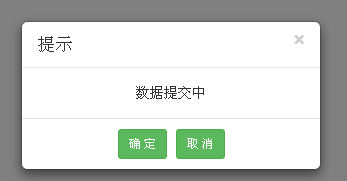
html代码如下:
<button id="btn">点击弹出弹框</button>
<!-- 弹出框 -->
<div class="modal fade" id="confirm_like" tabindex="-1">
<!-- 窗口声明 -->
<div class="modal-dialog modal-sm">
<!-- 内容声明 -->
<div class="modal-content">
<div class="modal-header" style="padding-top: 10px; padding-bottom: 10px;">
<button class="close" data-dismiss="modal">
<span>×</span>
</button>
<h4 class="modal-title" id="myModalLabel"></h4>
</div>
<div class="modal-body">
<div id="modal_con" style="text-align: center;"></div>
<div id="firstDiv"></div>
</div>
<div class="modal-footer" style="text-align: center; padding-top: 10px; padding-bottom: 10px;margin-top:0;">
<button class="btn btn-sm btn-success" data-dismiss="modal" id="ok_btn">确 定</button>
<button class="btn btn-sm btn-success" data-dismiss="modal" id="cancel_btn">取 消</button>
</div>
</div>
</div>
</div>
js代码如下:
    $("#btn").click(function(){

        //调用

        show_confirm('提示', '数据提交中',certain,cancel);

    });

    //显示弹窗函数

    function show_confirm(title, msg ,ok_callback,cancel_callback) {

        $("#isConfirm").val('false');

        $("#myModalLabel").text(title);//这里设置弹窗的标头

        $("#modal_con").text(msg);//设置提示的信息

        $("#confirm_like").modal({//显示弹窗

            show : true,

            //backdrop : true,去掉遮罩层

        });

        //确定按钮事件函数

        $("#ok_btn").click(function(){

            if($.isFunction(ok_callback)){

                $('#confirm_like').off('hidden.bs.modal');        //解绑事件,防止多次绑定

                $('#confirm_like').on('hidden.bs.modal', function(){ok_callback("这是确定");});

            }

        });

        //取消按钮事件函数

        $("#cancel_btn").click(function(){

            if($.isFunction(cancel_callback)){

                $('#confirm_like').off('hidden.bs.modal');

                $('#confirm_like').on('hidden.bs.modal', function(){cancel_callback();});

            }

        });

        //弹窗的关闭按钮事件函数

        $("#confirm_like .close").click(function(){

            if($.isFunction(cancel_callback)){

                $('#confirm_like').off('hidden.bs.modal');

                $('#confirm_like').on('hidden.bs.modal', function(){cancel_callback();});

            }

        });

    }

    function certain(str){

        alert(str);

    }

    function cancel(){

        alert("这是取消");

    }
基于bootstrap的模态框的comfirm弹窗的更多相关文章
- 基于bootstrap的模态框使用
使用步骤两步 1:按顺序引入以下三个文件 <link rel="stylesheet" href="../css/bootstrap.min.css"&g ...
- 基于bootstrap模态框的alert弹窗
完成的效果如下: html代码: <!-- 弹出框 --> <div class="modal fade" id="alert_like" t ...
- Bootstrap使用模态框modal实现表单提交弹出框
Bootstrap 模态框(Modal)插件 模态框(Modal)是覆盖在父窗体上的子窗体.通常,目的是显示来自一个单独的源的内容,可以在不离开父窗体的情况下有一些互动.子窗体可提供信息.交互等.如果 ...
- Bootstrap 3 模态框播放视频
Bootstrap 3 模态框播放视频 I'm trying to use the Modal feature from Bootstrap 3 to show my Youtube video. I ...
- Bootstrap 实例 - 模态框(Modal)插件
<!DOCTYPE html> <html> <head> <meta charset="utf-8"> <title> ...
- bootstrap的模态框
<!DOCTYPE html> <html> <head> <meta charset="utf-8"> <title> ...
- Bootstrap -- 插件: 模态框、滚动监听、标签页
Bootstrap -- 插件: 模态框.滚动监听.标签页 1. 模态框(Modal): 覆盖在父窗体上的子窗体. 使用模态框: <!DOCTYPE html> <html> ...
- Bootstrap中模态框多层嵌套时滚动条问题
在使用Bootstrap中模态框过程中,如果出现多层嵌套的时候,如打开模态框A,然后在A中打开模态框B,在关闭B之后,如果A的内容比较多,滚动条会消失,而变为Body的滚动条,这是由于模态框自带的遮罩 ...
- 黄聪:bootstrap中模态框modal在苹果手机上会失效
bootstrap中模态框在苹果手机上会失效 可将代码修改为<a data-toggle="modal" data-target="#wrap" hre ...
随机推荐
- 16个最佳响应式HTML5框架分享
HTML5框架可以快速构建响应式网站,它们帮助程序员减少编码工作,减少冗余的代码.如今有很多免费的HTML5框架可供使用,由于它们有着响应式设计.跨浏览器兼容.相对轻量级等特点,这些框架在开发中都十分 ...
- [Xamarin] 簡單實作ListActivity (转帖)
但是文中案例因為是用事先設好的Layout 但是如果需要被選擇的東西很多時該怎麼辦 我們討論一下,如何製作很簡單的List . 首先我們得先參考一下再android 思維下要製作一個List 需要的架 ...
- 网站变灰css
html{ filter: grayscale(100%); -webkit-filter: grayscale(100%); -moz-filter: grayscale(100%); -ms-fi ...
- linux 打包 压缩 解压缩
gzip gzip xxx文件 压缩文件xxx,后缀.gz 并且删除原来文件 gzip -tv xxx.gz 测试压缩文件压完整性 压缩当前文件夹所有文件: zip -r ./1.zip ./* -r ...
- Json&XML比较
1.定义 1.1 XML定义 扩展标记语言 (Extensible Markup Language, XML) ,用于标记电子文件使其具有结构性的标记语言,可以用来标记数据.定义数据类型,是一种允许用 ...
- python 脚本备份 mysql 数据库到 OSS
脚本如下: #!/usr/bin/python ########################################################### ################ ...
- WPF的ItemsControl设置数据源以及Binding使用
Student类: using System; using System.Collections.Generic; using System.Linq; using System.Text; usin ...
- 设计模式--策略模式(strategy)
1.策略模式(strategy ['strætədʒi]) 我的理解是:方案候选模式 (反正关键就是有很多的候选,哈哈) 看了很多例子,都是在说鸭子的,那个例子很好,在这里可以看 他们生产鸭子,我们就 ...
- http请求数据封装
package com.wdm.utils; import java.io.ByteArrayOutputStream; import java.io.IOException; import java ...
- 第七章、Linux 文件与目录管理
第七章.Linux 文件与目录管理 1. 目录与路径 1.1 相对路径与绝对路径 1.2 目录的相关操作: cd, pwd, mkdir, rmdir 1.3 关於运行档路径的变量: $PATH ...