
2 数据库开发--MySQL下载(windows)
Windows:(mysql)

操作:

0.下载安装mysql

    www.mysql.org

    downloads->进入社区community

    community 5.7.21

    下载5.6 Microsoft Windows

    解压到C:  C:\mysql-5.6.39-winx64

    C:\mysql-5.6.39-winx64\bin

        bin/mysql   客户端

        bin/mysqld  服务端

    设置环境变量:

        我的电脑 属性 高级系统设置 环境变量

        系统变量 Path 新建 将 前面加;  D:\mysql\mysql-5.6.41-winx64\bin 粘贴 确定...

    启动cmd:

        >>>:mysqld

        >>>:mysql

    将mysqld做成系统服务,开机自动启动:

        1.先杀死之前开启的mysqld:


2.制作系统服务:

            C:\Users\Administrator>mysqld --install   制作系统服务

            Service successfully installed.

            C:\Users\Administrator>mysqld --remove    解除系统服务

            Service successfully removed.
---------------------------------------------------------
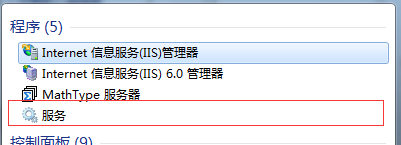
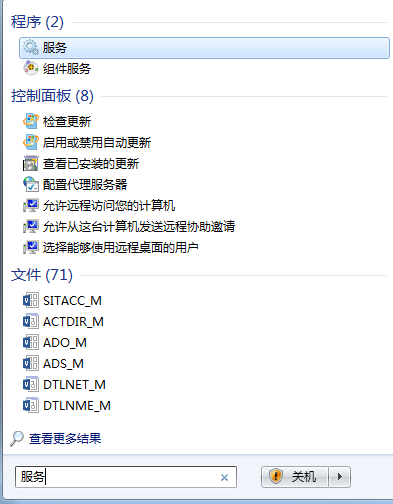
3.服务

            服务-->MySQL-->启动-->ok...

            或者:

            C:\Users\Administrator>net start MySQL

                MySQL 服务正在启动 .

                MySQL 服务已经启动成功。

            C:\Users\Administrator>net stop MySQL

                MySQL 服务正在停止.

                MySQL 服务已成功停止。
1.验证安装成功
    C:\Users\Administrator>mysql
    Welcome to the MySQL monitor.  Commands end with ; or \g.
    Your MySQL connection id is 15
    Server version: 5.6.39 MySQL Community Server (GPL)

    Copyright (c) 2000, 2018, Oracle and/or its affiliates. All rights reserved.

    Oracle is a registered trademark of Oracle Corporation and/or its
    affiliates. Other names may be trademarks of their respective
    owners.

    Type 'help;' or '\h' for help. Type '\c' to clear the current input statement.

    mysql> select user(); 注意标点符号也要加
    +----------------+
    | user()         |
    +----------------+
    | ODBC@localhost |
    +----------------+
    1 row in set (0.00 sec)
以上是默认帐号登录
  mysql> exit
    Bye
2. root默认没有密码
root帐号是管理员帐号

3.设置初始密码:上面管理员账户没有设置密码
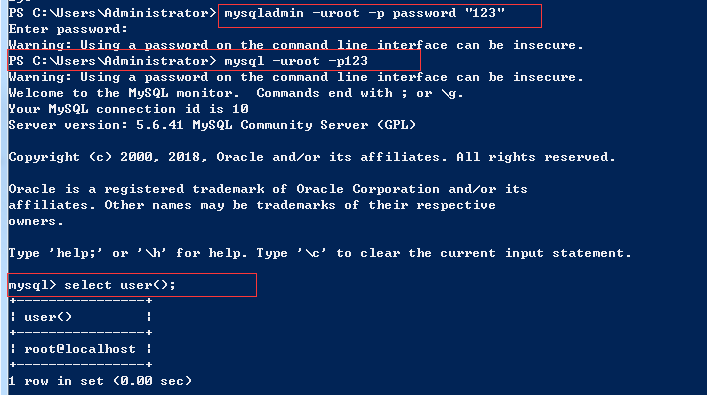
4.修改密码

5.忘记密码,破解密码,跳过授权表;
 C:\Users\Administor>net stop MySQL
    MySQL 服务正在停止.
    MySQL 服务已成功停止。

    C:\Users\Admininstor>mysqld --skip-grant-tables   # 跳过授权表 启动 mysqld
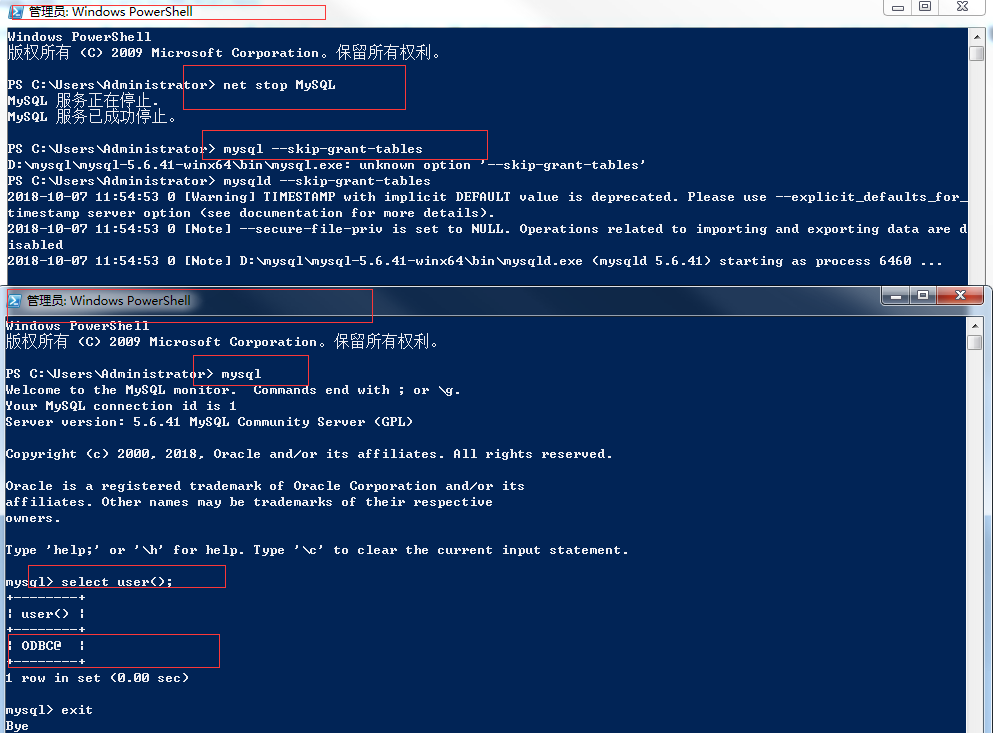
 C:\Users\Administor>mysql -uroot -p    # 跳过了授权 不需要输入密码了

    Enter password:

    Welcome to the MySQL monitor.  Commands end with ; or \g.

    Your MySQL connection id is 2

    Server version: 5.6.39 MySQL Community Server (GPL)

    Copyright (c) 2000, 2018, Oracle and/or its affiliates. All rights reserved.

    Oracle is a registered trademark of Oracle Corporation and/or its

    affiliates. Other names may be trademarks of their respective

    owners.

    Type 'help;' or '\h' for help. Type '\c' to clear the current input statement.

    mysql> select user();

    +--------+

    | user() |

    +--------+

    | root@  |

    +--------+

    1 row in set (0.00 sec)

    mysql> update mysql.user set password=password("") where user="root" and host="localhost";   # 修改密码

    Query OK, 1 row affected (0.00 sec)

    Rows matched: 1  Changed: 1  Warnings: 0

    mysql> flush privileges;

    Query OK, 0 rows affected (0.00 sec)

    mysql> exit

    Bye

    C:\Users\Administor>mysql -uroot -p123   # 修改密码成功

    Warning: Using a password on the command line interface can be insecure.

    Welcome to the MySQL monitor.  Commands end with ; or \g.

    Your MySQL connection id is 11

    Server version: 5.6.39 MySQL Community Server (GPL)

    Copyright (c) 2000, 2018, Oracle and/or its affiliates. All rights reserved.

    Oracle is a registered trademark of Oracle Corporation and/or its

    affiliates. Other names may be trademarks of their respective

    owners.

    Type 'help;' or '\h' for help. Type '\c' to clear the current input statement.

    mysql> select user();

    +----------------+

    | user()         |

    +----------------+

    | root@localhost |

    +----------------+

    1 row in set (0.00 sec)

    mysql> exit

    Bye
# 杀死之前 开启的 跳过授权的 mysqld
    C:\Users\Administrator>tasklist | findstr mysql
    mysqld.exe                   6460 Console                    1    453,740 K

    C:\Users\Administrator>taskkill /F /PID 66732
    成功: 已终止 PID 为 6460 的进程。

    C:\Users\Administrator>net start mysql
    MySQL 服务正在启动 .
    MySQL 服务已经启动成功。

    C:\Users\Administrator>mysql -uroot -p123   # 用之前设置的密码 登录便可
    Warning: Using a password on the command line interface can be insecure.
    Welcome to the MySQL monitor.  Commands end with ; or \g.
    Your MySQL connection id is 3
    Server version: 5.6.39 MySQL Community Server (GPL)

    Copyright (c) 2000, 2018, Oracle and/or its affiliates. All rights reserved.

    Oracle is a registered trademark of Oracle Corporation and/or its
    affiliates. Other names may be trademarks of their respective
    owners.

    Type 'help;' or '\h' for help. Type '\c' to clear the current input statement.

    mysql> select user();
    +----------------+
    | user()         |
    +----------------+
    | root@localhost |
    +----------------+
    1 row in set (0.00 sec)

    mysql> exit
    Bye
>mysql 套接字客户端
6.登录mysql的两种方式:

   C:\Users\Administrator>mysql -uroot -p123

  C:\Users\Administrator>mysql -uroot -p123 -h 127.0.0.1 -P 3306  # 默认端口是3306

    Warning: Using a password on the command line interface can be insecure.

    Welcome to the MySQL monitor.  Commands end with ; or \g.

    Your MySQL connection id is 8

    Server version: 5.6.39 MySQL Community Server (GPL)

    Copyright (c) 2000, 2018, Oracle and/or its affiliates. All rights reserved.

    Oracle is a registered trademark of Oracle Corporation and/or its

    affiliates. Other names may be trademarks of their respective

    owners.

    Type 'help;' or '\h' for help. Type '\c' to clear the current input statement.

    mysql> select user();

    +----------------+

    | user()         |

    +----------------+

    | root@localhost |

    +----------------+

    1 row in set (0.00 sec)

    mysql> exit

    Bye

    C:\Users\Administrator>mysql -h 127.0.0.1 -P 3306

    Welcome to the MySQL monitor.  Commands end with ; or \g.

    Your MySQL connection id is 9

    Server version: 5.6.39 MySQL Community Server (GPL)

    Copyright (c) 2000, 2018, Oracle and/or its affiliates. All rights reserved.

    Oracle is a registered trademark of Oracle Corporation and/or its

    affiliates. Other names may be trademarks of their respective

    owners.

    Type 'help;' or '\h' for help. Type '\c' to clear the current input statement.

    mysql> select user();

    +----------------+

    | user()         |

    +----------------+

    | ODBC@localhost |

    +----------------+

    1 row in set (0.00 sec)


    mysql> exit

    Bye
7.统一字符编码:
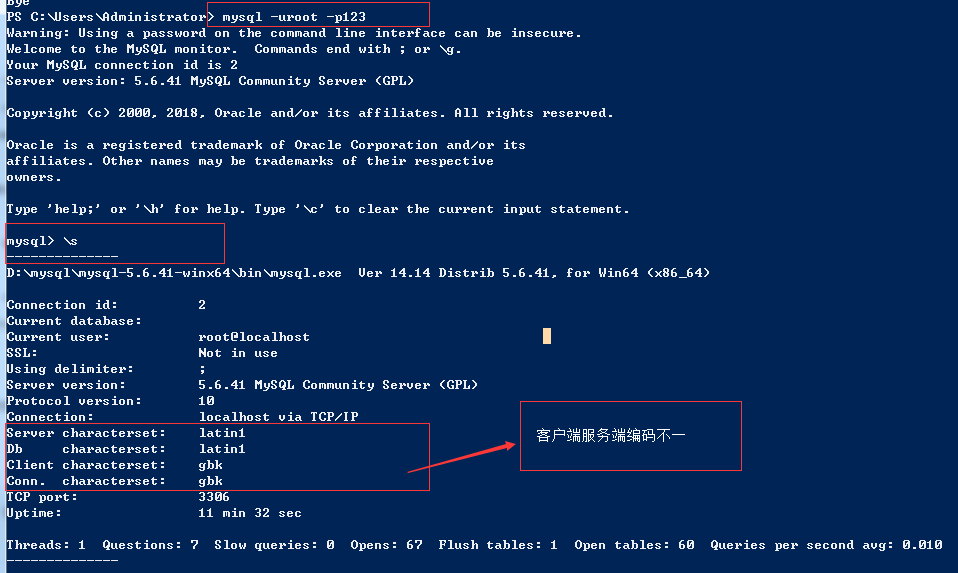
修改安装目录下的mysql配置文件

新建配置文件my.ini
粘贴内容:
#mysql5.5以上:修改方式有所改动
-----------------------------------

[mysqld]

character-set-server=utf8

collation-server=utf8_general_ci

[client]

default-character-set=utf8

[mysql]

default-character-set=utf8
----------------------------------
#2. 重启服务

#3. 查看修改结果:

\s

show variables like '%char%'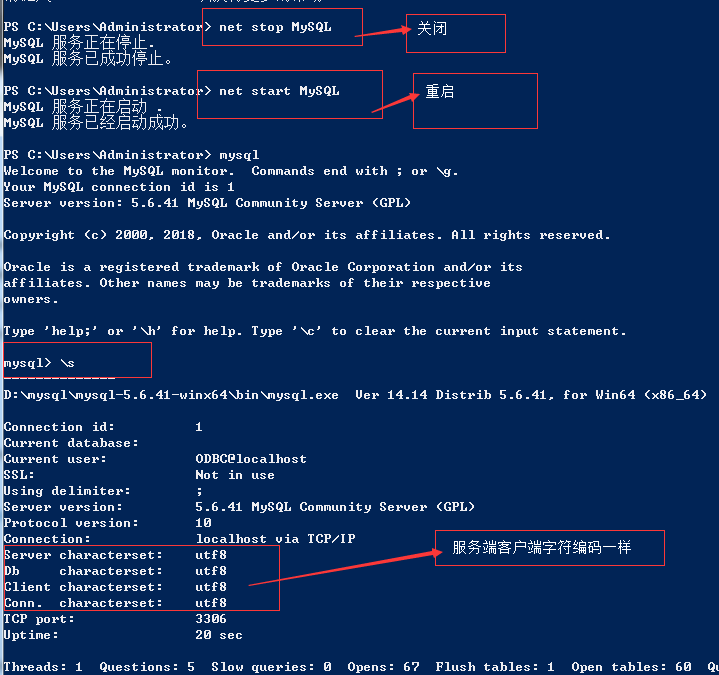
2 数据库开发--MySQL下载(windows)的更多相关文章
- 【数据库开发】在Windows上利用C++开发MySQL的初步
[数据库开发]在Windows上利用C++开发MySQL的初步 标签(空格分隔): [编程开发] Windows上在上面配置环境的基础上开展一个小demo链接数据库,没想到中间也出现了这么多的问题,简 ...
- 【数据库开发】在Windows上和Linux上配置MySQL的过程
[数据库开发]在Windows上和Linux上配置MySQL的过程 标签(空格分隔): [编程开发] 首先是在Windows上尝试用QT进行MySQL数据库开发,结果总出现driver不能load的错 ...
- 1 数据库开发--MySQL介绍
1.数据库管理软件 C/S 并发.锁 :SQL语句.语法 基本管理和语法学习 一.介绍: mysql数据库管理软件: 套接字:服务端,客户端:客户端可访问服务端得数据 1.支持并发:操作得是共享得数据 ...
- 数据库、MySQL下载与安装、基本SQL语句
数据演变史 # 1.单独的文本文件 没有固定的存放位置 没有固定的数据格式 '''程序彼此无法兼容 没有统一的标准''' # 2.软件开发目录规范 按照文件功能的不同规定了相应的位置 '''文件查找变 ...
- mysql数据库之mysql下载与设置
下载和安装mysql数据库 mysql为我们提供了开源的安装在各个操作系统上的安装包,包括ios,liunx,windows. mysql的安装,启动和基础配置-------linux版本 mysql ...
- 数据库之 MySQL --- 下载、安装 及 概述(一)
个人博客网:https://wushaopei.github.io/ (你想要这里多有) 一 . MySql数据库的安装 1.图解MySQL程序结构 2.双击运行安装程序:以Win32位为例 ...
- 数据库开发 MySQL
MySQL是Web世界中使用最广泛的数据库服务器.SQLite的特点是轻量级.可嵌入,但不能承受高并发访问,适合桌面和移动应用.而MySQL是为服务器端设计的数据库,能承受高并发访问,同时占用的内存也 ...
- 【VS开发】【数据库开发】libevent windows下基于VS2010的编译
libevent是一个常用的网络库,下面就看看在windows下面编译测试的过程吧. 一 环境 系统:win8.1编译器:VS2013官方下载地址:http://libevent.org/版本:2.0 ...
- 【数据库开发】在Windows上以服务方式运行 MSOPenTech/Redis
在Windows上以服务方式运行 MSOPenTech/Redis ServiceStack.Redis 使用教程里提到Redis最好还是部署到Linux下去,Windows只是用来做开发环境,现在这 ...
随机推荐
- 快速理解 FastCGI、PHP-CGI、PHP-FPM
你(PHP)去和泰国人(web服务器,如 Apache.Nginx)谈生意 你说中文(PHP代码),他说泰语(C代码),互相听不懂,怎么办?那就都把各自说的话转换成英语(FastCGI 协议)吧. 怎 ...
- jQuery hover 延时器实现代码
例如: 复制代码代码如下: $('#foo').slideUp(300).delay(800).fadeIn(400);// 在.slideUp() 和 .fadeIn()之间延时800毫秒. ho ...
- 作业要求20181023-4 Alpha阶段第2周/共2周 Scrum立会报告+燃尽图 03
作业要求[https://edu.cnblogs.com/campus/nenu/2018fall/homework/2284] 版本控制:https://git.coding.net/liuyy08 ...
- New Concept English Two 8 19
pls practice every day $课文17 青春常驻 161. My aunt Jennifer is an actress. 我的姑姑詹妮弗是位演员, 162. She must b ...
- C程序设计-----第2次作业
作业要求一 (15分) 完成下列编程题目,每次上完课都会增加2-3道题目,并将编程过程记录在博客里,一次PTA作业任选一道题目给出设计思路.流程图.源代码和错误记录,其他题目可只给出设计思路.源代码和 ...
- 6-1 Deque(25 分)Data Structures and Algorithms (English)
A "deque" is a data structure consisting of a list of items, on which the following operat ...
- HDU 3973 AC's String 字符串哈希
HDU 3973 通过哈希函数将一个字符串转化为一个整数,通过特定的方式可以使得这个哈希值几乎没有冲突(这就是关键之处,几乎没有视为没有= =!, 其实也可以考虑实现哈希冲突时的处理,只是这道题没必要 ...
- oracle之 RAC本地数据文件迁移至ASM
系统环境:CentOS release 6.7 (Final)Oracle Database 11g Enterprise Edition Release 11.2.0.4.0 - 64bit 操作过 ...
- linux 下 ifcfg-eth0 配置/CentOS_minimal安装和开发环境部署
CentOS_minimal安装和开发环境部署:http://www.th7.cn/system/lin/201305/39002.shtml 网络接口配置文件 [root@localhost ~]# ...
- python 书籍推荐 一
最近"瑞丽模特学Python"的热点牵动了大江南北程序员的心,有人说这是炒作,也有人说这是推广Python的爆点...我嘿嘿一笑,美女就是美女,眼光那是杠杠的,不仅人美,学的语言也 ...