
IOS 自己定义UITableView
依据不同须要,须要使用tableview的结构,可是里面每个cell,又须要自己的样式。所以学习了一下如何把自定义的cell加到tableview里面
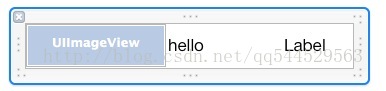
首先要自己创建一个类,继承UITableViewCell,然后新建一个空的xib文件,并在class属性设置为相应的类名
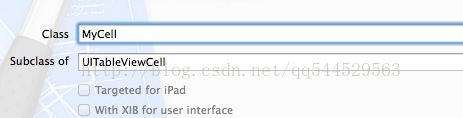
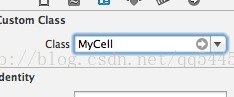
代码部分:
<pre name="code" class="objc">

#import "SettingViewController.h"

#import "SettingViewCell.h"

@interface SettingViewController ()

@end

@implementation SettingViewController

@synthesize listArray =_listArray;

- (id)initWithNibName:(NSString *)nibNameOrNil bundle:(NSBundle *)nibBundleOrNil

{

    self = [super initWithNibName:nibNameOrNil bundle:nibBundleOrNil];

    if (self) {

        // Custom initialization

    }

    return self;

}

- (void)viewDidLoad

{

    [super viewDidLoad];

    // Do any additional setup after loading the view from its nib.

    NSArray *array = [NSArray arrayWithObjects: @"房间设置",@"灯光设置",@"窗帘设置",@"场景设置",@"空调设置",@"安防设置",@"网络设置",nil];

    _settingview.dataSource =self; //设置数据源方法

    _settingview.delegate =self;//设置代理方法

    self.listArray =array; //注意。因为内存管理问题。假设不正确self.listArray进行赋值,则_listArray会被清空。程序会崩溃

}

- (IBAction)backClicked:(id)sender {

    [self.navigationController popToRootViewControllerAnimated:YES];

}

//数据源方法

- (NSInteger)tableView:(UITableView *)tableView numberOfRowsInSection:(NSInteger)section

{

        return [_listArray count];

}

//托付方法

- (void)tableView:(UITableView *)tableView didSelectRowAtIndexPath:(NSIndexPath *)indexPath

{

    switch(indexPath.row)

    {

        case 0:

            break;

        default:

            break;

    }

}

// Row display. Implementers should *always* try to reuse cells by setting each cell's reuseIdentifier and querying for available reusable cells with dequeueReusableCellWithIdentifier:

// Cell gets various attributes set automatically based on table (separators) and data source (accessory views, editing controls)

- (UITableViewCell *)tableView:(UITableView *)tableView cellForRowAtIndexPath:(NSIndexPath *)indexPath

{

    static NSString * cellIdentifier =@"mycell";

    SettingViewCell  *cell =(SettingViewCell *)[tableView dequeueReusableCellWithIdentifier:cellIdentifier];

    if(cell == nil)

    {

        NSArray *array =[[NSBundle mainBundle] loadNibNamed:@"SettingViewCell" owner:self options:nil];

        cell = [array objectAtIndex: 0];

        [cell setSelectionStyle:UITableViewCellSelectionStyleGray];

    }

    NSString *text = _listArray[indexPath.row];

    [[cell settingName] setText:text];

    return cell;

}

- (void)didReceiveMemoryWarning

{

    [super didReceiveMemoryWarning];

    // Dispose of any resources that can be recreated.

}

- (void)dealloc {

    [_back release];

    [_settingview release];

    [super dealloc];

}

@end
IOS 自己定义UITableView的更多相关文章
- iOS开发系列--UITableView全面解析
--UIKit之UITableView 概述 在iOS开发中UITableView可以说是使用最广泛的控件,我们平时使用的软件中到处都可以看到它的影子,类似于微信.QQ.新浪微博等软件基本上随处都是U ...
- IOS开发中UITableView(表视图)的滚动优化及自定义Cell
IOS开发中UITableView(表视图)的滚动优化及自定义Cell IOS 开发中UITableView是非常常用的一个控件,我们平时在手机上看到的联系人列表,微信好友列表等都是通过UITable ...
- 【iOS系列】- UITableView的使用技巧
[iOS系列]- UITableView的使用 UITableView的常用属性 indexpath.row:行 indexpath.section:组 separatorColor:分割线的颜色 s ...
- ios宏定义字符串
ios宏定义字符串 #define objcString(str) @""#str"" 使用效果: objcString(字符串)
- iOS开发之UITableView的使用
这一篇记录的是iOS开发中UITableView的使用,iOS中的UITableView跟Android中的ListView特别相似,以下用一个Demo来说明: 1.Xcode中新建projectTe ...
- iOS Programming Editing UITableView
iOS Programming Editing UITableView 1.1 Editing mode UITableView has an editing property, and when ...
- Ios 该图显示其出现的相关问题定义UITableView dataSource must return a cell from tableView:cellForRowAtIndexPath:'
解决这个问题 在 加上个 标示符 Cell 自己定义 customCell .h 代码例如以下 ViewController.m 文件里 代码例如以下 执行结果 吕 图坚持直接在这里 不行
- iOS开发之UITableView使用总结
什么是UITableView 在众多移动应用中,能看到各式各样的表格数据 在iOS中,要实现表格数据展示,最常用的做法就是使用UITableView UITableView继承自UIScrollVie ...
- iOS 8自动调整UITableView和UICollectionView布局
本文转载自:http://tech.techweb.com.cn/thread-635784-1-1.html 本文讲述了UITableView.UICollectionView实现 self-siz ...
随机推荐
- Android ContentProvider、ContentResolver和ContentObserver的使用
1.ContentProvider.ContentResolver和ContentObserver ContentProvider是Android的四大组件之中的一个,可见它在Android中的作用非 ...
- 小技巧处理div内容溢出
前几天遇到一个问题,代码是这样一个层次: <div class="province"> <ul> <li>1</li& ...
- Ubuntu 12.04.3 X64 使用 NFS 作为文件共享存储方式 安装 Oracle11g RAC
nfs-server 在 Ubuntu上可以选择 : nfs-kernel-server:如果在windows上,可以选择:haneWIN NFS Server nfs-client Ubuntu上使 ...
- 织梦DedeCMS使用SQL批量替换文章标题内容
在使用织梦DedeCMS的过程中,出于伪原创或者其他的原因,我们需要对文档的内容.标题.描述等等进行同义词或者其他的替换.这个就是一个简单的织梦SQL语句操作的问题,No牛网在织梦DedeCMS常用S ...
- javascript测试框架 Mocha 实例教程
http://www.ruanyifeng.com/blog/2015/12/a-mocha-tutorial-of-examples.html
- Ubuntu 14.04 设置Android开发环境
准备Java环境 本文仅仅安装sdk,不安装什么IDE,由于我仅仅须要命令行模式开发就可以. 首先安装openjdk 1.6.然后安装ant.这个不赘述. 下载SDK 从这里下载SDK for Lin ...
- select下拉框不能赋值
前言: 需要用到类似于下面的下拉选择框,按照官方文档写,始终实现不了下拉框赋上值的情况. 过程: 认认真真的看了好几遍文档,但是还没找到原因,不过还是应该感谢自己加入的vue-admin的微信群,大家 ...
- PyQt4 菜单栏 + 工具栏 + 状态栏 + 中心部件 生成一个文本编辑部件示例
我们将创建一个菜单栏.一个工具栏.一个状态栏和一个中心部件. #!/usr/bin/python # -*- coding:utf-8 -*- import sys from PyQt4 import ...
- poj_1151 线段树
题目大意 在平面上给定n个矩形,可以相互覆盖全部或者部分,求出矩形占据的总面积. 题目分析 将矩形按照x方向的进行分割之后,将平面沿着y方向划分一系列单元(不定高度),每个矩形在y方向上占据若干连续的 ...
- Delphi Live Bindings 初探
Delphi Live Bindings 初探 Live Bindings,顾名思义,动态绑定. 1.绑定前: 2.点击数据源: 3.绑定连线:点击 蓝色区域, 按住 鼠标左键,一直移动到绿色区域,然 ...