
1.Hadoop集群安装部署
Hadoop集群安装部署
1.介绍
(1)架构模型
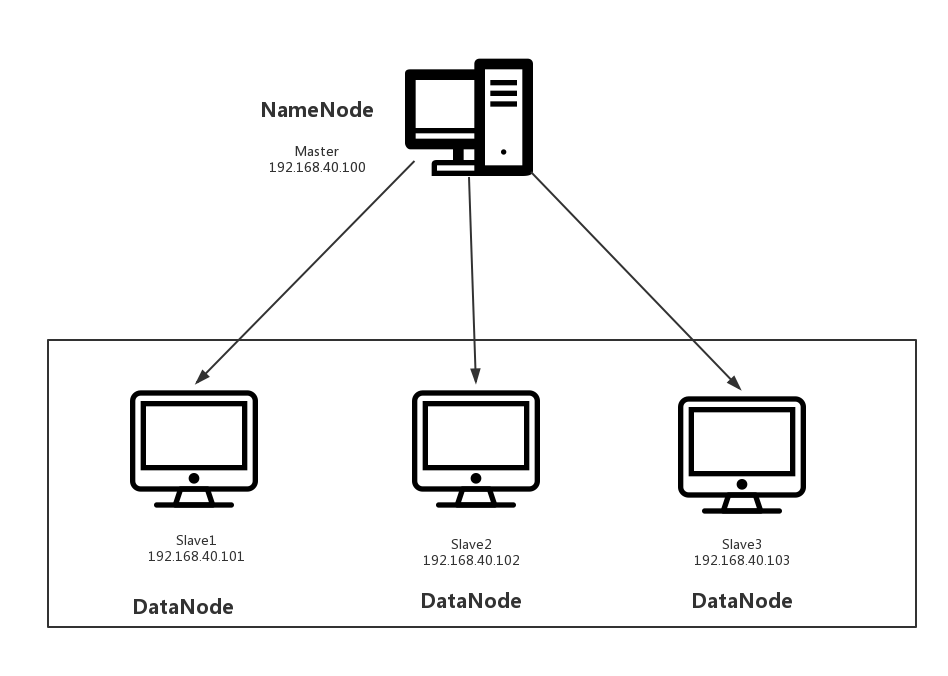
(2)使用工具
- VMWARE
- cenos7
- Xshell
- Xftp
- jdk-8u91-linux-x64.rpm
- hadoop-2.7.3.tar.gz
2.安装步骤
(1)部署master
创建一台虚拟机
修改ip
这里请参考:VMWARE虚拟机中CentOs7网络连接
Xftp传输jdk、hadhoop安装包
把两个安装包拉取到/usr/local路径下
安装jdk
rpm -ivh jdk-8u91-linux-x64.rpm
安装hadhoop
tar zxvf hadoop-2.7.3.tar.gz
配置环境变量
配置/hadoop/etc/hadoop/hadoop-env.sh的JAVA_HOME
# Licensed to the Apache Software Foundation (ASF) under one

# or more contributor license agreements.  See the NOTICE file

# distributed with this work for additional information

# regarding copyright ownership.  The ASF licenses this file

# to you under the Apache License, Version 2.0 (the

# "License"); you may not use this file except in compliance

# with the License.  You may obtain a copy of the License at

#

#     http://www.apache.org/licenses/LICENSE-2.0

#

# Unless required by applicable law or agreed to in writing, software

# distributed under the License is distributed on an "AS IS" BASIS,

# WITHOUT WARRANTIES OR CONDITIONS OF ANY KIND, either express or implied.

# See the License for the specific language governing permissions and

# limitations under the License.

# Set Hadoop-specific environment variables here.

# The only required environment variable is JAVA_HOME.  All others are

# optional.  When running a distributed configuration it is best to

# set JAVA_HOME in this file, so that it is correctly defined on

# remote nodes.

# The java implementation to use.

export JAVA_HOME=/usr/java/default

# The jsvc implementation to use. Jsvc is required to run secure datanodes

# that bind to privileged ports to provide authentication of data transfer

# protocol.  Jsvc is not required if SASL is configured for authentication of

# data transfer protocol using non-privileged ports.

#export JSVC_HOME=${JSVC_HOME}

export HADOOP_CONF_DIR=${HADOOP_CONF_DIR:-"/etc/hadoop"}

# Extra Java CLASSPATH elements.  Automatically insert capacity-scheduler.

for f in $HADOOP_HOME/contrib/capacity-scheduler/*.jar; do

  if [ "$HADOOP_CLASSPATH" ]; then

    export HADOOP_CLASSPATH=$HADOOP_CLASSPATH:$f

  else

    export HADOOP_CLASSPATH=$f

  fi

done

# The maximum amount of heap to use, in MB. Default is 1000.

#export HADOOP_HEAPSIZE=

#export HADOOP_NAMENODE_INIT_HEAPSIZE=""

# Extra Java runtime options.  Empty by default.

export HADOOP_OPTS="$HADOOP_OPTS -Djava.net.preferIPv4Stack=true"

# Command specific options appended to HADOOP_OPTS when specified

export HADOOP_NAMENODE_OPTS="-Dhadoop.security.logger=${HADOOP_SECURITY_LOGGER:-INFO,RFAS} -Dhdfs.audit.logger=${HDFS_AUDIT_LOGGER:-INFO,NullAppender} $HADOOP_NAMENODE_OPTS"

export HADOOP_DATANODE_OPTS="-Dhadoop.security.logger=ERROR,RFAS $HADOOP_DATANODE_OPTS"

export HADOOP_SECONDARYNAMENODE_OPTS="-Dhadoop.security.logger=${HADOOP_SECURITY_LOGGER:-INFO,RFAS} -Dhdfs.audit.logger=${HDFS_AUDIT_LOGGER:-INFO,NullAppender} $HADOOP_SECONDARYNAMENODE_OPTS"

export HADOOP_NFS3_OPTS="$HADOOP_NFS3_OPTS"

export HADOOP_PORTMAP_OPTS="-Xmx512m $HADOOP_PORTMAP_OPTS"

# The following applies to multiple commands (fs, dfs, fsck, distcp etc)

export HADOOP_CLIENT_OPTS="-Xmx512m $HADOOP_CLIENT_OPTS"

#HADOOP_JAVA_PLATFORM_OPTS="-XX:-UsePerfData $HADOOP_JAVA_PLATFORM_OPTS"

# On secure datanodes, user to run the datanode as after dropping privileges.

# This **MUST** be uncommented to enable secure HDFS if using privileged ports

# to provide authentication of data transfer protocol.  This **MUST NOT** be

# defined if SASL is configured for authentication of data transfer protocol

# using non-privileged ports.

export HADOOP_SECURE_DN_USER=${HADOOP_SECURE_DN_USER}

# Where log files are stored.  $HADOOP_HOME/logs by default.

#export HADOOP_LOG_DIR=${HADOOP_LOG_DIR}/$USER

# Where log files are stored in the secure data environment.

export HADOOP_SECURE_DN_LOG_DIR=${HADOOP_LOG_DIR}/${HADOOP_HDFS_USER}

###

# HDFS Mover specific parameters

###

# Specify the JVM options to be used when starting the HDFS Mover.

# These options will be appended to the options specified as HADOOP_OPTS

# and therefore may override any similar flags set in HADOOP_OPTS

#

# export HADOOP_MOVER_OPTS=""

###

# Advanced Users Only!

###

# The directory where pid files are stored. /tmp by default.

# NOTE: this should be set to a directory that can only be written to by

#       the user that will run the hadoop daemons.  Otherwise there is the

#       potential for a symlink attack.

export HADOOP_PID_DIR=${HADOOP_PID_DIR}

export HADOOP_SECURE_DN_PID_DIR=${HADOOP_PID_DIR}

# A string representing this instance of hadoop. $USER by default.

export HADOOP_IDENT_STRING=$USER
配置hadoop的全局变量
修改/etc/profile
vi /etc/profile
# /etc/profile

# System wide environment and startup programs, for login setup

# Functions and aliases go in /etc/bashrc

# It's NOT a good idea to change this file unless you know what you

# are doing. It's much better to create a custom.sh shell script in

# /etc/profile.d/ to make custom changes to your environment, as this

# will prevent the need for merging in future updates.

pathmunge () {

    case ":${PATH}:" in

        *:"$1":*)

            ;;

        *)

            if [ "$2" = "after" ] ; then

                PATH=$PATH:$1

            else

                PATH=$1:$PATH

            fi

    esac

}

if [ -x /usr/bin/id ]; then

    if [ -z "$EUID" ]; then

        # ksh workaround

        EUID=`/usr/bin/id -u`

        UID=`/usr/bin/id -ru`

    fi

    USER="`/usr/bin/id -un`"

    LOGNAME=$USER

    MAIL="/var/spool/mail/$USER"

fi

# Path manipulation

if [ "$EUID" = "0" ]; then

    pathmunge /usr/sbin

    pathmunge /usr/local/sbin

else

    pathmunge /usr/local/sbin after

    pathmunge /usr/sbin after

fi

HOSTNAME=`/usr/bin/hostname 2>/dev/null`

HISTSIZE=1000

if [ "$HISTCONTROL" = "ignorespace" ] ; then

    export HISTCONTROL=ignoreboth

else

    export HISTCONTROL=ignoredups

fi

export PATH USER LOGNAME MAIL HOSTNAME HISTSIZE HISTCONTROL

# By default, we want umask to get set. This sets it for login shell

# Current threshold for system reserved uid/gids is 200

# You could check uidgid reservation validity in

# /usr/share/doc/setup-*/uidgid file

if [ $UID -gt 199 ] && [ "`/usr/bin/id -gn`" = "`/usr/bin/id -un`" ]; then

    umask 002

else

    umask 022

fi

for i in /etc/profile.d/*.sh /etc/profile.d/sh.local ; do

    if [ -r "$i" ]; then

        if [ "${-#*i}" != "$-" ]; then

            . "$i"

        else

            . "$i" >/dev/null

        fi

    fi

done

unset i

unset -f pathmunge

export PATH=$PATH:/usr/local/hadoop/bin:/usr/local/hadoop/sbin
生效/etc/profile
source /etc/profile
(2)部署slave
- 克隆三个主机slave1、slave2、slave3
- 修改ip
(3)统一配置
利用Xshell提供的工具多窗口命令行,会使我们的操作更简单。
测试网络
ping 192.168.40.100
ping 192.168.40.101
ping 192.168.40.102
ping 192.168.40.103
关闭防火墙
systemctl stop filewalld ------关闭防火墙
systemctl disable filewalld ------失效防火墙,下次重启也属于关闭状态
修改host
vi /etc/hosts
192.168.40.100 master
192.168.40.101 slave1
192.168.40.102 slave2
192.168.40.103 slave3
配置core-site.xml
<?xml version="1.0" encoding="UTF-8"?>

<?xml-stylesheet type="text/xsl" href="configuration.xsl"?>

<!--

  Licensed under the Apache License, Version 2.0 (the "License");

  you may not use this file except in compliance with the License.

  You may obtain a copy of the License at

    http://www.apache.org/licenses/LICENSE-2.0

  Unless required by applicable law or agreed to in writing, software

  distributed under the License is distributed on an "AS IS" BASIS,

  WITHOUT WARRANTIES OR CONDITIONS OF ANY KIND, either express or implied.

  See the License for the specific language governing permissions and

  limitations under the License. See accompanying LICENSE file.

-->

<!-- Put site-specific property overrides in this file. -->

<configuration>

<property>

        <name>fs.defaultFS</name>

        <value>hdfs://master:9090</value>

</property>

</configuration>
(4)启动master
切换到master主机:
格式化namenode
hdfs namenode -format
启动namenode
hadoop-daemon.sh start namenode
查看namenode是否启动成功
jps
如果有NameNode进程则启动成功。
(5)启动slave
切换到slave1,slave2,slave3主机:
启动datanode
hadoop-daemon.sh start datanode
查看datanode是否启动成功
jps
如果有DataNode进程则启动成功。
(6)查看NameNode里的DataNode
hadoop dfsadmin -report
结果:
[root@bogon hadoop]# hadoop dfsadmin -report

DEPRECATED: Use of this script to execute hdfs command is deprecated.

Instead use the hdfs command for it.

Configured Capacity: 19925041152 (18.56 GB)

Present Capacity: 13599780864 (12.67 GB)

DFS Remaining: 13599756288 (12.67 GB)

DFS Used: 24576 (24 KB)

DFS Used%: 0.00%

Under replicated blocks: 0

Blocks with corrupt replicas: 0

Missing blocks: 0

Missing blocks (with replication factor 1): 0

-------------------------------------------------

Live datanodes (3):

Name: 192.168.40.103:50010 (slave3)

Hostname: localhost

Decommission Status : Normal

Configured Capacity: 6641680384 (6.19 GB)

DFS Used: 8192 (8 KB)

Non DFS Used: 2108416000 (1.96 GB)

DFS Remaining: 4533256192 (4.22 GB)

DFS Used%: 0.00%

DFS Remaining%: 68.25%

Configured Cache Capacity: 0 (0 B)

Cache Used: 0 (0 B)

Cache Remaining: 0 (0 B)

Cache Used%: 100.00%

Cache Remaining%: 0.00%

Xceivers: 1

Last contact: Tue Oct 16 18:34:12 CST 2018

Name: 192.168.40.101:50010 (slave1)

Hostname: localhost

Decommission Status : Normal

Configured Capacity: 6641680384 (6.19 GB)

DFS Used: 8192 (8 KB)

Non DFS Used: 2108420096 (1.96 GB)

DFS Remaining: 4533252096 (4.22 GB)

DFS Used%: 0.00%

DFS Remaining%: 68.25%

Configured Cache Capacity: 0 (0 B)

Cache Used: 0 (0 B)

Cache Remaining: 0 (0 B)

Cache Used%: 100.00%

Cache Remaining%: 0.00%

Xceivers: 1

Last contact: Tue Oct 16 18:34:12 CST 2018

Name: 192.168.40.102:50010 (slave2)

Hostname: localhost

Decommission Status : Normal

Configured Capacity: 6641680384 (6.19 GB)

DFS Used: 8192 (8 KB)

Non DFS Used: 2108424192 (1.96 GB)

DFS Remaining: 4533248000 (4.22 GB)

DFS Used%: 0.00%

DFS Remaining%: 68.25%

Configured Cache Capacity: 0 (0 B)

Cache Used: 0 (0 B)

Cache Remaining: 0 (0 B)

Cache Used%: 100.00%

Cache Remaining%: 0.00%

Xceivers: 1

Last contact: Tue Oct 16 18:34:12 CST 2018
1.Hadoop集群安装部署的更多相关文章
- 2 Hadoop集群安装部署准备
2 Hadoop集群安装部署准备 集群安装前需要考虑的几点硬件选型--CPU.内存.磁盘.网卡等--什么配置?需要多少? 网络规划--1 GB? 10 GB?--网络拓扑? 操作系统选型及基础环境-- ...
- HBase集群安装部署
0x01 软件环境 OS: CentOS6.5 x64 java: jdk1.8.0_111 hadoop: hadoop-2.5.2 hbase: hbase-0.98.24 0x02 集群概况 I ...
- flink部署操作-flink standalone集群安装部署
flink集群安装部署 standalone集群模式 必须依赖 必须的软件 JAVA_HOME配置 flink安装 配置flink 启动flink 添加Jobmanager/taskmanager 实 ...
- HBase 1.2.6 完全分布式集群安装部署详细过程
Apache HBase 是一个高可靠性.高性能.面向列.可伸缩的分布式存储系统,是NoSQL数据库,基于Google Bigtable思想的开源实现,可在廉价的PC Server上搭建大规模结构化存 ...
- Apache Hadoop 集群安装文档
简介: Apache Hadoop 集群安装文档 软件:jdk-8u111-linux-x64.rpm.hadoop-2.8.0.tar.gz http://www.apache.org/dyn/cl ...
- 第06讲:Flink 集群安装部署和 HA 配置
Flink系列文章 第01讲:Flink 的应用场景和架构模型 第02讲:Flink 入门程序 WordCount 和 SQL 实现 第03讲:Flink 的编程模型与其他框架比较 第04讲:Flin ...
- Apache Hadoop集群安装(NameNode HA + SPARK + 机架感知)
1.主机规划 序号 主机名 IP地址 角色 1 nn-1 192.168.9.21 NameNode.mr-jobhistory.zookeeper.JournalNode 2 nn-2 ).HA的集 ...
- Apache Hadoop集群安装(NameNode HA + YARN HA + SPARK + 机架感知)
1.主机规划 序号 主机名 IP地址 角色 1 nn-1 192.168.9.21 NameNode.mr-jobhistory.zookeeper.JournalNode 2 nn-2 192.16 ...
- K8S集群安装部署
K8S集群安装部署 参考地址:https://www.cnblogs.com/xkops/p/6169034.html 1. 确保系统已经安装epel-release源 # yum -y inst ...
随机推荐
- auto_ptr与shared_ptr ZZ
http://blog.csdn.net/rogeryi/article/details/1442700 Part(1) 这篇文章试图说明如何使用auto_ptr和shared_ptr,从而使得动态分 ...
- JavaScript学习---JavaScript基础知识
JavaScript的引入方式 JavaScript的引入方式: 1.直接在script里面写: 2.使用<script src="JS的文件位置"> {#1 直接编写 ...
- 乘风破浪:LeetCode真题_011_Container With Most Water
乘风破浪:LeetCode真题_011_Container With Most Water 一.前言 下面我们继续进行编程练习,可以说对于实际问题的活学活用是非常重要的.比如我们这次的题目,就需要从中 ...
- CentOS使用PXE网络启动自动安装操作系统
PXE工作原理简介 PXE (Preboot Excution Environment) 预启动执行环境 工作环境介绍: 要实现PXE自动网络安装CentOS至少需要两台主机 1)PXE服务器PXE ...
- PetaPoco轻量级ORM框架 - Database API 手册
PetaPoco Database API #region IDisposable public void Dispose() #endregion #region Constructors publ ...
- 【MySQL-123】MySQL8.0.12 安装于Win10
参考blog:MySQL8.0.12 安装及配置 [坑一]输入net start mysql时,MYSQL服务无法启动. 问题:第三步my.ini文件编码错误. 解决方案:https://blog.c ...
- 4、Android-数据存储方案(SQLite数据库存储)
4.4.SQLite数据库存储 这是Android内置的数据库 是一款轻量级的关系型数据库 运算速度非常快.占用资源少.通常只需要几百kb的内存就够了 因而特别适合在移动端设备上使用 SQLite不仅 ...
- 关于python接口基础到进阶随笔
想了很久,闲来无事,今天想了下还是总结了下写下来,部分参考官方源码理解,还有就是这么久的理解, 如果觉得有帮助请记得点赞 先讲下接口url组成拿后台服务为例 通常一个后台请求url格式: http:/ ...
- PAT——1060. 爱丁顿数
英国天文学家爱丁顿很喜欢骑车.据说他为了炫耀自己的骑车功力,还定义了一个“爱丁顿数”E,即满足有E天骑车超过E英里的最大整数E.据说爱丁顿自己的E等于87. 现给定某人N天的骑车距离,请你算出对应的爱 ...
- HDU 1176 免费馅饼 (类似数字三角形的题,很经典,值得仔细理解的dp思维)
题目链接: http://acm.hdu.edu.cn/showproblem.php?pid=1176 免费馅饼 Time Limit: 2000/1000 MS (Java/Others) ...