
1.Hadoop集群安装部署
Hadoop集群安装部署
1.介绍
(1)架构模型
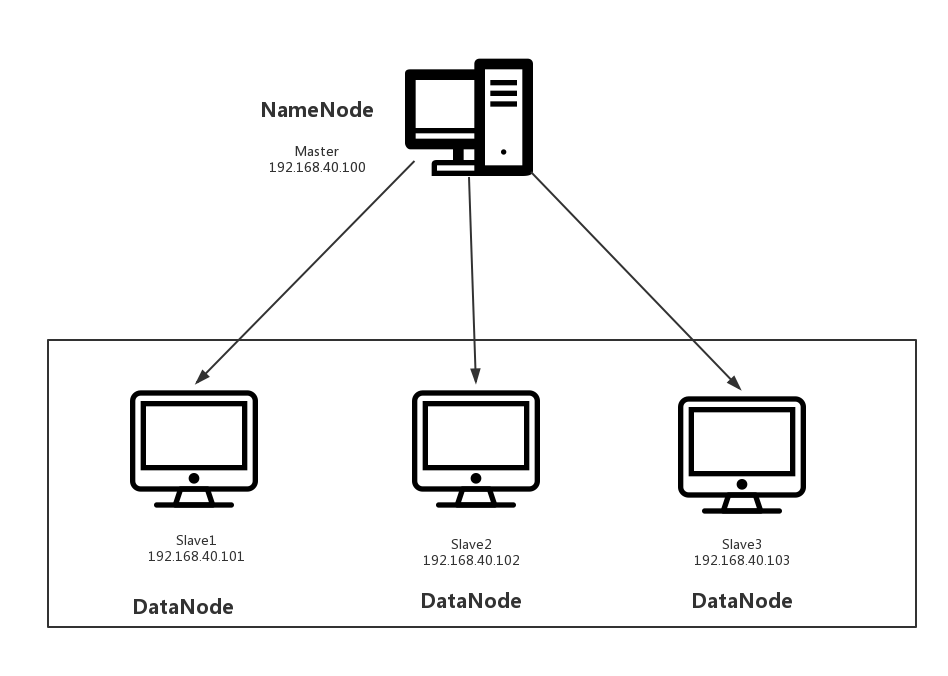
(2)使用工具
- VMWARE
- cenos7
- Xshell
- Xftp
- jdk-8u91-linux-x64.rpm
- hadoop-2.7.3.tar.gz
2.安装步骤
(1)部署master
创建一台虚拟机
修改ip
这里请参考:VMWARE虚拟机中CentOs7网络连接
Xftp传输jdk、hadhoop安装包
把两个安装包拉取到/usr/local路径下
安装jdk
rpm -ivh jdk-8u91-linux-x64.rpm
安装hadhoop
tar zxvf hadoop-2.7.3.tar.gz
配置环境变量
配置/hadoop/etc/hadoop/hadoop-env.sh的JAVA_HOME
# Licensed to the Apache Software Foundation (ASF) under one

# or more contributor license agreements.  See the NOTICE file

# distributed with this work for additional information

# regarding copyright ownership.  The ASF licenses this file

# to you under the Apache License, Version 2.0 (the

# "License"); you may not use this file except in compliance

# with the License.  You may obtain a copy of the License at

#

#     http://www.apache.org/licenses/LICENSE-2.0

#

# Unless required by applicable law or agreed to in writing, software

# distributed under the License is distributed on an "AS IS" BASIS,

# WITHOUT WARRANTIES OR CONDITIONS OF ANY KIND, either express or implied.

# See the License for the specific language governing permissions and

# limitations under the License.

# Set Hadoop-specific environment variables here.

# The only required environment variable is JAVA_HOME.  All others are

# optional.  When running a distributed configuration it is best to

# set JAVA_HOME in this file, so that it is correctly defined on

# remote nodes.

# The java implementation to use.

export JAVA_HOME=/usr/java/default

# The jsvc implementation to use. Jsvc is required to run secure datanodes

# that bind to privileged ports to provide authentication of data transfer

# protocol.  Jsvc is not required if SASL is configured for authentication of

# data transfer protocol using non-privileged ports.

#export JSVC_HOME=${JSVC_HOME}

export HADOOP_CONF_DIR=${HADOOP_CONF_DIR:-"/etc/hadoop"}

# Extra Java CLASSPATH elements.  Automatically insert capacity-scheduler.

for f in $HADOOP_HOME/contrib/capacity-scheduler/*.jar; do

  if [ "$HADOOP_CLASSPATH" ]; then

    export HADOOP_CLASSPATH=$HADOOP_CLASSPATH:$f

  else

    export HADOOP_CLASSPATH=$f

  fi

done

# The maximum amount of heap to use, in MB. Default is 1000.

#export HADOOP_HEAPSIZE=

#export HADOOP_NAMENODE_INIT_HEAPSIZE=""

# Extra Java runtime options.  Empty by default.

export HADOOP_OPTS="$HADOOP_OPTS -Djava.net.preferIPv4Stack=true"

# Command specific options appended to HADOOP_OPTS when specified

export HADOOP_NAMENODE_OPTS="-Dhadoop.security.logger=${HADOOP_SECURITY_LOGGER:-INFO,RFAS} -Dhdfs.audit.logger=${HDFS_AUDIT_LOGGER:-INFO,NullAppender} $HADOOP_NAMENODE_OPTS"

export HADOOP_DATANODE_OPTS="-Dhadoop.security.logger=ERROR,RFAS $HADOOP_DATANODE_OPTS"

export HADOOP_SECONDARYNAMENODE_OPTS="-Dhadoop.security.logger=${HADOOP_SECURITY_LOGGER:-INFO,RFAS} -Dhdfs.audit.logger=${HDFS_AUDIT_LOGGER:-INFO,NullAppender} $HADOOP_SECONDARYNAMENODE_OPTS"

export HADOOP_NFS3_OPTS="$HADOOP_NFS3_OPTS"

export HADOOP_PORTMAP_OPTS="-Xmx512m $HADOOP_PORTMAP_OPTS"

# The following applies to multiple commands (fs, dfs, fsck, distcp etc)

export HADOOP_CLIENT_OPTS="-Xmx512m $HADOOP_CLIENT_OPTS"

#HADOOP_JAVA_PLATFORM_OPTS="-XX:-UsePerfData $HADOOP_JAVA_PLATFORM_OPTS"

# On secure datanodes, user to run the datanode as after dropping privileges.

# This **MUST** be uncommented to enable secure HDFS if using privileged ports

# to provide authentication of data transfer protocol.  This **MUST NOT** be

# defined if SASL is configured for authentication of data transfer protocol

# using non-privileged ports.

export HADOOP_SECURE_DN_USER=${HADOOP_SECURE_DN_USER}

# Where log files are stored.  $HADOOP_HOME/logs by default.

#export HADOOP_LOG_DIR=${HADOOP_LOG_DIR}/$USER

# Where log files are stored in the secure data environment.

export HADOOP_SECURE_DN_LOG_DIR=${HADOOP_LOG_DIR}/${HADOOP_HDFS_USER}

###

# HDFS Mover specific parameters

###

# Specify the JVM options to be used when starting the HDFS Mover.

# These options will be appended to the options specified as HADOOP_OPTS

# and therefore may override any similar flags set in HADOOP_OPTS

#

# export HADOOP_MOVER_OPTS=""

###

# Advanced Users Only!

###

# The directory where pid files are stored. /tmp by default.

# NOTE: this should be set to a directory that can only be written to by

#       the user that will run the hadoop daemons.  Otherwise there is the

#       potential for a symlink attack.

export HADOOP_PID_DIR=${HADOOP_PID_DIR}

export HADOOP_SECURE_DN_PID_DIR=${HADOOP_PID_DIR}

# A string representing this instance of hadoop. $USER by default.

export HADOOP_IDENT_STRING=$USER
配置hadoop的全局变量
修改/etc/profile
vi /etc/profile
# /etc/profile

# System wide environment and startup programs, for login setup

# Functions and aliases go in /etc/bashrc

# It's NOT a good idea to change this file unless you know what you

# are doing. It's much better to create a custom.sh shell script in

# /etc/profile.d/ to make custom changes to your environment, as this

# will prevent the need for merging in future updates.

pathmunge () {

    case ":${PATH}:" in

        *:"$1":*)

            ;;

        *)

            if [ "$2" = "after" ] ; then

                PATH=$PATH:$1

            else

                PATH=$1:$PATH

            fi

    esac

}

if [ -x /usr/bin/id ]; then

    if [ -z "$EUID" ]; then

        # ksh workaround

        EUID=`/usr/bin/id -u`

        UID=`/usr/bin/id -ru`

    fi

    USER="`/usr/bin/id -un`"

    LOGNAME=$USER

    MAIL="/var/spool/mail/$USER"

fi

# Path manipulation

if [ "$EUID" = "0" ]; then

    pathmunge /usr/sbin

    pathmunge /usr/local/sbin

else

    pathmunge /usr/local/sbin after

    pathmunge /usr/sbin after

fi

HOSTNAME=`/usr/bin/hostname 2>/dev/null`

HISTSIZE=1000

if [ "$HISTCONTROL" = "ignorespace" ] ; then

    export HISTCONTROL=ignoreboth

else

    export HISTCONTROL=ignoredups

fi

export PATH USER LOGNAME MAIL HOSTNAME HISTSIZE HISTCONTROL

# By default, we want umask to get set. This sets it for login shell

# Current threshold for system reserved uid/gids is 200

# You could check uidgid reservation validity in

# /usr/share/doc/setup-*/uidgid file

if [ $UID -gt 199 ] && [ "`/usr/bin/id -gn`" = "`/usr/bin/id -un`" ]; then

    umask 002

else

    umask 022

fi

for i in /etc/profile.d/*.sh /etc/profile.d/sh.local ; do

    if [ -r "$i" ]; then

        if [ "${-#*i}" != "$-" ]; then

            . "$i"

        else

            . "$i" >/dev/null

        fi

    fi

done

unset i

unset -f pathmunge

export PATH=$PATH:/usr/local/hadoop/bin:/usr/local/hadoop/sbin
生效/etc/profile
source /etc/profile
(2)部署slave
- 克隆三个主机slave1、slave2、slave3
- 修改ip
(3)统一配置
利用Xshell提供的工具多窗口命令行,会使我们的操作更简单。
测试网络
ping 192.168.40.100
ping 192.168.40.101
ping 192.168.40.102
ping 192.168.40.103
关闭防火墙
systemctl stop filewalld ------关闭防火墙
systemctl disable filewalld ------失效防火墙,下次重启也属于关闭状态
修改host
vi /etc/hosts
192.168.40.100 master
192.168.40.101 slave1
192.168.40.102 slave2
192.168.40.103 slave3
配置core-site.xml
<?xml version="1.0" encoding="UTF-8"?>

<?xml-stylesheet type="text/xsl" href="configuration.xsl"?>

<!--

  Licensed under the Apache License, Version 2.0 (the "License");

  you may not use this file except in compliance with the License.

  You may obtain a copy of the License at

    http://www.apache.org/licenses/LICENSE-2.0

  Unless required by applicable law or agreed to in writing, software

  distributed under the License is distributed on an "AS IS" BASIS,

  WITHOUT WARRANTIES OR CONDITIONS OF ANY KIND, either express or implied.

  See the License for the specific language governing permissions and

  limitations under the License. See accompanying LICENSE file.

-->

<!-- Put site-specific property overrides in this file. -->

<configuration>

<property>

        <name>fs.defaultFS</name>

        <value>hdfs://master:9090</value>

</property>

</configuration>
(4)启动master
切换到master主机:
格式化namenode
hdfs namenode -format
启动namenode
hadoop-daemon.sh start namenode
查看namenode是否启动成功
jps
如果有NameNode进程则启动成功。
(5)启动slave
切换到slave1,slave2,slave3主机:
启动datanode
hadoop-daemon.sh start datanode
查看datanode是否启动成功
jps
如果有DataNode进程则启动成功。
(6)查看NameNode里的DataNode
hadoop dfsadmin -report
结果:
[root@bogon hadoop]# hadoop dfsadmin -report

DEPRECATED: Use of this script to execute hdfs command is deprecated.

Instead use the hdfs command for it.

Configured Capacity: 19925041152 (18.56 GB)

Present Capacity: 13599780864 (12.67 GB)

DFS Remaining: 13599756288 (12.67 GB)

DFS Used: 24576 (24 KB)

DFS Used%: 0.00%

Under replicated blocks: 0

Blocks with corrupt replicas: 0

Missing blocks: 0

Missing blocks (with replication factor 1): 0

-------------------------------------------------

Live datanodes (3):

Name: 192.168.40.103:50010 (slave3)

Hostname: localhost

Decommission Status : Normal

Configured Capacity: 6641680384 (6.19 GB)

DFS Used: 8192 (8 KB)

Non DFS Used: 2108416000 (1.96 GB)

DFS Remaining: 4533256192 (4.22 GB)

DFS Used%: 0.00%

DFS Remaining%: 68.25%

Configured Cache Capacity: 0 (0 B)

Cache Used: 0 (0 B)

Cache Remaining: 0 (0 B)

Cache Used%: 100.00%

Cache Remaining%: 0.00%

Xceivers: 1

Last contact: Tue Oct 16 18:34:12 CST 2018

Name: 192.168.40.101:50010 (slave1)

Hostname: localhost

Decommission Status : Normal

Configured Capacity: 6641680384 (6.19 GB)

DFS Used: 8192 (8 KB)

Non DFS Used: 2108420096 (1.96 GB)

DFS Remaining: 4533252096 (4.22 GB)

DFS Used%: 0.00%

DFS Remaining%: 68.25%

Configured Cache Capacity: 0 (0 B)

Cache Used: 0 (0 B)

Cache Remaining: 0 (0 B)

Cache Used%: 100.00%

Cache Remaining%: 0.00%

Xceivers: 1

Last contact: Tue Oct 16 18:34:12 CST 2018

Name: 192.168.40.102:50010 (slave2)

Hostname: localhost

Decommission Status : Normal

Configured Capacity: 6641680384 (6.19 GB)

DFS Used: 8192 (8 KB)

Non DFS Used: 2108424192 (1.96 GB)

DFS Remaining: 4533248000 (4.22 GB)

DFS Used%: 0.00%

DFS Remaining%: 68.25%

Configured Cache Capacity: 0 (0 B)

Cache Used: 0 (0 B)

Cache Remaining: 0 (0 B)

Cache Used%: 100.00%

Cache Remaining%: 0.00%

Xceivers: 1

Last contact: Tue Oct 16 18:34:12 CST 2018
1.Hadoop集群安装部署的更多相关文章
- 2 Hadoop集群安装部署准备
2 Hadoop集群安装部署准备 集群安装前需要考虑的几点硬件选型--CPU.内存.磁盘.网卡等--什么配置?需要多少? 网络规划--1 GB? 10 GB?--网络拓扑? 操作系统选型及基础环境-- ...
- HBase集群安装部署
0x01 软件环境 OS: CentOS6.5 x64 java: jdk1.8.0_111 hadoop: hadoop-2.5.2 hbase: hbase-0.98.24 0x02 集群概况 I ...
- flink部署操作-flink standalone集群安装部署
flink集群安装部署 standalone集群模式 必须依赖 必须的软件 JAVA_HOME配置 flink安装 配置flink 启动flink 添加Jobmanager/taskmanager 实 ...
- HBase 1.2.6 完全分布式集群安装部署详细过程
Apache HBase 是一个高可靠性.高性能.面向列.可伸缩的分布式存储系统,是NoSQL数据库,基于Google Bigtable思想的开源实现,可在廉价的PC Server上搭建大规模结构化存 ...
- Apache Hadoop 集群安装文档
简介: Apache Hadoop 集群安装文档 软件:jdk-8u111-linux-x64.rpm.hadoop-2.8.0.tar.gz http://www.apache.org/dyn/cl ...
- 第06讲:Flink 集群安装部署和 HA 配置
Flink系列文章 第01讲:Flink 的应用场景和架构模型 第02讲:Flink 入门程序 WordCount 和 SQL 实现 第03讲:Flink 的编程模型与其他框架比较 第04讲:Flin ...
- Apache Hadoop集群安装(NameNode HA + SPARK + 机架感知)
1.主机规划 序号 主机名 IP地址 角色 1 nn-1 192.168.9.21 NameNode.mr-jobhistory.zookeeper.JournalNode 2 nn-2 ).HA的集 ...
- Apache Hadoop集群安装(NameNode HA + YARN HA + SPARK + 机架感知)
1.主机规划 序号 主机名 IP地址 角色 1 nn-1 192.168.9.21 NameNode.mr-jobhistory.zookeeper.JournalNode 2 nn-2 192.16 ...
- K8S集群安装部署
K8S集群安装部署 参考地址:https://www.cnblogs.com/xkops/p/6169034.html 1. 确保系统已经安装epel-release源 # yum -y inst ...
随机推荐
- 适用于 Windows 的虚拟机扩展和功能
Azure 虚拟机扩展是小型应用程序,可在Azure 虚拟机上提供部署后配置和自动化任务. 例如,如果虚拟机要求安装软件.防病毒保护或进行 Docker 配置,便可以使用 VM 扩展来完成这些任务. ...
- 一些baidu面经
百度问的一些问题供参考: 1. epoll 和 select,epoll 两种模式,阻塞非阻塞: 2. 两个严格递增链表找出相同的元素组成新的链表: ref1 ref 3. 网络传输中如何传送一个 ...
- Java学习---Java面试基础考核·
Java中sleep和wait的区别 ① 这两个方法来自不同的类分别是,sleep来自Thread类,和wait来自Object类. sleep是Thread的静态类方法,谁调用的谁去睡觉,即使在a线 ...
- 【MySQL】MySQL数据库再安装
解决问题 安装时提示此产品配置信息损坏,怎么办? 环境检测时未响应,怎么办? 服务不能启动,怎么办? 输入密码不能登陆,不使用密码却能登录,是什么原因? 涉及到的错误代码:windows启动MySQL ...
- 搭建spring boot+elasticsearch+activemq服务
目前时间是:2017-01-24 本文不涉及activemq的安装 需求 activemq实时传递数据至服务 elasticsearch做索引 对外开放查询接口 完成全文检索 环境 jdk:1.8 s ...
- 深入剖析php执行原理(2):函数的编译
本文只探讨纯粹的函数,并不包含方法.对于方法,会放到类.对象中一起研究. 想讲清楚在zend vm中,函数如何被正确的编译成op指令.如何发生参数传递.如何模拟调用栈.如何切换作用域等等,的确是一个很 ...
- java list.remove移除失败
1. resultList.remove(i) 移除失败说明 当i为Integer类型时,通过观察源码发现当找不到该类型时就会自动去找Object类型,即remove(object),因为集合中不存在 ...
- 【[CQOI2016]手机号码】
递推版的数位dp 绝对的暴力美学 我们设\(dp[l][i][j][0/1][0/1][0/1]\)表示到了第\(l\)位,这一位上选择的数是\(i\),\(l-1\)位选择的数是\(j\),第一个\ ...
- 利用memcached实现分布式锁
一 需求场景: (1) 需要限制用户创建提现订单的频率:目的一是防止前端bug引起的用户重复提交:二是防止并发攻击绕过提现策略(第一次提现和第二次提现门槛可能不同). (2) 需要限制秒杀下同一用户 ...
- HTML5本地存储——IndexedDB
在HTML5本地存储——Web SQL Database提到过Web SQL Database实际上已经被废弃,而HTML5的支持的本地存储实际上变成了 Web Storage(Local Stora ...